Page 1 of 1
Monitor detection issue
Posted: 02 Dec 2012, 15:24
by viik
I'm getting some weird issue. Just made my first triple monitor setup, all three monitors are completely the same (ASUS vs228) and I'm using GTX590. First my monitors wasn't detected properly and I was just randomly reconnecting them to different port, at some point all 3 monitors where detected and I could run surround for the first time. After restart only two of three monitors are detected. Tried to switch to old nvidia drivers, didn't helped, now thinking to try beta. But I'm not really sure that it has anything to do with drivers. Did anyone experienced similar problems?
Re: Monitor detection issue
Posted: 03 Dec 2012, 03:51
by Fish44
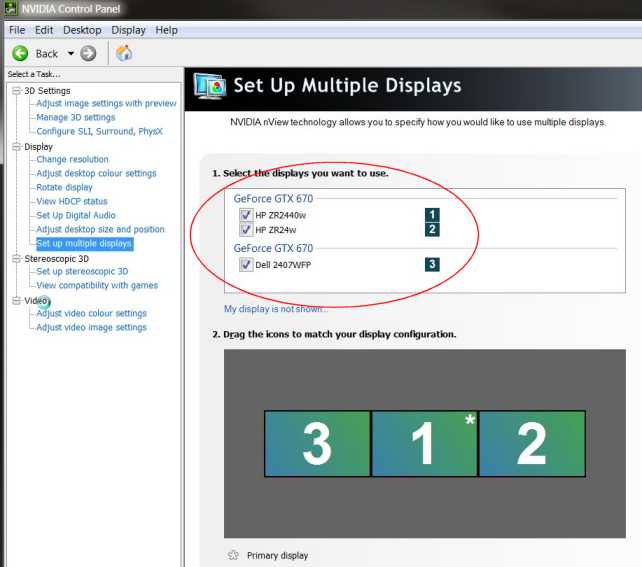
Have you activated them from both windows screen properties, and from the nvidia control panel ?
- Office12_226.jpg (33.93 KiB) Viewed 3927 times
Have you checked they are activated from the nvidia panel, as well as in windows?
Re: Monitor detection issue
Posted: 03 Dec 2012, 17:33
by viik
The problem is that third monitor is not detected all the time. Sometimes it's detected when I switch DVI connectors but after restart it's gone. I suspect that it's lame feature of Win7 to auto-detect monitors when they are switched on or off, or I'm extremely lucky to get two monitors with completely the same hardware ID (one was bought a year ago and two just last weekend).
Was thinking to buy triplehead as it should solve this issue but being limited to 50Hz on 5760x1080 doesn't sounds like a good option.
Re: Monitor detection issue
Posted: 03 Dec 2012, 22:58
by Fish44
<SOLVED> Monitor detection issue
Posted: 07 Dec 2012, 17:05
by viik
Looks like I've fixed it. First I've connected each screen separately and switched of CCD IO (something like that) on each screen, this option is suppose to be a smarter way of managing your screen so that it shuts down if there is no signal. The problem is that Win7 is doing the same thing - if it doesn't see your secondary screen it's not sending a signal to it. Then after connecting all three monitors I've "check for updates" from Nvidia control panel and it detected a third screen.
