[TOOL] Cynagen's Universal Intelligent Pre-Loader [4-21-15]
Posted: 23 Aug 2012, 03:08
Hello all! It's been a long time since I've been here, so I figured I might as well come back with a bang. Introducing the Universal Intelligent Pre-Loader (or UIPL for short)!
The UIPL will be a tool for gamers of all walks suffering the woes of disk speed bottlenecking. How? Pre-Loading content from the game into RAM before even loading! The concept is simple; Say you wish to play Diablo III but you don't have an SSD or have it installed to a HDD that may be suffering from old age and slowing down your gaming with little lag spikes here and there from new items being rendered/loaded while in game. What about the load times? This tool should help virtually eliminate all that lag AND load time by placing all the game's core data into a RAM disk drive (RDD) and then junctioning that data back into place so the game never knows the difference! The technique was first introduced to me for Star Wars: The Old Republic in which you could experience a significant performance increase with heavy user populations by pre-loading key files into the RAM disk to reduce things such as character render times by making the texture files instantly available! I've looked around and there isn't another tool like this even though it's been discussed repeatedly in the past on the internet. I'd like to trumpet in the awesomeness that is the current market of cheap RAM, where 32GB of "gaming" RAM is $160 with shipping.
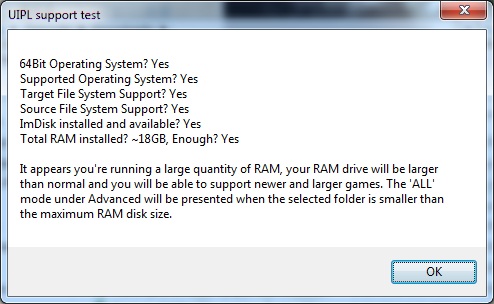
This is just a preliminary post to hold a place as I continue to develop. I have a testing application which will end up becoming a function of the end application as a command line option; "/check".
The test tool is available here: http://cynagen.com/UIPLtest.zip
IF you're interested in this tool and showing your support; Please download the above test tool and take a screenshot of the test popup and post back here on the thread with it. All support and discussion is welcome and I look forward to your input!
Modes planned:
Most Accessed File: This mode will record the accesses of the game files in the folder, logging important statistics to use when deciding which files to pre-load and which ones to leave on the magnetic HDD. This is the default mode when adding games.
Smallest Files First: This mode will select the smaller files to load to the drive first, especially useful when a game has a LOT of small files that it reads from frequently, or if the disk is heavily fragmented from all your fragging!
Largest Files First: This mode will select the largest files to load to the drive first, especially useful with Blizzard titles, Star Wars: The Old Republic, and the upcoming Planetside 2! Great for reducing lag on data streamed out of larger files throughout the game!
All: This is the ultimate of all modes! This will pre-load ALL available game content to RAM disk if possible and provide you with the fastest and smoothest gaming experience!
Features planned:
Simple setup with new games: Just open the app from your system tray and click add game, once you've done so, drag the sliders to your preferences and let it auto-pilot you to a better, faster gaming experience. Or take full control with Advanced mode, giving you direct control over what's pre-loaded if you know what you're looking for!
Support for game specific launchers/loaders/updaters so that you can keep your game up to date while still harnessing the power of pre-loading to RAM.
URI links to allow for quick configuration adds, configuration sharing via a link on a website!
(Your suggestion could end up here!)
I will be providing mock-up interface screenshots soon!
UPDATES:
9/17/12 - I have a working profiling beta, if you would like to start profiling your games now in preparation for the full version of the tool sometime in the coming weeks (I'm aiming for less than a month), and wish to help me test my pre-loading algorithms at the same time (by sending in sample profiles you generate), then please make yourselves known on the thread, or by PMing me directly! Either way, your participation and support are always greatly appreciated! Thanks!
10/5/12 - I have a working release profiling beta which is now user friendly. Please see this post for more details and download link!
4/10/13 - I'm starting to get some data to work with now, as well as crash reports. I'll be patching it up a bit here and adding active logging functions so that I can start to collect details on the trouble being seen in the wild. Seems that playing for hours (the absolute best case scenario!) causes the tool to bomb, whoops!
4/21/15 - I've pushed through some changes in order to address the "crashing" at the end where it could not collect data. I found that it was linked to games specifically with launchers that would pop up and steal focus. I have implemented calls to fix this and was able to greatly speed things up because of this. Please download a new copy of UIPLtest.zip from the link above to test out the overdue patch.
The UIPL will be a tool for gamers of all walks suffering the woes of disk speed bottlenecking. How? Pre-Loading content from the game into RAM before even loading! The concept is simple; Say you wish to play Diablo III but you don't have an SSD or have it installed to a HDD that may be suffering from old age and slowing down your gaming with little lag spikes here and there from new items being rendered/loaded while in game. What about the load times? This tool should help virtually eliminate all that lag AND load time by placing all the game's core data into a RAM disk drive (RDD) and then junctioning that data back into place so the game never knows the difference! The technique was first introduced to me for Star Wars: The Old Republic in which you could experience a significant performance increase with heavy user populations by pre-loading key files into the RAM disk to reduce things such as character render times by making the texture files instantly available! I've looked around and there isn't another tool like this even though it's been discussed repeatedly in the past on the internet. I'd like to trumpet in the awesomeness that is the current market of cheap RAM, where 32GB of "gaming" RAM is $160 with shipping.
This is just a preliminary post to hold a place as I continue to develop. I have a testing application which will end up becoming a function of the end application as a command line option; "/check".
The test tool is available here: http://cynagen.com/UIPLtest.zip
IF you're interested in this tool and showing your support; Please download the above test tool and take a screenshot of the test popup and post back here on the thread with it. All support and discussion is welcome and I look forward to your input!
Modes planned:
Most Accessed File: This mode will record the accesses of the game files in the folder, logging important statistics to use when deciding which files to pre-load and which ones to leave on the magnetic HDD. This is the default mode when adding games.
Smallest Files First: This mode will select the smaller files to load to the drive first, especially useful when a game has a LOT of small files that it reads from frequently, or if the disk is heavily fragmented from all your fragging!
Largest Files First: This mode will select the largest files to load to the drive first, especially useful with Blizzard titles, Star Wars: The Old Republic, and the upcoming Planetside 2! Great for reducing lag on data streamed out of larger files throughout the game!
All: This is the ultimate of all modes! This will pre-load ALL available game content to RAM disk if possible and provide you with the fastest and smoothest gaming experience!
Features planned:
Simple setup with new games: Just open the app from your system tray and click add game, once you've done so, drag the sliders to your preferences and let it auto-pilot you to a better, faster gaming experience. Or take full control with Advanced mode, giving you direct control over what's pre-loaded if you know what you're looking for!
Support for game specific launchers/loaders/updaters so that you can keep your game up to date while still harnessing the power of pre-loading to RAM.
URI links to allow for quick configuration adds, configuration sharing via a link on a website!
(Your suggestion could end up here!)
I will be providing mock-up interface screenshots soon!
UPDATES:
9/17/12 - I have a working profiling beta, if you would like to start profiling your games now in preparation for the full version of the tool sometime in the coming weeks (I'm aiming for less than a month), and wish to help me test my pre-loading algorithms at the same time (by sending in sample profiles you generate), then please make yourselves known on the thread, or by PMing me directly! Either way, your participation and support are always greatly appreciated! Thanks!
10/5/12 - I have a working release profiling beta which is now user friendly. Please see this post for more details and download link!
4/10/13 - I'm starting to get some data to work with now, as well as crash reports. I'll be patching it up a bit here and adding active logging functions so that I can start to collect details on the trouble being seen in the wild. Seems that playing for hours (the absolute best case scenario!) causes the tool to bomb, whoops!
4/21/15 - I've pushed through some changes in order to address the "crashing" at the end where it could not collect data. I found that it was linked to games specifically with launchers that would pop up and steal focus. I have implemented calls to fix this and was able to greatly speed things up because of this. Please download a new copy of UIPLtest.zip from the link above to test out the overdue patch.