Page 1 of 63
Flawless Widescreen
Posted: 23 Apr 2012, 20:18
by HaYDeN
Flawless Widescreen (Fixer)
Flawless Widescreen was created in an effort to make it easier to craft fixes, patches and hacks to get games functioning correctly in UltraWide/Surround/Eyefinity gaming resolutions.
Features:
Repository based plugins/modules with autonomous updating and version checking.
Fast with low memory utilization, C++ classes exposed to LUA for powerful and fast memory manipulation/injection, registry and file manipulation.
LUA and XML based plugins requiring minimal programming knowledge
SoftTH, AMD Eyefinity and NVIDIA Surround API's intergrated for accurate display environment detection including bezel compensation, manually configurable fall-back for non-standard solutions.
Plugins are inherently open-source encouraging contributions and improvements from the community.
Supported Games:
Alice: Madness Returns - removed.
Borderlands
Battlefield 3
Blacklight: Retribution
Bioshock 2
Binary Domain
Bulletstorm
C&C: Red Alert 3
C&C: Tiberium Wars
Call Of Duty: Black Ops
Call Of Duty: Modern Warfare 3
Counterstrike: Global Offensive
Dark Void
Dead Rising 2
Dead Rising 2: Off The Record
Death Rally
Diablo III
Driver San Francisco
Enemy Engaged 2
FIFA 12
FIFA 13
Ghost Recon
Ghost Recon Advanced Warfighter 2 (GRAW2)
Grand Theft Auto III
Grand Theft Auto: San Andreas
Inversion
L.A. Noire
Kingdoms of Amalur: Reckoning
Mass Effect 1
Mass Effect 2
Mass Effect 3
Max Payne 2
Mirror's Edge
Mini Ninjas
Ninja Blade
Orcs Must Die!
Orcs Must Die 2
RAGE
Tom Clancy's Rainbow Six: Vegas 2
Resident Evil 5
Ridge Racer Unbounded
Singularity
Skydrift
Starcraft II
Sonic Generations
Sonic and Sega All-Stars Racing
Spec Ops: The Line
Star Wars: Knights Of The Old Republic (KOTOR)
Supreme Commander 2
The Elder Scrolls V: Skyrim
The Lord of the Rings: War in the North
The Risen 2
The Witcher 2
Transformers: War for Cybertron
Transformers: Fall of Cybertron
Tribes: Ascend
Unreal Tournament 3: Black Edition
Warhammer 40K: Space Marine
Download and instructions
- You must run it as Administrator, and/or have UAC off.
- Requires the C++ 2010 Runtime (x86)
- Hotkey Enable: Ctl+Alt+Z (default)
- Hotkey Add FOV: Numpad + (default)
- Hotkey Minus FOV: Numpad - (default)
- Closing Tabs: Right click -> Close.
Download
Installation package available from the Flawless Widescreen Website
Hey, welcome back ! Looks
Posted: 23 Apr 2012, 21:30
by scavvenjahh
Hey, welcome back ! Looks like someone's been superbusy... The old flawlessws was great, but this is HUGE.
The planets are aligning.
A Fixer arises.
Remember when HaYDeN's Rep was 14 ? THIS IS TODAY.
Just one little thing... my Rage hands are still stretched :p
scavvenjahh wrote:Hey,
Posted: 23 Apr 2012, 21:31
by HaYDeN
Hey, welcome back ! Looks like someone's been superbusy... The old flawlessws was great, but this is HUGE.
The planets are aligning.
A Fixer arises.
Remember when HaYDeN's Rep was 14 ? THIS IS TODAY.
Just one little thing... my Rage hands are still stretched :p
HUD's fixed tho right? Hands are a work in progress, the old values are .... eluding me for some reason, I think they've changed it.
Appreciate the hard work
Posted: 23 Apr 2012, 22:38
by Kayden
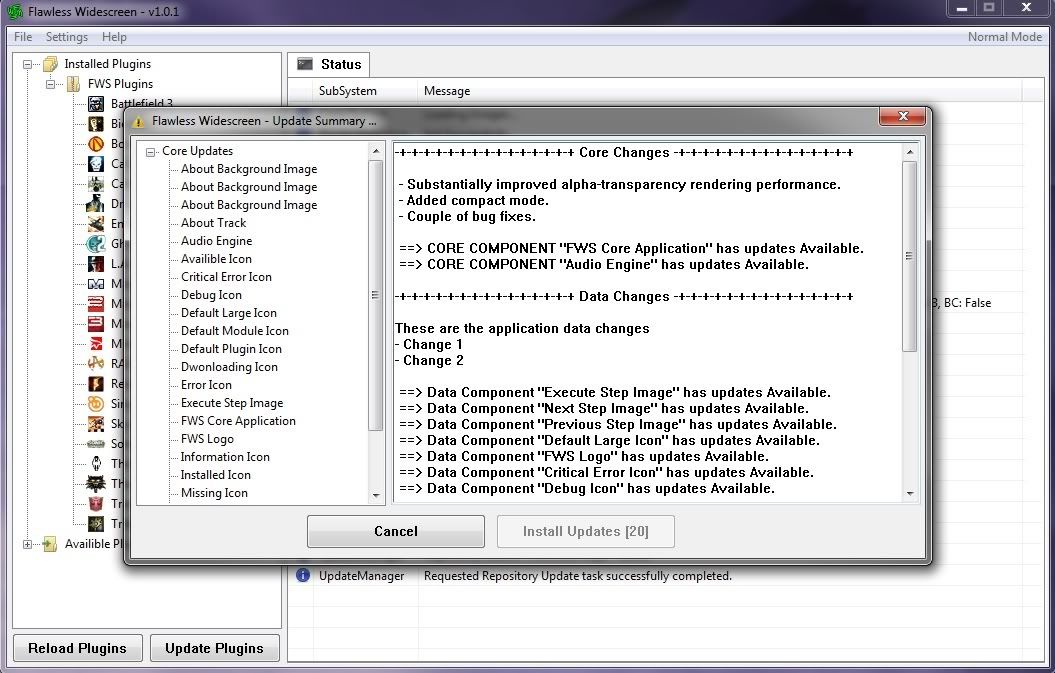
Appreciate the hard work HaYDeN going to give this a go here in a few, do you think you could you give us an option to turn on or off the always on top for the Update Summary? Also I got the rar ver and keeps updating over and over, any ideas?
EDIT: Here is a SS of what I'm seeing over and over, nothing changes.
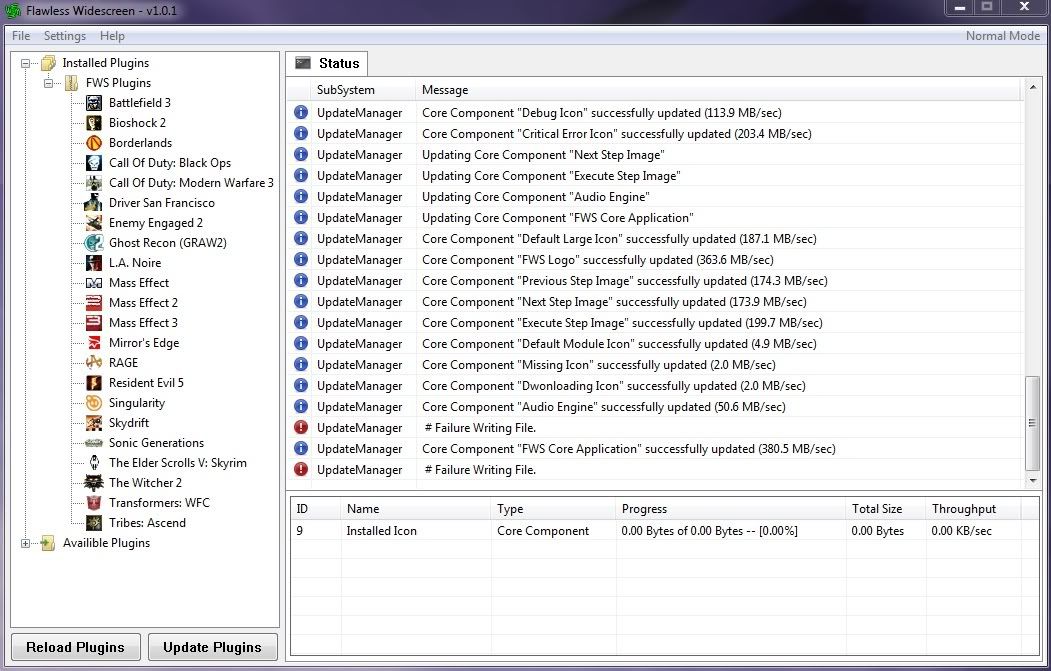
EDIT 2: Here is where it's failing, just noticed it. I've checked my AV and I am admin on my machine, no problems there. I did noticed when I downloaded the installer, Chrome said it was malicious, hence my checking the AV programs. UAC is diabled as well.
EDIT 3: I figured it out. I named the folder like this _-•º°”˜¨·· Flawless Widescreen ··¨˜”°º•-_ and it didn't like that, going to -= Flawless Widescreen =- made your app run without issue.
Just want to say great job
Posted: 23 Apr 2012, 22:50
by AndreStarTrek
Just want to say great job and thanks for your time.
Hi Hayden,Replying here
Posted: 23 Apr 2012, 23:16
by NightWatch
Hi Hayden,
Replying here instead of 'Skyrim Multi-Monitor User Interface Fix Discussion' thread.
First off, thanks for the advice you gave me earlier (today)!
After a bit of fiddling with alt+tab, the 'Map Check Byte Value' and 'Task Manager' ( really - don't ask ;) ) I now have a fully functional Skyrim that works quite splendidly across my eyefinity display (3*1).
Secondly, you are the boss! Thank you so much for all the hard work and time you have devoted to helping us widescreeners to realise the potential of Skyrim (and other games).
Now where did I put that paypal password? LOL! Found it - a small donation to show appreciation sent. Could not send much, but it should keep you in coffe and donuts for a little while at least!
Could be something to do with
Posted: 25 Apr 2012, 01:00
by HaYDeN
Could be something to do with the dual GPU nature of the 7970 - I will investigate this, this is the first report I've had of detection failure on AMD.
When its set to auto detect AMD, can you check the status and look at the information about detection and paste whatever is relevant.
ME3 is a work in progress at this stage.
HaYDeN wrote:Could be
Posted: 25 Apr 2012, 01:15
by daimian
Could be something to do with the dual GPU nature of the 7970 - I will investigate this, this is the first report I've had of detection failure on AMD.
When its set to auto detect AMD, can you check the status and look at the information about detection and paste whatever is relevant.
ME3 is a work in progress at this stage.
Well, for the life of my I can't get the problem to come back now. I've tried about 10 different times with various settings and every time the auto detect works perfectly.
I would just write it off as a fluke - I will edit my post. Thanks.
Words can't describe my
Posted: 25 Apr 2012, 01:18
by daimian
Words can't describe my gratitude, however I believe paypal can :) Donation gladly sent again for continued work on these fixes!
Feedback/Bug report if interested:
Did not detect my weird screen res (6144x1152 - i know weird right?) 7970. Even after manually setting screen size some things like loading screen text and menus showed on the wrong screen (left not center). After trying HUD X value of 4098 (which placed everything on right monitor) and then changing back to 2048 everything worked like a charm! Can't get it to NOT work now, back to auto detect!
Other then that seems to work like a charm!
NOTE: ME3 fix doesn't seem to be working... least not for me. Finished however so doesn't bother me.
Awesome, thanks HaYDeN !
Posted: 25 Apr 2012, 11:55
by thales100
Awesome, thanks HaYDeN ! :party:
Excellent, Cheers for all
Posted: 25 Apr 2012, 12:49
by tepescovir
Excellent, Cheers for all your effort
Hayden thanks for the tool!
Posted: 25 Apr 2012, 14:46
by Toothless Spoon
Hayden thanks for the tool! Next pay I will be donating to you like I do to the other guys on here that work hard. Hopefully you will be able to fix Rage's hand scaling etc. The HUD centres great.
Cheers
Hinice job Hayden...the app
Posted: 25 Apr 2012, 16:20
by seanstar
Hi
nice job Hayden.
ive only tested it on skyrim...and its working great.
cheers
Sean
Version 1.0.2: Display
Posted: 25 Apr 2012, 16:36
by HaYDeN
[h3]Version 1.0.2:[/h3]
- Display detection now floating-point based rather than integer, caused some issues when bezel compensation was enabled.
- Updated SoftTH parser, attempts auto detection - but mixed screen sizes require additional configuration in SoftTH config file, add "FWS_GridX=xmonitors and FWS_GridY=ymonitors"
- Added copy function to make it a little easier to report bugs.
- Misc bug fixes.
Out of interest, has anyone
Posted: 25 Apr 2012, 18:21
by HaYDeN
Out of interest, has anyone had a update to a module they were using at the time?
In theory even tho the plugin is active, it should close it (cleanly, removing all injections) - reinstall it and re instance, probably notice nothing more than a half a second flash in the game.
This is amazing, thank you
Posted: 25 Apr 2012, 20:15
by CY:G
This is amazing, thank you very very much and thank you for making it open source and for including some documentation, this is the right way of doing things and its a great step in the right direction, cant wait for the future, THANKS
Thank you very much HaYDeN!
Posted: 26 Apr 2012, 01:27
by kmac
I admit to trolling the "Skyrim Multi-Monitor User Interface Fix Discussion" thread for months patiently (sometimes anxiously) awaiting a perfect Skyrim Eyefinity fix.... I registered here just to add my thanks to HaYDeN for all of his time and hard work. Flawless Widescreen is fantastic and was certainly worth the wait. I am happy to donate towards it's continuing development! :)
Thanks for taking the time to
Posted: 26 Apr 2012, 11:29
by miked1883
Thanks for taking the time to make this tool. Last night I tried testing it out on mirrors edge (steam version) in eyefinity and it hard locked my computer both times (on the menu screen). Anyone else gotten it to work on mirrors edge? Maybe I am doing something wrong?
2x 5870 2GB in crossfire, 12.3 drivers, 5760x1200
Maybe try disabling it at
Posted: 26 Apr 2012, 11:40
by HaYDeN
Maybe try disabling it at first (untick enabled)
then start Mirrors Edge and hit whatever Enable hotkey you set (Control Alt Z by default) - my suspicion is that its injecting too quickly on some machines, before its loaded properly....
I've only tested on 4.2ghz quad i7 with RAID0 SSD's which is going to load the executable pretty much instantly.
OK, I'm sure I'm doing something wrong....
Posted: 26 Apr 2012, 18:33
by Sungod067
First of all, thank you Hayden for your most diligent work on this project!! It's people like you that make the world more enjoyable for the rest of us..
So I'm running 3 monitors on an eyefinity setup. I set my desktop to stretch across all 3 monitors, just like I used to do (before this whole patch problem started). Then I run your flawless widescreen and "activate" the skyrim plugin and leave the program active. Then I run skyrim. The problem is that I am getting 3 identical views on my 3 monitors instead of getting one view stretched across the 3 (i.e. the game comes up individually on each monitor at the same time).
Any ideas, or things to try at this point. Any help would be appreciated. I think long ago I had to actually go in and change one of the lines on the skyrim.ini file to get it to run on all three. Do I have to do that again, or something else??
Thanks!!