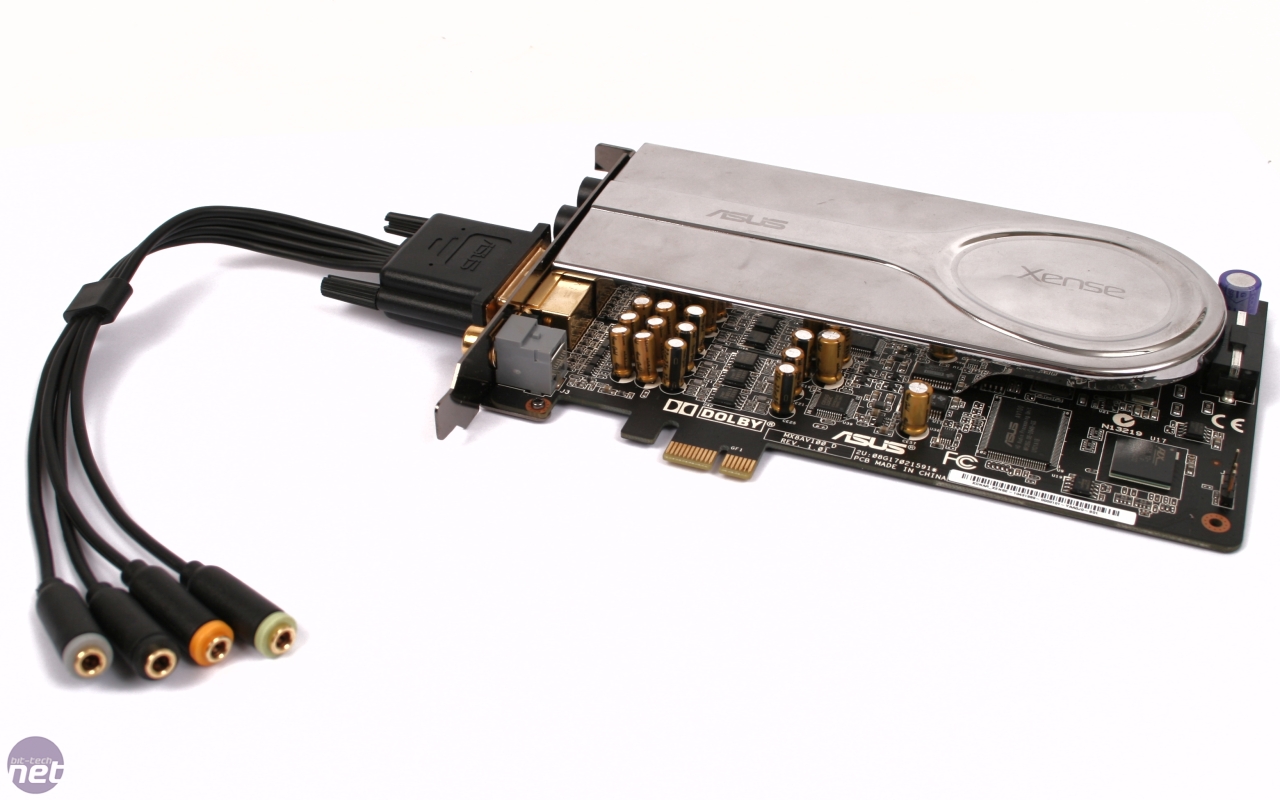
ASUS Xonar Xense +Hardware Sound Mixer?
Posted: 04 Aug 2011, 16:14
Hello everyone :)
I am new here and I am searching for an answer to a problem I am experiencing.
I currently own an ASUS Xonar Xense soundcard with an onboard headphone amp, it also comes with a very nice Sennheiser headset. One problem I dont know if it comes from the Sennheiser PC350 or the Xonar souncard is that the volume from the PC350 doesnt mute using the volume control on the headset itself when you turn the nob to 0. You still end up with 10-20% sound.
The soundcard uses 1/4 jacks for the headset which also has the same. The soundcard also has a breakout cable that connects to the back and then breaks out into individual inputs for a 7.1 speaker system.
I also own a very nice Logitech Z906 speaker system.
The problem I am experiencing is that I find it very cumbersome, especially when playing fullscreen video games, to have to access the ASUS sound panel to switch between the headset and speakers everytime.
Now I may be experienced with hardware and computers, but sound is where I am lacking in experience.
From what I hear, Windows is unable to output sound to 2 devices at the same time from 1 soundcard, which I really don't understand why.
After much consideration, this is what I am thinking, and please let me know what you think.
I need to find a hardware sound mixer, nothing complicated. If I get a small easy to use sound mixer that has a microphone input, I can use extender cables with 1/4 jacks to go to the soundcard's mic input and to 1 of the mixer's source input's. I could then use the other inputs for the 5.1 audio of the Logitech Z906.
Doing this would allow me audio from both sources at the same time and give me physical controls over both sources and possibly fix the audio mute of my headset?
Are there any cost effective 5.1 audio mixers outt here that are small and user friendly?
Would I lose my 5.1 Audio?
I don't know where to ask these questions as I don't know any high end pc audio forums to help me answer these questions.
Thank you for any help you can provide :)
I am new here and I am searching for an answer to a problem I am experiencing.
I currently own an ASUS Xonar Xense soundcard with an onboard headphone amp, it also comes with a very nice Sennheiser headset. One problem I dont know if it comes from the Sennheiser PC350 or the Xonar souncard is that the volume from the PC350 doesnt mute using the volume control on the headset itself when you turn the nob to 0. You still end up with 10-20% sound.
The soundcard uses 1/4 jacks for the headset which also has the same. The soundcard also has a breakout cable that connects to the back and then breaks out into individual inputs for a 7.1 speaker system.
I also own a very nice Logitech Z906 speaker system.
The problem I am experiencing is that I find it very cumbersome, especially when playing fullscreen video games, to have to access the ASUS sound panel to switch between the headset and speakers everytime.
Now I may be experienced with hardware and computers, but sound is where I am lacking in experience.
From what I hear, Windows is unable to output sound to 2 devices at the same time from 1 soundcard, which I really don't understand why.
After much consideration, this is what I am thinking, and please let me know what you think.
I need to find a hardware sound mixer, nothing complicated. If I get a small easy to use sound mixer that has a microphone input, I can use extender cables with 1/4 jacks to go to the soundcard's mic input and to 1 of the mixer's source input's. I could then use the other inputs for the 5.1 audio of the Logitech Z906.
Doing this would allow me audio from both sources at the same time and give me physical controls over both sources and possibly fix the audio mute of my headset?
Are there any cost effective 5.1 audio mixers outt here that are small and user friendly?
Would I lose my 5.1 Audio?
I don't know where to ask these questions as I don't know any high end pc audio forums to help me answer these questions.
Thank you for any help you can provide :)