Page 1 of 2
Dragon age 2
Posted: 08 Mar 2011, 22:48
by Psycrow
To soon to ask if there is any eyefinity fix for dragon age 2 ?
Because it seems like the spell bar is out of place with the 1.2.3.4.5... spells/skills.
i can only see the first 4 spells/skills due to the rest is hidden behind the bezels.
And the camera view angle could be more far away or adjusted so it would fit right.
Sometimes i feel like this 3 screens setup is a huge waste of money :x
Re: Dragon age 2
Posted: 09 Mar 2011, 00:08
by LordJuanlo
Did you try it on the demo or the full game? Developers
have said that they fixed it for the final game.
We are aware of both issues reported by the original poster. They have both been fixed for the retail version of the game, which works great with Eyefinity.
Re: Dragon age 2
Posted: 09 Mar 2011, 03:37
by Rhyrs
The camera seems fine for me, but as OP said, the skill bar is right in the middle of the bezel. Skills 4, 5, and 6 are invisible to me.
Re: Dragon age 2
Posted: 09 Mar 2011, 04:57
by Psycrow
Yes i found out that the spells and skills could be dragged to anywere in the bar.
But its only the hot keys that shows between the bezels, so i cant see the icons for hotkey 5.6 and 7
I will manage :D
Re: Dragon age 2
Posted: 09 Mar 2011, 08:34
by Armenius
Do you have this problem if you don't use a bezel-corrected resolution or vice-versa (whichever you're not using)?
Re: Dragon age 2
Posted: 09 Mar 2011, 13:41
by Paradigm Shifter
My apologies to Rhyrs, whose post got lost in the moderation queue under a metric ton of spam.
Re: Dragon age 2
Posted: 09 Mar 2011, 22:49
by Rhyrs
Do you have this problem if you don't use a bezel-corrected resolution or vice-versa (whichever you're not using)?
When running at 5760x1080 (non-corrected), I can see all of the spots in the bar.
Re: Dragon age 2
Posted: 10 Mar 2011, 12:41
by LordJuanlo
I can confirm than multimonitor support is incomplete on this game. Menus, cinematics and fov work fine, however hud should be changed. It's not stretched but if you are using any bezel compensated resolution, some spells are hidden behind the bezel. The spell bar is between left and center monitors, the party member icons are at the botton left corner of the left monitor, and the minimap and hints appear on the upper right corner of the right monitor.
Everything should be on center monitor, or at least they should allow us to move the hud elements freely like some MMORPG games do (LOTRO for example).
Re: Dragon age 2
Posted: 12 Mar 2011, 10:10
by LordJuanlo
I've sent an email to EA support about those issues, please have a look at their response and try not to laugh (or not to cry):
Greetings,
Thank you for contacting Electronic Arts.
I apologize for any inconvenience caused to you thus far. Regarding this issue I would like to suggest you that please turn off the two screens and try to play the game on on screen because game has problem in order to detracting screen. Please try to play the game on single screen.
If there is anything else I can help you with please let me know
Re: Dragon age 2
Posted: 12 Mar 2011, 10:41
by tet5uo
EA tech support:
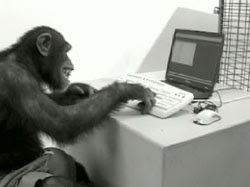
But seriously, this isn't support.
We are aware of both issues reported by the original poster. They have both been fixed for the retail version of the game, which works great with Eyefinity.
This is BS. "Works great" games don't have HUDs that expand to the outside monitors.
Re: Dragon age 2
Posted: 12 Mar 2011, 15:04
by Paradigm Shifter
Don't say it on the Bioware forums, you'll get banned. :P
;)
Re: Dragon age 2
Posted: 12 Mar 2011, 15:15
by Armenius
I've sent an email to EA support about those issues, please have a look at their response and try not to laugh (or not to cry):
Greetings,
Thank you for contacting Electronic Arts.
I apologize for any inconvenience caused to you thus far. Regarding this issue I would like to suggest you that please turn off the two screens and try to play the game on on screen because game has problem in order to detracting screen. Please try to play the game on single screen.
If there is anything else I can help you with please let me know
GG EA, GG.
Seriously, how hard would this be to fix in a patch? Plenty of other developers have added centered HUDs to surround resolutions in the past post-release.
Hmm, let's see...
Code: Select all
   HMONITOR center = MonitorFromPoint(POINT((xRes/2)-1, (yRes/2)+1); // get a handle to the center monitor

   LPMONITORINFO lpCenterMi; // pointer to a struct that contains virtual screen coordinates of a monitor

   lpCenterMi->cbsize = sizeof(MONITORINFO); // specify the struct to populate


   if(GetMonitorInfo(center, lpCenterMi)) { // populates the struct with info of the passed in monitor, returns true if successful

       HUD.left = lpCenterMi->rcMonitor.left;

       HUD.right = lpCenterMi->rcMonitor.right;

       HUD.top = lpCenterMi->rcMonitor.top;

       HUD.bottom = lpCenterMi->rcMonitor.bottom;

   }
This is quick and dirty assuming the HUD structure or class contains points of a RECT for drawing. There also needs to be some manipulation of the coordinates in case the values returned are negative. The point is it is not difficult because the Windows SDK contains these functions for multiple monitors already, the developer just has to use them. I haven't looked at the most recent DirectX SDK, but I'm sure it either uses these functions or it contains functions similar to those in the Windows SDK.
Re: Dragon age 2
Posted: 12 Mar 2011, 17:02
by LordJuanlo
Don't say it on the Bioware forums, you'll get banned. :P
Too late...
http://social.bioware.com/forum/1/topic/294/index/6153929/2
Re: Dragon age 2
Posted: 13 Mar 2011, 21:03
by LordJuanlo
New response from EA:
I apologize for any inconvenience caused to you thus far. Regarding this issue I would like to inform you that I have already forwarded your issue to concern department.They could release patch or any updates
People, we need to do something. Please, contact EA support and ask for it, if they receive enough complaints then maybe, just maybe, they will fix it and make it work out of the box in future games, just like Ubisoft (Prince of Persia, Assassin's Creed) or Codemasters (Dirt 2, F1) are doing.
Re: Dragon age 2
Posted: 24 Mar 2011, 20:25
by Downtown1
This game works a lot better than Dragon Age 1, a lot better. Movies play on center monitor, objects don't disappear far away when you look up.
I could see how the spell/item bar being in between monitors could cause issues for people using bezel compensation (I never did, since I'm more of a multiplayer FPS guy, and you gotta be able to see all your enemies) so I guess that is a real shame.
I was surprised to find it certified "Gold" on the EyeFinity compatibility page, guess that doesn't mean 100% eyefinity compatibility, just 99%.
Personally I'm quite pleased, at least they tried really hard here. Unlike the devs for Mass Effect 2 which just completely ignored the possibility of surround gaming.
Re: Dragon age 2
Posted: 25 Mar 2011, 00:24
by mattsimis
I just completed it today, 59.5hrs well spent.
On the bezel correction, not much of an issue as whats not really noted above is you can just drag the spells from "behind" the bezel into whatever screen taskbar you want. So basically is the issue is the came doesnt know where the bezel is but you can simply move the spells icon location.
All you are loosing is 3 spell locations out of about 30 (and there arent even close to 30 per class anyhow).
Re: Dragon age 2
Posted: 25 Mar 2011, 10:35
by evilmatt
Unfortunately, you can't hotkey more than the first 10 slots though, so you're losing 3 hotkeys out of 10. Although, I guess you could put spells on the bar twice - once behind the bezel for the hotkey, and once where it's visible in order to see the cooldown.
Re: Dragon age 2
Posted: 25 Mar 2011, 14:22
by mattsimis
Unfortunately, you can't hotkey more than the first 10 slots though, so you're losing 3 hotkeys out of 10. Although, I guess you could put spells on the bar twice - once behind the bezel for the hotkey, and once where it's visible in order to see the cooldown.
Correct, but I dont find hotkeys past the number 5 "hot keys" anymore as you would need to lift your hand from WASD anyway. Its faster to click it with the mouse. Also I played on Hard with plenty of pausing during battles, so there was no real need for any hot keys at all.
PS: On my setup 7,8,9 were behind the bezel, not low numbers like others mentioned earlier?
Re: Dragon age 2
Posted: 25 Mar 2011, 22:50
by Downtown1
I'd have to agree, you are losing 3 hotkeys? Big deal, you can pause in this game and just use the mouse to click. The harder difficulty you play on (I play on Nightmare) the more pausing you're going to be doing. If you're playing on easier difficulties the battles themselves are a lot easier so you don't have to worry about not using a spell "fast enough".
So while it's certainly annoying, it's not totally terrible like maybe stretched HUD or Vert- cutscenes or any of the other common issues otherwise-perfect games have.
Still, it would've been nice if the entire HUD was on the center monitor, looking at the sides gets old.
Re: Dragon age 2
Posted: 26 Mar 2011, 00:37
by evilmatt
It's the portraits right over on the left that annoy the most, the game's clearly designed to be played more real-time than the first, but can't be, because you have to keep looking way over to the side to check your party's health levels. And then the cutscenes and all the menus are rendered on the central monitor perfectly. Why couldn't the same code to work out where to render those have been used for the UI?