Page 1 of 1

F1 2010 (patch 1.01) : TH2G doesnt work anymore...

Posted: 03 Nov 2010, 10:49
by JeDa
Hi,
Yesterday I patched F1 2010 to v1.01. Before the patch everything worked great. But now it looks like the FOV is to small, everything looks zoomed in.

I use a TH2G-device, but I dont think this is causing the problem because it worked fine with the unpatched game. Is anyone else having problems?

Re: F1 2010 (patch 1.01) : TH2G doesnt work anymore...

Posted: 03 Nov 2010, 13:54
by blackrat
I haven't installed this patch, but if it's only a FOV setting in race, it can be repaired.

At http://www.nogripracing.com in the dowloads section under 'Misc Files' there are various cam mods, which also change the FOV.

Don't know, if you can change it for pits.

Maybe the developers only thoght for eyefinity, where they (according to another post) only support racing. So a correct implementation should switch to single monitor in this circumstances.

Re: F1 2010 (patch 1.01) : TH2G doesnt work anymore...

Posted: 04 Nov 2010, 15:32
by blackrat
I read smoewhere:

Try to go in windowed mode by ALT+ENTER

You can also change temporarly the aspect ration to 4:3, 10:16, 9:16 according to your monitors (in graphics settings of the game).
Then the menus are o.k., but the racing view is completely streched. So you could use this for interviews or changing settings in menus, but don't forgert to change back to 'Normal' befor actually going to race.

Re: F1 2010 (patch 1.01) : TH2G doesnt work anymore...

Posted: 10 Nov 2010, 10:55
by The Beard
Hi,

I'm running TH2GO digital at 3840 x 800 - my FOV is only affected in the Menus. In game is fine apart from the Hud which is no longer central.


Not sure on the how/why, codemasters have been good with multi-mon recently.

Re: F1 2010 (patch 1.01) : TH2G doesnt work anymore...

Posted: 25 Nov 2010, 23:03
by SEI
funny i ran into the same problem. was playing with my 5850 and didnt have the menu problem. but the next day i switched to gtx580 and got this.

Re: F1 2010 (patch 1.01) : TH2G doesnt work anymore...

Posted: 26 Feb 2011, 02:27
by Jeff1961
Just got a new rig and installed F1 2010.
It was working fine in eyefinity until the Live feature downloaded the 1.01 updates. I was then unable to get eyefinity running. Side monitors were black. Only the center monitor working.
I have just updated to the 11.2 CCC drivers and have not tried yet to see if it will help.
Because of this I now respond "no" to Live for the update...which results in it refusing me to log in...which means I can't play online. Which is fine...I really just wanted this game for offline playing with beautiful looking graphics. But it may be an issue for others.
Here's my rant about it at the Codemasters F1 2010 forum:
http://community.codemasters.com/forum/f1-2010-technical-help-1343/456187-microsoft-games-live-steam-no-save-game.html

I also ran in to the issue of square artifacts around camera flashes in the crowd...and on Hockenheim light in the game would group together and form a huge blinding area that made it impossible to drive. I saw a thread about ATI cards not being able to use the AA in this game.
I turned off all AA in game...and cranked the CCC Graphics 3D settings up...and it works fine. All artifacts gone. A bit less quality in appearance without the in-game AA.
This too...has not been tested with the new 11.2 CCC drivers.
http://community.codemasters.com/forum/f1-2010-technical-help-1343/433515-flashing-lights-so-bad-i-cant-see-track.html

Re: F1 2010 (patch 1.01) : TH2G doesnt work anymore...

Posted: 09 Mar 2011, 13:49
by Paradigm Shifter
I picked up F1 2010 in the Steam Christmas sales. Wish I hadn't, as Codemasters plainly don't care a jot about fixing the myriad of issue with the game. It's not just EyeFinity, it's the AI, crash bugs and all sorts of other junk.

I gave up in disgust and went back to Grand Prix 4. Which can't do Surround, but at least is a good F1 game that doesn't have AI that is coded to cheat.

And GfWL should be considered malware.

Re: F1 2010 (patch 1.01) : TH2G doesnt work anymore...

Posted: 12 Mar 2011, 13:23
by Mr Pibb
I gave up in disgust and went back to Grand Prix 4. Which can't do Surround


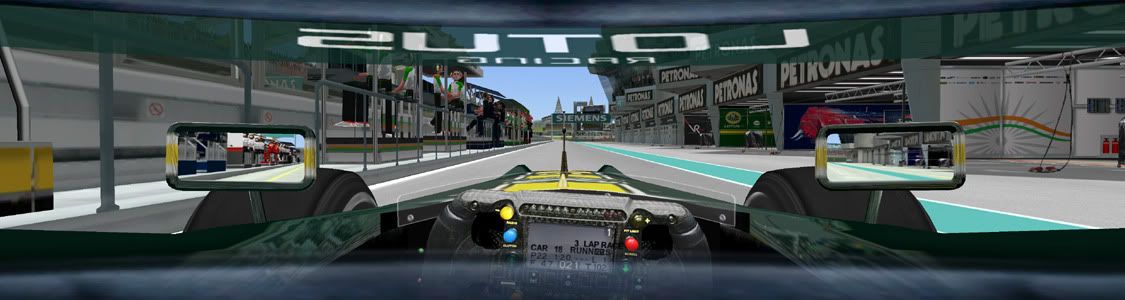
GP4 is perfectly capable of surround:


Re: F1 2010 (patch 1.01) : TH2G doesnt work anymore...

Posted: 12 Mar 2011, 15:05
by Paradigm Shifter
Is that stretching I see?

Which is what I meant by not working. ;)

Re: F1 2010 (patch 1.01) : TH2G doesnt work anymore...

Posted: 12 Mar 2011, 16:11
by Armenius
The helmet overlay is stretched, but the rest of it isn't stretched. Look at the Petronas banners above the pit stalls. Is the cockpit zoomed out all the way?

Re: F1 2010 (patch 1.01) : TH2G doesnt work anymore...

Posted: 12 Mar 2011, 18:01
by Mr Pibb
It is not stretched at all. I have set up the FOV and rear clipping plane to give me a viewpoint that I like, and where the mirrors are not blocked by the monitor bezels.

The helmet visors are bespoke. They're not stretched either believe it or not. The logos on the upper visor appear central screen only, and the slight curve is all I could do really, otherwise they'd just look like a band top and bottom. I made the bottom of the visor transparent so I can see the steering wheel data.

The game runs beautifully on surround, with the notable exception of the screen menus. They're central screen only and not stretched but the font height is all screwed up where it's larger than the line spacing so it overlaps vertically with the line above and below it, plus the mouse pointer doesn't correspond with the selection. I made a bespoke font to combat this and while it's now heaps better, it's still not great.

Re: F1 2010 (patch 1.01) : TH2G doesnt work anymore...

Posted: 12 Mar 2011, 22:53
by Paradigm Shifter
Could you post more details; admittedly, I tried it with vanilla GP4, so any patches etc are missing... but it just stretched for me. :(

Getting it as it should look... and in Surround... means F1 2010 will get totally abandoned by me, just like it was by the developers. ;)

Re: F1 2010 (patch 1.01) : TH2G doesnt work anymore...

Posted: 13 Mar 2011, 14:38
by Mr Pibb
OK, firstly you must have GP4 patched to V9.6.
After installation of patch, game will then be GP4 v1.02.
You then must also use a Decrypted-nocd exe file. Without this exe file, GP4 editor programs won't work.

Patch 9.6 and GP4v1.02 decrypted-nocd exe can be found here.

Once that's all up and running, you need to change your GP4 resolution via the GP4 "f1graphics.cfg" file. This is in the main GP4 folder.

Change the top lines in this file as follows:

1 ; f1graphics.cfg controls all settings (default 0)
3840 ; [RELEASE] Game 3D Horizontal Resolution
1024 ; [RELEASE] Game 3D Vertical Resolution

Note that in-game resolution will still be reported as 640x480 (or similar). Do not change this. Let the f1graphics.cfg file do the work.

When in cockpit view, use the keyboard "+" and "-" keys to zoom in and out. This will hopefully give you a desired view.

You may want to further alter this view, to set a camera position that is closer by default so that the +/- keys work in a more suitable range. In any event, you will probably need to alter the rear clipping plane of the cockpit camera, otherwise the cockpit sides will be cut off in front of the camera.

To do both these things (alter default camera view/rear clipping plane), download and install a program called GP4Tweaker. It can be found here. I *think* the one you're after is "gp4tweaker_v1045_reloaded".

Within GP4Tweaker, navigate to:

ONBOARD CAMERA POSITION . By altering the Z value you can get your camera close to where your default needs to be, and you can then use keyboard "+" and "-" to zoom in and out from there.

ONBOARD CAMERA PROJECTION for rear clipping plane. I *think* it is the near clipping plane you will need to adjust.

Note that these things can be edited in real time during game play if you enable RT EDIT for these features within GP4Tweaker. During RT-edit mode, press TAB key few times until associated edit mode shown on screen, e.g. If you want to edit onboard camera position, press TAB until "ONBOARD CAMERA POSITION EDIT MODE" shown, then press H (left), K( right), I (up), M (down), U (forward), J (backward), V (centering), and Q (reset to original position).

Cockpit cameras can also be altered via a program called "Team Editor". You can get that here but I reckon it might not be necessary as GP4Tweaker will probably suffice.

Please note ALL of the above is from memory. I haven't played GP4 since F12010 was released, and it was years before that when I last needed to modify camera etc positions....so it's been a while.

As for the menu font alteration, PM me if you need the font file.
Re: F1 2010 (patch 1.01) : TH2G doesnt work anymore...

Posted: 14 Mar 2011, 19:17
by scavvenjahh
Great stuff :onethumb I added it to the Confirmed Multi-Monitor Solutions.

Re: F1 2010 (patch 1.01) : TH2G doesnt work anymore...

Posted: 15 Mar 2011, 16:11
by Paradigm Shifter
Top stuff, thanks. :D