Page 1 of 3
PLP configurations eyefinity, Heres a little "trick" working
Posted: 09 Apr 2010, 14:22
by boxrick
Currently i have a PLP configuration consisting of 2 portrait 1600 x 1200 dell 2007fp monitors and a 2560 x 1600 dell 3007wfp monitor and one thing many people have been waiting for is an eyefinity solution to allow for different orientations of monitors to be used with eyefinity. However this is not supported.
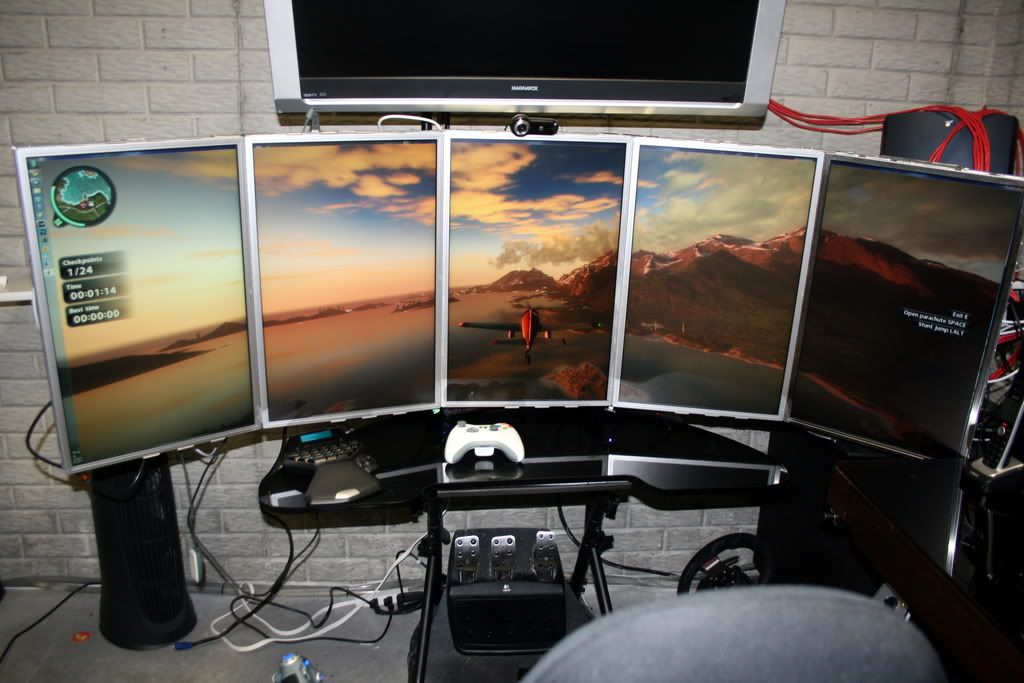
I currently have all 3 monitors working through a single 5850 and they are in crossfire. 2 are connected with DVI and the third using the Display port to VGA adaptor. Since i was curious how eyefinity would look i tried setting my monitor orientation back to Landscape on all 3 and tried a 1600 x 1200 * 3 combination for just cause 2 and then recently switched back to my PLP combo. However just cause 2 retained my settings for 4800 x 1200 resolution then booted up in windowed mode. This worked no problem across all my 3 monitors which got me thinking. If its happily doing it this way then surely if i can modify the resolution to whatever i need then it will simply span my 3 monitors, so i changed the launch options to force 4960 x 1600 resolution in windowed mode ( needs to be windowed or this trick wont work - also meaning crossfire wont work )

I then proceed to boot the game up and low and behold it works just fine. Performance is still decent even though its only off 1 GPU and its MILES better than any soft TH solution because there is no laggy monitors. The main downside is simply its in windowed mode.
forgive the following picture quality, my shoddy phone =(


Here are a few videos ( also from my phone ) - Audio and video horribly out of sync and video is at the wrong framerate. Woops. But you get the idea.
http://www.boxrick.com/justcause1.mkv
http://www.boxrick.com/justcause2.mkv
http://www.boxrick.com/justcause3.mkv
I then thought id give another game a go, so i tried Penumbra - Black Plague and this time modified the settings file and again set the resolution to 4960 x 1600 and windowed mode. The game started off hugely off centre but a simple window drag and it spanned my 3 monitors and again worked fine.

http://www.boxrick.com/penumbra.mkv
Hope this helps a few people. :rockout
Re: PLP configurations eyefinity, Heres a little "trick" working
Posted: 09 Apr 2010, 16:21
by boxrick
And finally just booted up dragon age and also works just fine.

http://www.boxrick.com/dragonage.mp4
Re: PLP configurations eyefinity, Heres a little "trick" working
Posted: 09 Apr 2010, 16:24
by Tamlin
Nice find! :rockout
I am stickying this for a week so it doesn't get drowned! I think a lot of people are interesting in seeing this! :cheers
Re: PLP configurations eyefinity, Heres a little "trick" working
Posted: 09 Apr 2010, 16:52
by Delphium
Nice one on the workaround :onethumb
Re: PLP configurations eyefinity, Heres a little "trick" working
Posted: 10 Apr 2010, 04:09
by Abram
Neato.
Re: PLP configurations eyefinity, Heres a little "trick" working
Posted: 10 Apr 2010, 04:24
by skipclarke
Can you post a pic of your Windows display settings? I'd like to see how you have the monitors set and see if I can mimic this for 5x1-P with my Eyefinity6.
I ran this through the FOV calculator, and the ratio for 4,960x1200 is 31:10. Force that to 16:x and you get 16:5.2 aspect ratio. This is a hair wider than the 5x1-P setup. Assuming 90 degrees FOV in widescreen, this one would be 125. The 5x1-P is 115, with traditional 3x1-L being 143. Looks like a nice sweet spot that avoids the stretching.
A couple of questions:
1 - Is there any performance hit for playing in a window?
2 - Can you "maximize" the window to make it look fullscreen?
3 - When you say Dragon Age "ran fine" did you have to set the custom res in the config file, as shown in the Detailed Report. Is there a variable in the config file for windowed mode, or do you set that in the game options?
4 - CFX doesn't work in windowed mode?
Overall looks like a nice option for a custom res in windowed mode.
Re: PLP configurations eyefinity, Heres a little "trick" working
Posted: 10 Apr 2010, 09:28
by boxrick
Can you post a pic of your Windows display settings?


1 - Is there any performance hit for playing in a window?
A small amount of around 5% it seems
2 - Can you "maximize" the window to make it look fullscreen?
Dont think so, maximize option is greyed out. Alt enter full screens to centre window. Some games have an option to hide the border though.
3 - When you say Dragon Age "ran fine" did you have to set the custom res in the config file, as shown in the Detailed Report. Is there a variable in the config file for windowed mode, or do you set that in the game options?
All games need setting in the config file or forced at command line otherwise they simply won't work
"C:UsersAdministratorDocumentsBioWareDragon AgeSettingsDragonAge.ini" (windows 7)
Top few options
[VideoOptions]
ResolutionWidth=4960
ResolutionHeight=1600
FullScreen=0
UseVSync=0
Antialiasing however trashed performance, moreso than at 2560 x 1600. Presumably due to low memory. Typical stuttering signs.
4 - CFX doesn't work in windowed mode?
Crossfire becomes automatically disabled in windowed mode and requires fullscreen to run.
Also an extra quick video ( slightly better quality )
http://www.boxrick.com/dragonage.mkv
Re: PLP configurations eyefinity, Heres a little "trick" working
Posted: 10 Apr 2010, 12:58
by skipclarke
Thanks for this info. Do you still get the disappearing scenery/object issues in Dragon Age?
Re: PLP configurations eyefinity, Heres a little "trick" working
Posted: 10 Apr 2010, 13:40
by boxrick
Not quite sure what issue you mean. Never seen anything like that!
Re: PLP configurations eyefinity, Heres a little "trick" working
Posted: 10 Apr 2010, 19:04
by doublejj0305
It works in 5x1P but without crossfire and windowed I'm only getting about 20FPS with 5870 2GB card. Good workaround none the less. Great Find!!!
Re: PLP configurations eyefinity, Heres a little "trick" working
Posted: 10 Apr 2010, 20:08
by boxrick
Can you not normally run those in portrait then only landscape?
May i recommend another game than just cause 2, it really hates high resolutions. I only get 30fps (ish) and it doesn't seem to like turning vsync off in windowed mode which obviously has a big impact on framerate. All my other games run great though !
Re: PLP configurations eyefinity, Heres a little "trick" working
Posted: 10 Apr 2010, 20:46
by doublejj0305
Can you not normally run those in portrait then only landscape?
May i recommend another game than just cause 2, it really hates high resolutions. I only get 30fps (ish) and it doesn't seem to like turning vsync off in windowed mode which obviously has a big impact on framerate. All my other games run great though !
ATI still hasn't come out with the drivers to run 5x1 Portrait.
Re: PLP configurations eyefinity, Heres a little "trick" working
Posted: 11 Apr 2010, 02:58
by skipclarke
Not quite sure what issue you mean. Never seen anything like that!
Start reading half-way down this page
http://www.widescreengamingforum.com/forum/viewtopic.php?f=57&t=17259&start=15
Re: PLP configurations eyefinity, Heres a little "trick" working
Posted: 11 Apr 2010, 16:35
by Gizm0
Nice find :)
I also have a similar PLP setup 20" + 30" + 20". I'm getting horrible framerate (< 20 fps) using OP's method in JC2 with 5870 1GB. Then I tried Live For Speed and fps was constant 100, which was great. A lot better and faster than using softTH.
Any idea how to make Team Fortress 2 work in 4960x1600 windowed mode? If I set start parameters "-w 4960 -h 1600 -sw", the game doesn't start at all.
Re: PLP configurations eyefinity, Heres a little "trick" working
Posted: 11 Apr 2010, 19:11
by boxrick
Nice find :)
I also have a similar PLP setup 20" + 30" + 20". I'm getting horrible framerate (< 20 fps) using OP's method in JC2 with 5870 1GB. Then I tried Live For Speed and fps was constant 100, which was great. A lot better and faster than using softTH.
Any idea how to make Team Fortress 2 work in 4960x1600 windowed mode? If I set start parameters "-w 4960 -h 1600 -sw", the game doesn't start at all.
Try this:
"-windowed -w 4960 -h 1600"
for team fortress 2 or any other valve games.
Mine for some reason will not pass over the centre monitor, maybe if we can find a config file so it adds it in menu options.
Re: PLP configurations eyefinity, Heres a little "trick" working
Posted: 11 Apr 2010, 20:34
by Gizm0
Try this:
"-windowed -w 4960 -h 1600"
for team fortress 2 or any other valve games.
Mine for some reason will not pass over the centre monitor, maybe if we can find a config file so it adds it in menu options.
Sadly, it's not working. The window shows up for a split second, then it just exits. No error, no nothing...
Re: PLP configurations eyefinity, Heres a little "trick" working
Posted: 11 Apr 2010, 21:02
by Paradigm Shifter
Excellent workaround for those games it works with. :)
Those using a dual-GPU card might find that only one GPU is actually working, though - for some reason, Just Cause 2 always loads up in a window for me (Alt+Enter cures it) and with my 4870X2, I get around half the framerate in a window that I do fullscreen. I presume this is because the internal CrossFire isn't working correctly out of fullscreen mode, but I don't know that for sure.
Someone with a 5970 could test to see if it has the same effect on the 5000 series?
Re: PLP configurations eyefinity, Heres a little "trick" working
Posted: 11 Apr 2010, 22:33
by whismerhill
Although nobody asked for it, I thought I would post this info in this thread just in case :
http://grismar.net/shiftwindow/ may help to auto-center windowed games ...
edit: (and therefore hide the window title bar & borders should they exist...)
Re: PLP configurations eyefinity, Heres a little "trick" working
Posted: 12 Apr 2010, 01:13
by BRPunk
DoubleJJ, would you be able to record some footage of a few games running on the 5x1 portrait setup? I've been loving my 3x1 landscape setup, but I think 5x1 would keep the widescreen I want and give me the height I'm looking for. I'd love to see it in action first though.
Re: PLP configurations eyefinity, Heres a little "trick" working
Posted: 12 Apr 2010, 01:32
by doublejj0305
DoubleJJ, would you be able to record some footage of a few games running on the 5x1 portrait setup? I've been loving my 3x1 landscape setup, but I think 5x1 would keep the widescreen I want and give me the height I'm looking for. I'd love to see it in action first though.
Once they release the drivers. With windowed and 1 GPU the performance isn't worth showing.