Page 1 of 16
Displayport-to-VGA Adapter = Successful 3 Monitor Eyefinity
Posted: 24 Nov 2009, 19:40
by TexasTango
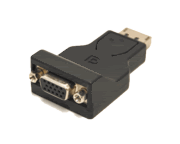
I'd like to confirm that the displayport-to-VGA adapter does work to provide a 3 monitor Eyefinity display.
Apparently it is active without the need for the additional USB power.
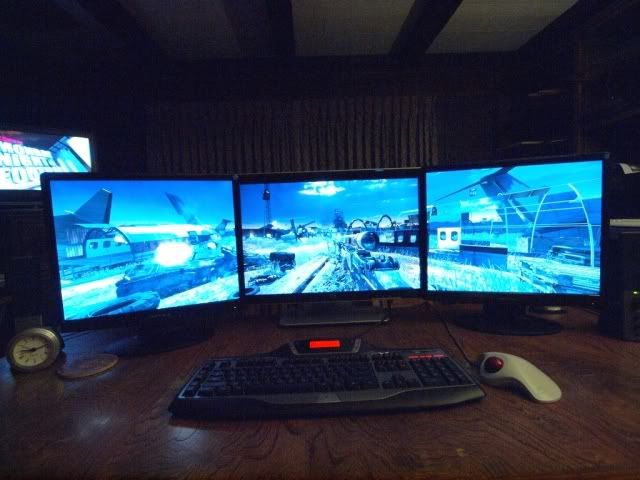
I have a 22" widescreen, flanked by two square 19" (pic taken with wide-angle lens, makes the 19" monitors look widescreen, but they're not).
The resolution is 3840x1024.
When I first hooked it up, I connected the displayport/VGA adapter to one of the 19" monitors - did not work. When hooked to the 22" monitor, it does.
Therefore, connect it to your monitor with the highest native resolution, and you're good to go! (thanks, whismerhill)
I bought the adapter from Directron. I live close to Houston, so walked in and picked it up. I was skeptical, but for less than $23, I gave it a shot.
Hope this helps.
This is the adapter:
This is where I got it:
http://www.directron.com/apdpvga.html
Here's my setup:
Displayport-to-VGA Adapter = Successful 3 Monitor Eyefinity
Posted: 24 Nov 2009, 19:44
by Greg Ellis
Rock and roll!
What happened when you hooked the adapter to one of the side screens?
Did Windows or the CCC see the monitor at all?
Displayport-to-VGA Adapter = Successful 3 Monitor Eyefinity
Posted: 24 Nov 2009, 20:07
by TexasTango
Rock and roll!
What happened when you hooked the adapter to one of the side screens?
Did Windows or the CCC see the monitor at all?
I couldn't remember what it said exactly, so I switched the cables back.
Yes, in CCC "Desktop and Displays", all three monitors will show up with a "1" - Duplicated.
However, if connected to the VGA input of the 19", and you try and expand to 3 monitors, you get this error message from CCC:
"Displayport Link Failure"
"The system detected a link failure and cannot set the requested resolution and refresh rate on your displayport display.
Your display might not support the requested resolution or there may be an issue with the cable connecting the disply to your computer."
Remember, it works perfectly if the displayport/VGA adapter is connected to the VGA input of the 22" higher resolution monitor.
Displayport-to-VGA Adapter = Successful 3 Monitor Eyefinity
Posted: 24 Nov 2009, 22:15
by Sideeffect
Thats good news thanks for sharing. Is the image quality good with those adapters? Also do you have any problems with random black screens every now and then on the displayport connection?
Displayport-to-VGA Adapter = Successful 3 Monitor Eyefinity
Posted: 24 Nov 2009, 22:18
by BHawthorne
This definitely looks to be the way to go for mainstream users. It simply doesn't make financial sense to go DVI just for the digital signal.
Displayport-to-VGA Adapter = Successful 3 Monitor Eyefinity
Posted: 24 Nov 2009, 23:10
by TexasTango
Thats good news thanks for sharing. Is the image quality good with those adapters? Also do you have any problems with random black screens every now and then on the displayport connection?
This definitely looks to be the way to go for mainstream users. It simply doesn't make financial sense to go DVI just for the digital signal.
I've been playing for a day and a half now:
Call Of Duty Modern Warfare 2, SP MP
Call Of Duty 4, SP
Left for Dead 2
Far Cry 2
Zero black screens/glitches in any way.
**EDIT: I did finally have an instance of black screen (2 seconds, then back on)
The image on the displayport/vga adapter monitor (22") exhibits no difference in quality, brightness, or lag as compared to the two 19" DVI connected monitors!
And CCC Hot Keys in and out of 1 screen/3 screens are smooth and quick.
.
.
Displayport-to-VGA Adapter = Successful 3 Monitor Eyefinity
Posted: 25 Nov 2009, 01:19
by ChainSOV
this is awesome news
and would be the best upgrade possiblility for people with 3 dvi/vga displays already standing on their table.
At least till the promised ATI certified dp > single link dvi 30$ adapter comes along.
I wonder how good it copes with widescreen displays on the VGA side. Well it says 1080p on the specs, so it must have some ws support.
Apple seems to be building something similar (mentions 1080p too) although its mini-dp to vga.
I read a comment that some guy had no probs with it driving a 1920x1200 display.
and HP builds them too (AS615AA), but I cant find any meaningful specs on HP's adapter.
its kinda absurd, how this new DP tech drives us towards older VGA tech :shock:
but I wouldn't mind, dvi inputs died on 2 of my displays anyway :P
hmmm, I also see a bunch of cheaper (at least in germany) DP -> DVI-I adapters and wonder if they also carry the analog signal as would be expected from DVI-I
ah well, found the information on delock's site that it only works with dvi-d devices.
Displayport-to-VGA Adapter = Successful 3 Monitor Eyefinity
Posted: 25 Nov 2009, 03:31
by Greg Ellis
However, if connected to the VGA input of the 19", and you try and expand to 3 monitors, you get this error message from CCC:
"Displayport Link Failure"
"The system detected a link failure and cannot set the requested resolution and refresh rate on your displayport display.
Your display might not support the requested resolution or there may be an issue with the cable connecting the disply to your computer."
Remember, it works perfectly if the displayport/VGA adapter is connected to the VGA input of the 22" higher resolution monitor.
It's good that you were able to find a combination that works.
It sounds like it's not 100% certainty though - imagine if you had all three screens the same 19", and they all gave that error. That would have been frustrating.
I'm about to try a 3 x VGA config using some old Hercules Prophetview screens I dug up. Fingers crossed.
Displayport-to-VGA Adapter = Successful 3 Monitor Eyefinity
Posted: 25 Nov 2009, 04:03
by whismerhill
I think I know the reason behind 22" DVI + 22" DVI + 19" DP=>VGA does not work
if you read the benchmarking of Ibrin about the 5870, you'll learn that with 3x1920x1200 (5760x1200) panels he didn't have the 3x1680x1050 (5040x1050) resolution available and that he needed to connect a 1680x1050 panel so that the 3x1680x1050 becomes available.
so from this two facts and as I see it, 22" DVI + 19" DVI + 22" DP=>VGA correctly detects the 19" resolution and correctly set it up
whereas it is possible that 22"DVI + 22" DVI + 19" DP=>VGA might not detect correctly the maximum resolution of the 19" and try to force the 22" resolutions on the 19" panel which fails.
Displayport-to-VGA Adapter = Successful 3 Monitor Eyefinity
Posted: 25 Nov 2009, 04:09
by TexasTango
I think I know the reason behind 22" DVI + 22" DVI + 19" DP=>VGA does not work
if you read the benchmarking of Ibrin about the 5870, you'll learn that with 3x1920x1200 (5760x1200) panels he didn't have the 3x1680x1050 (5040x1050) resolution available and that he needed to connect a 1680x1050 panel so that the 3x1680x1050 becomes available.
so from this two facts and as I see it, 22" DVI + 19" DVI + 22" DP=>VGA correctly detects the 19" resolution and correctly set it up
whereas it is possible that 22"DVI + 22" DVI + 19" DP=>VGA might not detect correctly the maximum resolution of the 19" and try to force the 22" resolutions on the 19" panel which fails.
Sounds reasonable.
One minor change - my config -
Works: 19" DVI + 22" DP=>VGA + 19" DVI
Doesn't Work: 19" DVI + 22" DVI + 19" DP=>VGA
.
.
.
Displayport-to-VGA Adapter = Successful 3 Monitor Eyefinity
Posted: 25 Nov 2009, 07:54
by thenjwaslike
TexasTango good job on this discovery, as what Bhawthorne said - this is a huge plus for mainstream users, if only i knew this adapter would work, i wouldnt of spent $130 for my bizlink adapter, again this is great news and im sure majority of us probably wont use more than 1920x1200 each display.[/list]
Displayport-to-VGA Adapter = Successful 3 Monitor Eyefinity
Posted: 25 Nov 2009, 17:43
by MoRTiCuS
GREAT news, now to see if they have them in the UK :o Anyone finds one let me know plz!
Will this do: http://www.cableuniverse.co.uk/catalog/cables/Display-Port-male-to-VGA-female-adapter.html
how does this work if it's not powered by usb?
Displayport-to-VGA Adapter = Successful 3 Monitor Eyefinity
Posted: 25 Nov 2009, 20:21
by TexasTango
....
Will this do: http://www.cableuniverse.co.uk/catalog/cables/Display-Port-male-to-VGA-female-adapter.html
how does this work if it's not powered by usb?
It has to be getting it's power through the DP connection.
The reason it works, I think but don't quote me, is because by having to convert the digital output to analog VGA input, there is an "active" process taking place, not just a "passive" pass-through of digital to digital.
All I know is that it works!!
So, even though I can't say for sure that the one you found will work, it seems to me that ANY displayport to analog VGA adapter will have this "active" process taking place.
Good luck!!
Displayport-to-VGA Adapter = Successful 3 Monitor Eyefinity
Posted: 26 Nov 2009, 00:05
by suiken_2mieu
awesome, i might actually go save up for a new card now.
Displayport-to-VGA Adapter = Successful 3 Monitor Eyefinity
Posted: 26 Nov 2009, 22:17
by Dick Hard
I tried the dp to vga from apple, it doesnt seem to support 1920x1200,when i make a group it forces all three monitors to do 1600x1200???
Displayport-to-VGA Adapter = Successful 3 Monitor Eyefinity
Posted: 26 Nov 2009, 22:53
by BloodTotal
thank you for making this discovery, once again this forum and its great members are eons ahead of everyone else in the world in regards to WSG
my question is, I just want to confirm that
3 x (22" 1680x1050) will work, the third monitor can go through vga to display correct?
also, just want to make triple sure that this adapter would work
http://accessories.dell.com/sna/productdetail.aspx?l=en&c=ca&cs=cadhs1&sku=330-4091&dgc=SS&cid=38279&lid=1183571
Displayport-to-VGA Adapter = Successful 3 Monitor Eyefinity
Posted: 26 Nov 2009, 23:29
by TexasTango
thank you for making this discovery, once again this forum and its great members are eons ahead of everyone else in the world in regards to WSG
my question is, I just want to confirm that
3 x (22" 1680x1050) will work, the third monitor can go through vga to display correct?
also, just want to make triple sure that this adapter would work
http://accessories.dell.com/sna/productdetail.aspx?l=en&c=ca&cs=cadhs1&sku=330-4091&dgc=SS&cid=38279&lid=1183571
I can only confirm that it works with my setup:
19" DVI from 5850 graphics card DVI
19" DVI from graphics card DVI
22" VGA from graphics card displayport with VGA adapter
Two things about your choice of an adapter from HELL (I mean Dell):
1- The picture is showing the wrong item - that's a passive DVI adapter
2- Usually ships in 1-2 weeks ????? Screw that!
Just get it from here (
http://www.directron.com/apdpvga.html) and you'll have it in 3 days!
I wouldn't recommend using Dell for anything. Their shipping nightmare stories are all over the internet.
Just ask yourself why would a simple thing like a $20 adapter take 2 WEEKS before they can even ship it???
Because they don't have it in stock but aren't telling you is my guess.
I buy lots of stuff on the internet - it ALL ships same day or next day.
Stay away from Dell.
.
.
Displayport-to-VGA Adapter = Successful 3 Monitor Eyefinity
Posted: 26 Nov 2009, 23:45
by Cygone
This spec on this product....
DisplayPort v1.1 Compliant
Enable high quality optional digital audio transmissions
embedded clock architecture to reduce EMI susceptibility
Support greater than QXGA (2048x1536) resolution at 24-bit color depths
Support existing VESA and CEA standards
Support hot plug and unplug detection as well as link status-failure detection
Support reduced bandwidth transmission via direct drive over a 15M cable
Supports a minimum of 1080P resolution at 24bpp, 50/60Hz at 15 M
Support conversion from DisplayPort signal to VGA signal
Support DisplayPort connector 20pins
Support 8-bit & 10-bit deep color
Support the video bandwidth up to 10.8Gbps
Support the 1Mbps' bidirectional auxiliary channel
Support the 1 lane, 1 direction, 4 lines connection
That is probably why it works, there DP-DVI also has this feature.. someone should try it, im in the UK and if someone can find where i can get it, ill buy it...
ta
Displayport-to-VGA Adapter = Successful 3 Monitor Eyefinity
Posted: 26 Nov 2009, 23:56
by TexasTango
....
That is probably why it works, there DP-DVI also has this feature.. someone should try it, im in the UK and if someone can find where i can get it, ill buy it... ta
Well, I bought and tried the DP-DVI adapter first - didn't work.
"Actively" converting from digital to analog for VGA is the key. And it's powered through the displayport
The DP-DVI is just "passively" transferring digital to digital. Must not need power to do this.
Someone with more knowledge will have to tell us what the USB power cord is actually powering on the DVI adapter that does work.
Just my take ....
Displayport-to-VGA Adapter = Successful 3 Monitor Eyefinity
Posted: 27 Nov 2009, 00:01
by BloodTotal
I just spent half an hour on the phone getting transferred to every department at Dell :roll: . I figured out that the picture is wrong and that dell actually has the correct adapter, and not the one in the picture.
I think I will wait and see how this turns out before I make a purchase
I actually ordered 3 dell monitors a week ago, and got them 5 days later, so I am pretty happy. I also live in Canada, and I would happily buy the same connector that you bought, but the calculated shipping on that website is $40 for me :shock: . So I will maybe wait for an alternative.
----
Edit 1: Some one should try to connect their dvi to a vga, then back to dvi, and from dvi to dp, maybe that would work, since the signal would be converted?
Edit 2: I think this one should work http://ncix.com/products/?sku=41414&vpn=DP2VGA&manufacture=Startech.com%20Ltd I mean it even says
This DisplayPort to VGA adapter lets you connect a VGA computer monitor to a DisplayPort video card or other DisplayPort source, eliminating the expense of upgrading the monitor for compatibility.
Please Note: This product may be incompatible with some HDTVs. DP2VGA has known issues with LCD HDTV's, Plasma HDTV's, and older projectors. DP2VGA is intended for use with computer monitors. To use DisplayPort with LCD or Plasma HDTVs please use StarTech.com's DisplayPort to HDMI Video Adapter Converter(DP2HDMI) or see related products for other suggestions.
Certifications, Reports and Compatibility
View Certification
The StarTech.com Advantage
•
Easily make your new DisplayPort PC compatible with your existing displays with StarTech.com's line of DisplayPort converters.
• Keep your existing VGA monitor to be used with your new DisplayPort PC.
• Ideal for using your VGA monitor as a secondary display.