Page 1 of 2
Problematic Eyefinity setup
Posted: 07 Nov 2009, 17:25
by CMetaphor
Hey all,
Trying to find some help in troubleshooting my Eyefinity setup now...
I have 3x BenQ monitors (2x FP222WH and 1x FP222W) which all correctly report their resolution @ 1680x1050. However, when connecting them all to my 5870 using the Dell DP-DVI adapter, CCC only seems to want to put them in cloned mode. I can see all three monitors, and when i create the group i have an option for a 3x1 setup, but when i accept it the "virtual" view of my monitors quickly switches from what would appear to be a proper 5040x1080 resolution to just triple cloned.
Any help would be greatly appreciated!
Do you think it's because one monitor is slightly older? I forcibly switched its driver to that of a FP222HW with no change.
Help!!! :(
Problematic Eyefinity setup
Posted: 07 Nov 2009, 20:05
by KryptoNyte
All I can tell you, is keep fooling with it. Also, it probably wouldn't hurt to make sure the USB portion of the adapter is plugged into a powered USB transformer that plugs directly into the wall.
Keep rebooting the machine, switching cables on the three screens, and pray. Probably wouldn't hurt to even through in a complete uninstall of the ATI driver(s) and re-install.
Problematic Eyefinity setup
Posted: 07 Nov 2009, 21:35
by CMetaphor
No luck yet... tried reinstalling the drivers, switching heads... nadda.
Is it possible that Eyefinity only works with Exactly the same monitors?
Problematic Eyefinity setup
Posted: 07 Nov 2009, 21:52
by CMetaphor
Another update:
Forcing the drivers again make all three monitors appear exactly the same in the device manager does not change anything.
However, when checking the "hardware device ID" of each monitor, two are still listed as "BNQ76CE" and one is a "BNQ76F2". I suppose this is why Eyefinity does not like them... because one of the hardware IDs is different.
Problematic Eyefinity setup
Posted: 07 Nov 2009, 22:22
by Dave Baumann
When they are cloned, have you tried right clicking on them and selecting Display Group?
Problematic Eyefinity setup
Posted: 07 Nov 2009, 22:26
by CMetaphor
When they are cloned, have you tried right clicking on them and selecting Display Group?
No change. When i right-click on display 1 (which is the cloned group) i can select display group, and when the popup appears, i can select 3x1. But when i click ok i see a momentary flash of a triplewide display group before it pops back to being triple cloned.... :(
Btw... the same thing (momentary flash of seeing a virtual triplewide) happens when i right-click and then choose "arrange".
Problematic Eyefinity setup
Posted: 07 Nov 2009, 23:05
by Sideeffect
Disable all except 1 display. Right click create group 3 x 1. Screen might flash and show all cloned click ok and unplug the USB Dell DP-DVI adapter and plug it in again. The group might now appear if not create group 3 x 1 again.
This should work to create the group it doesn't matter that they are not all the same model as long as they are all at the same resolution or support the same resolution and refresh rate.
If it still doesn't create group change the USB slot you are using to power the adapter and unplug all other USB devices until you get it working. do not use USB hubs. The motherboard USB ports or external ac powered seem the most stable.
Problematic Eyefinity setup
Posted: 07 Nov 2009, 23:31
by KryptoNyte
Sideeffect's method is the only one that works for me at the moment. Disabling two screens, then initializing the group creating from the remaining screen.
Problematic Eyefinity setup
Posted: 08 Nov 2009, 00:35
by CMetaphor
When i create a group (after selecting 3x1) with the other monitors disabled, im obligated to click on each of the other two monitors, one at a time. Each one is then added in clone mode, with a "yes/no" prompt each time. Then, when all three were once again enabled and cloned, i tried pulling the usb cable out and then reconnecting it....Still no joy. For some reason, when i pull out the usb cable for the dp-dvi adadpter, TWO monitors turn off (leaving the center one on) then when i reconnect it all three turn back on, in cloned mode, and CCC closes by itself?
I thought this was supposed to be easier than TH2Go... maybe ill go back to it.
Problematic Eyefinity setup
Posted: 08 Nov 2009, 02:22
by alxnet2003
No luck yet... tried reinstalling the drivers, switching heads... nadda.
Is it possible that Eyefinity only works with Exactly the same monitors?
Eyefinity is a little buggy, but it does work with different monitors. I've seen reports and screenshots of people using different brands and some even different sizes as long as all three are running at matching resolutions.
My setup runs perfectly but I purchased three of the same make and model simultaneously.
The only thing I can tell you, like others have mentioned, is to try a separate USB powered wall adapter rather than trying to plug it in to your computer's USB port. Also try swapping cables around.
Can you at least get Eyefinity working on two of the monitors correctly?
Problematic Eyefinity setup
Posted: 08 Nov 2009, 02:35
by CMetaphor
Hmmm... i wonder if the problem IS in fact the DP-DVI adapter... Cant even make a display group with the two exact same monitors but with one of them using the adapter and one not. Ill keep testing and see if i can get my hands on a usb wall adapter soon.
Problematic Eyefinity setup
Posted: 08 Nov 2009, 02:40
by CMetaphor
Negative, can't create a two monitor display group using the two DVI ports either.... back to the drawing board.
Problematic Eyefinity setup
Posted: 08 Nov 2009, 03:15
by thatdude90210
Could it be some sort of conflict with older drivers, or even conflict with leftover TH2go stuff? Because different monitors do work, I have a Asus 25.5" x Dell 27" x Asus 25.5" setup and no issues.
Problematic Eyefinity setup
Posted: 08 Nov 2009, 03:20
by CMetaphor
Could it be some sort of conflict with older drivers, or even conflict with leftover TH2go stuff? Because different monitors do work, I have a Asus 25.5" x Dell 27" x Asus 25.5" setup and no issues.
Ill probably be doing a fresh install of Windows 7 x64 soon. Been using the latest 9.10 drivers ever since they came out. Have to do a steam backup first... lol. I'll let you all know what happens after that.
Problematic Eyefinity setup
Posted: 08 Nov 2009, 04:07
by alxnet2003
Negative, can't create a two monitor display group using the two DVI ports either.... back to the drawing board.
That's weird. It should at least work among the two DVI ports. Before getting my Apple DP DVI adapter, I had Eyefinity running across two monitors just fine for a couple of weeks. You shouldn't be having any problems running two at least.
Loading Windows from scratch sounds like a good idea or at least use a driver cleaner, remove all video drivers, then reload that first.
Problematic Eyefinity setup
Posted: 11 Nov 2009, 05:46
by CMetaphor
Another update: Still no joy. Ive ran driver cleaner a few times, swapped heads some more, and still nothing. A clean install will be coming this weekend....
I can tell you at that least CCC THINKS a triple wide display is possible, because one i have the eyefinity group of 3 monitors @ 1680x1050 i can see a 5040 mode under display properties... but when i select it and click apply CCC just ignores the changes and blinks back to 1680...
Sigh.
Problematic Eyefinity setup
Posted: 26 Nov 2009, 05:38
by rosskevin
CMetaphor, I have the same exact issue, though I do have identical monitors. I have the Dell DP adapter, and I have tried everything mentioned. When I choose "arrange", it flashes wide then goes back.
I too can see the possible resolution. At the moment, I'm stuck with 3 displays, mirrored.
Did you figure out what was wrong? I've tried with 9.10 and 9.11 drivers.
Problematic Eyefinity setup
Posted: 26 Nov 2009, 05:40
by CMetaphor
Nothing at all yet. Still haven't had time for a full reinstall, unfortunately.
But I have a theory... and the AMD guys might not like it. I'm running this on a 790GX motherboard - it has integrated graphics. Disabled as they may be, i have a feeling it may be causing my issues, because i know the 5870 and DP adapter work = i tried them together on a different system (with no integrated graphics) and it worked just fine.
Problematic Eyefinity setup
Posted: 26 Nov 2009, 05:53
by rosskevin
I have an asus 5870 and an asus P6t deluxe board, no joy. The motherboard definitely doesn't have onboard graphics. Please let me know if you find something, I'll do the same.
Problematic Eyefinity setup
Posted: 26 Nov 2009, 06:30
by Greg Ellis
I'm having a similar problem.
Create group, 3x1, Accept, and then it comes back to 3 clones, with the control panel looking like this. I can't even click ok, or apply, or cancel, or anything. Frustrating.
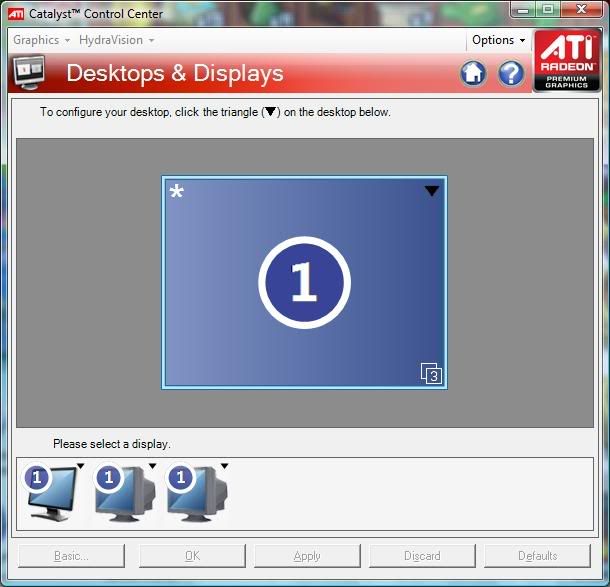
I had it working once last night, but not at all tonight. Don't know what's going on.