
http://www.matrox.com/graphics/en/support/drivers/
TH2GO Windows 7 Drivers are there :D
TH2GO Windows 7 drivers are there
TH2GO Windows 7 drivers are there
Version number x64_gxm-veos_2_06_00_026_whql,
But stil can get no high resolutions under Windos 7_x64 with This one and the 191.07_w7_64 Nvidia driver.
Back to 181.71 win 7-64 :cry: and the Beta GXM driver
But stil can get no high resolutions under Windos 7_x64 with This one and the 191.07_w7_64 Nvidia driver.
Back to 181.71 win 7-64 :cry: and the Beta GXM driver
-
AussieTimmeh

- Editors

- Posts: 1441
- Joined: 14 Oct 2009, 03:11
TH2GO Windows 7 drivers are there
I just don't get it, I can get 5040x1050 on 191.07. I feel sorry for others who can't. :(
When you install the new video driver, once its installed and the GXM is installed, have you tried rebooting the computer and then right clicking on the desktop, choose Screen resolution, and see if 5040x1050 is there?
When you install the new video driver, once its installed and the GXM is installed, have you tried rebooting the computer and then right clicking on the desktop, choose Screen resolution, and see if 5040x1050 is there?
i5-2500K @ 4Ghz ° Asus P8Z68 ° GTX670 Windforce OC ° 8GB DDR3 RipjawsX ° 4x Viewsonic VA2703 ° Logitech G15 / G5 / G27 ° Razer Vespula ° TrackIR 5 ° Thrustmaster Warthog HOTAS
-
Mach1.9pants

- Insiders

- Posts: 1512
- Joined: 29 Jul 2007, 05:24
- Location: NZ
TH2GO Windows 7 drivers are there
It is just so bizarre. It is totally easy for me, even when I updated to the latest BETA NV drivers it required no restart and (although the res went back to 3860) 5040 was still there...
TH2GO Windows 7 drivers are there
it doesent work for me again.
Nothing has changed.
now i am angry
chriz
Nothing has changed.
now i am angry
chriz
-
scavvenjahh

- Editors
- Posts: 3424
- Joined: 06 Mar 2008, 17:20
TH2GO Windows 7 drivers are there
Guess it's working on an "all or nothing" basis... And I'm definitely in the Nothing league.
New HDD, new install of Win7 x64.
191.07, 6.56 firmware, GXM 2.06.
"A Windows error has occurred" for 3x1680x1050, 3x1440x900.
Multiple reboots/cold boots don't help, custom res's don't help, the best I can get is 3x 1280x800 but the scaling is wrong, whatever the scaling option in nvidia cp.
Sometimes the Wizard lists only 1680x1050@60 Hz with two different 'pixel rates' or sth, now I have 1680x1050@57 and @60 and no pixel rates. Heck, I don't even wanna know what that means. All I know is that it all failed, yet again. :cry:
New HDD, new install of Win7 x64.
191.07, 6.56 firmware, GXM 2.06.
"A Windows error has occurred" for 3x1680x1050, 3x1440x900.
Multiple reboots/cold boots don't help, custom res's don't help, the best I can get is 3x 1280x800 but the scaling is wrong, whatever the scaling option in nvidia cp.
Sometimes the Wizard lists only 1680x1050@60 Hz with two different 'pixel rates' or sth, now I have 1680x1050@57 and @60 and no pixel rates. Heck, I don't even wanna know what that means. All I know is that it all failed, yet again. :cry:
TH2GO Windows 7 drivers are there
I'm using 182.50 with the beta powerdesk in Win 7 x64.
I was going to do the upgrade, once seing this, I guess I stay put, no upgrade till someone confirm it's working
I was going to do the upgrade, once seing this, I guess I stay put, no upgrade till someone confirm it's working
TH2GO Windows 7 drivers are there
If i could have a $ for every thread ive read, that starts off with "the new drivers work!" only to read on and be disappointed and find others are having problems, id almost have enough for a Big Mac meal lol
Im in the "doesnt work for me" camp. Still running on 178 drivers (from memory!) but im changing MB's this weekend and doing a full clean install of Vista 64 bit (some gaming software ive found having trouble with Win 7 on my other PC). Ill give it a try, messing around with different versions of the drivers and GXM i think, Ill see if my problem is fixed with a clean install of the OS.
Keep the reports coming!
Im in the "doesnt work for me" camp. Still running on 178 drivers (from memory!) but im changing MB's this weekend and doing a full clean install of Vista 64 bit (some gaming software ive found having trouble with Win 7 on my other PC). Ill give it a try, messing around with different versions of the drivers and GXM i think, Ill see if my problem is fixed with a clean install of the OS.
Keep the reports coming!
TH2GO Windows 7 drivers are there
EDIT: 195.39 Win7 64 bit & powerdesk 2.06 work great so far, pretty smooth
ok I took a gamble because I have a new rigs comming in next week
it work, but at 59Hz ... wery weird
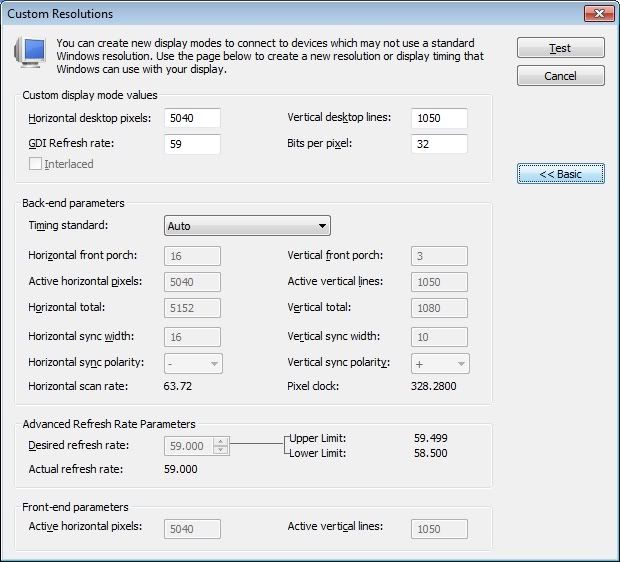
before upgrade it run at 57hz
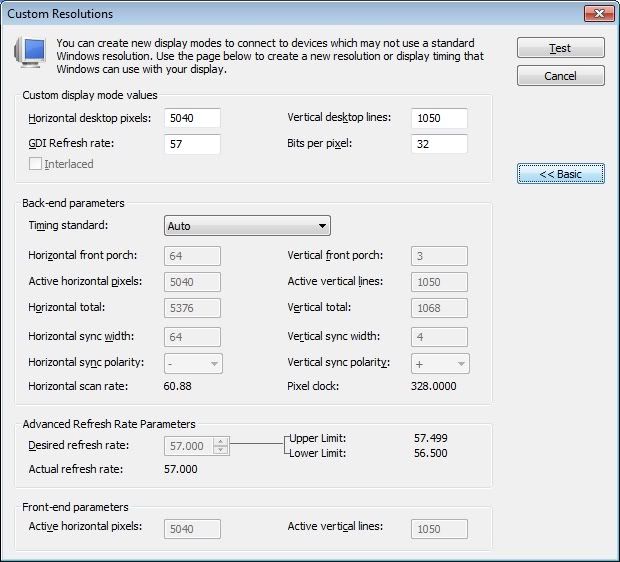
ok I took a gamble because I have a new rigs comming in next week
it work, but at 59Hz ... wery weird
before upgrade it run at 57hz
-
AussieTimmeh
- Editors
- Posts: 1441
- Joined: 14 Oct 2009, 03:11
TH2GO Windows 7 drivers are there
I can't help but wonder if its not hardware related somehow. I could always get 5040x1050 with the TH2G on my setup first time (if you include a reboot after driver install) regardless of the operating system and Nvidia drivers and even regardless of the video card I am using. - Disclaimer, only after the 5040x1050 firmware update was applied to the TH2O, of course.
Eg:
Constants
Motherboard - ASUS P5K-SE
CPU - Intel Q8300
PSU - Generic 550W
RAM - 4GB Kingston DDR2 800
HDD - Samsung 250GB SATA
GXM - V2.05
Surely the PSU, RAM, and HDDs are irrelevant though, but the motherboard chipset may or may not be?
Variables
Video card - first a Palit 8800GT OC then a Sapphire GTX275
OS - Vista 32 bit then 7 64 bit
Video card drivers - older version 8 drivers with the 8800GT OC then 191.07 with the GTX275
Just doesn't seem to make sense, so it has to be something a little bit unusual to blame I think? Video card memory?
Eg:
Constants
Motherboard - ASUS P5K-SE
CPU - Intel Q8300
PSU - Generic 550W
RAM - 4GB Kingston DDR2 800
HDD - Samsung 250GB SATA
GXM - V2.05
Surely the PSU, RAM, and HDDs are irrelevant though, but the motherboard chipset may or may not be?
Variables
Video card - first a Palit 8800GT OC then a Sapphire GTX275
OS - Vista 32 bit then 7 64 bit
Video card drivers - older version 8 drivers with the 8800GT OC then 191.07 with the GTX275
Just doesn't seem to make sense, so it has to be something a little bit unusual to blame I think? Video card memory?
i5-2500K @ 4Ghz ° Asus P8Z68 ° GTX670 Windforce OC ° 8GB DDR3 RipjawsX ° 4x Viewsonic VA2703 ° Logitech G15 / G5 / G27 ° Razer Vespula ° TrackIR 5 ° Thrustmaster Warthog HOTAS
TH2GO Windows 7 drivers are there
I am waiting for my other two dell E228WFP's to come in and give it a go on win 7 ultimate 64 bit. Should be here tuesday.
I have 4230x900 working on vista 32, but I decided to upgrade. We'll see. I have been waiting for this software to come out thinking it would work, but this makes me a little worried that I may have made a mistake in upgrading...
I have 4230x900 working on vista 32, but I decided to upgrade. We'll see. I have been waiting for this software to come out thinking it would work, but this makes me a little worried that I may have made a mistake in upgrading...
TH2GO Windows 7 drivers are there
W7 64 bit (as of an hour ago)
3 x Dell 2208WFP's
3 x GTX285
GXM 2.06
Firmware 2.3.4.t6.56
Nvidia driver: 191.07
It refuses to work. GXM will not install the 5040 modes. I get the dreaded red X. But here's what strange:
The GXM UI has changed for W7 dramatically. Takes a bit of getting used to, but in the "Mode List", I have two 5040 resolution choices, at least at first glance:
3 x 1689x1050 57Hz
3 x 1680x1050 60Hz
...but I can't choose them. Instead of checkable boxes beside them, I have a greyed out check mark. And no matter what I try, it won't let me choose either.
Man, this is really beginning to get to me.
3 x Dell 2208WFP's
3 x GTX285
GXM 2.06
Firmware 2.3.4.t6.56
Nvidia driver: 191.07
It refuses to work. GXM will not install the 5040 modes. I get the dreaded red X. But here's what strange:
The GXM UI has changed for W7 dramatically. Takes a bit of getting used to, but in the "Mode List", I have two 5040 resolution choices, at least at first glance:
3 x 1689x1050 57Hz
3 x 1680x1050 60Hz
...but I can't choose them. Instead of checkable boxes beside them, I have a greyed out check mark. And no matter what I try, it won't let me choose either.
Man, this is really beginning to get to me.
-
AussieTimmeh
- Editors
- Posts: 1441
- Joined: 14 Oct 2009, 03:11
TH2GO Windows 7 drivers are there
Man, this is really beginning to get to me.
If you ignore the GXM utility and just right click on the desktop, select Screen Resolution, can you choose 5040x1050 from the inbuilt Windows resoltuion screen?
I found I couldn't get it in the Matrox PowerDesk but rather on the desktop and then saved it in the GXM as a profile.
i5-2500K @ 4Ghz ° Asus P8Z68 ° GTX670 Windforce OC ° 8GB DDR3 RipjawsX ° 4x Viewsonic VA2703 ° Logitech G15 / G5 / G27 ° Razer Vespula ° TrackIR 5 ° Thrustmaster Warthog HOTAS
Found a 100 % working for the 3*1680x1050 with windows 7
:o Heres the tricks Install latest powerdesk 2.06 from matrox website then only the version 182.50 of nvidia drivers works but they aren't on nvidia site you have to google it to have it.
Try this it work great here and no more X windows error occur when setting resolution up :wink:
Try this it work great here and no more X windows error occur when setting resolution up :wink:
-
kevintrisha
- Posts: 31
- Joined: 17 Aug 2009, 00:25
Does everything work??
Hi mtxz,
Does all of the AERO bells and whistles work?
I have 5040x1050 with 182.50 and the old beta GXM.
No AERO for me.
Does all of the AERO bells and whistles work?
I have 5040x1050 with 182.50 and the old beta GXM.
No AERO for me.
TH2GO Windows 7 drivers are there
does that mean those of us with 59-60hz screens can run 5040x1050?????????? if so i´d be a happy bunny!
Re: Does everything work??
Hi mtxz,
Does all of the AERO bells and whistles work?
I have 5040x1050 with 182.50 and the old beta GXM.
No AERO for me.
Same here,
Yesterday I've got the 182.50_geforce_winvista_64bit_english_whql up and running with the 2.06 gxm.
Now I've got 5040x1050 but no AERO at that particular resolution.
Switching back to 1680x1050 and the AERO is back.
Very strange is that I'm now running the 5040 res with 59 refresh rate. This is very nice because it disables the "not the right resolution" warning on my samsung 226bw screens.
Matrox always claims that the refresh-rate of 57 on 5040 is that low because of directx limitations and due to technical issues. Maybe this has something to do with directx 11 ??
TH2GO Windows 7 drivers are there
it's the 182.50 drivers, swich to the 180.X or 191.X then it's back
I'm on 195.38 and I have it
I'm on 195.38 and I have it
TH2GO Windows 7 drivers are there
in the "Mode List", I have two 5040 resolution choices, at least at first glance:
3 x 1689x1050 57Hz
3 x 1680x1050 60Hz
...but I can't choose them. Instead of checkable boxes beside them, I have a greyed out check mark. And no matter what I try, it won't let me choose either.
I have the same problem, but also for the 1366x768 (x3) and the 1440x900 (x3). Factory reset the TH2Go, didn't help. I cannot choose or add any of these resolutions, not in GXM and not through the regular Windows resolution picker. I have tried the 195.39.
My system: Win7 Ultimate X64, GTX 275, Inter Core i7 on X58 MB.
TH2GO Windows 7 drivers are there
[quote]
Man, this is really beginning to get to me.
If you ignore the GXM utility and just right click on the desktop, select Screen Resolution, can you choose 5040x1050 from the inbuilt Windows resolution screen?
I found I couldn't get it in the Matrox PowerDesk but rather on the desktop and then saved it in the GXM as a profile.
Just got off the phone with Matrox Support again. They had no real insight as to why the latest drivers (matrox & nvidia), with the latest firmware, wasn't working.
Parting advice, try older NVidia drivers until you find one that works.
Riiiight.
Thanks for the tip.
Interrogative: Will games see the res also once saved as a profile?
Who is online
Users browsing this forum: No registered users and 7 guests