Page 1 of 1
Eyefinity questions
Posted: 21 Oct 2009, 14:54
by AussieTimmeh
Ok, so while I am running a TH2G at the moment, I am tempted to convert to the dark side and buy a 5850.
I am somewhat worried about all the fuss and dissatisfaction from previous TH2G owners. I have a couple of questions that I have searched for answers for and have not been able to find, sometimes due to one person saying one thing and then another posting that they can't do the same thing.
Advantages
No expensive middle box
Great video card performance over equivalent-price Nvidia card
Disadvantages
Still need at least one active DVI - DP adapter
No bezel management but I assume driver updates will correct this eventually
No option of a fourth monitor from a secondary output <-- this is the killer downer for the flight sims I build.
Eyefinity users on the whole still seem very unhappy?
1. Can I run a resolution of 3 x 1680 x 1050? If so, does it support 59-60Hz or not? I have 57Hz compliant monitors anyway but for future proofing.
2. Can it run at a 16:9 aspect ratio monitor native resolution, ie 3 x 1920 x 1080, also for future proofing?
3. How easy is it to set up for games (ie Oblivion, FSX, GRID, Left 4 Dead)? For example, I find the Matrox SGU really good.
I am very tempted. Very, very tempted. The small voice in my head still has doubts... help me silence them?
Eyefinity questions
Posted: 21 Oct 2009, 15:26
by scooby
At the moment all we are only seeing from ATI are the 5770 and 5870 series card on the market. I suggest you look in to the up coming 5870 (SIX) series cards that will be able to connect 6 monitors on one card. I think this card will do the trick for you.
The card is the 3rd card down on the left. See the connectors on the back they are mini-display ports. ATI is also working on their own connectors that will go Mini-Display-to-DVI for this card.
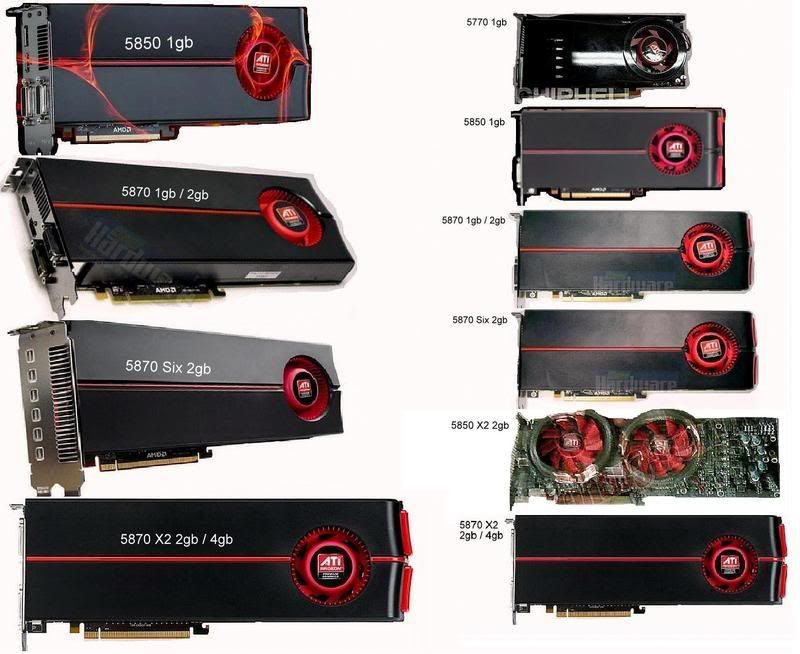
Also take a look at this early video review of the Eyefinity technology.
Link: http://www.hardocp.com/article/2009/09/28/amds_ati_eyefinity_technology_review/
If watching this video and it doesn't do it for you then give me a few days as I'm waiting for my card to arrive and I can tell you first hand.
HTH :wink:
Re: Eyefinity questions
Posted: 21 Oct 2009, 15:33
by whismerhill
Disadvantages
Still need at least one active DVI - DP adapter
yes for TripleHead
No bezel management but I assume driver updates will correct this eventually
yes it should
No option of a fourth monitor from a secondary output
yes on the current 5870 card. however the future 5870 "Six" will be able to do what you want since it'll have more than 1 DP port and so support up to 6 screens total, however for a 4 screens setup you'll need 2 DP Panels or 2 active adapters. (or 1 of each of course ;) )
1. Can I run a resolution of 3 x 1680 x 1050? If so, does it support 59-60Hz or not?
there no such limits on eyefinity, you can run as high as each output supports, 3 x 2560x1600 is possible & 120Hz monitors should also be an option
2. Can it run at a 16:9 aspect ratio monitor native resolution, ie 3 x 1920 x 1080, also for future proofing?
yes why couldn't it do that? just need 48:9 aspect ratio in games ...
Eyefinity questions
Posted: 22 Oct 2009, 01:13
by AussieTimmeh
Thanks for all the answers. The 5870 (six) looks interesting. <-- when does this come out?
For cost reasons, can I:
Install a 5850 in the primary PCI-e slot and run 3 monitors (for say out-the-window visual scene for FSX)
Install a lesser ATI card in the secondary PCI-e slot to run a fourth monitor for instruments only?
Or will that ruin the able to run Eyefinity?
Eyefinity questions
Posted: 22 Oct 2009, 02:37
by scooby
Install a 5850 in the primary PCI-e slot and run 3 monitors (for say out-the-window visual scene for FSX)
Install a lesser ATI card in the secondary PCI-e slot to run a fourth monitor for instruments only
(EDITED)
After reading the post that JKeefe wrote which was a summery of the information in the EyeFinity Discussions thread it is clear that...well read on.
[quote]Example, having 2x 5850's in Crossfire, have a SLS 3 monitor setup, and have 2 of the monitors connected to the DVI ports of the primary card, and the 3rd connected to a DVI port on the secondary card. If this feature was enabled, it would save alot of hassle and money in having to buy an active adaptor, which then could be spend on a 2nd ATI card for better performance, (CrossFire 5850's > 1x5870 + active adaptor)
To do this type of setup you'd need a genlock/framelock type connector that is typically a workstation feature. Without this it would make the timing/syncing of the panels between card particularly difficult and you'd be getting "panel" tearing.
Eyefinity questions
Posted: 22 Oct 2009, 05:08
by SunSp*t
Excuse me for not visiting the forums very much since Monday as I am recovering from major surgery.
MS operating systems recognize two graphics cards uniquely, which is to say that one card can operate in EF SLS mode, and the other in traditional modes. So the scenario of having something like a 5850 drive three displays in SLS mode and another graphics card (such as an evil green card) doing something else should work. I say should work because I haven't actually tried it myself.
For those who persist in saying an active DP to DVI adapter is required, I have to persist in saying "no, that is only true if you have more than two DVI monitors or are trying to match two existing DVI monitors with a third DVI monitor." There are people like me who are buying three monitors purely for doing EF. I know of a number of folks selling their Apple 30" displays to buy three Dell U2410s. And some folks are buying a third monitor that is DP capable.
Please be complete in your comments - anything less is erroneous. Active adapters are a configuration choice, not a requirement.
SunSp*t
Eyefinity questions
Posted: 22 Oct 2009, 05:58
by AussieTimmeh
(EDITED)
After reading the post that JKeefe wrote which was a summery of the information in the EyeFinity Discussions thread it is clear that...well read on.
I'm not sure that answers my question, because the three panels displaying the 'one' image are all coming out of the same card, and an entirely separate window / panel / image is coming out of the second card.
The way I read it, the comment you posted relates to having one part of the original three coming out of the second card.
Ie the way I read it:
My question
First card - three panels - one group or virtual monitor
Second card - one panel - second group / monitor
Your quote
First card - 2 panels, forming 2/3 of one group or virtual monitor
Second card - 1 panel, forming remaining 1/3 of group
Happy to be corrected if I am intepreting it wrong.
Eyefinity questions
Posted: 22 Oct 2009, 06:01
by AussieTimmeh
MS operating systems recognize two graphics cards uniquely, which is to say that one card can operate in EF SLS mode, and the other in traditional modes. So the scenario of having something like a 5850 drive three displays in SLS mode and another graphics card (such as an evil green card) doing something else should work. I say should work because I haven't actually tried it myself.
I feel like you understand what I am asking, and that's about the same assumption I had made.
I am going to use a second ATI card to keep it in the family, no point being half red half green like some cheap plastic christmas ornament.
Please be complete in your comments - anything less is erroneous. Active adapters are a configuration choice, not a requirement.
SunSp*t
Well, in my case, I am modding an existing system that does not use DisplayPort monitors, so in my case it is a requirement when calculating cost of changing.
Eyefinity questions
Posted: 22 Oct 2009, 06:02
by ViciousXUSMC
Here are the facts that I know to help clear things up.
> Currently No Crossfire in Eyefinity SLS mode, if you use 2 cards in crossfire you will only be using 1 of the cards the other wont be doing anything.
> You can not split the displays between two cardss for Eyefinity all the monitors must be connected to the same physical video card.
(FYI the demo of the flight sim running on multiple cards was multiple instances of that game each running only a section of the game)
> You can use 4 monitors with the current card, but only 3 of them at the same time, and one of them must be the display port connection.
> Bezel management is supposed to be on the way but never bet on what is to come only what is here.
> Crossfire support for eyefinity is also supposed to be in the works though sounds like the ETA for this is not nearly as close as the bezel management.
MS operating systems recognize two graphics cards uniquely, which is to say that one card can operate in EF SLS mode, and the other in traditional modes. So the scenario of having something like a 5850 drive three displays in SLS mode and another graphics card (such as an evil green card) doing something else should work. I say should work because I haven't actually tried it myself.
Yeah will work as long as you can get it working on the driver level.
I had a 4850 Crossfire Setup and when I got my 5870 I could not run the 5870 and 4850 at the same time using the 5870 drivers. I had to use the standard Catylist drivers for both cards to function at the same time, and that meant no 5870 functions like eyefinity.
These early 5870 drivers are ONLY working for 5000 series cards, they are not backwards compatible with older ATI cards, and if thats the case I would imagine it even harder to get a nvidia card working along side of it. Or it maybe easier as the ATI drivers wont install for the Nvidia card so it can just use stock windows drivers, nothing fancy but it will work for the purpose of more displays.
Eyefinity questions
Posted: 22 Oct 2009, 06:05
by AussieTimmeh
Here are the facts that I know to help clear things up.
> Currently No Crossfire in Eyefinity SLS mode, if you use 2 cards in crossfire you will only be using 1 of the cards the other wont be doing anything.
> You can not split the displays between two cardss for Eyefinity all the monitors must be connected to the same physical video card.
(FYI the demo of the flight sim running on multiple cards was multiple instances of that game each running only a section of the game)
> You can use 4 monitors with the current card, but only 3 of them at the same time, and one of them must be the display port connection.
> Bezel management is supposed to be on the way but never bet on what is to come only what is here.
> Crossfire support for eyefinity is also supposed to be in the works though sounds like the ETA for this is not nearly as close as the bezel management.
All of these 'parameters' will work for my proposed setup.
...and if thats the case I would imagine it even harder to get a nvidia card working along side of it. Or it maybe easier as the ATI drivers wont install for the Nvidia card so it can just use stock windows drivers, nothing fancy but it will work for the purpose of more displays...
Good point. It might be easier to use an Nvidia card as the secondary card to avoid driver conflicts.
Guess there is one way to know for sure...
Eyefinity questions
Posted: 22 Oct 2009, 12:54
by Magic Man
Good point. It might be easier to use an Nvidia card as the secondary card to avoid driver conflicts.
Think that is meant to work okay in Win7 and XP but not in Vista because they changed the multiple card support - i.e. requries a single driver.
XP won't run Eyefinity so you are looking at Win7.
Anyone with an Eyefinity setup running under Win7 got a 'green' card they could pop in to check for compatibility? When I build my Eyefinity setup I'd like to use my current 8800GTX alongside if possible (want to drive lots of panels...)
Eyefinity questions
Posted: 22 Oct 2009, 13:27
by Paradigm Shifter
You can have ATi and nVidia cards play together in XP or Windows 7. They won't do it in Vista due to the way Microsoft enforces the display driver model. :( EyeFinity is Win 7 only, so yes, that makes it Win 7 needed, then. That's not a bad thing, though. ;)
I've tested out an 8800GT and a 3870 (cards I had 'lying around') in the same system (Foxconn Blackops X48 board - horrible thing...) and while they both powered a screen each at the time, you won't get PhysX due to nVidia locking it out in software. (Before anyone says it, yes, I know there is a 'patch' but excuse me for not fully trust it...) To be honest, we have no idea whether nVidia will try locking out their cards completely when ATi cards are detected in future. I wouldn't expect them to, but then I never expected them to lock out PhysX, either. I can't speak for EyeFinity, though, sorry. :(
And despite the WDDM1.1 allowing multiple cards, it still doesn't seem like their drivers coexist all that well.
Eyefinity questions
Posted: 22 Oct 2009, 14:11
by BHawthorne
[quote]Good point. It might be easier to use an Nvidia card as the secondary card to avoid driver conflicts.
Think that is meant to work okay in Win7 and XP but not in Vista because they changed the multiple card support - i.e. requries a single driver.
XP won't run Eyefinity so you are looking at Win7.
Anyone with an Eyefinity setup running under Win7 got a 'green' card they could pop in to check for compatibility? When I build my Eyefinity setup I'd like to use my current 8800GTX alongside if possible (want to drive lots of panels...)
Yes, if you're looking to mix brands of cards Windows 7 (and possibly a Lucid Hydra mobo) is the most accomodating answer.
Eyefinity questions
Posted: 22 Oct 2009, 16:00
by JKeefe
Thanks for all the answers. The 5870 (six) looks interesting. <-- when does this come out?
For cost reasons, can I:
Install a 5850 in the primary PCI-e slot and run 3 monitors (for say out-the-window visual scene for FSX)
Install a lesser ATI card in the secondary PCI-e slot to run a fourth monitor for instruments only?
Or will that ruin the able to run Eyefinity?
This will work
for MSFS only. If you want to do something similar for almost any other title it will not work.
Eyefinity questions
Posted: 22 Oct 2009, 22:13
by AussieTimmeh
Wow some great answers there. How bizarre that it's the first time I have heard Eyefinity is a Windows 7 only feature, despite all the reviews I have watched.
[quote]Thanks for all the answers. The 5870 (six) looks interesting. <-- when does this come out?
For cost reasons, can I:
Install a 5850 in the primary PCI-e slot and run 3 monitors (for say out-the-window visual scene for FSX)
Install a lesser ATI card in the secondary PCI-e slot to run a fourth monitor for instruments only?
Or will that ruin the able to run Eyefinity?
This will work
for MSFS only. If you want to do something similar for almost any other title it will not work.
By MSFS do you mean Microsoft Flight Sim (ie FSX)?
Eyefinity questions
Posted: 22 Oct 2009, 22:21
by BHawthorne
EyeFinity is both for Vista and Win 7, the talk about mixing card brands and drivers is a Win 7 improvement to drivers.
Eyefinity questions
Posted: 22 Oct 2009, 22:48
by Paradigm Shifter
EyeFinity is both for Vista and Win 7,
Yup. Sorry about the confusion, Timmeh. :(
the talk about mixing card brands and drivers is a Win 7 improvement to drivers.
Aye, Microsoft updating the 'Windows Display Driver Model' to support multiple graphics drivers. They forced it to a single driver in Vista for "compatibility purposes", IIRC.
Eyefinity questions
Posted: 23 Oct 2009, 01:46
by scooby
By MSFS do you mean Microsoft Flight Sim (ie FSX)?
I think YES. :D Microsoft Flight Sim alway had this option to span over multiple screens.
Eyefinity questions
Posted: 23 Oct 2009, 05:27
by ViciousXUSMC
How odd that XP supports multiple drivers but Vista wont, oh well my Win 7 disk may arrive today but probably late in the day so wont have time to mess with it.
Eyefinity questions
Posted: 23 Oct 2009, 16:17
by JKeefe
[quote]By MSFS do you mean Microsoft Flight Sim (ie FSX)?
I think YES. :D Microsoft Flight Sim alway had this option to span over multiple screens.
MSFS = Microsfot Flight Simulator. FSX is the latest version.
And yes, MSFS has always (or at least in the last few versions) to span a 3D environment over multiple screens (and even screens connected to multiple GPUs). It basically can do SoftTH without SoftTH in place, but is the only title that can do so (because of its native Microsoft development). :)