Ati Catalyst 9.6 working with 5040x1050
Posted: 25 Jun 2009, 17:47
"Kinda", as usual. Thanks goes to the mysterious "Flabado" on the Entech forums for the heads up. I originally started this ATI + TH2G quest months ago and hit a brick wall due to an ATI driver bug (massive corruption at 5040, even when you set it up manually). So I got in contact with Entech (makers of Powerstrip, a GFX tweaking program) and hung out on their forum. Recently ATI fixed the bug, so I tried again.
I tested this on my "old" (but never really used) HD4870 512MB, it works!
Plug the TH2G into the DVI port furthest from the motherboard on the Radeon (ie the Dual Link DVI port).
Install latest Powerstrip:
http://entechtaiwan.com/files/pstrip.exe
Install and reboot when prompted.
Install latest Matrox SW.
Run both PowerDesk and Pstrip once, you should have 4320x900 installed and working now. The Matrox Wizard will reset your config, so dont run the Wizard again.
After running Pstrip it creates a file "pstrip.ini" in your "C:UsersyournameAppDataRoaming" folder (in Vista, dunno in Xp), just do a file search for it. Open pstrip.ini and add "Unlimited=1" (no quotations) under the Global Options section. Close and save the file.
Open Pstrip. Right Click the icon on the taskbar, goto "Display Profiles", then "Configure"
Click on "Advanced Timing Options"
Click on "Custom Resolutions"
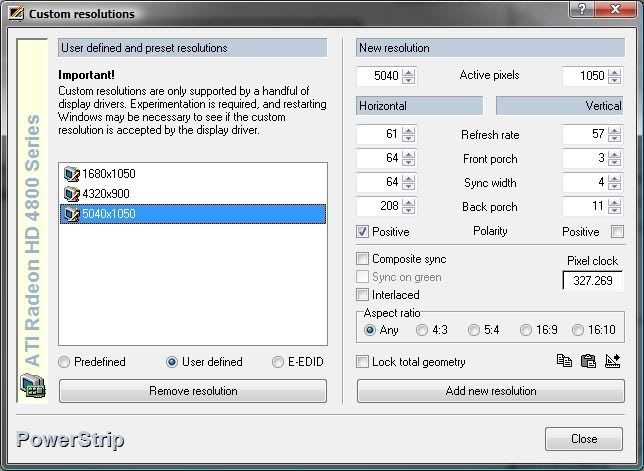
Input these settings exactly (watch tick boxes) for 5040x1050@57Hz
I tried a couple of tests. Fear2 (DX9) ran fine, seemed slower than the GTX280 I usually use.
Farcry 2 Benchmark, both DX9 and DX10 modes had massive corruption with VSync Enabled. With it disabled, it ran, but its much slower than the nVidia card (which is odd as its an "ATI" game, usually faster on ATI)
Farcry 2 Ranch Small Benchmark - HD4870 512MB DX10 - no Vsync - Ultra High Settings
* Total Frames: 642, Total Time: 51.01s
* Average Framerate: 12.59
* Max. Framerate: 20.74 (Frame:594, 47.67s)
* Min. Framerate: 7.14 (Frame:371, 28.56s)
Farcry 2 Ranch Small Benchmark - GTX280 1GB DX10 - with Vsync - Ultra High Settings
* Total Frames: 1570, Total Time: 51.03s
* Average Framerate: 30.77
* Max. Framerate: 43.57 (Frame:261, 7.19s)
* Min. Framerate: 24.31 (Frame:988, 31.23s)
Farcry2 supports DX10.1, but the benchmark made no reference to it, just DX9 or 10. 10.1 would bench higher (assuming its not defaulted to 10.1 already). I should also point out that maybe the Radeon drivers simply do not handle 5040 correctly, the performance is much worse than I thought it should be.
So there you have it, working ATI support with no Matrox software help or support (of the human kind). The HD4870 certainly doesnt seem to be a very good card for 5040 in the limited tests above. Maybe with 1GB like the GTX280 it would be more competitive.
According to Flabado neither Crossfire or X2 ATI cards work correctly at this resolution. though he tested with much older Catalyst drivers than we have today.
I might be able to test this if I borrow a HD4850 (cross GPU Crossfire baby!) from my brother.
EDIT: Maybe I was expecting a bit much from a 512MB Radeon HD4870, according to http://www.anandtech.com/video/showdoc.aspx?i=3539&p=19, the 1GB GTX280 is 3.5x (!) as fast at the lower resolution of 2560x1600 ("lower" as its 4.1m Pixels vs the 5.3m of 5040x1050).
The much newer 1GB HD4890 is in the region of 2.5 to 3x faster at high resolutions, though still not as fast in that game as the old GTX280.
I tested this on my "old" (but never really used) HD4870 512MB, it works!
Plug the TH2G into the DVI port furthest from the motherboard on the Radeon (ie the Dual Link DVI port).
Install latest Powerstrip:
http://entechtaiwan.com/files/pstrip.exe
Install and reboot when prompted.
Install latest Matrox SW.
Run both PowerDesk and Pstrip once, you should have 4320x900 installed and working now. The Matrox Wizard will reset your config, so dont run the Wizard again.
After running Pstrip it creates a file "pstrip.ini" in your "C:UsersyournameAppDataRoaming" folder (in Vista, dunno in Xp), just do a file search for it. Open pstrip.ini and add "Unlimited=1" (no quotations) under the Global Options section. Close and save the file.
Open Pstrip. Right Click the icon on the taskbar, goto "Display Profiles", then "Configure"
Click on "Advanced Timing Options"
Click on "Custom Resolutions"
Input these settings exactly (watch tick boxes) for 5040x1050@57Hz
I tried a couple of tests. Fear2 (DX9) ran fine, seemed slower than the GTX280 I usually use.
Farcry 2 Benchmark, both DX9 and DX10 modes had massive corruption with VSync Enabled. With it disabled, it ran, but its much slower than the nVidia card (which is odd as its an "ATI" game, usually faster on ATI)
Farcry 2 Ranch Small Benchmark - HD4870 512MB DX10 - no Vsync - Ultra High Settings
Code: Select all
Settings: Demo(Ranch Small), 5040x1050 (57Hz), D3D10, Fixed Time Step(No), Disable Artificial Intelligence(No), Full Screen, Anti-Aliasing(None), VSync(No), Overall Quality(Custom), Vegetation(Very High), Shading(Ultra High), Terrain(Ultra High), Geometry(Ultra High), Post FX(High), Texture(Ultra High), Shadow(Ultra High), Ambient(High), Hdr(Yes), Bloom(Yes), Fire(Very High), Physics(Very High), RealTrees(Very High)* Total Frames: 642, Total Time: 51.01s
* Average Framerate: 12.59
* Max. Framerate: 20.74 (Frame:594, 47.67s)
* Min. Framerate: 7.14 (Frame:371, 28.56s)
Farcry 2 Ranch Small Benchmark - GTX280 1GB DX10 - with Vsync - Ultra High Settings
Code: Select all
Settings: Demo(Ranch Small), 5040x1050 (56Hz), D3D10, Fixed Time Step(No), Disable Artificial Intelligence(No), Full Screen, Anti-Aliasing(None), VSync(Yes), Overall Quality(Custom), Vegetation(Very High), Shading(Ultra High), Terrain(Ultra High), Geometry(Ultra High), Post FX(High), Texture(Ultra High), Shadow(Ultra High), Ambient(High), Hdr(Yes), Bloom(Yes), Fire(Very High), Physics(Very High), RealTrees(Very High)* Total Frames: 1570, Total Time: 51.03s
* Average Framerate: 30.77
* Max. Framerate: 43.57 (Frame:261, 7.19s)
* Min. Framerate: 24.31 (Frame:988, 31.23s)
Farcry2 supports DX10.1, but the benchmark made no reference to it, just DX9 or 10. 10.1 would bench higher (assuming its not defaulted to 10.1 already). I should also point out that maybe the Radeon drivers simply do not handle 5040 correctly, the performance is much worse than I thought it should be.
So there you have it, working ATI support with no Matrox software help or support (of the human kind). The HD4870 certainly doesnt seem to be a very good card for 5040 in the limited tests above. Maybe with 1GB like the GTX280 it would be more competitive.
According to Flabado neither Crossfire or X2 ATI cards work correctly at this resolution. though he tested with much older Catalyst drivers than we have today.
I might be able to test this if I borrow a HD4850 (cross GPU Crossfire baby!) from my brother.
EDIT: Maybe I was expecting a bit much from a 512MB Radeon HD4870, according to http://www.anandtech.com/video/showdoc.aspx?i=3539&p=19, the 1GB GTX280 is 3.5x (!) as fast at the lower resolution of 2560x1600 ("lower" as its 4.1m Pixels vs the 5.3m of 5040x1050).
The much newer 1GB HD4890 is in the region of 2.5 to 3x faster at high resolutions, though still not as fast in that game as the old GTX280.