Plants vs. Zombies

Detailed breakdowns of how games react to widescreen, ultra-wide, 4k and multi-mon
Post Reply
The_cranky_hermit
Insiders
Insiders
Posts: 3010
Joined: 07 Nov 2005, 04:16

Plants vs. Zombies

Post by The_cranky_hermit »


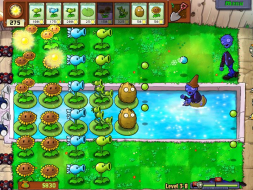
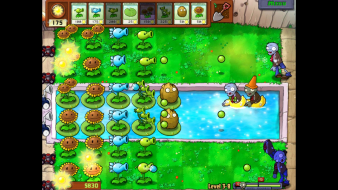
Widescreen Grade: Unsupported
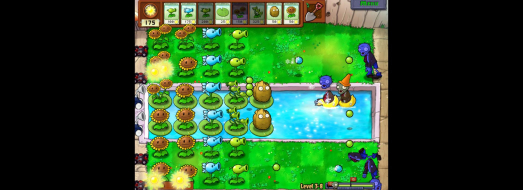
Ultra-Widescreen Grade: Unsupported
Multi-monitor Grade: Unsupported
4k Grade: Unsupported

Read Full Detailed Report - Plants vs. Zombies

Armed with an alien nursery-worth of zombie-zapping plants like peashooters and cherry bombs, you'll need to think fast and plant faster to stop dozens of types of zombies dead in their tracks.


4:3


16:10


16:9


3x1

Last edited by The_cranky_hermit on 19 Feb 2018, 16:49, edited 3 times in total.
Reason: Edit
Somian
Posts: 17
Joined: 22 Jan 2008, 12:51

Plants vs. Zombies

Post by Somian »

thx for the info :) now i can get the game without worrying i cannot play it on my widescreen
profosor_54
Posts: 12
Joined: 06 Jul 2008, 21:11

Plants vs. Zombies

Post by profosor_54 »

Try disabling the 3D acceleration in the menu to get full screen, even on widescreen resolutions. I tried it on 1680x1050 an i can play without pillar-boxing.

The_cranky_hermit
Insiders
Insiders
Posts: 3010
Joined: 07 Nov 2005, 04:16

Plants vs. Zombies

Post by The_cranky_hermit »

Nope, still pillarboxed. Got any screenshots? I suspect you weren't actually playing at 1680x1050 - just a stretched 800x600 or something.
profosor_54
Posts: 12
Joined: 06 Jul 2008, 21:11

Plants vs. Zombies

Post by profosor_54 »

I get a full screen stretched 800x600 on 1920x1200, but it's better then pillarboxing. If I save a screenshot I get a 800x600 image.
The_cranky_hermit
Insiders
Insiders
Posts: 3010
Joined: 07 Nov 2005, 04:16

Plants vs. Zombies

Post by The_cranky_hermit »

Having everything stretched out and distorted is not better than pillarboxing.
Post Reply

Who is online

Users browsing this forum: Bing [Bot] and 9 guests