Page 1 of 2
Killing floor @ 5040 x 1050
Posted: 15 May 2009, 00:21
by Valk
EDIT: updated with full solution and correct Unreal version :roll: .
Killing floor only showed a max 1680 x1050 as default but as it uses the Unreal
2 game engine its possible to do a couple of simple changes to the games .ini file to get the desired 5040 x 1050 widescreen res.
Using the instructions on this forum for Unreal 4 and a bit of common sense I can confirm the following worked for me.
The file you need to edit is
killingfloor.ini, which is in the Killingfloor/system/ folder.
Search for the following lines in the file and update them with the new res:
WindowedViewportX=
WindowedViewportY=
FullscreenViewportX=
FullscreenViewportY=
e.g for 5040 x 1050 widescreen:
WindowedViewportX=5040
WindowedViewportY=1050
FullscreenViewportX=5040
FullscreenViewportY=1050
You will also need to change ScaleHUDX=0.000000 to a new value to adjust the HUD.
I found ScaleHUDX=0.333333 fitted my HUD to the centre screen, however it distorts the weapons and timer so I am using ScaleHUDX=0.666666 which uses all 3 screens but weapons display perfectly. This fits quite well with only your weight info being slighly cropped at the bottom of the screen but still readable.
Screenshots
Original 1680 x 1050
 Widescreen 5040 x 1050
 (using 0.666666 Hud scale)

The game can be purchased on Steam:
http://store.steampowered.com/app/1250/
Killing floor @ 5040 x 1050
Posted: 15 May 2009, 03:10
by MackXX
Thanks for the heads up, I'm having some double weapon rendering problems running 3840x1024. One is the normal and the other is a squished one more in the middle.
Killing floor @ 5040 x 1050
Posted: 15 May 2009, 04:47
by Sep01
Thanx for that. was waiting for this one :D
I´m having the same graphical problems. Double weapons rendering somehow.
Killing floor @ 5040 x 1050
Posted: 15 May 2009, 12:40
by Valk
Theres some other settings files in the folder too but Im not too sure which the game actually uses other than killingfloor.ini
So far my HUD is all on the centre screen but Ive managed to squish my gun and timer so they appear a lot thinner than they should. I did notice my random fiddling of ini settings actually made the gun even more squished so it may be possible to edit settings to set it right. I'll spend some time later today and see if I can get exact details on what to change. Also the fact I have a squished gun and timer and that you guys are seeing double may be down to some of the other settings I changed.
Ill try post some screens and any findings a bit later today, in any case I think with a bit of fiddling we should be able to get this to work.
EDIT: updated first post with full solution - please post back here if you find any other problems.
Re: Killing floor @ 5040 x 1050
Posted: 18 May 2009, 04:53
by dopefish
Killing floor only showed a max 1680 x1050 as default but as it uses the Unreal 3 game engine...
It uses Unreal Engine 2 (It's a UT2004 mod). :)
Re: Killing floor @ 5040 x 1050
Posted: 18 May 2009, 04:57
by Soduka
[quote]Killing floor only showed a max 1680 x1050 as default but as it uses the Unreal 3 game engine...
It uses Unreal Engine 2
.5 (It's a UT2004 mod). :)
Killing floor @ 5040 x 1050
Posted: 18 May 2009, 12:55
by dopefish
That's still UE2. ;)
Killing floor @ 5040 x 1050
Posted: 18 May 2009, 17:40
by MackXX
Awesome Valk! :)
I found these settings worked when running 3840x1024:
WindowedViewportX=3840
WindowedViewportY=1024
FullscreenViewportX=3840
FullscreenViewportY=1024
ScaleHUDX=1.000000

Killing floor @ 5040 x 1050
Posted: 22 May 2009, 05:56
by Downtown1
Awesome, I might pick it up now. Any way to fix the HUD to middle monitor?
Killing floor @ 5040 x 1050
Posted: 24 May 2009, 02:53
by Valk
Awesome, I might pick it up now. Any way to fix the HUD to middle monitor?
If you use ScaleHUDX=0.333333 that seemed to fit the HUD to the middle screen, however it squished the weapons images up.
Killing floor @ 5040 x 1050
Posted: 31 May 2009, 23:17
by thefunk007
For some reason if I apply this fix, my weapons also appear on my far right screen, so it is essentially mirrored similar to the middle screen - although just the weapons...Anybody know how to fix this?! I am running 5040 x 1050 and have applied the settings in the top thread?!
Killing floor @ 5040 x 1050
Posted: 01 Jun 2009, 14:50
by Sep01
I am running this game in 4320x900 on three 19" screens with a GTX295.
I have found that scaleHUD 0.333333 gives me double weapons renderings on the center screen. So basicely it looks as if the player is having 4 arms, when using double pistols (4 pistols with the double rendering).
scaleHUD 0.666666 gives me the double weapon renderings on the far right screen, just as thefunk007 has discribed it.
When I use scaleHUD 1.000000 everything is in order how it should be,.. well except the HUD, which is on the left and right screens, but thats something I can live with, as long as the weapons look ok.
Killing floor @ 5040 x 1050
Posted: 22 Oct 2009, 00:03
by ViciousXUSMC
Hey guys this game is having a free to play weekend. I debated getting it when it was only $10 on preorder but passed it up.
So I wanna try to play this free weekend. Looks like I'll maybe be out of luck my monitors are not due in till the 23rd or later :(
News Link: http://store.steampowered.com/news/2969/
Its in honor of the 2nd new free DLC pack for this game.
I am assuming the 5760x1200 eyefinity settings will be similar to the 5040x1050 settings.
Probably HudScale 1.0 and then fill in the resolution in the right areas.
Killing floor @ 5040 x 1050
Posted: 22 Oct 2009, 02:01
by suiken_2mieu
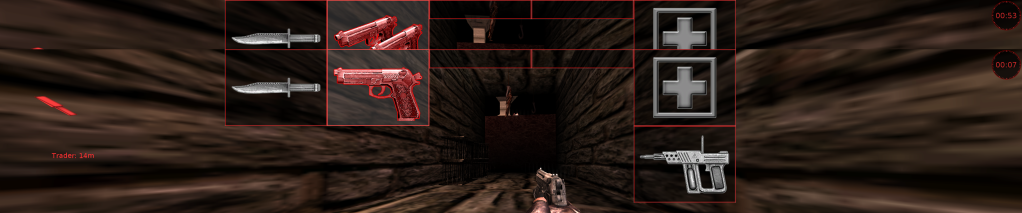
I found these settings worked when running 4320x900:
WindowedViewportX=4320
WindowedViewportY=900
FullscreenViewportX=4320
FullscreenViewportY=900
ScaleHUDX=1.000000
Ignore my horrible use of paint, i didn't know i messed up till i posted it. :P
Killing floor @ 5040 x 1050
Posted: 22 Oct 2009, 04:33
by ViciousXUSMC
So as a owner of the game is it worth $20 if I only can play once in a while and will rely on random groups of people to play with?
Killing floor @ 5040 x 1050
Posted: 22 Oct 2009, 06:58
by Downtown1
Can't say this game is that much fun with randoms.. you will probably die a whole bunch early on and its going to be hard to get money after you die to buy new gear, which means you'll be in late game with crap equipment and thus dying even more easily.
Killing floor @ 5040 x 1050
Posted: 22 Oct 2009, 21:06
by suiken_2mieu
So as a owner of the game is it worth $20 if I only can play once in a while and will rely on random groups of people to play with?
The game is fun, but i cant say that i play online because people just suck. I play with my friends over lan mostly.
Killing floor @ 5040 x 1050
Posted: 23 Oct 2009, 19:08
by ViciousXUSMC
I decided to pass on killing floor (BTW after you get done playing the game a screen comes up to offer you to buy it for $15)
I am getting borderlands instead. I am hosting an event where I am selling the other 3 copies for $35 so I can take advantage of the 4 pack discount.
It looks like a really neat game, I just really really hope it works on 3 screens. It would suck if my new favorite game only works on one screen.
Killing floor @ 5040 x 1050
Posted: 28 Oct 2009, 21:09
by saivenkat
Awesome Valk! Smile
I found these settings worked when running 3840x1024:
Killing floor @ 5040 x 1050
Posted: 28 Oct 2009, 21:22
by suiken_2mieu
Awesome Valk! Smile
I found these settings worked when running 3840x1024:
Amazing, there's no settings listed.