

Anyone have a chance to get the new KA-50 helo simulator DCS:Black Shark? (I'm looking at you Jkeefe! :D )
I'm most curious if they've solved the FOV cockpit issue that plagued LOMAC.
I'm sure I'll buy it anyways just to support anyone doing serious flight sim developement.... but I pray this was fixed.
TH2Go & DCS:Black Shark?
TH2Go & DCS:Black Shark?
Gigabyte GTX 980 - SLI
i7-4770k @4ghz
16GB Ram
Planar SA2311W 3D Vision monitors (x3)
Windows 7 x64 Ultimate SP1
i7-4770k @4ghz
16GB Ram
Planar SA2311W 3D Vision monitors (x3)
Windows 7 x64 Ultimate SP1
TH2Go & DCS:Black Shark?
http://www.youtube.com/watch?v=uL9dLB_5dT0
http://forums.eagle.ru/showthread.php?t=34832
Everything is optimized for Th2Go for release. There will even be a 3-viewport mode where each of the 3 screen sections render seperately with no distortion.
:cheers
http://forums.eagle.ru/showthread.php?t=34832
Everything is optimized for Th2Go for release. There will even be a 3-viewport mode where each of the 3 screen sections render seperately with no distortion.
:cheers


TH2Go & DCS:Black Shark?
Patch 1.01 is out but its still impossible to launch the game at 5040x1050 (menu is "invisible"), how hard could be to fix this issue ? :? Awful
TH2Go & DCS:Black Shark?
they have indicated it was too late to fix for 1.01 but will be fixed for 1.02
TH2Go & DCS:Black Shark?
they have indicated it was too late to fix for 1.01 but will be fixed for 1.02
Thans for the info :P
-
escrotumus
- Posts: 135
- Joined: 03 Jun 2006, 04:38
TH2Go & DCS:Black Shark?
Bought this game today and man is it rough. Very spartan and hard to figure out control and config menus. The 3.75 FOV seems to have your nose right on the dash. What FOV settings are you guys using? I'm just at the 3.75 default for now but it's not right. I would surely appreciate any tips or configs that anyone has that has been playing this game for a while!
TH2Go & DCS:Black Shark?
Bought this game today and man is it rough. Very spartan and hard to figure out control and config menus. The 3.75 FOV seems to have your nose right on the dash. What FOV settings are you guys using? I'm just at the 3.75 default for now but it's not right. I would surely appreciate any tips or configs that anyone has that has been playing this game for a while!
Yes, GSENN posted this sometome ago, and it works perfectly :
[quote]For the 1 camera view there should be a tweak guide in BlackShark's manual that shows you how to adjust your FOV to avoid the "squashing" you're talking about. The devs spent lots of time with TripleHead2Go for this title, and optimizing for 1 camera view for Th2Go was also taken into strong consideration.Funny you should mention that..
Turns out I was a little premature with regards to the '1camera' FOV
URZE over at http://forums.eagle.ru/ posted this
Code: Select all
..Eagle DynamicsKa-50ConfigViewview.lua


   -- Camera view angle limits {view angle min, view angle max}.

   CameraViewAngleLimits = {}

   CameraViewAngleLimits[PlaneIndex.iSu_27] = {20.0, 140.0}

   CameraViewAngleLimits[PlaneIndex.iSu_33] = {20.0, 120.0}

   CameraViewAngleLimits[PlaneIndex.iSu_25] = {20.0, 120.0}

   CameraViewAngleLimits[PlaneIndex.iSu_39] = {20.0, 120.0}

   CameraViewAngleLimits[PlaneIndex.iMiG_29] = {20.0, 120.0}

   CameraViewAngleLimits[PlaneIndex.iMiG_29K] = {20.0, 120.0}

   CameraViewAngleLimits[PlaneIndex.iA_10] = {5.0, 120.0}

   CameraViewAngleLimits[PlaneIndex.iF_15] = {20.0, 140.0}

   CameraViewAngleLimits[PlaneIndex.iKA_50] = {20.0, 120.0}


   In the view.lua text file there is a line for the KA-50's view angles min and max..


   Change the max from 120.0 to 200.0 to increase the view angle.
Which in turn pulls the view back a bit..
i.e. you dont feel like you have your chin on the gun sight..
After that change use the ingame zoom keys to adj the location of your point of view (POV)..
I didn't look into much because I use TrackIR that zooms your POV by simply moving your head..
But these zoom 'keys' seem to move the location of the POV start point..
Which affects the POV start point when using TrackIR..
I tried it and it looks great!!
The '1camera' view is now very usable..
But at a big cost!
It really does make your vid card work hard!
Just about brought my GTX280 to it knees! ;)
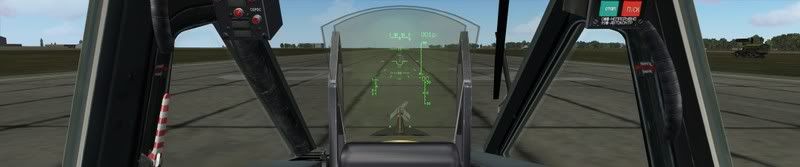
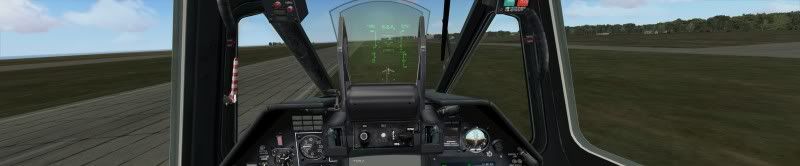
Here are Shrubbo's before and after pictures..
Before
After
Who is online
Users browsing this forum: Semrush [Bot] and 7 guests