Page 1 of 2
Repost - Setting up 5040x1050 57Hz - nv180.xx drivers
Posted: 19 Nov 2008, 12:35
by mattsimis
Afaik this is needed only on Vista and the new nVidia drivers. There seems to still be lots of confusion, it is very possible to get 5040x1050 Triplehead support on the newest drivers. If this doesnt work, IMO you have a monitor problem. I have tested this on 2 entirely separate and quite different systems.
First Ensure your Monitor driver in Device Manager looks like this:
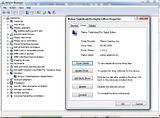
If not, do the following (you need GXM installed somewhere to actually find the driver):
Goto Device Manager, open Monitor Section, double click whatever Monitor device is installed, click Driver, click "Update Driver".
Then step through the options:
"Browse My Computer for driver software", Let me Pick from a list...", "Have Disk", point to driver [note this is the default location] to
"C:PROGRAM FILES (X86)MATROX GRAPHICS INCPOWERDESK SE" folder and it should automatically give you the "Triplehead2Go Digital Edition" option as the suggested "Compatible" driver.
-------
To test 1680x1050 57hz (ie to see if your monitor will work in 5040x1050 triplehead 57hz) simply do the following:
Right Click on Desktop and select NVidia Control Panel.
Under the Display drop down mention on the Left select "Manage Custom Resolutions".
Put in 1680 (Horizontal value) and 1050 (Vertical), change GDI refresh to 57. Click on "Test".
Thats it.
-------
To actually Setup 5040x1050 57hz, do the following:
Right Click on Desktop and select NVidia Control Panel.
Under the Display drop down mention on the Left select "Manage Custom Resolutions".
Select Create, put in 5040 (on the Horizontal value) and 1050 (Vertical).
GDI Refresh set to 57, bits per pixel 32.
Then click on "Advanced"
In the Back-end Parameters, Timing Standard section change it to
CVT Reduced Blank first, then select
"Manual".
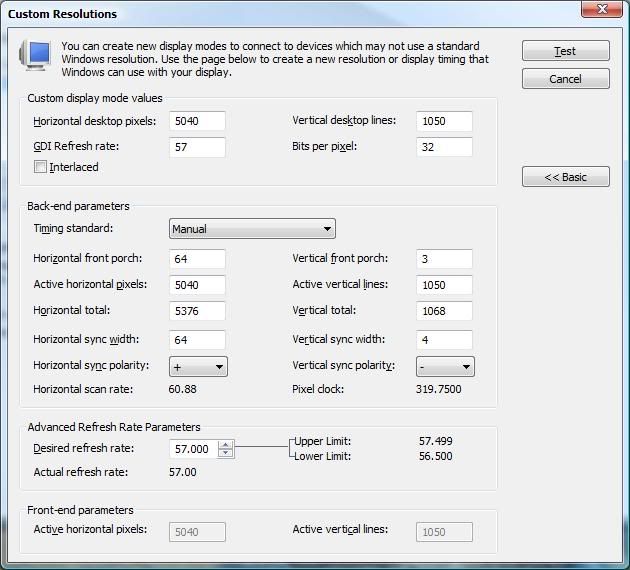
Setup the
Manual timing as per this image:
-------
Stopping Powerdesk SE (Matrox GXM utility) from removing modes on every boot
Goto to your Powerdesk SE install folder, default (on x64) is
C:Program Files (x86)Matrox Graphics IncPowerDesk SE. Open up file
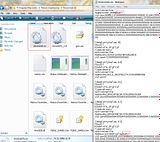
DeviceInfo.ini and find the entries "Name=CUST_MODE" and "Name=CustomDisplay". Rename these to something else, something more than just adding "bak" the end however as there are sometimes registry entries named that too.
In the picture below I added "bak3" to the end.
Close and reboot, GXM will give you a warning about reverting or keeping current display setup, select keep. Reboot. It will come up again and may ask for another reboot, do it as required.
It should no longer overwrite your custom resolution as its no longer overwriting your "CUST_MODE" and "CustomDisplay" settings. GXM utility otherwise continues to work as normal, no need to uninstall or move to other folders and no more error messages.
EDIT: Added bit about installing the Monitor Driver first, you wont get far otherwise!
EDIT2: Added part about fixing GXM utility removing the 5040 modes
Does this work in games for anyone?
Posted: 22 Nov 2008, 07:48
by kondor999
I've done this successfully for my desktop, but:
1) GXM erases the custom res at startup.
2) The custom res (5040x1050) isn't selectable in any games I've tried.
Has anyone figured out how to play games in 5040x1050 under Vista x64/180.x drivers?
Repost - Setting up 5040x1050 57Hz - nv180.xx drivers
Posted: 22 Nov 2008, 11:58
by scavvenjahh
Same here. I don't quite understand the "CVT Reduced Blank" trick, but your manual settings work with me, in that I can apply 5040x1050 to the desktop without getting "out of range". For this, I say thanks ! :)
Now the tricky part : how do you have GXM and games deal with this res ? :?
Repost - Setting up 5040x1050 57Hz - nv180.xx drivers
Posted: 22 Nov 2008, 23:45
by mattsimis
Ive never had GXM mess the res on either system Ive done this on. Have you tried removing it and reinstalling it? What method does your GXM start.. I have mine
manually placed as a shortcut in the Startup Folder, not as a service or anything. This is what my GXM Display Modes looks like:
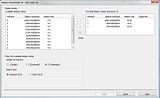
Did you get the "Setup has changed" error message from GXM at any point and what did you select?
Has anyone figured out how to play games in 5040x1050 under Vista x64/180.x drivers?
There isnt (shouldnt?) be anything to figure out!?
Neither system has any issue above the generic TH2G issues. Some games let you select the res in-game, most dont. Ive played Fallout3 to completion, tested WoW, played Left 4 Dead, CS Source, Dead Space, no issues specific to 180 series manual setup. Nor should there be, this is all just vanilla nVidia driver supporting - res stuff, people do this all the time on CRT projectors and various other setups.
What have you tried that isnt working?
Repost - Setting up 5040x1050 57Hz - nv180.xx drivers
Posted: 23 Nov 2008, 08:06
by kondor999
No game allows me to select 5040x1050.
As I said before, 5040x1050 is avail. on the desktop via the custom res, but no games can "see" that res. In other words, the highest res that shows up in all games as selectable is 3840x800.
I am running Vista x64 - perhaps that's the problem.
Updated to 180.48 and still no luck. Game performance under Tri-SLI did improve quite a bit, though (yay).
Repost - Setting up 5040x1050 57Hz - nv180.xx drivers
Posted: 23 Nov 2008, 19:15
by mattsimis
No game allows me to select 5040x1050.
As I said before, 5040x1050 is avail. on the desktop via the custom res, but no games can "see" that res. In other words, the highest res that shows up in all games as selectable is 3840x800.
Omg, please pick one or two of the games Ive said work! "No games" is completely vague.
Manually force them with either an ini tweak (Fallout) or Command Line (any Valve Steam game). You cannot (reliably) expect the resolution to appear in the game.
The nVidia 5040 custom res working or not is nothing to do with TH2G, its all nVidia software at this point. Have you tried searching for other, non-TH2G, people with resolutions that are entered in Control Panel that didnt appear in games (that are confirmed working with "selectable" resolutions)? People here forget there is a whole world of people out there setting up manual timings and resolutions that have nothing to do with Triplehead.
As a by-note, some people have mentioned the Horizontal scan rate appears as 61.49 when setting up the res and maybe this is causing it not to work. I dont think so as I just setup a new graphics card and sure enough, 61.49 appears when testing, but once you complete the test it automatically changes to 60.88 as pictured.
I will also add that its
much easier to setup 5040x1050 if you setup 1680x1050@57hz and are running in that res when setting up 5040 by editing the 1680x1050@57hz custom res.
Repost - Setting up 5040x1050 57Hz - nv180.xx drivers
Posted: 23 Nov 2008, 21:33
by scavvenjahh
All these tips make sense, but please understand you seem to be just a lucky uh... guy at this point :lol:
I will also add that its much easier to setup 5040x1050 if you setup 1680x1050@57hz and are running in that res when setting up 5040 by editing the 1680x1050@57hz custom res.
I gotta say I've not tried the 180.xx forceware under Vista yet - I use XP for TripleWide, period - but I'll keep your tips in mind when I get the patience to try and setup my TH2G in Vista again.
-Your GXM : it sucks, just like ours (none of the new display modes listed).
-"Setup has changed" : what do you think ? :lol: I tried with or without restarting in my numerous attempts, like everyone having a hard time at this I think, to no avail.
-Custom res : in XP it's a pretty straightforward process. First I create 5040x1050@57Hz in nvidia cp, then I can apply it to the desktop
and select it in games. In Vista, I can only apply it to the desktop - using your manual settings, and it won't show up in games. So why does it work in XP, without "anything to figure out" ?! This is what's driving kondor999 and I crazy :cry:
Repost - Setting up 5040x1050 57Hz - nv180.xx drivers
Posted: 23 Nov 2008, 22:44
by kondor999
Yes, all good suggestions, but please realize most of us are very experienced users who have been on the bleeding edge for 20+ years.
There is clearly something different and subtle about your setup which is allowing 5040 to work.
The reason I say "all games" is because I literally own every PC game made in the last few years and there wasn't any point in listing all of them. But, to be specific, here is a subset:
Crysis
Warhead
Fallout3
Far Cry 2
COD4
HL2
GTR2/GT Legends/all games using this engine
Bioshock
World In Conflict
and, literally, everything else....
Get my point? It's game-agnostic. All using ini/cfg - not trying to select from within the game. Please note that, when it was working under XP, the 5040 res was avail. as a selection from within the game menu of all those games. If the res is being reported to Windows, it should show up in menus.
One big thing: the list of avail res's is built up from the *monitor* config - not the vid card config. And my monitor is listed as "generic plug and play" under windows, although the Nvidia cpl says "Matrox Digital". Perhaps that's the problem? What does yours say?
I've tried to install the gxm.inf as a driver for my monitor, as elucidated in another thread, but under x64 anyway, Windows simply comes back and says "The driver you have is already up-to-date" (I'm paraphrasing).
Upon reboot, the GXM will erase my 5040 custom res from the Nvidia cpl.
Even with the GXM utility uninstalled (to prevent it from erasing my 5040 custom res) 5040 is not do-able. Windows simply does not know my monitor can do that res, it would seem.
I'll continue to try different permutations, but perhaps it would be easiest if you could list every salient detail abut your system - including a single game we all own (such as Crysis) that you have working at 5040.
Once we can reproduce your results on someone else's machine - we should be able to figure out what's different and, therefore, what the problem is in everyone else's setup.
Thanks!
Repost - Setting up 5040x1050 57Hz - nv180.xx drivers
Posted: 23 Nov 2008, 23:43
by mattsimis
I have 2 entirely separate PCs and one of them with 2 different graphics cards (just sold the 8800GTXs) and I have not had GXM delete my res nor had any issue in any game like you have described. The issues you guys are having are driving me mad too! :evil: :lol:
And its not just me, my girlfriend setup her new, fresh x64 Vista PC w/TH2G, I purposely refused to help and told her read my thread and her setup works exactly as mine!?
What GXM version are you using? Mine is 11.10.302.8.
The only thing I did with GXM (other than Bezel Management) was setup 1680x1050 single screen as one of the 3 supported modes. I also install GXM
after 5040 is up (as its not doing anything before anyway).
EDIT:
One big thing: the list of avail res's is built up from the *monitor* config - not the vid card config. And my monitor is listed as "generic plug and play" under windows, although the Nvidia cpl says "Matrox Digital". Perhaps that's the problem? What does yours say?
I've tried to install the gxm.inf as a driver for my monitor, as elucidated in another thread, but under x64 anyway, Windows simply comes back and says "The driver you have is already up-to-date" (I'm paraphrasing).
Wow, this is definitely (hopefully) a big thing! Mine (also Vista x64) is listed as below:
Nothing special to install it as such for my setup:
Click Update,
"Browse My Computer for driver software", Let me Pick from a list...", "Have Disk", point to driver default location of
"C:PROGRAM FILES (X86)MATROX GRAPHICS INCPOWERDESK SE" folder and it automatically gives me the Triplehead2Go Digital Edition option as "Compatible". If I untick "Show compatible hardware" I can also install DualHead2Go or Matrox VEOS drivers (no point to this).
Both PCs only worked properly when the monitor driver was installed as Matrox Triplehead2Go (which was a tip I read here).
scavvenjahh, what does your one say?
I was under the impression several other people followed the custom res install, ie Mach1 for one, and have it up and running too? Can some other people chime in here?
EDIT2: For Reference, here is my GXM Monitor driver, this installs as a Triplehead2Go Digital Edition "Monitor":
Mirror 1
http://FastFreeFileHosting.com/file/11014/GXM-Monitor-Driver-only-Driver-zip.html
Mirror 2
GXM Monitor Driver only Driver.zip
Repost - Setting up 5040x1050 57Hz - nv180.xx drivers
Posted: 24 Nov 2008, 00:25
by Mud
What GXM version are you using? Mine is 11.10.302.8.
The only thing I did with GXM (other than Bezel Management) was setup 1680x1050 single screen as one of the 3 supported modes. I also install GXM after 5040 is up (as its not doing anything before anyway).
Same GXM, same resolutions in supported mode list, same monitor driver, same GXM install after setting up 5040...installing GXM requires a restart which instantly removes my 5040 custom resolution.
Jesus H. Christ on a pogo stick...this is driving me nuts
Posted: 24 Nov 2008, 09:26
by kondor999
UPDATE:
DID IT! Got the monitor installed and that did indeed unlock 5040 in all games (selectable in their menu's).
Here's How:
Do everything the same as below except:
7. Instead of putting the path to the driver in that upper text box, click on the green arrow just below that says: "Let me pick from a list of device drivers on my computer".
8. Click on Have Disk...nav to location of gxm.inf
9. Ta-da!
Now I'm off to re-install the dreaded GXM to see if it will continue to disable my 5040 res at each bootup.
But this is some REAL BIG PROGRESS here, people!
============================================
OK, I CANNOT get Windows to install the monitor driver.
1. Display Settings
2. Advanced Settings...
3. Monitor...Properties...Generic PnP Monitor
4. Properties
5. Update Driver
6. Browse My Computer...
7. Navigate to GXM.inf location
8. Windows spits back:
9 "Windows has determined the driver software for your device is up to date"
I have tried deleting the generic Pnp driver, and reinstalling from the "Add hardware" cpl. Windows will then say:
"The folder you specified does not contain a compatible software driver for your device."
I am going insane. Maybe I should blow out the install and start over.
One quick question. Did you install the monitor driver before or after you installed the GXM? I'm trying to install it *after* the GXM has been installed.
Next, I'll try uninstalling GXM and then trying to install the monitor driver.
F*CK THIS SHIT!!!!
*sigh* Sorry.
Repost - Setting up 5040x1050 57Hz - nv180.xx drivers
Posted: 24 Nov 2008, 10:34
by kondor999
OK, installing GXM kills 5040 at reboot - just like always.
Now, here's where it gets weird. If you then uninstall the GXM, and reboot - the 5040 res is now back and selectable either thru the standard windows res selector or the Nvidia cpl. *Without* having to re-enter the custom res again!
This means all those settings (horiz front porch and all that crap) were still sitting there in the registry (or wherever the nvidia cpl custom res settings get stored), but loading the GXM somehow hid it.
Here's what I think: the GXM somehow (probably thru the service it runs - viewable under msconfig) replaces the "custom res" part of the cpl with it's own set of resolutions from the GXM "Mode List".
Since the GXM "Mode List" does not include the 5040 res, then it "disappears" from the Nvidia cpl.
When you uninstall the GXM (not just exit - that does nothing to stop the GXM service), the Nvidia cpl goes back to using it's own custom res's again. Including the 5040 one you had set up previously.
I wonder if you can run the GXM without its associated service? If so, maybe you can get bezel mgmt without losing access to the 5040 res.
Anyway - that's what I'll try next:
1. Reinstall GXM...Reboot
2. Stop GXM service...see if the GXM app stops.
3. If it does, re-launch the GXM app
4. If it works (incl bezel mgmt) and doesn't kill 5040 (since its Service isn't running anymore), we have a good hack.
OK, we officially have a workaround
Posted: 24 Nov 2008, 11:16
by kondor999
OK, I now have 5040x1050 AND Bezel mgmt. under Vista x64.
I thought about demanding to be made an Insider for the 5 hr process it took to figure this out (from 11pm to 4am!!), but then decided to be generous :wink:
Here's what you do.
1. Set up the 5040 custom res
2. Install GXM...reboot
3. You'll lose the 5040 as always.
4. Copy (not move) the install folder of the GXM (c:program files (x86)matrox graphics incpowerdesk se) to anywhere you like.
5. If you want bezel mgmt., go in there and set it up now.
6. Uninstall the GXM...reboot
7. You should be able to select 5040x1050 now (no need to set it up again - it should still be there).
8. Launch "Matrox.PowerDesk SE.exe" from the folder that you copied in step 4.
OK - now you can have your cake and eat it too. You will get your 5040 res back (due to the fact you set it up in step 1). And your "Matrox.PowerDesk SE.exe" (AKA GXM) will give you bezel mgmt. AND all games I've tried can "see" the 5040 res from within their menu's - no need to edit .ini's and crap.
One prob - after you uninstall the GXM, you can't get to the bezel mgmt setup anymore. BUT - if you set up a hotkey combo in step 5, it still works! Weird!
Clearly, something is being installed along with the GXM that is f*cking things up. Not sure what it is, but using the above method, you get what you need: 5040x1050 and Bezel Mgmt.
Yay!!!!! :D :D :D :D
PS - I 1st tried stopping the Matrox Service (can't recall the exact name right now - it's obvious) and preventing it from loading. It didn't work (either way). Something is being installed besides the Service and the GXM itself that screws up the Nvidia cpl's Custom resolutions and replaces them with the list under "Edit Mode List" in the GXM (which still does not include anything better than 3840x800).
Repost - Setting up 5040x1050 57Hz - nv180.xx drivers
Posted: 24 Nov 2008, 12:12
by mattsimis
So you see Im not crazy! :p
You should always do the "Let me Pick Driver from List.., Browse..", Windows will always (always!) err on the side of caution and keep a similar driver its already installed over a new one.
Weird you are having such a headache with GXM though. I disabled mine from auto starting then made a Shortcut to PowerDesk.exe and placed it in "Startup". The first run is says config has changed, I selected to keep it as it is. Now on every boot I get GXM (via Powerdesk.exe), bezel management and 5040.
Repost - Setting up 5040x1050 57Hz - nv180.xx drivers
Posted: 25 Nov 2008, 10:19
by kondor999
Yeah - that's the next little project is actually getting GXM fully working, but really just having the 5040 rez and bezel mgmt. is what I needed. I'm also too damn scared I'll somehow jack it all up again.
You realize just how many permutations it took to figure this shit out? Jesus!
What I don't get is how the GXM is hooking into the OS if I stop and/or prevent both the GXM and its associated Service from loading. I'm sure there are a million ways and I'm too much of a hobbyist/not enough of a programmer to figure them out.
One question for matt -- did you ever get it to where the 5040 rez shows up under the list of avail. rez under the GXM? Cause that would be the real trick.
Repost - Setting up 5040x1050 57Hz - nv180.xx drivers
Posted: 25 Nov 2008, 14:09
by mattsimis
One question for matt -- did you ever get it to where the 5040 rez shows up under the list of avail. rez under the GXM? Cause that would be the real trick.
Yeah, that would be the most elegant solution, but afaik it doesnt work for anyone like that.
Repost - Setting up 5040x1050 57Hz - nv180.xx drivers
Posted: 25 Nov 2008, 19:43
The windows registry?
Repost - Setting up 5040x1050 57Hz - nv180.xx drivers
Posted: 26 Nov 2008, 06:02
by kondor999
The windows registry?
Unfortunately it's not there. Not that I could find.
Obviously the dang thing almost works - probably a programmer could fix it in an afternoon.
Matrox?
Repost - Setting up 5040x1050 57Hz - nv180.xx drivers
Posted: 27 Nov 2008, 13:51
by mattsimis
[quote]The windows registry?
Unfortunately it's not there. Not that I could find.
Obviously the dang thing almost works - probably a programmer could fix it in an afternoon.
Matrox?
An alternate registry fix:
Stopping Powerdesk SE (Matrox GXM utility) from removing modes on every boot
Goto to your Powerdesk SE install folder, default (on x64) is
C:Program Files (x86)Matrox Graphics IncPowerDesk SE. Open up file
DeviceInfo.ini and find the entries "Name=CUST_MODE" and "Name=CustomDisplay". Rename these to something else, something more than just adding "bak" the end however as there are sometimes registry entries named that too.
In the picture below I added "bak3" to the end.
Close and reboot, GXM will give you a warning about reverting or keeping current display setup, select keep. Reboot. It will come up again and may ask for another reboot, do it as required.
It should no longer overwrite your custom resolution as its no longer overwriting your "CUST_MODE" and "CustomDisplay" settings. GXM utility otherwise continues to work as normal, no need to uninstall or move to other folders and no more error messages.
Repost - Setting up 5040x1050 57Hz - nv180.xx drivers
Posted: 27 Nov 2008, 14:23
by kondor999
Brilliant!
I'm off to check it out.


