Page 1 of 3
Driver nv178.08 also works in 5040x1050 in Vista x64
Posted: 11 Nov 2008, 01:33
by mattsimis
Just tried the official nVidia Cuda Driver, out of the box it wasnt working with 5040x1050 on Vista X64 (8800GTX SLI), however I added the custom res manually as so:
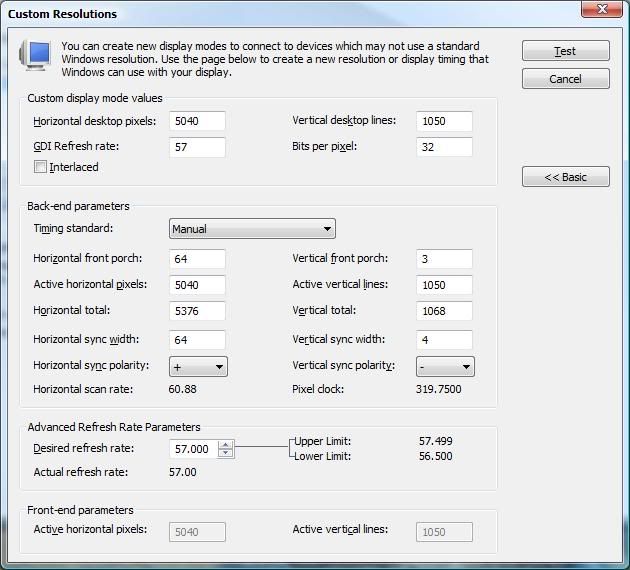
And it works, Desktop and games (only tried Fallout3 however).
Get the driver here:
http://www.nvidia.com/object/cuda_get.html
Probably a high IQ driver given the CUDA connection.
Im going to assume people have tried manually adding the custom res in the 180 series drivers!
Driver nv178.08 also works in 5040x1050 in Vista x64
Posted: 11 Nov 2008, 02:40
by Mach1.9pants
Mmmm that is interesting. I tried manually adding with the 178 drivers but (After that didn't work) I don't think I tried with the 180 series. I'll give it a go when I get home I suppose.
Driver nv178.08 also works in 5040x1050 in Vista x64
Posted: 12 Nov 2008, 18:52
by mattsimis
Ok, just tried a straight update from 178.08 to 180.43, it actually kept the custom res and its working (desktop and games) at 5040x1050:
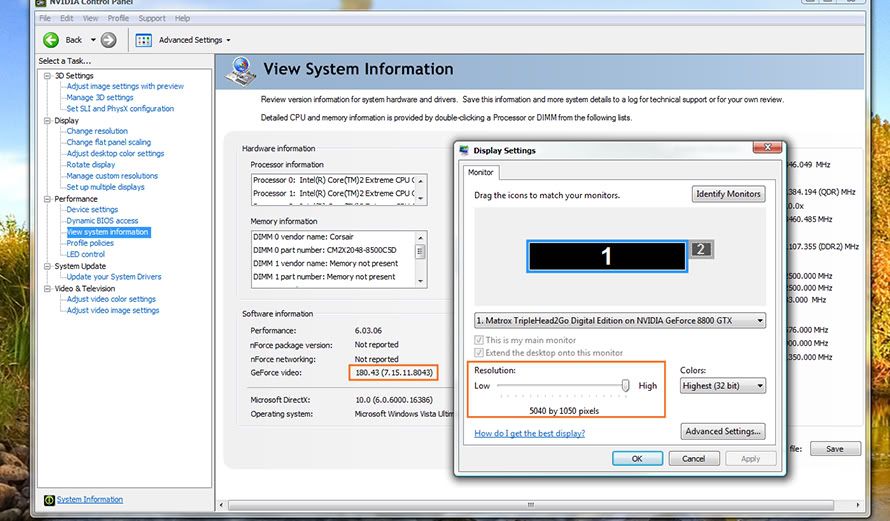
Am I missing something or is this what people were saying doesnt work?!
Driver nv178.08 also works in 5040x1050 in Vista x64
Posted: 12 Nov 2008, 19:20
by mattsimis
Ive just tried it on a 2nd Triplehead system, Vista X64, 2x 260GTXs, upgraded from 177.41, custom res was not carried over (as it was inputed by Matrox, not me). I input my own custom 5040x1050 res settings as above (which are just copied from Matrox anyway) and it also works fine, 180.43 - Vista - 5040x1050, desktop and games.
Driver nv178.08 also works in 5040x1050 in Vista x64
Posted: 12 Nov 2008, 20:22
by Mud
I'll give this a go tonight and report back.
Driver nv178.08 also works in 5040x1050 in Vista x64
Posted: 13 Nov 2008, 00:32
by Mud
No go for me, couldn't set the custom resolution...it sends all of my screens out of range. Could be ultramon or my 4th screen, but I don't have time to mess around right now.
I'm staying on 180.43 for the moment, 3x1280x800 is an annoyance, but frankly having working bezel management back makes it worthwhile.
Driver nv178.08 also works in 5040x1050 in Vista x64
Posted: 14 Nov 2008, 01:33
by mattsimis
No go for me, couldn't set the custom resolution...it sends all of my screens out of range. Could be ultramon or my 4th screen, but I don't have time to mess around right now.
I'm staying on 180.43 for the moment, 3x1280x800 is an annoyance, but frankly having working bezel management back makes it worthwhile.
Whenever you get the chance and have the older drivers with 5040x1050 res working (Custom input by GXM in the NV control panel), edit (goto Advanced) the setting and confirm its the same as above. Its possible the setting is automatically tweaked per system (specific monitor settings) and my exact settings may not work on all screens (though it should). This is unlikely IMO.
Afaik, the Matrox Custom res is just what you see there however, so if it works in driver version x, it should work in driver y as long as the settings are an exact match.
Driver nv178.08 also works in 5040x1050 in Vista x64
Posted: 14 Nov 2008, 02:55
by kondor999
Didn't work for me either. I put in the exact settings as in the screenshot above.
Interestingly, the "Horizontal scan rate" and "pixel clock" values (which are apparently calculated based on the input values) were different than what was in the example screenshot.
Anyway - not working for me under 180.43.
Shit. :(
Driver nv178.08 also works in 5040x1050 in Vista x64
Posted: 14 Nov 2008, 13:20
by mattsimis
I dont get it! I did it on 2 different systems with totally different graphics cards and different size and brand monitors, so it wasnt a once off fluke!?
Can you post up a screen shot of your custom res settings for comparison? Also what I was suggesting above was that you go and check your 177.41 custom res and copy that (if different to mine).
EDIT:
The monitors I have this working on are:
Zalman Trimon (22")
2x Dell 2208WFP (22")
2x Dell E248 (24")
1x Dell 2407WFP (24")
Graphics Cards:
2x GTX260
2x 8800GTX
OS:
Both Vista X64, which should be the most difficult to get to work, not the easiest. UAC was disabled on one and severely crippled on the other, since it affects driving signing maybe try that too.
Driver nv178.08 also works in 5040x1050 in Vista x64
Posted: 14 Nov 2008, 15:07
by Mud
Here's the screenshot I took under the CUDA drivers:


I keep UAC 100% off.
Driver nv178.08 also works in 5040x1050 in Vista x64
Posted: 14 Nov 2008, 17:41
by mattsimis
Here's the screenshot I took under the CUDA drivers:
I keep UAC 100% off.
In your image Horizontal Scan and Pixel Clock are way off. Obviously these arent user editable... anyone any idea where these fiqures are generated?
Driver nv178.08 also works in 5040x1050 in Vista x64
Posted: 14 Nov 2008, 17:46
by Mud
They seem to be generated from your current resolution. I assume you've taken your screenshot after getting 5040x1050 since it says your refresh rate is 57Hz already.
Driver nv178.08 also works in 5040x1050 in Vista x64
Posted: 14 Nov 2008, 18:53
by mattsimis
They seem to be generated from your current resolution. I assume you've taken your screenshot after getting 5040x1050 since it says your refresh rate is 57Hz already.
Think you are on to something. I created a custom 1680x1050
57hz resolution
single display mode way back when I started the testing.
Ive looked this up, its an oddity with the nVidia drivers but regardless you should be able to manually create this res in PowerStrip, however maybe try being in 1680x1050 single screen when creating the 5040x1050 mode.
Driver nv178.08 also works in 5040x1050 in Vista x64
Posted: 14 Nov 2008, 22:57
by Mach1.9pants
Oh, BTW, what exactly do you mean by "CUDA drivers"? Is this a different driver from the standard ones you DL from the normal driver section?
Driver nv178.08 also works in 5040x1050 in Vista x64
Posted: 15 Nov 2008, 00:10
by mattsimis
Its all in the link above (http://www.nvidia.com/object/cuda_get.html)!
Its the driver component in nVidias CUDA software development program. Not really useful or relevant to us, it just happened that it was the first driver I tried to create a custom res on, then I tried 180.43.
Driver nv178.08 also works in 5040x1050 in Vista x64
Posted: 15 Nov 2008, 00:12
by Killtacular
They seem to be generated from your current resolution. I assume you've taken your screenshot after getting 5040x1050 since it says your refresh rate is 57Hz already.
It's the pixel clock that's throwing your monitor out of whack. The only method I could find to get it in the right range months ago, was to first set the basic info to 5040x1050, 57HZ, then change the advanced dropdown to CVT reduced blank. That will change the pixel clock to around 320ish... then change the dropdown right back to manual, edit the rest of the settings and test it. Should work then.
Driver nv178.08 also works in 5040x1050 in Vista x64
Posted: 15 Nov 2008, 00:28
by Mach1.9pants
'Kay so the normal BETA 180.43 worked fine for you? and you recommend trying to set the custom res while your desktop is set to 1680x1050? :)
Driver nv178.08 also works in 5040x1050 in Vista x64
Posted: 15 Nov 2008, 01:33
by mattsimis
'Kay so the normal BETA 180.43 worked fine for you? and you recommend trying to set the custom res while your desktop is set to 1680x1050? :)
Yes and Yes! Try Killtacular's approach too, I also tend to rotate through the modes to see what they do, I may have inadvertantly bypassed the problem with the Pixelclock in doing so.
But the 180 series definitely work!
Driver nv178.08 also works in 5040x1050 in Vista x64
Posted: 15 Nov 2008, 01:40
by Mach1.9pants
Cool thanks
Driver nv178.08 also works in 5040x1050 in Vista x64
Posted: 15 Nov 2008, 01:44
by Mud
***See below***
