Page 1 of 1
Mass Effect PC, Triplehead2go FOV, and UI problems
Posted: 30 May 2008, 02:56
by Fudgemaker17
Mass Effect for the PC was released this week and I quickly went out and purchased it. To my dismay the game doesn't seem to change the FOV despite having wide screen options in the game menu. The UI also seems to completely dissapear or is just way off screen. I've tried fiddling with some of the options in the .ini files in the config folder to no avail. So if anyone else has seen a fix, or knows how to fix these issue's please share! ^^
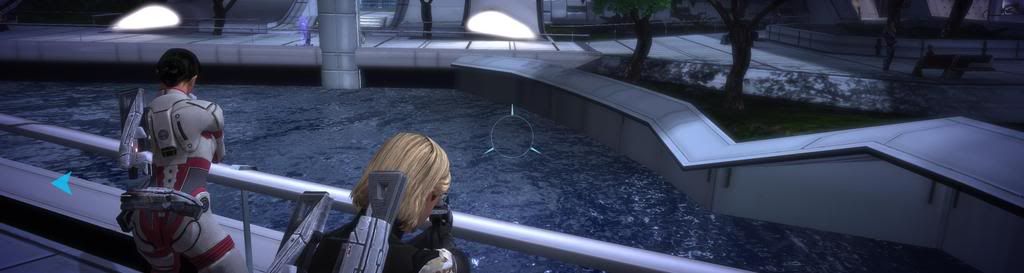
3840x1024
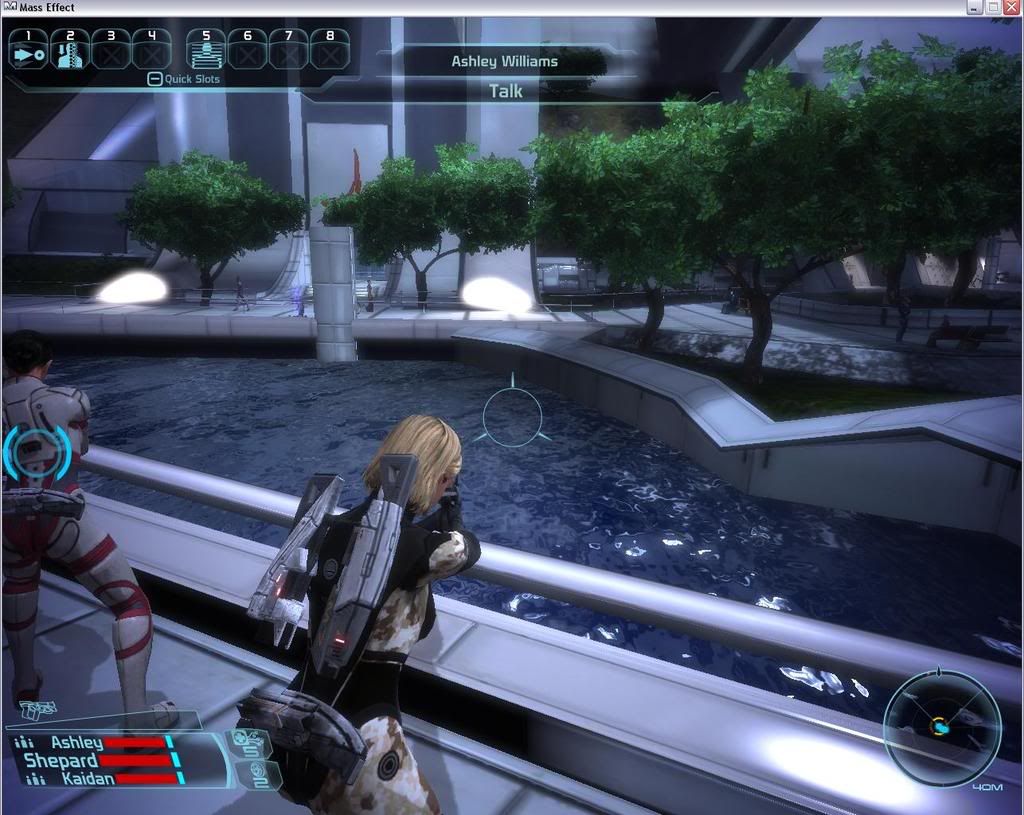
1280x1024
Mass Effect PC, Triplehead2go FOV, and UI problems
Posted: 30 May 2008, 04:55
by JulianP
Fiddlesticks. I'm getting tired of constantly having to fight with UE3-games. :(
Mass Effect PC, Triplehead2go FOV, and UI problems
Posted: 30 May 2008, 13:13
by khula
Seconded! You'd think they'd learn from Bioshock and release a patch to enable correct FOV. It's the same engine goldarnit!!
Just goes to show how niche we really are. I see on the steam survey something like 73% of steam users still use a 4:3 monitor (or 5:4 I guess, but then that just reinforces my point about how little is known about monitor size). Gah, it sucks monumentally....
Mass Effect PC, Triplehead2go FOV, and UI problems
Posted: 30 May 2008, 13:36
by Paddy the Wak
Typical UE3 crap ... :(
Try typing FOV 130 in at the console ... if it has a console.
That is how it worked in Gears of War.
I don't think it will help too much if it does work as the HUD isn't scaling ... :(
Mass Effect PC, Triplehead2go FOV, and UI problems
Posted: 30 May 2008, 18:32
by Tanuki
I don't think it will help too much if it does work as the HUD isn't scaling ...
Actually I think the problem is that it is scaling to another aspect ratio. I have seen this with a alot of 4:3 only games I force into widescreen.
When you press spacebar do you see anything? That is a HUD that covers all edges of the screen.
I tried creating a shortcut to the executable with the console tag but it did not work. Based on the current copy protection I am not too suprised.
Mass Effect PC, Triplehead2go FOV, and UI problems
Posted: 30 May 2008, 20:44
by Fudgemaker17
Typical UE3 crap ... Sad
Try typing FOV 130 in at the console ... if it has a console.
That is how it worked in Gears of War.
I don't think it will help too much if it does work as the HUD isn't scaling ...
No there is no console, that I know of anyway. And changing any of the FOV settings in the config files, have yielded 0 results, its like they don't do anything :?:
When you press spacebar do you see anything? That is a HUD that covers all edges of the screen.
No pressing Space bar, does not reveal any of those HUD elements either. I'm not sure what the issue is @.@
Mass Effect PC, Triplehead2go FOV, and UI problems
Posted: 30 May 2008, 21:11
by Paddy the Wak
I don't think it will help too much if it does work as the HUD isn't scaling ...
Actually I think the problem is that it is scaling to another aspect ratio.
We are talking about TH so what that meant was ... the HUD isn't scaling to the TH aspect ratio ... :wink: ... so yeah ... it is scaling to another aspect ratio.
Mass Effect PC, Triplehead2go FOV, and UI problems
Posted: 30 May 2008, 23:26
by Tanuki
We are talking about TH so what that meant was ... the HUD isn't scaling to the TH aspect ratio ... ... so yeah ... it is scaling to another aspect ratio.
Whats is TH? :P
Mass Effect PC, Triplehead2go FOV, and UI problems
Posted: 31 May 2008, 00:10
by Paddy the Wak
:mrgreen:
Mass Effect PC, Triplehead2go FOV, and UI problems
Posted: 31 May 2008, 00:21
by Paradigm Shifter
While this behaviour seems typical of the Unreal 3 Engine, it's frankly embarrassing that devs using it don't seem to have twigged to it's issues yet.
...
It's also embarrassing that it's not released in the UK yet, and yet fully cracked versions of it are available. :evil: Wow... that SecuROM lasted all of two days, absolute maximum, didn't it? :x
Mass Effect PC, Triplehead2go FOV, and UI problems
Posted: 31 May 2008, 00:50
by DaFox
It's also embarrassing that it's not released in the UK yet, and yet fully cracked versions of it are available. :evil: Wow... that SecuROM lasted all of two days, absolute maximum, didn't it? :x
Two days? I seen it up before It was out here :p
The problem with SecuROM is that it only works the first time (ala Bioshock, 5 days no crack people actually went out and bought it after waiting a few days) Now people know how to crack it very easily (Theres even documentation so anyone with half a brain can do it for themselves) and not enough (if anything) gets changed between games.
Once you figure out how to do something you can easily do it a second, third and fourth time. In which copy protection becomes pointless if its reused.
Mass Effect PC, Triplehead2go FOV, and UI problems
Posted: 31 May 2008, 15:36
by Paddy the Wak
... No there is no console, that I know of anyway. ...
... in the Detailed Report ... a post by
JulianP ... http://www.widescreengamingforum.com/forum/viewtopic.php?p=131158#131158
Mass Effect PC, Triplehead2go FOV, and UI problems
Posted: 27 Jun 2008, 14:48
by Vroshnak
I just started playing this. I played in 1680x1050 and it felt pretty claustrophobic to me.
Slightly off topic but the Citadel Tower does NOT like SLI.
http://masseffect.bioware.com/forums/viewtopic.html?topic=631433&forum=127
Anyways, is it worth trying to use TH or SoftTH with this game? Or am I going to be the guinea pig? I don't understand the problems reported in the detailed report about changing the FOV.
Mass Effect PC, Triplehead2go FOV, and UI problems
Posted: 04 Jul 2008, 05:30
by skipclarke
It appears that you can enable the console, and change the FOV. See the bottom of this page from TweakGuides: http://www.tweakguides.com/ME_9.html
Mass Effect PC, Triplehead2go FOV, and UI problems
Posted: 08 Jul 2008, 23:44
by Smig
I just got Mass Effect and I was surprised to see a 3840x1024 resolution listed. Of course, I was even more surprised when I chose it and stopped seeing any of the apply/cancel buttons since they were off-screen. Setting that setting back was a pain too as you can imagine.
Now, I've checked the list again and I noticed that the aspect ratio is standing just after the resolution and the aspect ratio listed for the 3840x1024 resolution is 16:9, that's why things are thrown off screen.
Now, besides everything else, why would they list a 3840x1024 resolution if it doesn't work and why would they list it as a 16:9 resolution?
I'm a newbie in this stuff but it's not 16:9 right? It doesn't make sense.
I couldn't even see the game itself at that resolution, I would have to guess where all the buttons were.
Mass Effect PC, Triplehead2go FOV, and UI problems
Posted: 30 Jul 2008, 18:24
by refugee_x
can anyone confirm on HUD working in 3840x1024 res. with console FOV command? awaiting replies :)
Mass Effect PC, Triplehead2go FOV, and UI problems
Posted: 03 Aug 2008, 20:57
by Downtown1
Pretty much any game branded Games for Windows will show 3840x1024, I think they're required to show the same resolution as in your Display Properties window. The problem is that even though you can select that resolution they will almost always do Vert-.
Mass Effect PC, Triplehead2go FOV, and UI problems
Posted: 21 Nov 2008, 02:53
by avatar382
can anyone confirm on HUD working in 3840x1024 res. with console FOV command? awaiting replies :)
I can confirm that setting the FOV in the console
does not resolve the HUD issues at 3840x1024 resolution. The 2D elements of the interface do not move no matter what FOV the game is set to. There doesn't seem to be a way to make this game playable on the TH2G.
Mass Effect PC, Triplehead2go FOV, and UI problems
Posted: 29 Jun 2009, 16:59
by tkrysiak
Did anyone had any luck with it? I tried few thigns but nothing seems to work so far... :cry: