Page 1 of 1
Divine Divinity
Posted: 16 Dec 2007, 07:54
by Tanuki
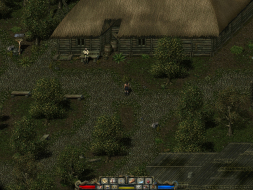
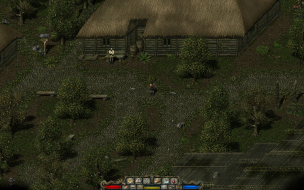
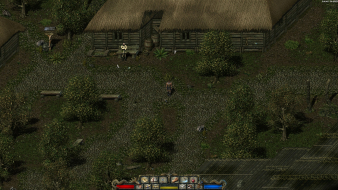
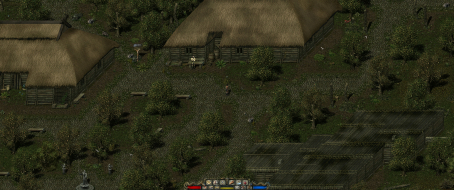
 Widescreen Grade: AUltra-Widescreen Grade: BMulti-monitor Grade: Unsupported4k Grade: IncompleteRead Full Detailed Report - Divine DivinityDeveloped by Larian Studios, Divine Divinity is an action RPG. This game employs a top-down perspective with mouse-based movement and actions. Combat is fast and geared towards experienced gamers.
The gameworld allows for nonlinear exploration and questing. Character development is a customizable class-based system.
Don't be put off by the goofy title, this game is a gem.
Divine Divinity
Posted: 16 Dec 2007, 07:57
by Tanuki
Cranky, all are cosmetic, no gamebreakers.
Divine Divinity
Posted: 16 Dec 2007, 16:48
by The_cranky_hermit
Beyond Divinity had some cropping problems that rendered 1440x900 useless. Is that the case here at all?
==Grading==
Calculated grade: B
Major unresolved issues: None
Minor unresolved issues: None
Summary of widescreen-related flaws:
.ini solution
Some cropping and misalignment bugs
Cranky's coverage estimate: 99.5%
Divine Divinity
Posted: 16 Dec 2007, 18:28
by Tanuki
Beyond Divinity had some cropping problems that rendered 1440x900 useless. Is that the case here at all?
I heard rumors about that as well. 1440x900 works.
The only cropping that occurs is with the 1280x720 res.
Divine Divinity
Posted: 03 Aug 2008, 02:28
by Sinbad
2560x1600 causes the game to crash out with an error.
2048x1536 produced interesting results. The game works and the diary buttons are visible while using the automap. However, the automap is docked against the top of the screen with the buttons directly beneath it (about center screen). It looks a bit awkward but it works properly.
Divine Divinity
Posted: 02 Oct 2008, 14:22
by lobski
2560x1600 causes the game to crash out with an error.
2048x1536 produced interesting results. The game works and the diary buttons are visible while using the automap. However, the automap is docked against the top of the screen with the buttons directly beneath it (about center screen). It looks a bit awkward but it works properly.
I got it working under 2560x1600, change your rendering mode to DirectDraw.
edit: Looks like I also ran into the crashes..
Divine Divinity
Posted: 26 Oct 2008, 22:12
by Meneldur
I tried to play it in 1440x900. Modified the .div and... crashed.
GPF in div.exe.
It's patched to 1.34.
If I edit config.lcl too, the game works for a while before crashing.
I'm (sadly) back in 1024x768. :(
Divine Divinity
Posted: 26 Oct 2008, 23:45
by Tanuki
I tried to play it in 1440x900. Modified the .div and... crashed.
GPF in div.exe.
When this did crash occur? On load?
It's patched to 1.34.
If I edit config.lcl too, the game works for a while before crashing.
When did this crash occur?
I have updated the report to avoid the use of the diary button on the hot bar. It seems to be crash happy because it defaults to the automap. I found pressing "Q" gets to the quest screen where you can then safely use the automap.
Re: Divine Divinity
Posted: 26 Dec 2009, 04:01
by stubbie
Also you were unable to place marker flags on the automap using the above hack.
However Larian has recently released a download version of the game for about US $6. I got mine from Impulse.
It has support for the following resolutions:
1152x864
1280x720
1360x1024
1440x900
1680x1050
stubbs :)
Re: Divine Divinity
Posted: 26 Dec 2009, 22:33
by Tanuki
Reading up about it it seems there are updates on the way. I imagine the remastered version will need a seperate DR eventually.
Re: Divine Divinity
Posted: 04 May 2010, 06:47
by Triplehammer
The remastered version of Divine Divinity that can be found on gog.com and Impulse is 1.4A, and it is not possible to patch the older versions to 1.4A. The changelog for version 1.4A of Divine Divinity can be found here:
http://www.larian.com/forums/ubbthreads.php?ubb=showflat&Number=390118
General:
- Feature: Allow more resolutions
- Feature: Recreated config tool
- Fixed numerous crashes and freezes
- Fixed: encumbrance could make items disappear
- Feature: Tooltips of damage stats on stat screen improved
Skills:
- Fixed: Spellbooks no longer ignore level requirements
- Fixed: All weapon expertise skills give percentile bonuses instead of static bonuses
- Fixed: True Sight damage is now actually used
- Fixed: Bow and crossbow expertise bonuses are now actually used
- Fixed: Divine Eye removes the fog of war
- Fixed: Deadly Gift's Scorpion Trap is less powerful
- Fixed: Resurrected enemies die after region swap
Re: Divine Divinity
Posted: 04 May 2010, 19:07
by Tanuki
The remastered version of Divine Divinity that can be found on gog.com and Impulse is 1.4A, and it is not possible to patch the older versions to 1.4A.
Good to see the original customers getting screwed over a la Dungeon Lords.