Page 1 of 1
Sam & Max Season Two (Beyond Time and Space)
Posted: 09 Nov 2007, 00:15
by Flo
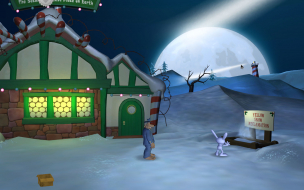
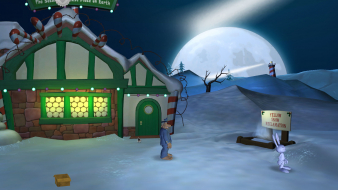
 Widescreen Grade: BUltra-Widescreen Grade: IncompleteMulti-monitor Grade: Unsupported4k Grade: IncompleteRead Full Detailed Report - Sam & Max Season Two (Beyond Time and Space)Sam & Max - Season Two is the continuation of the critically-acclaimed episodical point-and-click adventure series by Telltale Games based on the comics created by Steve Purcell. Season 2 contains a total of 5 episodes, which will be released over the next few months.Among the most notable changes from the previous season are an adjustable, in-game hint system as well as native support for non-4:3 resolutions, including 5:4, 16:10 and 16:9.
Sam & Max: Season Two: Detailed Report
Posted: 09 Nov 2007, 02:03
by The_cranky_hermit
==Supported resolutions==
How about 1280x768? Were you able to test it?
==Singleplayer anomalies==
Since Season Two isn't complete yet, we should leave this at "unknown" for the time being. It's just possible that future episodes might have a bug or two in them. Be sure to keep an eye out. Once all 5 episodes come out and you've played them, if none have anomalies, you can claim there aren't any here.
==Grading==
Calculated grade: C+
Potential grade: Certified
Major unresolved issues:
Are 1280x720, 1280x768, 1280x800, 1440x900, 1920x1080, and 1920x1200 supported?
Will future episodes have any anomalies?
Minor unresolved issues:
None
Cranky's coverage estimate: 77%
Sam & Max: Season Two: Detailed Report
Posted: 09 Nov 2007, 12:40
by Flo
Added your updates.
I'll try to get the lower widescreen resolutions to work (it's a matter of getting them to work with my system, not the game). However, my monitor's native res is 1680x1050 so I can't test the higher ones myself.
Sam & Max: Season Two: Detailed Report
Posted: 09 Nov 2007, 13:40
by Flo
960x600 supported:

1280x720 supported:

1280x800 supported:

1280x768 seems unsupported. It does not show up in the in-game resolution list on a system that supports that resolution.
Sam & Max: Season Two: Detailed Report
Posted: 10 Nov 2007, 00:34
by The_cranky_hermit
I'd like to know if there's a method of enabling 1280x768, possibly by editing a config file. Lack of 1280x768 support will hurt S&M2's grade profoundly. But until there's a non-Gametap version, I assume this won't be possible. But try and see if you can find something anyway, like a config file buried in your documents and settings folder.
Sam & Max: Season Two: Detailed Report
Posted: 10 Nov 2007, 14:19
by Flo
The Gametap version stores everything in proprietary files (even saves, configs and such that would normally be in Documents).
There's a standalone version available now though, and a
demo. Maybe someone else can verify that 1280x768 isn't natively supported before I start digging into another version.
Sam & Max: Season Two: Detailed Report
Posted: 10 Nov 2007, 17:41
by Flo
Sam & Max uses the registry to store its configuration:
Code: Select all
[HKEY_CURRENT_USERSoftwareTelltale GamesSam & Max Season 2]

   "Screen Resolution First"=hex:00,00,a0,40

   "Screen Resolution Index"=hex:00,00,00,41

   "Volume Music"=hex:ae,47,e1,3e

   "Volume Voice"=hex:c2,f5,28,3f

   "Volume Sound"=hex:c2,f5,a8,3e

   "Windowed"=dword:00000000

   "Fullscreen anti-aliasing quality"=hex:00,00,80,bf

   "Enable Subtitles"=dword:00000000

   "Enable Rollover Text"=dword:00000001

   "Hint Level"=hex:00,00,80,3f

   "nDecalLevelElmer"=hex:00,00,00,40
Unfortunately the hex values for the resolution don't correspond to a decimal horizontal/vertical resolution. Here are some values, maybe someone else can figure it out, if it's not completely proprietary:
1680x1050:
Screen Resolution First = 00 00 a0 40
Screen Resolution Index = 00 00 00 41
1280x1024:
Screen Resolution First = 00 00 a0 40
Screen Resolution Index = 00 00 c0 40
1024x768:
Screen Resolution First = 00 00 40 40
Screen Resolution Index = 00 00 40 40
Sam & Max: Season Two: Detailed Report
Posted: 10 Nov 2007, 20:30
by The_cranky_hermit
It looks to me like all it does is reference fixed values in the game binaries. Sloppy work, Telltale. That's *not* the correct way to enable widescreen resolutions.
I'm going to download the demo and see if I can get 1280x768 to work, but I'm not counting on it.
Calculated grade: C+
Major unresolved issues: None
Minor unresolved issues: None
Summary of widescreen-related flaws:
No 1280x768 support
Cranky's coverage estimate: 98.5%
Sam & Max: Season Two: Detailed Report
Posted: 10 Jan 2008, 19:05
by Flo
No improvements or regressions in Episode 2: Moai Better Blues (Gametap).
Sam & Max: Season Two: Detailed Report
Posted: 10 Jan 2008, 19:09
by Tanuki
No 1280x768 support
Are some resolutions weighted more than others?
Sam & Max: Season Two: Detailed Report
Posted: 10 Jan 2008, 19:43
by The_cranky_hermit
1280x768 weighs more than the others because for people who have this as their native res, it's either that or nothing. So to them, Sam & Max Season Two can't be played in widescreen at all.
Sam & Max: Season Two: Detailed Report
Posted: 13 Jan 2008, 15:41
by Flo
So to them, Sam & Max Season Two can't be played in widescreen at all.
Unless of course they use 1280x720 in windowed mode.
Sam & Max: Season Two: Detailed Report
Posted: 13 Jan 2008, 16:16
by The_cranky_hermit
No such luck. Windowed mode adds a couple of pixels on all sides making the horizontal width more than 1280.
Sam & Max: Season Two: Detailed Report
Posted: 13 Jan 2008, 17:55
by Flo
It doesn't change the width of the desktop resolution. You can position the 1280x720 window inside a 1280x768 desktop without losing anything on the sides.
Sam & Max: Season Two: Detailed Report
Posted: 13 Jan 2008, 20:44
by The_cranky_hermit
I just tried playing the game in windowed mode on my old 17" 1280x768 monitor. 1280x720 wasn't an option. Nor were any other WS resolutions, for that matter.
Sam & Max: Season Two: Detailed Report
Posted: 13 Jan 2008, 21:08
by Flo
Not sure what the problem is then. I can select 1280x720 on a 19" (1280x1024 native).
Sam & Max: Season Two: Detailed Report
Posted: 15 Mar 2008, 21:55
by Simplex
I sent the following post to teltalle forums but after reading this topic I doubt the solution can be found:
I have 8800GT and 20'' LG widescreen monitor (native res 1680x1050), I also have 32'' LCD TV (native res 1360x768). A while back I added custom resolutions to my LG monitor, such as 1440x900 and 1280x800 - when I run Sam and Max on my LG monitor I can set all those resolutions, and of course my native one. All is well and good.
However, when I set my TV LCD as primary display and run Sam & Max (S2E1) I can only choose 800x600, 1024x768, 1280x720 and 1920x1080 - I cannot choose my TV's native res. When I choose 1280x720 the picture is interpolated and looks bad. I tried adding 1360x768 to custom resolutions (although it is already there as a predefined, default resolution) but it did not help. In Options I still cannot set it. This effectively prevents me from experiencing Sam & Max goodness on big screen.
This is not my TV's or video card's issue - when I run Gears of War, for example, I can set 1360x768 without any problems.
Is there any solution to this problem, i.e. forcing Sam & Max to run in a user defined resolution?
Sam & Max: Season Two: Detailed Report
Posted: 12 Apr 2008, 16:45
by Flo
Season 2 is complete. There have been no regressions (nor improvements) in widescreen support in episodes 3, 4 and 5.
Sam & Max: Season Two: Detailed Report
Posted: 20 Jul 2008, 01:10
by Lucas80 Jodokast
POST REMOVED