Page 1 of 2
OpenTTD
Posted: 05 Jan 2007, 11:09
by P-Storm
 Widescreen Grade: AUltra-Widescreen Grade: IncompleteMulti-monitor Grade: B4k Grade: IncompleteRead Full Detailed Report - OpenTTDOpenTTD is a clone of the Microprose game "Transport Tycoon Deluxe", a popular game originally written by Chris Sawyer. It attempts to mimic the original game as closely as possible while extending it. It can be downloaded at www.openttd.org
Open Transport Tycoon Deluxe: Detailed Report
Posted: 05 Jan 2007, 11:30
by ctrlsteef
OMG, I so loved that game. Gonna try this for sure. Thanks for the tip dude. :P
Open Transport Tycoon Deluxe: Detailed Report
Posted: 05 Jan 2007, 13:00
by Daemonius
Sweeeeeet :P
Open Transport Tycoon Deluxe: Detailed Report
Posted: 05 Jan 2007, 13:04
by ctrlsteef
OMG, I just find out there is even an OSX version. No need to boot to windows then. :o
Open Transport Tycoon Deluxe: Detailed Report
Posted: 05 Jan 2007, 15:56
by Daemonius
Too bad that I don't have the original TTD what is required... :( ;)
Open Transport Tycoon Deluxe: Detailed Report
Posted: 05 Jan 2007, 16:08
by ctrlsteef
Crap, I don't have an original Mac version of the game. :(
Open Transport Tycoon Deluxe: Detailed Report
Posted: 05 Jan 2007, 16:48
by skipclarke
In the aspect ratio section, your 16:9 shot is actually 16:10; and your 16:10 is actually 5:4. Can you post a 1280x720 for the 16:9 and a rename the first one to the 16:10
Open Transport Tycoon Deluxe: Detailed Report
Posted: 05 Jan 2007, 16:51
by P-Storm
Too bad that I don't have the original TTD what is required... :( ;)
You don't need the original version of TTD because it only uses the gfx from the original TTD.
Just a small note for what OS you can use.
Code: Select all
Windows Installer

   Windows Zip file

   Mac OS X (universal, for 10.3.9 or newer only)

   Debian and Ubuntu (all versions x86)

   Sourcecode

   In addition, binaries for different Linux distributions, MorphOS, 64-bit systems, etc. are available here.


   Or you can download the files via BitTorrent. For a list of torrents, see here.


   Note: there will be no OSX 10.2.8 release, since it fails to compile.
The url for installing on all OS's
I did forget to include 1 big warning
VERY ADDICTIVE
[Edit]
In the aspect ratio section, your 16:9 shot is actually 16:10; and your 16:10 is actually 5:4. Can you post a 1280x720 for the 16:9 and a rename the first one to the 16:10
I will post the when I'm finished with work, opfull soon.
Open Transport Tycoon Deluxe: Detailed Report
Posted: 05 Jan 2007, 16:55
by ctrlsteef
But you still need an original copy of the game to copy the files from right?
Open Transport Tycoon Deluxe: Detailed Report
Posted: 05 Jan 2007, 17:53
by Daemonius
On the installation FAQ it says:
1. Obtain a copy of Transport Tycoon Deluxe for Windows or DOS.
so it seems that we'll have to visit a certain interweb-download-a-file-for-free-but-don't-tell-anyone -site (in short, find a torrent)
EDIT: I found it, woohoo... this game looks awesome in 1680x1050 !!!
2nd EDIT: to clarify previous, I obtained a copy of TTD and succesfully installed the whole game...
Open Transport Tycoon Deluxe: Detailed Report
Posted: 05 Jan 2007, 18:41
by ctrlsteef
I have it working on OSX aswell. This rocks.
Too bad the max res is 1680 x 1050 though.
Edit: never mind, I forgot to tag the fullscreen option. That gave me 1920 x 1200 support. :)
Open Transport Tycoon Deluxe: Detailed Report
Posted: 05 Jan 2007, 23:15
by P-Storm
Can somebuddy do the aspect ratio do for me, because i have to work a lot so...
Posting this from my work :P
Open Transport Tycoon Deluxe: Detailed Report
Posted: 06 Jan 2007, 13:12
by Jupix
"Open Trailway Tycoon Deluxe: Detailed Report"
Dude! Transport Tycoon!
Oh, and last time I checked it didn't work in 2560x1600. This was version 0.4.8.
Open Transport Tycoon Deluxe: Detailed Report
Posted: 08 Jan 2007, 23:02
by The_cranky_hermit
Certified.
Open Transport Tycoon Deluxe: Detailed Report
Posted: 13 Jan 2007, 20:12
by P-Storm
Today i checked the forum for some widescreen and surround gaming resolutions, and i found that you could play transport tycoon deluxe portrait, but i couldn't find what resolutions is supported.
Open Transport Tycoon Deluxe: Detailed Report
Posted: 13 Jan 2007, 20:40
by skipclarke
Certified.
It looks like it cuts the vertical as the FOV gets wider. How is that certified? Is that because it is a 2D game?
Open Transport Tycoon Deluxe: Detailed Report
Posted: 13 Jan 2007, 21:41
by The_cranky_hermit
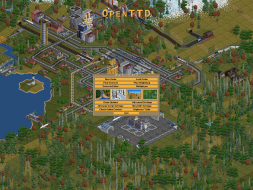
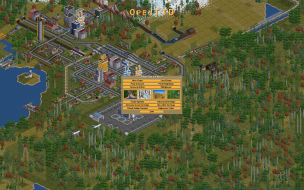
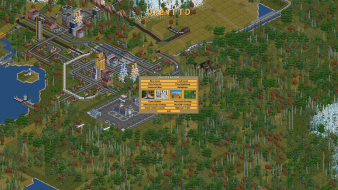
From the screenshots, it looks like the wider the horizontal resolution, the wider the FOV. If you take two screenshots with the same vertical resolution, but one has a wider horizontal resolution, the wide one will be hor +. Take a look at the first two shots in the report, comparing 1920x1200 and 1600x1200. The widescreen shot is definitely hor +.
The reason 1280x720 is vert- compared to 1280x800 is because they have the same horizontal resolution, but 720p has less vertical resolution. By the same note, 1280x800 would be a vert - version of 1280x1024.
This "per pixel" FOV thing is standard for 2D games. DEFCON, Total Annihilation, and Worms Armageddon work this way, and they've been certified. Windows works this way too.
Anyway, 1280x800 and 1280x1024 is probably not a good way to compare standard and widescreen. 1280x800 vs. 1024x768 works, 1680x1050 vs. 1280x1024 works, and 1920x1200 vs. 1600x1200 works. All three of these comparisons would make the widescreen shot be hor +.
Open Transport Tycoon Deluxe: Detailed Report
Posted: 15 Jan 2007, 10:28
by P-Storm
Sorry that I didn't post those resolution The_cranky_hermit, but maybe it is a idea to set preferred resolution in your template for aspect ratio, and screen save also
Open Transport Tycoon Deluxe: Detailed Report
Posted: 15 Jan 2007, 14:45
by The_cranky_hermit
I don't quite understand what you're suggesting to me.
Open Transport Tycoon Deluxe: Detailed Report
Posted: 15 Jan 2007, 17:42
by skipclarke
I think that in your template you might as for screenshots based on specific resolutions. Maybe something like, "Please take screenshots at either 1600x1200, 1920x1080, and 1920x1200; or 1024x768, 1280x720 and 1280x800. Then, please resize the screenshots to 480px high."