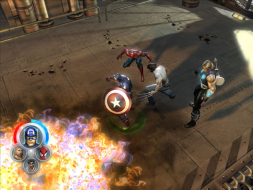
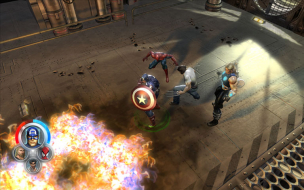
Detailed breakdowns of how games react to widescreen, ultra-wide, 4k and multi-mon
Gabbo
Posts: 381 Joined: 24 Dec 2005, 11:13
Post
by Gabbo 29 Oct 2006, 15:03
Widescreen Grade: B Multi-monitor Grade: Incomplete Read Full Detailed Report - Marvel: Ultimate Alliance Marvel: Ultimate Alliance is an 3D Action/RPG that is essentially the spiritual successor of the X-Men: Legends series. You can chose from over 20 playable heroes and interact with over 140 other characters from the Marvel Universe.
Last edited by
Gabbo on 27 Mar 2013, 13:12, edited 1 time in total.
Reason: Edit
The_cranky_hermit
Insiders
Posts: 3010 Joined: 07 Nov 2005, 04:16
Post
by The_cranky_hermit 29 Oct 2006, 16:06
Calculated grade: B
Cyber-Mav
Posts: 3 Joined: 28 Oct 2006, 01:23
Post
by Cyber-Mav 11 Nov 2006, 01:55
is there any way to get custom resolutions to work in this game like 1360x768?
xxe47
Posts: 3 Joined: 07 Apr 2006, 20:45
Post
by xxe47 03 Dec 2006, 23:11
Is there anything that can be hacked/edited to have this play in 2560x1600?
skipclarke
Founder
Posts: 7358 Joined: 13 Oct 2003, 05:00
Post
by skipclarke 03 Dec 2006, 23:54
It simply hasn't been tested. Do you have a 30" panel? If so, is the resolution available?
John Reynolds
Posts: 19 Joined: 20 Sep 2005, 17:07
Post
by John Reynolds 04 Dec 2006, 01:25
I can't find an .ini file to edit to see if resolution lines are present.
xxe47
Posts: 3 Joined: 07 Apr 2006, 20:45
Post
by xxe47 05 Dec 2006, 09:44
I can't find an .ini file to edit to see if resolution lines are present.
What a bummer. Yeah, I have a 30'' panel, and would love to see it in native resolution :p
I tried doing it with Art Money, but I couldn't get the game not to crash.
Users browsing this forum: No registered users and 6 guests