Page 1 of 1
Live for Speed
Posted: 27 Sep 2006, 22:31
by geeman
 Widescreen Grade: AUltra-Widescreen Grade: IncompleteMulti-monitor Grade: B4k Grade: IncompleteRead Full Detailed Report - Live for SpeedLFS S2 is a serious racing simulator. No arcade modes, no steering aids - YOU have to do the driving. You can race alone or against the AI, but the real fun is to be found online, in multiplayer mode.
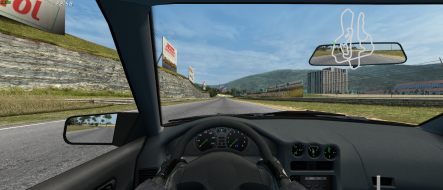
Widescreen and triplehead support has been in LFS for a quite a long time now. The coder of the game has a triplehead setup himself so support should and is flawless.
Live For Speed: Detailed Report
Posted: 28 Sep 2006, 00:48
by The_cranky_hermit
==Grading==
Calculated grade: B+
Potential grade: Certified
Major unresolved issues:
Are 1920x1080 and 1920x1200 supported?
Live For Speed: Detailed Report
Posted: 28 Sep 2006, 01:28
by geeman
==Grading==
Calculated grade: B+
Potential grade: Certified
Major unresolved issues:
Are 1920x1080 and 1920x1200 supported?
fixed.
Now we just need someone to test those resolutions, so this one can get the rating it deserves.
Live For Speed: Detailed Report
Posted: 21 Oct 2006, 12:47
by briank
This game (sim) is incredible. Can't wait to run it WS.
Live For Speed: Detailed Report
Posted: 21 Oct 2006, 15:41
by skipclarke
My the Surround comments, I'm guessing it natively supports Surround. It's not listed in the Matrox SGU.
Live For Speed: Detailed Report
Posted: 30 Oct 2006, 01:51
by scortech
In the cfg.ini txt file there is three options like this
Driver FOV 84.24
Wide FOV 120.00
Editor FOV 60.00
which one of these should I change to 90
I wanna run the game in 1680*1050
thanks
Live For Speed: Detailed Report
Posted: 30 Oct 2006, 14:09
by geeman
In the cfg.ini txt file there is three options like this
Driver FOV 84.24
Wide FOV 120.00
Editor FOV 60.00
which one of these should I change to 90
I wanna run the game in 1680*1050
thanks
Change the FOV in game. It's in the View section of the options.
Live For Speed: Detailed Report
Posted: 31 Oct 2006, 00:32
by scortech
Change the FOV in game. It's in the View section of the options.
Oh yeah.. :oops: thanks :wink:
Live For Speed: Detailed Report
Posted: 17 Sep 2007, 05:32
by Gu3st
An inaccuracy here, As of recent LFS versions, the FOV can be expanded up to 160 degrees.
A rather large bump, but found this post linked in the LFS manual, and thought that this minor inaccuracy be corrected.
Also, any resolution that the monitor reports to LFS (Is it visible in Display Propertys?) will be reported, and available in LFS.
Live For Speed: Detailed Report
Posted: 20 Sep 2007, 13:24
by geeman
An inaccuracy here, As of recent LFS versions, the FOV can be expanded up to 160 degrees.
Edited. This report was based on a older version when 120 was the max.