Page 1 of 2
Condemned: Criminal Origins
Posted: 31 Mar 2006, 03:17
by The_cranky_hermit
 Widescreen Grade: AUltra-Widescreen Grade: CMulti-monitor Grade: C4k Grade: IncompleteRead Full Detailed Report - Condemned: Criminal OriginsWhat twists the mind of an ordinary human into a serial killer?
Assigned to the Serial Crimes Unit, Agent Ethan Thomas must answer this question, and bring the worst of society to justice. His solve rate is the best in the bureau....perhaps too good.
While investigating the growing list of serial killers, Agent Thomas concludes that something is twisting the bodies and souls of those that society has left behind. The homeless, addicted and deranged are rising from the city’s underbelly and committing mindless acts of violence. Could there be an unseen connection between the increasing brutality of the latest serial killings and the increasing crime rate? This question is pushed to the forefront after Agent Thomas is framed for the murder of two police officers. Now he must solve the murders to stop the killings, and exonerate himself from the crimes of which he is accused.
As FBI agent Ethan Thomas, you rely on sharp instincts and sophisticated forensic tools to investigate crime scenes, collect evidence, and find clues that will lead you to the killers. With danger lurking in every shadow, you need whatever weapons you can find to stay alive. If you run out of bullets, you’ll have to fight with a fire axe, shovel, pipe, two-by-four, or whatever you can pry from the environment around you. You’ll need to make sure nothing stops you as you try to uncover exactly who...or what is behind the grisly killings plaguing the city.
Condemned - Criminal Origins: Detailed Report
Posted: 21 May 2006, 01:49
by lilblackdemon
I've played the full version of the game, and I can confirm that the entire game takes place in the 16:9 anamorphic mode, letterboxing any other aspect ratios.
Also, could a moderator can move this portion of the post to the correct thread:
As of the 1.07 Halo patch, all aspect ratios/resolutions are supported above 640x480, and the FOV automatically adjusts to the aspect ratio/resolution. This is native and can be set from within the game menus.
Condemned - Criminal Origins: Detailed Report
Posted: 21 May 2006, 07:21
by The_cranky_hermit
Thanks for the confirmation.
And rather than troubling the moderators with that, I recommend you create a new solution thread yourself with this information. I will update the MGL accordingly. And be sure to include before and after screenshots.
Condemned - Criminal Origins: Detailed Report
Posted: 31 May 2006, 09:06
by Paddy the Wak
Hi guys ...
Racer_S has made a tool to remove the letterboxing ... get his tool here ... http://dl.tocaedit.com/conFOV2.zip
Just run the file and leave it running whilst the game is playing ... :D
It seems the FOV is automatically adjusted for the res ... 8)
1280x1024 ... click to see at full size ...

1920x1200 ... click to see at full size ...

3072x768 ... before the tool ... click to see at full size ......

3072x768 ... with the tool running ... click to see at full size ...

Condemned - Criminal Origins: Detailed Report
Posted: 03 Jun 2006, 01:03
by jmj713
Adding "Widescreen "0"" to autoexec.cfg removes letterboxing.
Condemned - Criminal Origins: Detailed Report
Posted: 03 Jun 2006, 08:52
by Paddy the Wak
Hi jmj713 ... welcome to the WSGF ... 8)
Whilst running the game at 1920x1200 ...
I tried ... "Widescreen "0"" ... it doesn't change anything for me.
I tried ... "Widescreen" "0" ... it does remove the letterboxing bars at the top and bottom but adds black bars to the sides keeping the view to 4:3 ... even though the res is 1920x1200.
I might be doing it wrong ... if so let me know.
Condemned - Criminal Origins: Detailed Report
Posted: 05 Jun 2006, 19:14
by Paddy the Wak
Racer_S has made a new tool for TripleHead users ... this one allows you to squeeze the HUD in so that it is just on the center screen ... http://dl.tocaedit.com/conFOV5.zip
Just move the sliders in for the Right and Left ... :D
Condemned - Criminal Origins: Detailed Report
Posted: 20 Nov 2006, 10:55
by tomatomanzseedlezz
Adding "Widescreen "0"" to autoexec.cfg removes letterboxing.
Cool it works!!!.. no more "letterboxes" for me!.. :D
Paddy : did u add "Widescreen "0" instead of the typo of "Widescreen "0"" ?.. :oops:
Cheers :wink:
Condemned - Criminal Origins: Detailed Report
Posted: 12 Apr 2008, 16:04
by scavvenjahh
From the other lines in the file, the correct syntax is obviously "Widescreen" "0". And it really doesn't help for TH2G.
Here's what you get on a triple display by default OR using the "Widescreen" "0" trick:


And here's the result with Racer_S's brilliant app running (default HUD position):


The cutscenes become Hor+ as well:

(all eye-candy including "intuition blur" and "camera noise-like effect" are on, hence the color differences between my pics and the original report's).
Does conFOV.exe help with widescreen resolutions too ?
Condemned - Criminal Origins: Detailed Report
Posted: 18 Mar 2009, 06:35
by Destroy
Need some help here please.
Looking for
conFOV5.zip
file to adjust to FOV for this game.
I searched and can't seem to find the file on ToCAEDIT site. Internet file search comes up empty too.
Condemned - Criminal Origins: Detailed Report
Posted: 18 Mar 2009, 09:26
by Paddy the Wak
Version 5 of the tool ...
conFOV5.zip
8)
Condemned - Criminal Origins: Detailed Report
Posted: 18 Mar 2009, 15:29
by Destroy
Thanks. Perhaps you may want to mention to Racer_S to include this missing file in his 'all-in-one' FOV zip file.
Condemned - Criminal Origins: Detailed Report
Posted: 20 Mar 2009, 14:57
by skipclarke
I have added this one to the Racer_S page. Link is in the left nav.
Condemned - Criminal Origins: Detailed Report
Posted: 20 Mar 2009, 15:26
by scavvenjahh
We still need a "ask Paddy" link...
Condemned - Criminal Origins: Detailed Report
Posted: 21 Mar 2009, 17:59
by Destroy
Got the game. Hmmm...seems this hack does not alter the FOV but only the hud.
Is there not FOV work around for this game? Feels a bit too tight for my liking.
Condemned - Criminal Origins: Detailed Report
Posted: 15 Apr 2009, 19:14
by scavvenjahh
== Version ==
1.0
== Method & Screen Change ==
0) The_cranky_hermit should take a deep breath here. Also please note that I can prove all of the following assertions with screenshots, I just felt it'd be too aggravating to post 'em all.
1) Out of the box, Condemned is
anamorphic in widescreen. TripleHead is both pillarboxed and squashed (i.e unsupported).
2) Adding
"Widescreen" "0" to autoexec.cfg (game folder) or settings.cfg (player data folder) will make the game run in
fullscreen in 4:3 and 5:4. In both widescreen and TripleHead though, this setting results in squashed gameplay, pillarboxing and misplaced HUD.
3) Racer_S designed a tool (
conFOV.exe) to make the game
Hor+ in surround. (Check the site's left panel for a link to all Racer_S FOV tools.)
- conFOV in TripleHead : the game is now Hor+, with slightly misplaced HUD.
- conFOV in widescreen : the HUD position is correct, the FOV is not.
:!: In all aspect ratios, using the tool to adjust the HUD's position doesn't quite work : the adjusted HUD keeps jumping to its default position and back again. Very annoying. Is it just me ?
4) Now, with a touch of
both "Widescreen" "0" and conFOV, Condemned is Hor+ across the board. What you need to use depends on your aspect ratio.
Again, the HUD is slightly out of place in non-16:9 widescreen and surround, and the sliders in conFOV don't really help. :?
1024x768 (4:3), "Widescreen" "0" only

1280x800 (16:10), "Widescreen" "0" + conFOV

1360x768 (16:9), default

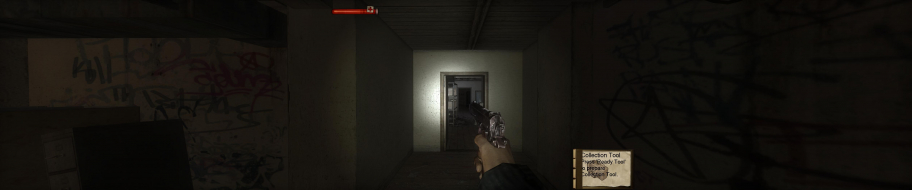
5040x1050, conFOV only

Here's what you'll see of the HUD on your center screen using "Widescreen" "0" or not in Wide TripleHead :
5040x1050, conFOV only

5040x1050, "Widescreen" "0" + conFOV

Keep in mind that the Collection Tool thingy will slide to the left whenever you must equip forensic tools, hence my preferring "conFOV only". In classic TripleHead however (3840x1024), the HUD position using "Widescreen" "0" + conFOV is much better and very close to what it should be.
Hope this helps, somehow.
Condemned - Criminal Origins: Detailed Report
Posted: 15 Apr 2009, 19:38
by The_cranky_hermit
Your post has me thoroughly confused. Can you rewrite it so that it focuses on information relevant to TH users?
Condemned - Criminal Origins: Detailed Report
Posted: 15 Apr 2009, 20:19
by scavvenjahh
Okay.
Launch
conFOV.exe, launch the game, and voilà .
Condemned - Criminal Origins: Detailed Report
Posted: 15 Apr 2009, 20:35
by The_cranky_hermit
And this will make the game go from this:
to this?
Condemned - Criminal Origins: Detailed Report
Posted: 15 Apr 2009, 20:40
by scavvenjahh
Erm, so to speak, yes (now
you're confusing me). Or from this...
5040x1050, out of the box