Page 1 of 72
Post your "Command Centre" Pictures Here
Posted: 15 Jan 2006, 16:10
by skipclarke
Post your command centre pics here.
Post your "Command Centre" Pictures Here
Posted: 15 Jan 2006, 22:27
by ctrlsteef
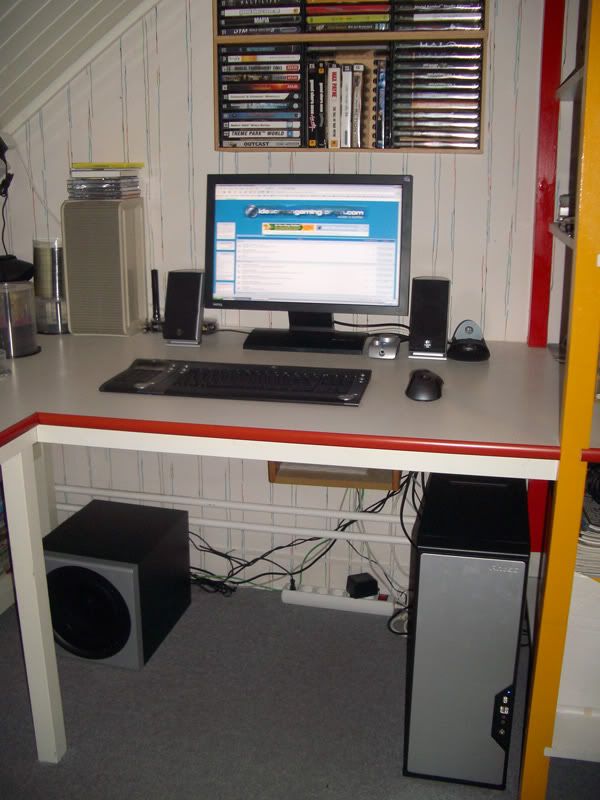
Here is another one of my centre, now with the rest of the hardware visible.
Post your "Command Centre" Pictures Here
Posted: 16 Jan 2006, 07:32
by Gabbo
Ok...well my digital camera is broken. So this will have to do...

well... you get the picture
Post your "Command Centre" Pictures Here
Posted: 16 Jan 2006, 08:50
by ctrlsteef

WAHAHA, that's just too damn lame. That can be any commandcentre out there.
Post your "Command Centre" Pictures Here
Posted: 16 Jan 2006, 09:58
by Gabbo
are you making fun of my sweet rig?
Post your "Command Centre" Pictures Here
Posted: 16 Jan 2006, 10:01
by ctrlsteef
Who, me :shock: .
No, offcourse not. :P
Post your "Command Centre" Pictures Here
Posted: 16 Jan 2006, 12:35
by Paddy the Wak
My old system ...

Photo of new system to follow when I next get my camera out ... :D
Post your "Command Centre" Pictures Here
Posted: 16 Jan 2006, 13:01
by ctrlsteef
:shock: :shock: :shock: That are a lot of screens. Looks cool dude.
Post your "Command Centre" Pictures Here
Posted: 16 Jan 2006, 18:05
by Paradigm Shifter
are you making fun of my sweet rig?
That's a really cool drawing, actually. :) I like it! :D :lol:
Post your "Command Centre" Pictures Here
Posted: 16 Jan 2006, 20:32
by X-Warrior


1) case displaying 32.6ºC CPU temperature. To the lower left the head of my Saitek Cyborg Evo. Behind the headset the Saitek P2500 rumble pad. Cd rack and mouse (MX-500).
2) an overview of the whole lot. Secondary display is usually off, but I do use it for TeamSpeak and maybe other useful stuff.
3) Rear view, showing sattelite speakers and chair. The BenQ box comes from the display my mother bought recently. The PC there is her old rig (XP 2000+, GeForce3Ti500, 768MB DDR, should be in working order after the GPU is refit).
Post your "Command Centre" Pictures Here
Posted: 16 Jan 2006, 21:00
by funch
Good lord Paddy. I am going to show my fiancee that pic because thats how I want my desk to look!!
Almost looks "dispatcher-ish".
Post your "Command Centre" Pictures Here
Posted: 16 Jan 2006, 21:10
by Paddy the Wak
:mrgreen:
Post your "Command Centre" Pictures Here
Posted: 16 Jan 2006, 21:44
by Gilly
which were those screens? the VP191B's?
Post your "Command Centre" Pictures Here
Posted: 16 Jan 2006, 22:17
by maherie
********* reserved for when I get my camera back. **************
Post your "Command Centre" Pictures Here
Posted: 16 Jan 2006, 22:39
by Paddy the Wak
which were those screens? the VP191B's?
Yeah ... I still have them ... the screens don't look as bright as the once did.
I don't know if they are getting dimmer or if it is because my Dell is so much brighter.
Post your "Command Centre" Pictures Here
Posted: 18 Jan 2006, 13:10
by skipclarke
Paddy,
I can picture you sitting there gaming away with your hair being blown backwards - like in those old Bose commercials :lol:
That "cockpit" of a command centre is just so downright nasty looking. :shock:
Post your "Command Centre" Pictures Here
Posted: 18 Jan 2006, 13:44
by Paddy the Wak
:lol:
It's a great system but there are not too many new games that work well on it ... :cry:
Farcry, Ghost Recon, Yagar and Midnight Club 2 were awesome across the three screens ... it's a shame other card manufacturers didn't take up the idea.
Post your "Command Centre" Pictures Here
Posted: 18 Jan 2006, 14:17
by skipclarke
Here was mine I posted in another thread:
In case anyone was ever wondering, this is where all the magic happens...

The panorama stitcher wasn't perfect, but you get the idea.
Post your "Command Centre" Pictures Here
Posted: 20 Jan 2006, 14:01
by skipclarke
Ice[DDZ]'s Command Centre
See below
Post your "Command Centre" Pictures Here
Posted: 20 Jan 2006, 14:03
by ctrlsteef
Unfortunatly it isn't accurate anymore since he had to send one back after a day :( . But it still looks good. :D
