Page 43 of 63
Re: Flawless Widescreen
Posted: 02 Jul 2014, 11:04
by talason
Hayden can you update the Battlefield 4 fov plugin? it doesnt work for single player anymore. Thanks mate

also is there anyway to make a tomb raider 2013 fov fix? All these games make me nauseous with the in game fov.
You are the best ty
Re: Flawless Widescreen
Posted: 04 Jul 2014, 23:29
by Janno
Got to ask... the tool and the webpage are gone....
Can I just send you some paypal cash and I can get a copy?
Just got my R9 280X up and running with three screens and I have no way of running games easy on all of them...
Janno Sinclair BuzzBazz
Re: Flawless Widescreen
Posted: 04 Jul 2014, 23:39
by HaYDeN
My hosting provider is pissing me around something chronic, yet another ticket in with them... hopefully be back up shortly.
Re: Flawless Widescreen
Posted: 20 Jul 2014, 22:26
by kiax0001
Hey Hayden,
Just wanted to let you know that I can't get the Kingdoms of Amalur fix working 100% as seen in the pictures you posted in the forum topic below:
http://www.wsgf.org/forums/viewtopic.php?f=64&t=23490&start=310I just have a few questions that hopefully you can answer:
1). Did you add the centered HUD fix to your plugin already (up to date?)
2). Is the plugin for steam only? I'm using the origin version of the game.
The FOV looks like it's working properly in game but the screens with the centered menus and quest log are not working (main menu is stretched, quest log is blank, etc.)
Let me know if I can provide additional details. I attached the debug window from flawless.
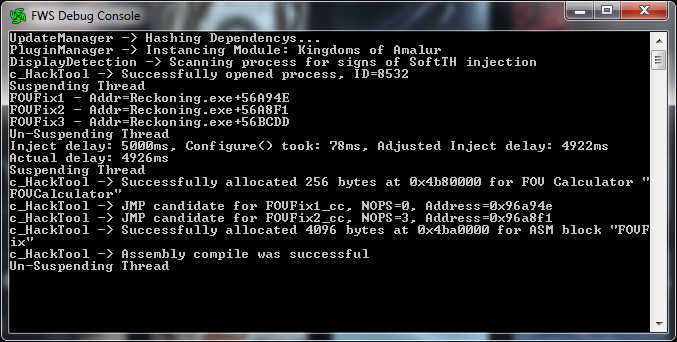
- KOADebug.png (81.72 KiB) Viewed 9388 times
Thanks,
kiax0001
Re: Flawless Widescreen
Posted: 25 Jul 2014, 00:09
by Tchâps
Why Alice Madness Returns is removed? Anyone knows a fix for this game? Thx
Re: Flawless Widescreen
Posted: 26 Jul 2014, 16:37
by minMaxRNG
Hello Hayden,
I really appreciate the work you've put in for the widescreen gaming community. I have been a long time lurk user of your software and it has made my experience in Skyrim and other video games a pleasure, I feel that you have enabled full use out of my expensive monitor setup and that a "thanks" is most definitely in order.
I've been having complications with your Dark Souls II fix for a while now, I would attribute that to the many updates the game has been getting, especially with DLC. Most times it usually boils down to the game soft locking once I press start.
Additionally, the sound often goes out when using the fix. When alt - tabbing out of the game the mouse is frozen and centered in the screen while once I unplug it and replug it, the windows taskbar becomes unresponsive. This is fixed through a control alt delete then resuming. This may be an issue with my mouse. For a time, I was getting a Microsoft Visual Runtime error or something along those lines after quitting the game.
Anyway, I was wondering if you had an ETA for an update to the Dark Souls II fix, but with the many plugin fixes you have available I'm sure it's extremely difficult to keep up with each one individually. Take your time, as I'm certainly not entitled to anything. If your plan is to keep the update for when all three DLC come out and the game updates stabilize, take your time as I'm coping just fine without my glorious PC mustard race monitors.
Many thanks,
minMax
Re: Flawless Widescreen
Posted: 09 Aug 2014, 18:50
by epspl9
Mortal Kombat Komplete Edition's fix is outdated as well with the recent patch.
Re: Flawless Widescreen
Posted: 12 Aug 2014, 03:25
by peanut
Hayden, would you mind looking into CS:GO again? It seems like it's gaining some popularity and if you can find something VAC-safe(ish) I'd be interested in trying/testing it out.
Re: Flawless Widescreen
Posted: 12 Aug 2014, 21:19
by chriswsgf
Hey Hayden, as usual thanks for your great work.
Any chance of 21:9 support in Risen 3? It currently doesn't have it.
3 - 4 monitors
Posted: 09 Sep 2014, 23:40
by dinglesniff
Hayden thanks for the great job!
I was wondering what you thought, I have 4 30" monitors and got it to work with Skyrim with no problem with 3 monitors. I tried changing it to 4 but the crosshair is in the wrong place. Is there a way to move the hud around to support 6400 x 2560. I was surprised it even worked since Nvidia only supports 3 monitors. Be great to get this working!
Re: Flawless Widescreen
Posted: 13 Sep 2014, 10:56
by HaYDeN
Re: 3 - 4 monitors
Posted: 13 Sep 2014, 10:57
by HaYDeN
dinglesniff wrote:Hayden thanks for the great job!
I was wondering what you thought, I have 4 30" monitors and got it to work with Skyrim with no problem with 3 monitors. I tried changing it to 4 but the crosshair is in the wrong place. Is there a way to move the hud around to support 6400 x 2560. I was surprised it even worked since Nvidia only supports 3 monitors. Be great to get this working!
Tried configuring a custom display? -> Settings -> Configuration -> Display Detection -> Enable Display Detection Override
Re: Flawless Widescreen
Posted: 13 Sep 2014, 19:19
by fenriswlf1
Just stopped in to see if a discussion had started for this and find you have already done it. You Sir are indeed the man!
Thank you!
Re: Flawless Widescreen
Posted: 13 Sep 2014, 19:38
by Amon Amarth
Hello Hayden,
Any chance you'll have time to look at the original Witcher? Witcher 1 seems to support triple monitor aspect ratios, but doesn't have a centered HUD/UI, and in-game cut scenes are zoomed in.
Re: Flawless Widescreen
Posted: 19 Oct 2014, 13:07
by Amon Amarth
Sorry for resurrecting this old post, but did the PoE fix ever get worked on?
Re: Flawless Widescreen
Posted: 26 Oct 2014, 21:14
by cygnific
What should I look for when I want to make my own hud fix? Are there specific api calls or other usefull things to do with Ollydbg or cheatengine etc.? I'm trying to fix Train Simulator but having a hard time finding info about what to do.
Re: Flawless Widescreen
Posted: 03 Nov 2014, 06:49
by PunkNugget
Hi Hayden,
I have an EVGA GTX 980 GPU that uses nVidia Surround Gaming that will support 3 x (1920 x 1080) monitors on Windows 7. Having too many issues with Windows 8 and UT2004 and UT3 (Unreal Tournament) not working, so that's why I'm using Windows 7. I used your app and it works great with UT3 now, so THANK YOU !!! My question is do you have some kind of patch for UT2004 and Rainbow Six Vegas 2? Whatever you can let me know would greatly appreciated and I will also contribute some funds for the help. Again, thank you…

Re: Flawless Widescreen
Posted: 03 Nov 2014, 19:16
by mr stroke
Hayden any chance at a Widescreen fix for COD Advance Warfighter tomorrow?
Re: Flawless Widescreen
Posted: 05 Nov 2014, 05:05
by Mashuu
So is this gone for good? Im trying to get a game to work, but seems FWS just wont work at all now
Re: Flawless Widescreen
Posted: 05 Nov 2014, 05:50
by PunkNugget
Hi Hayden,
What happened to Flawless Widescreen's website? For that matter, what happened to the application? First the desktop logo (for the app) disappeared, but the app still loaded my setting for UT3, so I thought something was wrong with the plugin and I uninstalled it and then reinstalled it and still no logo for the desktop app. Then when I launched the app (after I rebooted my PC), the app didn't load up the needed plugin for UT3. I think it has to do with the website not working properly. Can you please help? Thank you...


