Amon Amarth wrote:Any chance the fix the water clipping issue? Don't know if someone noticed, but the water keeps disappearing when the FoV is somewhat high.
hey Jackfuste, awesome work on these fixes. any chance of getting an updated fix for the 1.08 patch? the v7 patch unlocks the FOV slider, but the setting no longer seems to do anything. thank you much
hello again! i'd hate to be 'that guy' to ask again, but could you possibly get an updated fov fix for us? i didn't play for a month or so and i come back and found there's been two or so patches again. hugely appreciated either way! (would be nice if ubisoft would just allow us to adjust this setting without having to patch anything) thank you
GordoDeAzul wrote:Hey guys, anyone know if this fix still works with 1.11? If not, would someone be willing to update for this final update that came out this week?
if you supporting what I do, buy me a coffee here https://ko-fi.com/kevinsesario or instead direct to paypal.me/kevinsesario . EMAIL:mailto:?subject=&body=, Steam: https://steamcommunity.com/id/sesariok
blaztardz wrote:I still would like to drop something in your steam wallet Jackfuste. You have saved so many games for me, it's unreal. What's your steam ID
czarman wrote:Hex edit Cuscene Aspect ratio: Go to ...\Far Cry 5\bin\FC_m64.dll Go to OFFSET 3F867A0 look for 00 00 10 41 and change it to 00 00 40 40. Before:
FarCry5 2018-04-22 21-29-11-41.jpg
After:
c4.jpg
and zens anticheat fix:
Search: "40 55 53 56 57 41 56 48 8D AC 24 B0 FD FF FF" and change it to "B0 01 C3 56 57 41 56 48 8D AC 24 B0 FD FF FF"
Hi czarman!
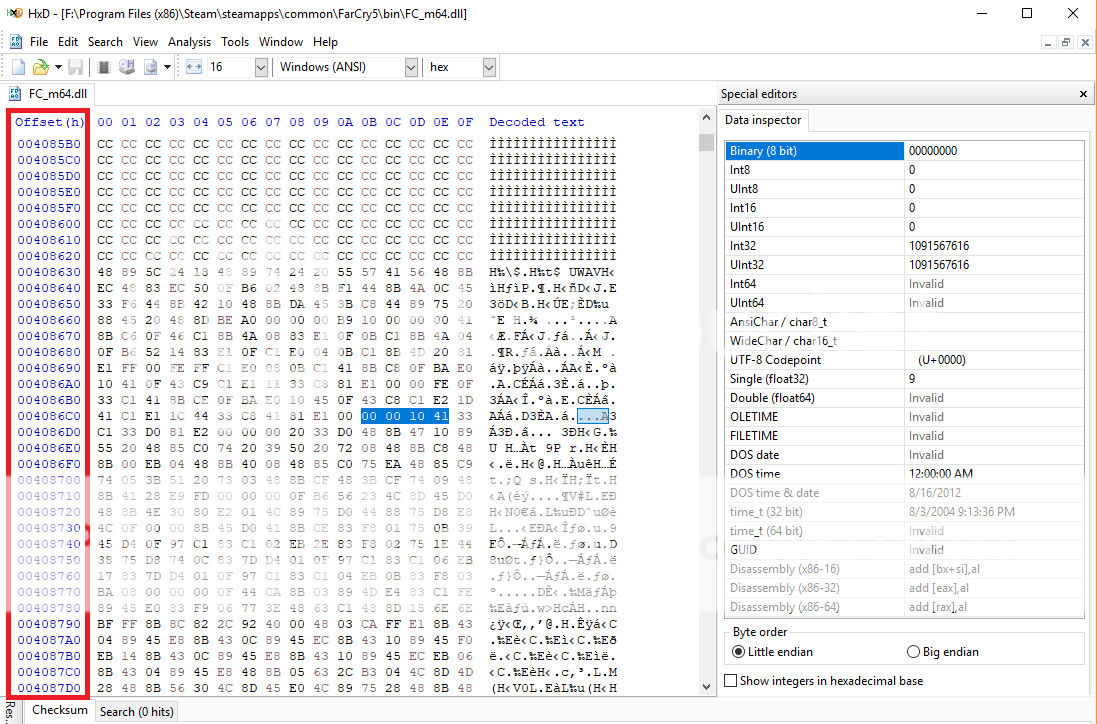
I tried to update the HEX for the cutscene aspect ratio fix per your instructions using HxD ( OFFSET 3F867A0 look for 00 00 10 41 and change it to 00 00 40 40) but I'm not able to find OFFSET 3F867A0 anywhere; there are multiple instances of 00 00 10 41 to change in the FC_m64.dll file, but no corresponding OFFSET 3F867A0. Is the column highlighted in red where I'm supposed to find the string 3F867A0?
dskillerbr wrote:Any idea if it is possible to unlock aspect ration on cutscenes? It goes back to 16:9 on every cutscene
Here's unlock for cutscenes:
FC5_Unlock_FOV_v2.7z
Restore original FC_m64.dll from backup, before applying patch.
Hi Jackfuste! Might there happen to be an updated version of your FC5_Unlock_FOV file to unlock the aspect ratio cutscenes to 21:9 for the latest game update? Thank you so much in advance!!
Ctrl+F > Click "Hex Values" > Click Search Direction "All" > Write 04 F3 0F 5E CA 8B 7E 78
Replace Value With 04 0F 1F 40 00 8B 7E 78
Save and play
Attachments
Untitled.jpg (494.22 KiB) Viewed 5664 times
if you supporting what I do, buy me a coffee here https://ko-fi.com/kevinsesario or instead direct to paypal.me/kevinsesario . EMAIL:mailto:?subject=&body=, Steam: https://steamcommunity.com/id/sesariok





 Is the column highlighted in red where I'm supposed to find the string 3F867A0?