
I have some problems.
When I run CE after running RE i get the error "this game is incompatible with cheat engine. Please close CE and restart the game" So I can't use the script. I guess I have to use FileUnsigner on the three .EXEs? But when I try that it fails to unsign and the access is denied:/
Resident Evil 7 No 21:9 support
Re: Resident Evil 7 No 21:9 support
Yup, you have to use FileUnsigner. You have to right click each of them, go to properties, compatibility and check the box to run them in administrator mode. Once done on all three, it should work.
Also, to add to my earlier post, once you have added the value for the FOV, make sure to tick the box on the middle, on the left, so that the FPS value doesn't change even if you have to reload.
Also, to add to my earlier post, once you have added the value for the FOV, make sure to tick the box on the middle, on the left, so that the FPS value doesn't change even if you have to reload.
Re: Resident Evil 7 No 21:9 support
btw ppl who using a "16:10" resolution may have to fix the vertical aspect ratio value from "9" to "10" here:

Re: Resident Evil 7 No 21:9 support
Hi guys
I used the Hex Fix for 3440x1440 but I still have black little bars on the side. How can I fix that?
Well I just notice my game is not 21:9 even though I modified the Hex Values. It just zooms in....
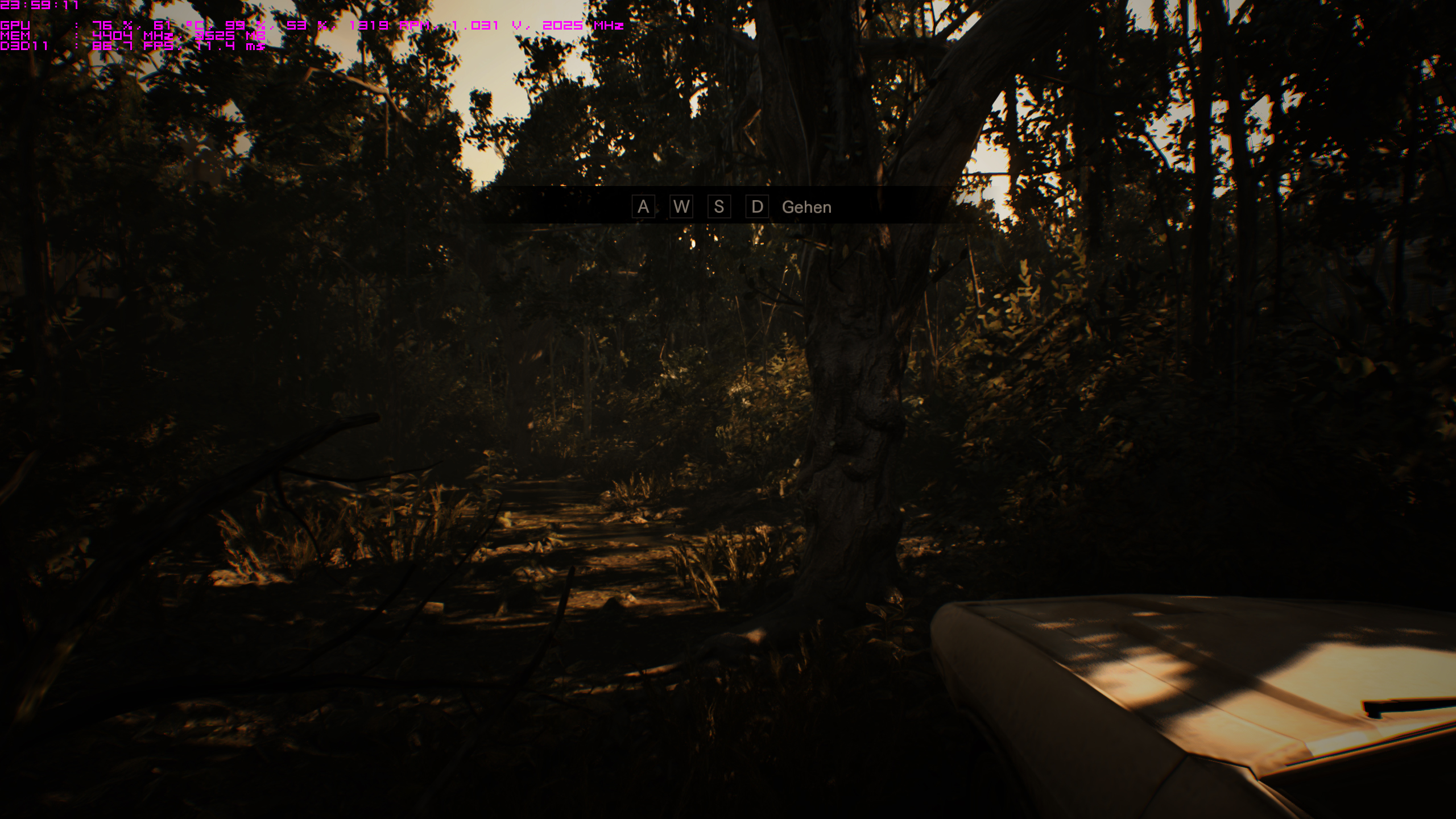
3440x1440: https://abload.de/img/re7_2017_02_01_23_58_umskx.jpg
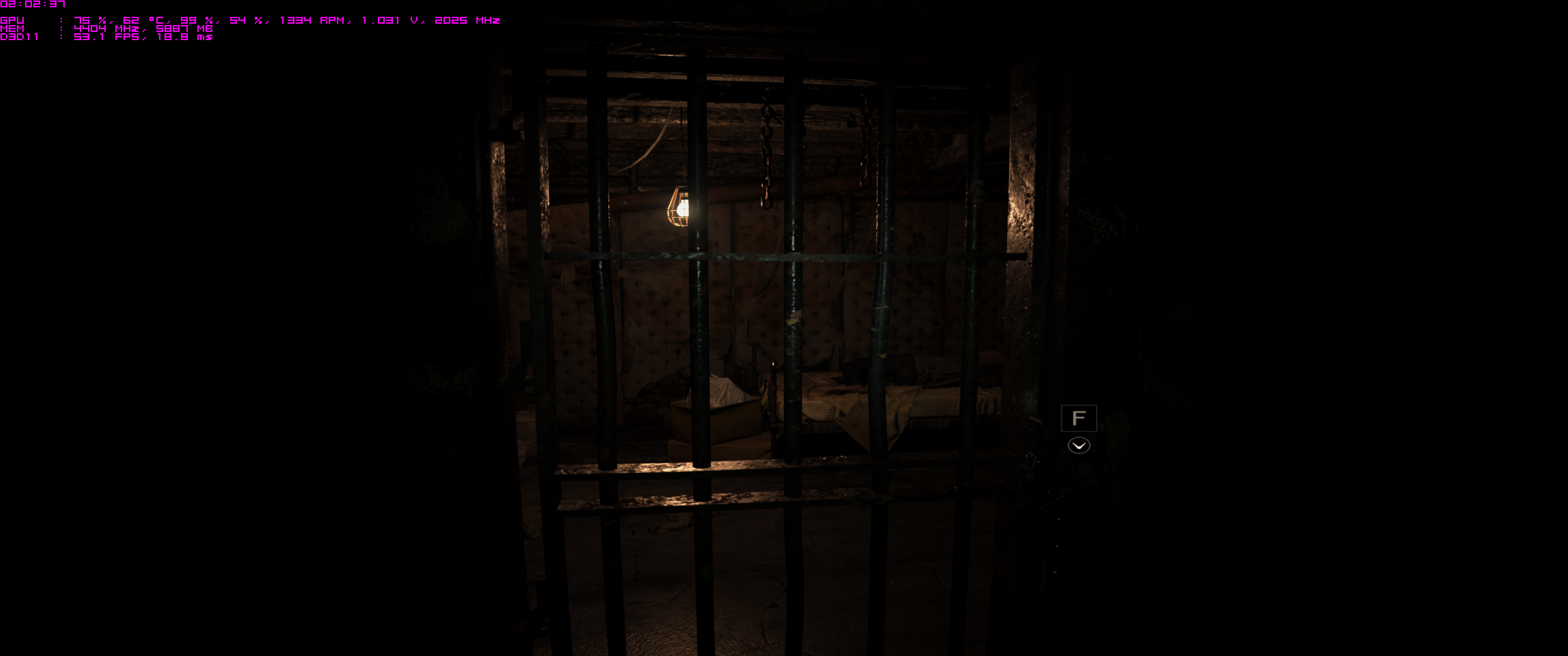
2560x1440: https://abload.de/img/re7_2017_02_01_23_59_19sqc.jpg
Look at the top and on the bootom. 21:9 my ass. it just zooms in the picture. Did I something wrong? Or am I just stupid? ^^
I used the Hex Fix for 3440x1440 but I still have black little bars on the side. How can I fix that?
Well I just notice my game is not 21:9 even though I modified the Hex Values. It just zooms in....
3440x1440: https://abload.de/img/re7_2017_02_01_23_58_umskx.jpg
2560x1440: https://abload.de/img/re7_2017_02_01_23_59_19sqc.jpg
Look at the top and on the bootom. 21:9 my ass. it just zooms in the picture. Did I something wrong? Or am I just stupid? ^^
Re: Resident Evil 7 No 21:9 support
I changed my hex codes:
Change 39 8E E3 3F to 9A 99 19 40 and
change 00 00 80 41 to 00 00 2C 42
My game seems zoomed in, along with menu's and cutscenes. I have my graphics settings checked to 3440x1440 in-game. Should I be running this at 2560x1440?
Edit: I changed my in-game settings to 2560x1440 with the hex fix, and my menu's, cutscenes, and gameplay look fine with no black bars, and doesn't look like anything is stretched.
I'm running native 3440x1440 on my monitor....
Change 39 8E E3 3F to 9A 99 19 40 and
change 00 00 80 41 to 00 00 2C 42
My game seems zoomed in, along with menu's and cutscenes. I have my graphics settings checked to 3440x1440 in-game. Should I be running this at 2560x1440?
Edit: I changed my in-game settings to 2560x1440 with the hex fix, and my menu's, cutscenes, and gameplay look fine with no black bars, and doesn't look like anything is stretched.
I'm running native 3440x1440 on my monitor....
Re: Resident Evil 7 No 21:9 support
Okay, if I use the hex codes in zens first post at 3440x1440 everything works except I get smaller 1/4 inch bars on each side, but everything works fine.
Re: Resident Evil 7 No 21:9 support
Alright guys, I did some calculations myself.
For 3440x1440 use these hex codes:
8F E3 18 40
00 00 AC 41- Ratio
I was able to get no black bars on the side of my monitor, and the aspect ratio seems to be working.
For 3440x1440 use these hex codes:
8F E3 18 40
00 00 AC 41- Ratio
I was able to get no black bars on the side of my monitor, and the aspect ratio seems to be working.

Re: Resident Evil 7 No 21:9 support
Akalabeth wrote:Alright guys, I did some calculations myself.
For 3440x1440 use these hex codes:
8F E3 18 40
00 00 AC 41- Ratio
I was able to get no black bars on the side of my monitor, and the aspect ratio seems to be working.
Thank you, finally after failing over and over with various different hex edits yours were perfect. For some reason my EXE has the top hex value on a different line (90 instead of 50) and I think that's why I have had such issues. Previous attempts have had me with super zoomed in picture that makes the game obviously unplayable. Was about to give up and steam refund when I saw your post and noticed your hex values were slightly different. Figured meh one more try and finally I can play this game proper in 3440x1440 on my x34 predator.
Thank you
Sincerely,
Skoda Zek
Zek Gaming: http://www.modsrigs.com/detail.aspx?BuildID=36010
If you like my build, please give me a +1 on ModsRigs. Thanks!
Skoda Zek
Zek Gaming: http://www.modsrigs.com/detail.aspx?BuildID=36010
If you like my build, please give me a +1 on ModsRigs. Thanks!
Re: Resident Evil 7 No 21:9 support
Akalabeth wrote:Alright guys, I did some calculations myself.
For 3440x1440 use these hex codes:
8F E3 18 40
00 00 AC 41- Ratio
I was able to get no black bars on the side of my monitor, and the aspect ratio seems to be working.
With these Values the game seems too just stretch the picture.
In my opinion there not a single fix atm. You either get a cut down picture on the top and bottom or you get no black bars on the side, but a strechted image. 3440x1440 user here.
3440x1440 strechted: https://abload.de/img/re7_2017_02_02_02_02_s0sc8.jpg
2560x1440 not strechted -> correct: https://abload.de/img/re7_2017_02_02_02_02_5fs03.jpg
3440x1440 cut down bottom and top: https://abload.de/img/re7_2017_02_01_23_58_umskx.jpg
2560x1440 correct: https://abload.de/img/re7_2017_02_01_23_59_19sqc.jpg


Re: Resident Evil 7 No 21:9 support
Ex3cut3r wrote:Akalabeth wrote:Alright guys, I did some calculations myself.
For 3440x1440 use these hex codes:
8F E3 18 40
00 00 AC 41- Ratio
I was able to get no black bars on the side of my monitor, and the aspect ratio seems to be working.
With these Values the game seems too just stretch the picture.
In my opinion there not a single fix atm. You either get a cut down picture on the top and bottom or you get no black bars on the side, but a strechted image. 3440x1440 user here.
3440x1440 strechted: https://abload.de/img/re7_2017_02_02_02_02_s0sc8.jpg
2560x1440 not strechted -> correct: https://abload.de/img/re7_2017_02_02_02_02_5fs03.jpg
3440x1440 cut down bottom and top: https://abload.de/img/re7_2017_02_01_23_58_umskx.jpg
2560x1440 correct: https://abload.de/img/re7_2017_02_01_23_59_19sqc.jpg
Agreed. I was able to change my hex values and came to the same calculations he did, but my menu is still really zoomed in. I've triple checked my values. Maybe I need to update drivers? I can't imagine that would be it. It's gotta be one of these dumb values...
Re: Resident Evil 7 No 21:9 support
Skoda Zek wrote:Akalabeth wrote:Alright guys, I did some calculations myself.
For 3440x1440 use these hex codes:
8F E3 18 40
00 00 AC 41- Ratio
I was able to get no black bars on the side of my monitor, and the aspect ratio seems to be working.
Thank you, finally after failing over and over with various different hex edits yours were perfect. For some reason my EXE has the top hex value on a different line (90 instead of 50) and I think that's why I have had such issues. Previous attempts have had me with super zoomed in picture that makes the game obviously unplayable. Was about to give up and steam refund when I saw your post and noticed your hex values were slightly different. Figured meh one more try and finally I can play this game proper in 3440x1440 on my x34 predator.
Thank you
You're welcome. I really hope Capcom fixes this.
As far as the menu problem (Menu would look fine if I changed the res to 2560x2440, go figure), I had the same thing until I changed the values to the ones above. Not sure why that was happening. I usually play games around 90 FOV. Could it be that the values above used with the FOV CheatEngine fix makes things look not stretched?
I remember trying out the fix without the aspect ratio fix, and I could tell that things were stretched.
The only reason that I could see that the top hex value difference is that there is a steam version of the game and a Windows Store version... but I have no idea.
Re: Resident Evil 7 No 21:9 support
Akalabeth wrote:Skoda Zek wrote:Akalabeth wrote:Alright guys, I did some calculations myself.
For 3440x1440 use these hex codes:
8F E3 18 40
00 00 AC 41- Ratio
I was able to get no black bars on the side of my monitor, and the aspect ratio seems to be working.
Thank you, finally after failing over and over with various different hex edits yours were perfect. For some reason my EXE has the top hex value on a different line (90 instead of 50) and I think that's why I have had such issues. Previous attempts have had me with super zoomed in picture that makes the game obviously unplayable. Was about to give up and steam refund when I saw your post and noticed your hex values were slightly different. Figured meh one more try and finally I can play this game proper in 3440x1440 on my x34 predator.
Thank you
You're welcome. I really hope Capcom fixes this.
As far as the menu problem (Menu would look fine if I changed the res to 2560x2440, go figure), I had the same thing until I changed the values to the ones above. Not sure why that was happening. I usually play games around 90 FOV. Could it be that the values above used with the FOV CheatEngine fix makes things look not stretched?
I remember trying out the fix without the aspect ratio fix, and I could tell that things were stretched.
The only reason that I could see that the top hex value difference is that there is a steam version of the game and a Windows Store version... but I have no idea.
How were you able to fix your FOV?
Re: Resident Evil 7 No 21:9 support
I wasn't able to fix my fov. I'm used to a fov of 90-95 but there is a guide here:
http://steamcommunity.com/app/418370/di ... 992053921/
I tried to get it to work, but was unsuccessful. That is when I tried the hexes in my comment and it seemed to fix everything. I am not experiencing the stretching that is being showed in the screenshots. I experienced that stretching when I edited the first hex but not the second...
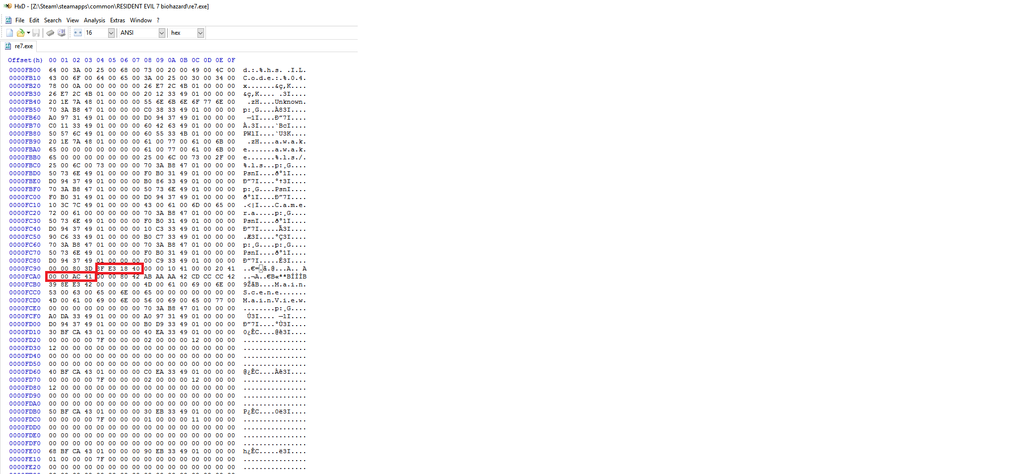
Here's what my hex looks like. The difference might be because of steam vs windows store copies?
http://img.photobucket.com/albums/v329/ ... %20fix.png
http://steamcommunity.com/app/418370/di ... 992053921/
I tried to get it to work, but was unsuccessful. That is when I tried the hexes in my comment and it seemed to fix everything. I am not experiencing the stretching that is being showed in the screenshots. I experienced that stretching when I edited the first hex but not the second...
Here's what my hex looks like. The difference might be because of steam vs windows store copies?
http://img.photobucket.com/albums/v329/ ... %20fix.png
Re: Resident Evil 7 No 21:9 support
Akalabeth wrote:I wasn't able to fix my fov. I'm used to a fov of 90-95 but there is a guide here:
http://steamcommunity.com/app/418370/di ... 992053921/
I tried to get it to work, but was unsuccessful. That is when I tried the hexes in my comment and it seemed to fix everything. I am not experiencing the stretching that is being showed in the screenshots. I experienced that stretching when I edited the first hex but not the second...
Here's what my hex looks like. The difference might be because of steam vs windows store copies?
http://img.photobucket.com/albums/v329/ ... %20fix.png
have problem me to.....and for all person have fitgirl repack or other....
 i know hexa is different not for black bar but aspect ratio..and find fov...
is my first trying.....
fileunsigner for cheat engine 6.6..ok ?
find this values with pointer scanner.....
try my file......i create trainer after....

for 5760x1080 5.3
fov 13..14....15 your choice !
quality is blurred..i search more tweak for that...reshade.....http://www.filedropper.com/chire7
or  ?
?Re: Resident Evil 7 No 21:9 support
On Multi monitor 5760x1080 the image is definitely stretched and zoomed in. haven't tried the FOV fix or script yet, not sure if that will help or not. Just getting frustrated as Capcom probably could fix this relatively easy with a patch for multi monitor and 21:9. Another question is what ever happened to nvidia's simultaneous multi projection? No games have come out supporting the technology and RE is nvidia.
Re: Resident Evil 7 No 21:9 support
20mchop wrote:On Multi monitor 5760x1080 the image is definitely stretched and zoomed in. haven't tried the FOV fix or script yet, not sure if that will help or not. Just getting frustrated as Capcom probably could fix this relatively easy with a patch for multi monitor and 21:9. Another question is what ever happened to nvidia's simultaneous multi projection? No games have come out supporting the technology and RE is nvidia.
try my fix
for other game capcom no fix that....ex metal gear solid V....fov hack is only solution !!!
try this is perfect for today.....capcom patch ? not sure...........
Re: Resident Evil 7 No 21:9 support
Hi there,
I do not want to make anybody sad or so, I am not a troll. Just a gamer!
I think, when we hex RE7 into 21:9 we lost picture material up and down.
I add 3 pictures from my 2 monitors which shows this.
In my opinion: If the game is not programmed with 21: 9 support, we do have a problem.
But when the game is progammed with 21:9 support like BF1 we do have an big advantage with 21:9!!! See BF1 pictures.
I do not want to make anybody sad or so, I am not a troll. Just a gamer!
I think, when we hex RE7 into 21:9 we lost picture material up and down.
I add 3 pictures from my 2 monitors which shows this.
In my opinion: If the game is not programmed with 21: 9 support, we do have a problem.
But when the game is progammed with 21:9 support like BF1 we do have an big advantage with 21:9!!! See BF1 pictures.
- Attachments
-
- BF1 21:9
- BF1 21 zu 9 (UWQHD).jpg (3.55 MiB) Viewed 6226 times
-
- BF1 16:9
- BF1 16 zu 9 (4k).jpg (3.47 MiB) Viewed 6129 times
-
- 16:9 3840x2160
- 16 zu 9 4K UHD (3840×2160).jpg (3.05 MiB) Viewed 6122 times
-
- 21:9 withoout Hexeditor 3440 x 1440
- 21 zu 9 nicht gehext UWQHD (3440×1440).jpg (2.89 MiB) Viewed 6135 times
-
- 21:9 with Hexeditor 3440x1440
- 21 zu 9 gehext UWQHD (3440×1440).jpg (2.96 MiB) Viewed 6123 times
Re: Resident Evil 7 No 21:9 support
I need to know this before I pull my hair out. This is where I change the fov right? I've tried so many times now and the fov won't change ingame.
- Attachments
-
- re7.PNG (10.11 KiB) Viewed 6066 times


Re: Resident Evil 7 No 21:9 support
User01 wrote:Weird. Same thing just happened to me. You can fix it though. Once you are running RE7 and CE, added re7 to CE and dragged the script to CE, if you cannot do anything to it, then do this:
Right click on the script and on the list you get, put the mouse on top of "Group Config", then you get a new menu, once there left click on "Hide children when deactivated". You could also enable "Allow left and right to collapse and expand". Either way, it should fix it and you will be able to see the current FOV as well as edit it.
This is not working... It seems that FOV table works random...
One time it worked for me and after that never again...
Re: Resident Evil 7 No 21:9 support
The FOV address is pretty much random. It can also change to a different address during the game (for example when viewing the first VHS tape).
On 5760x1200 resolution there is great amount of distortion (not stretching, but fisheye effect towards the edges), and it increases a lot when increasing the FOV. Pretty much unplayable right now.
On 5760x1200 resolution there is great amount of distortion (not stretching, but fisheye effect towards the edges), and it increases a lot when increasing the FOV. Pretty much unplayable right now.
Who is online
Users browsing this forum: No registered users and 4 guests