
Eyefinity Crossfire Stuttering Resolved !


Re: Eyefinity Crossfire Stuttering Resolved !
The fact that you see no difference between single gpu frame times and multi gpu frame times, doesn't mean that it is a reliable way to measure them when testing multi gpu systems. Don't get me wrong it probably is, but with single pgu it has been validated by comparing frame times from Fraps with frame times from build in benchmarks that produce frame times as well.
Philips BDM4065UC(3840x2160) Acer Z35(2560x1080@200hz); 980 Ti Hybrid @stock ; 6700K 4.6ghz (1.35v)/D15; 16GB 3200mhz; Asus Maximus Ranger VIII; AX860; 1TB 960 EVO; 750GB 840 EVO; Teufel Concept D 500; Sennheiser HD6XX; Windows 10 (latest build)

Re: Eyefinity Crossfire Stuttering Resolved !
its CPU threads, Single or all 12!
And which game has built in Frametimecouner? Mod for Skyrim? really want to ceck Fraps Frametimes recording But i Know of No other Tool that does.
And which game has built in Frametimecouner? Mod for Skyrim? really want to ceck Fraps Frametimes recording But i Know of No other Tool that does.
We gonna send it to outa space!
Re: Eyefinity Crossfire Stuttering Resolved !
Haldi wrote:And which game has built in Frametimecouner? Mod for Skyrim? really want to ceck Fraps Frametimes recording But i Know of No other Tool that does.
I believe the following article compares Fraps with several games: http://alienbabeltech.com/main/?p=33060&page=3
Philips BDM4065UC(3840x2160) Acer Z35(2560x1080@200hz); 980 Ti Hybrid @stock ; 6700K 4.6ghz (1.35v)/D15; 16GB 3200mhz; Asus Maximus Ranger VIII; AX860; 1TB 960 EVO; 750GB 840 EVO; Teufel Concept D 500; Sennheiser HD6XX; Windows 10 (latest build)


Re: Eyefinity Crossfire Stuttering Resolved !
So with all this buzz talk of frame times on the net recently I figured I would jump on the boat and build a tool for WSGF to churn out graphs quickly.
I had been disccussing and previewing this in the wsgf irc channel, however haldi requested I show a preview here.
Still a bit of work to do yet, but proof of concept is working...
Intention is to allow upload of csv via web broswer and get a graph in return, along with a batch process mode so we can dump files to an ftp folder for processing in a single job lot that can be used for our wsgf benchmarks.
Will update when ive something more to show.
EDIT:
Iv'e added a front end with options and upload...
http://delphium.mine.nu/grapher.html
I had been disccussing and previewing this in the wsgf irc channel, however haldi requested I show a preview here.
Still a bit of work to do yet, but proof of concept is working...
Intention is to allow upload of csv via web broswer and get a graph in return, along with a batch process mode so we can dump files to an ftp folder for processing in a single job lot that can be used for our wsgf benchmarks.
Will update when ive something more to show.
EDIT:
Iv'e added a front end with options and upload...
http://delphium.mine.nu/grapher.html
| Gigabyte X79S-UP5-WiFi Skt2011 | i7 4820k @4.4GHz Watercooled (Ivy Bridge-E) | Corsair Vengence 32GB @2133MHz 11-11-11-27 2T Quad-Channel (8x4GB) | AMD R9-Fury-X 4GB @1140/505MHz + EKWB Watercooled | 256GB Crucial MX200 SSD | 8x 1TB Samsung F3 SATA-II | Corsair 850W TX PSU | 3x Dell S2209W 22"wide TFT's (5760x1080res) | Logitech Z-5400 5.1ch speakers | Win7 Ultimate x64 |
Re: Eyefinity Crossfire Stuttering Resolved !
Yes It looks verry promising.
It looks verry promising.- Unigine_2013-01-09_21-22-39-53_frametimes..png (37.46 KiB) Viewed 4797 times
- unigine.png (37.98 KiB) Viewed 4802 times
We gonna send it to outa space!
Re: Eyefinity Crossfire Stuttering Resolved !
Made updates to http://delphium.mine.nu/grapher.html
Features:-
Offset - set starting possition from begining of file.
Chunksize - how many data points to use, starting from the offset value.
Label Interval - set the frequency of y-axis (frames) labels.
Graph size width/height - graph image size in pixels.
GPU - which gpu was used in the test, also first half of main title.
Game - the game used, should be auto detected and is also second half of main title.
Max range - set a limit to the max y-axis (milliseconds) range staring from 0.
Example output...
Features:-
Offset - set starting possition from begining of file.
Chunksize - how many data points to use, starting from the offset value.
Label Interval - set the frequency of y-axis (frames) labels.
Graph size width/height - graph image size in pixels.
GPU - which gpu was used in the test, also first half of main title.
Game - the game used, should be auto detected and is also second half of main title.
Max range - set a limit to the max y-axis (milliseconds) range staring from 0.
Example output...
- Attachments
-
- Unigine 2013-01-09 21-22-39-53 frametimes.csv.png (184.28 KiB) Viewed 4670 times
| Gigabyte X79S-UP5-WiFi Skt2011 | i7 4820k @4.4GHz Watercooled (Ivy Bridge-E) | Corsair Vengence 32GB @2133MHz 11-11-11-27 2T Quad-Channel (8x4GB) | AMD R9-Fury-X 4GB @1140/505MHz + EKWB Watercooled | 256GB Crucial MX200 SSD | 8x 1TB Samsung F3 SATA-II | Corsair 850W TX PSU | 3x Dell S2209W 22"wide TFT's (5760x1080res) | Logitech Z-5400 5.1ch speakers | Win7 Ultimate x64 |
Re: Eyefinity Crossfire Stuttering Resolved !
i did 'a few' benchmarks on VRAM usage....
Verry interesting is the part 4070*2289 Pixel in Lowest Quality with 8xMSAA The Benchmark runs at 5 FPS! But the VRAM is completly overloaded.

When you overclock the VRAM from 1425mhz to 1850mhz you get 13FPS and a way smoother Graph!

(the low graph before the spike is the Loading screen!)
Sadly that only helps for VRAM limit and not for all Microstutter
Hitman Absolution Benchmark:
Ultra Quality: 8xMSAA
1920*1080: 36-108 43 FPS 3200mb
3840*2160: GPU Limit 0 FPS
______________________________________
Ultra Quality: 0xMSAA
1920*1080: 38-165 54FPS 2150mb
3840*2160: 27-71 38FPS 2880mb
5760*3240: 9-18 14FPS 4020mb
7680*4320: 0.4-11 7FPS 5617mb
7999*4499: 0.3-11 6.5FPS 5780mb
---------------------------------------
Ultra Quality: 0xMSAA Overclocked: (1425mhz VRAM +1150mhz core)
7680*4320: 0.08-12 6.6FPS 5580mb
----------------------------------------
Ultra Quality: 0xMSAA Overclocked: (1850mhz VRAM +1150mhz core)
7680*4320: 0.4-13 8.5FPS 5580mb
7999*4499: 0.4-15 8.5FPS 5780mb
______________________________________________________________________
Lowest Quality: 8xMSAA
1920*1080: 56-81 62FPS 1800mb
3840*2160: 0.4-33 18FPS 5450mb
3974*2235: 0.05-31 16FPS 5880mb
4031*2267: 0.1-30 15.7FPS 5880mb
4070*2289: 0.6-15 5FPS 5911mb
4128*2322: --------- 5660mb (Definitiv VRAM Limit... 8sek pro bild!)
4479*2519: --------- 5635mb (Definitiv VRAM Limit... 8sek pro bild!)
-----------------------------------------------------------------------
Lowest Quality: 8xMSAA Overclocked (1850mhz VRAM)
4070*2289: 01-15 13FPS 5807mb
-----------------------------------------------------------------------
Lowest Quality: 8xMSAA Overclocked: (1850mhz VRAM +1150mhz core)
1920*1080: 50-88 68FPS 1850mb
3840*2160: 0.4-40 21FPS 5450mb
4070*2289: 0.1-37 18FPS 5911mb
Verry interesting is the part 4070*2289 Pixel in Lowest Quality with 8xMSAA The Benchmark runs at 5 FPS! But the VRAM is completly overloaded.
When you overclock the VRAM from 1425mhz to 1850mhz you get 13FPS and a way smoother Graph!
(the low graph before the spike is the Loading screen!)
Sadly that only helps for VRAM limit and not for all Microstutter
We gonna send it to outa space!
-
AussieTimmeh

- Editors

- Posts: 1441
- Joined: 14 Oct 2009, 03:11
Re: Eyefinity Crossfire Stuttering Resolved !
Nice one Delphium, can't wait to try it!
i5-2500K @ 4Ghz ° Asus P8Z68 ° GTX670 Windforce OC ° 8GB DDR3 RipjawsX ° 4x Viewsonic VA2703 ° Logitech G15 / G5 / G27 ° Razer Vespula ° TrackIR 5 ° Thrustmaster Warthog HOTAS
Re: Eyefinity Crossfire Stuttering Resolved !
some more toughts about Microstuttering: nice read.
http://techreport.com/blog/24415/as-the ... e-and-more
Rage3D s new Benchmarkinf strategy!
http://www.rage3d.com/reviews/video/his ... ex.php?p=3
And PCPer says why Fraps sucks for Microstutter definition.
http://www.pcper.com/reviews/Graphics-C ... /Frame-Rat
be aware that the Graphs you see in this post are not the raw data but the Filtered Frametimes which ignore 1 pixe high Frames which would be counted as whole Frame.
http://techreport.com/blog/24415/as-the ... e-and-more
Rage3D s new Benchmarkinf strategy!
http://www.rage3d.com/reviews/video/his ... ex.php?p=3
And PCPer says why Fraps sucks for Microstutter definition.
http://www.pcper.com/reviews/Graphics-C ... /Frame-Rat
be aware that the Graphs you see in this post are not the raw data but the Filtered Frametimes which ignore 1 pixe high Frames which would be counted as whole Frame.
We gonna send it to outa space!
Re: Eyefinity Crossfire Stuttering Resolved !
I have read those articles as well. This one from HarwareCanucks is also a good read: http://www.hardwarecanucks.com/forum/ha ... sfire.html.
It seems to me that more and more sites are considering using frame times instead of fps as a measure of performance, which is great
It seems to me that more and more sites are considering using frame times instead of fps as a measure of performance, which is great
Philips BDM4065UC(3840x2160) Acer Z35(2560x1080@200hz); 980 Ti Hybrid @stock ; 6700K 4.6ghz (1.35v)/D15; 16GB 3200mhz; Asus Maximus Ranger VIII; AX860; 1TB 960 EVO; 750GB 840 EVO; Teufel Concept D 500; Sennheiser HD6XX; Windows 10 (latest build)
Re: Eyefinity Crossfire Stuttering Resolved !
Ryan Shrout at PC Perspective has released a very interesting article and video about measuring frame time be capturing gameplay. Especially for crossfire and sli this is a big step up, since measuring frame times with Fraps was to the most reliable option.
http://www.pcper.com/reviews/Graphics-C ... nce-Testin
https://www.youtube.com/watch?v=CsHuPxX8ZzQ
http://www.pcper.com/reviews/Graphics-C ... nce-Testin
https://www.youtube.com/watch?v=CsHuPxX8ZzQ
Philips BDM4065UC(3840x2160) Acer Z35(2560x1080@200hz); 980 Ti Hybrid @stock ; 6700K 4.6ghz (1.35v)/D15; 16GB 3200mhz; Asus Maximus Ranger VIII; AX860; 1TB 960 EVO; 750GB 840 EVO; Teufel Concept D 500; Sennheiser HD6XX; Windows 10 (latest build)
Re: Eyefinity Crossfire Stuttering Resolved !
hehe, you beat me to this article  but seems like you haven't seen that one yet: (But that Video is nice, gotta try that out ^^ )
http://www.anandtech.com/show/6857/amd- ... dmap-fraps
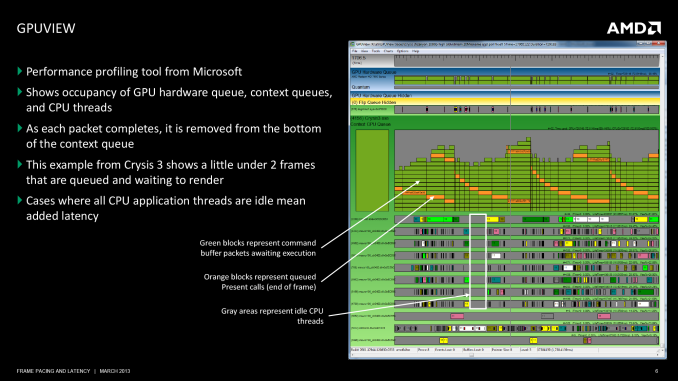
Well well well.... gotta try that out xD me... a complete n00b xD wow... but still, gotta try.
xD lol
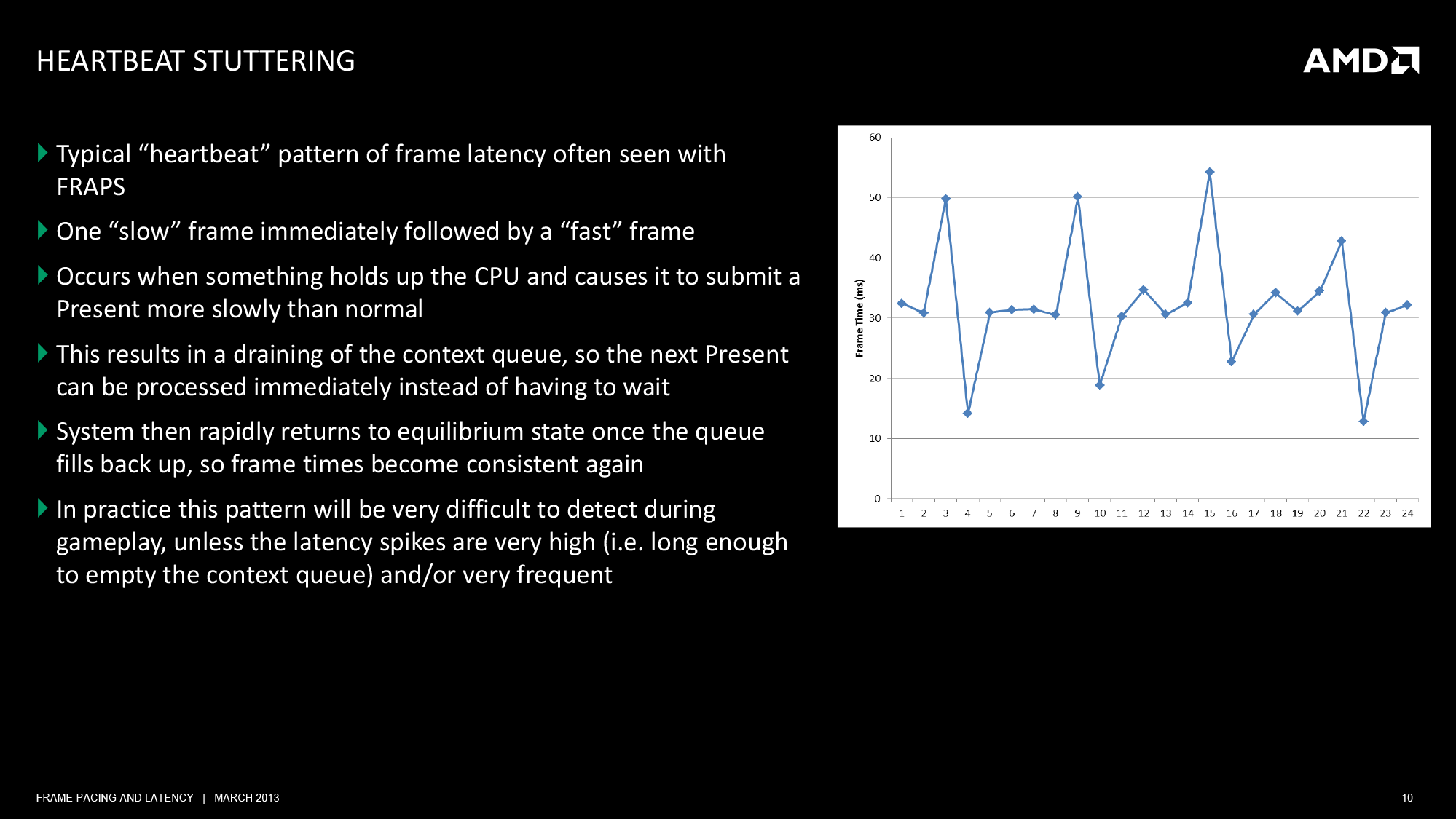
Stutter explained cool!
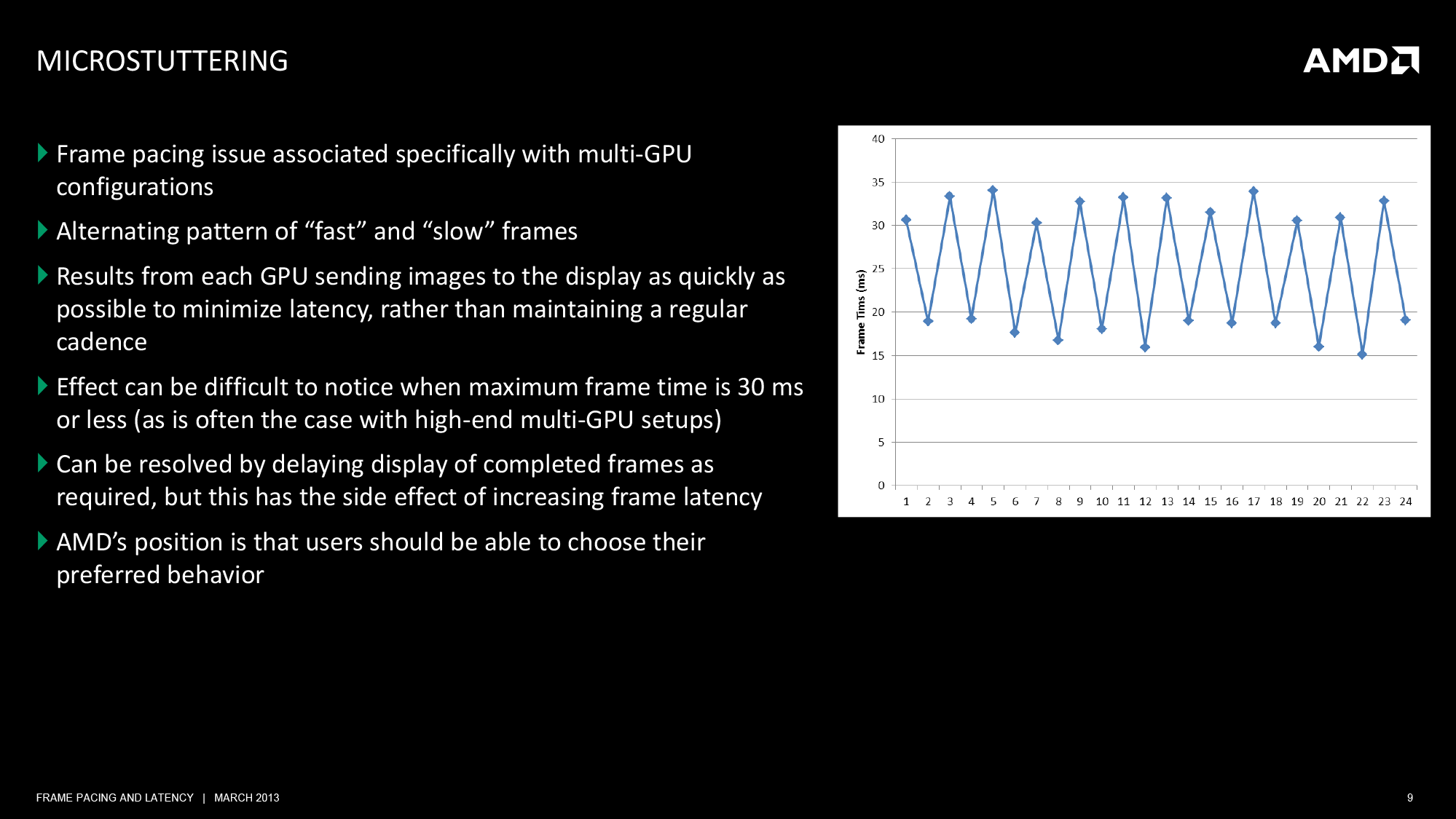
"Effect can be difficult to notice when maximum Frame time is 30ms or less" (so 30FPS or lower!)
"AMD's position is that user should be able to choose their preferred behavior" so July Driver will have settings that let us choose "Smoothe gameplay" ? Sounds cool.
and then FCAT!
http://www.anandtech.com/show/6862/fcat ... ing-part-1
Edit:
lol, that guy explained what was going on. On the 1st January 2013 way before everyone else.
http://forum.beyond3d.com/showthread.php?p=1689708
Edit 2: About that PCper Link from Wijkert.
Looking forward to test that out myself. If i ever manage to capture Video ~.~
Important Part:
http://www.pcper.com/reviews/Graphics-C ... nce-Test-3
LOL
Oookay.... ^^
but seems like you haven't seen that one yet: (But that Video is nice, gotta try that out ^^ )http://www.anandtech.com/show/6857/amd- ... dmap-fraps
The problem here is not in using FRAPS to measure average framerates over the run of a benchmark, but rather when it comes to using FRAPS to measure individual frames. FRAPS is at the very start of the rendering pipeline; it’s before the GPU, it’s before the drivers, it’s even before Direct3D and the context queue. As such FRAPS can tell you all about what goes into the rendering pipeline, but FRAPS cannot tell you what comes out of the rendering pipeline.
So to use FRAPS in this method as a way of measuring frame intervals is problematic. Considering in particular that the application can only pass off a new frame when the context queue is ready for it, what FRAPS is actually measuring is the very start of the rendering pipeline, which not unlike a true pipe is limited by what comes after it. If the pipeline is backed up for whatever reason (context queue, drivers, etc), then FRAPS is essentially reporting on what the pipeline is doing, and not the frame interval on the final displayed frames. Simply put, FRAPS cannot tell you the frame interval at the end of the pipeline, it can only infer it from what it’s seeing.
.......
Adding weight to the whole matter is the fact that FRAPS is one of the few things both AMD and NVIDIA can agree on. In our talks with NVIDIA and in past statements made to the press, NVIDIA dislikes FRAPS being used in this manner for roughly the same reason. The fact that it’s measuring Present calls instead of the time a frame is actually shown to the user impacts them just as well, and muddles the picture when it comes to trying to differentiate themselves from AMD. Again, not to say that NVIDIA thinks FRAPS is a bad tool, but there seems to be a general agreement with AMD’s stance that beyond a certain point it’s the wrong tool for measuring stuttering.
Well well well.... gotta try that out xD me... a complete n00b xD wow... but still, gotta try.
Stuttering doesn’t just impact the frame intervals, but many of those stalls where stuttering was occurring were also stalling the GPU entirely, reducing overall performance. One figure AMD threw around was that when they fixed their stuttering issue on Borderlands 2, overall performance had increased by nearly 13%, a very significant increase in performance that AMD would normally have to fight for, but instead exposed by an easy fix for stuttering.
xD lol
Stutter explained
cool!In a heartbeat situation the next Present gets delayed coming out of the application for whatever reason, which results in the rendering pipeline feeding from the context queue for a bit while nothing new comes in. Eventually the block is cleared and the application submits the next Present, at which point FRAPS records the Present as having come relatively later. Furthermore, since the context queue has been at least partially drained, there’s still room for one more frame, so rather than idling for a bit the application immediately gets to work on the next frame. As a result the next Present hits the context queue sooner than average, resulting in the early frame as picked up by FRAPS.
Multi-GPU stuttering has become an important issue for AMD just as single-GPU stuttering has, and AMD is working on a resolution for it. That resolution will come in or around a July driver drop, at which point AMD will introduce some new driver options to control how their cards deal with the issue.
"Effect can be difficult to notice when maximum Frame time is 30ms or less" (so 30FPS or lower!)
"AMD's position is that user should be able to choose their preferred behavior" so July Driver will have settings that let us choose "Smoothe gameplay" ? Sounds cool.
and then FCAT!
http://www.anandtech.com/show/6862/fcat ... ing-part-1
Edit:
lol, that guy explained what was going on. On the 1st January 2013
way before everyone else.http://forum.beyond3d.com/showthread.php?p=1689708
Edit 2: About that PCper Link from Wijkert.
The next question from our readers should then be: are there questions about the programs used for this purpose? After having access to the source code and applications for more than 12 months I can only say that I have parsed through it all innumerable times and I have found nothing that NVIDIA has done that is disingenuous. Even better, we are going to be sharing all of our code from the Perl-based parsing scripts (that generate the data in the graphs you’ll see later from the source XLS file) as well as a couple of examples of the output XLS file
Looking forward to test that out myself. If i ever manage to capture Video ~.~
Important Part:
Another issue that cropped up with the AMD configurations in CrossFire mode showed its face when we tried 5760x1080 testing. In nearly every case, an AMD CrossFire dual-GPU configuration running an Eyefinity configuration at 5760x1080 showed alternating dropped frames. Whereas with single monitor gaming we were seeing some full game frames being turned into runts at the display, with Eyefinity those frames were missing completely (seen as missing overly colors from the expected pattern).
This actually caused two things to happen. First, our Perl scripts and data generation would sometimes error out completely (after the capture and extraction steps) because the code was never able to find the initial sequence of 16 colors in the correct order to validate the video capture. We are still working on a fix for this in order to present that information in a useable format, but for now we will point out specifically when that occurred. Secondly, the frame rates were smoother! Without the runts getting in the way of the animation sequences the motion on the screen was actually more fluid than it would have been otherwise, but don’t take this as a vindication of what AMD’s Eyefinity is actually doing. While the animation is smoother, you are still not seeing any benefit from the second card in your CrossFire configuration and you could view it simply as wasted investment.
Finally, we saw some interesting visual problems in our captures of Eyefinity that cause us to raise some eyebrows. Because the overlay changes colors with every frame I was able to notice some instances where the digital scan out of the graphics cards were not matching up; frames were being split by other frames.
http://www.pcper.com/reviews/Graphics-C ... nce-Test-3
LOL
As I later learned, enabling Vsync actually does not work at all with Eyefinity and that, combined with the results I have seen (of which the screenshot above is an indicator) with our testing, lead me to believe that something is fundamentally wrong with AMD’s Eyefinity implementation. And if it’s not “wrong”, it is definitely counter intuitive. We’ll be asking AMD for more information in the coming weeks and hope to get more information from them as our Frame Rating process evolves.
Oookay.... ^^
We gonna send it to outa space!
Re: Eyefinity Crossfire Stuttering Resolved !
A lot of sites seem to pick this up:
http://www.tomshardware.com/reviews/gra ... ,3466.html
http://techreport.com/review/24553/insi ... ture-tools
http://www.pcper.com/reviews/Graphics-C ... nce-Testin
http://www.anandtech.com/show/6857/amd- ... dmap-fraps
Posted the one from PCper since they started the whole capturing thing. Techreport's Scott Wasson actually started the whole frame time instead of fps bench marking thing, but I am sure you know that.
All in all this seems to be a very good thing, AMD gets outed for there problematic crossfire performance. This "forces" them to fix the drivers and/or maybe change something in the hardware in there next series (8xxx).
It's funny that in the article of PCper they said that a second 7970 was wasted, because the observed fps was the same as a single 7970. This is what I was saying in this thread almost 1.5 years ago:
http://www.tomshardware.com/reviews/gra ... ,3466.html
http://techreport.com/review/24553/insi ... ture-tools
http://www.pcper.com/reviews/Graphics-C ... nce-Testin
http://www.anandtech.com/show/6857/amd- ... dmap-fraps
Posted the one from PCper since they started the whole capturing thing. Techreport's Scott Wasson actually started the whole frame time instead of fps bench marking thing, but I am sure you know that.
All in all this seems to be a very good thing, AMD gets outed for there problematic crossfire performance. This "forces" them to fix the drivers and/or maybe change something in the hardware in there next series (8xxx).
It's funny that in the article of PCper they said that a second 7970 was wasted, because the observed fps was the same as a single 7970. This is what I was saying in this thread almost 1.5 years ago:
Wijkert wrote:The microstutter problem we (or at least I) am having is also quite apparent even if the game runs at a constant 60 fps with v-sync on and everything. 'Normal' stuttering from either low or inconsistent fps is fixable by turning v-sync on or lowering the graphical settings. Running a game in eyefinity and with crossfire enabled at 60 fps can feel like 20-30 fps, so that would make a second card useless.
Philips BDM4065UC(3840x2160) Acer Z35(2560x1080@200hz); 980 Ti Hybrid @stock ; 6700K 4.6ghz (1.35v)/D15; 16GB 3200mhz; Asus Maximus Ranger VIII; AX860; 1TB 960 EVO; 750GB 840 EVO; Teufel Concept D 500; Sennheiser HD6XX; Windows 10 (latest build)
Re: Eyefinity Crossfire Stuttering Resolved !
Jup, seems like AMD has to do a LOT of work on crossfire!
btw, as much is i get it. PCPer in cooperation with Nvidia developed in the last 12 month this FCAT tool.
But the thread vom Tech report with Fraps made AMD aware of their deficit. and now according to anandtech AMD is working heavy on getting stuttering solved. And maybe after that they will take a look on Crossfire! And Eyefinity!
btw, as much is i get it. PCPer in cooperation with Nvidia developed in the last 12 month this FCAT tool.
But the thread vom Tech report with Fraps made AMD aware of their deficit. and now according to anandtech AMD is working heavy on getting stuttering solved. And maybe after that they will take a look on Crossfire! And Eyefinity!
We gonna send it to outa space!
Re: Eyefinity Crossfire Stuttering Resolved !
Haldi wrote:But the thread vom Tech report with Fraps made AMD aware of their deficit. and now according to anandtech AMD is working heavy on getting stuttering solved. And maybe after that they will take a look on Crossfire! And Eyefinity!
Indeed, some of the single gpu/single screen stuttering has already been resolved by AMD. They where made aware of this because of frame time testing by the TechReport. It is likely they would like to level the playing field when it comes to less stuttering in crossfire compared to SLI. Both crossfire and Eyefinity are technologies that don't have a great install base. Tech sites on the other use crossfire and Eyefinity to test new cards and both AMD an Nvidia would like to do well in these reviews.
Philips BDM4065UC(3840x2160) Acer Z35(2560x1080@200hz); 980 Ti Hybrid @stock ; 6700K 4.6ghz (1.35v)/D15; 16GB 3200mhz; Asus Maximus Ranger VIII; AX860; 1TB 960 EVO; 750GB 840 EVO; Teufel Concept D 500; Sennheiser HD6XX; Windows 10 (latest build)
Re: Eyefinity Crossfire Stuttering Resolved !
PCper just released in my opinion the most interesting part of the series of articles about frame times:
http://www.pcper.com/reviews/Graphics-C ... 70-CrossFi
Check out the frame times at 5760x1080 for the Titan. So basically the higher the resolution the more a single card makes sense. That conclusion has been already made in the thread a long time ago, but we did't have the best means to prove it the way PCper just did.
http://www.pcper.com/reviews/Graphics-C ... 70-CrossFi
Check out the frame times at 5760x1080 for the Titan. So basically the higher the resolution the more a single card makes sense. That conclusion has been already made in the thread a long time ago, but we did't have the best means to prove it the way PCper just did.
Philips BDM4065UC(3840x2160) Acer Z35(2560x1080@200hz); 980 Ti Hybrid @stock ; 6700K 4.6ghz (1.35v)/D15; 16GB 3200mhz; Asus Maximus Ranger VIII; AX860; 1TB 960 EVO; 750GB 840 EVO; Teufel Concept D 500; Sennheiser HD6XX; Windows 10 (latest build)
Re: Eyefinity Crossfire Stuttering Resolved !
all these reports make me question myself since I just ordered 2x 7970 GHz..  should I cancel the order? It's a pretty big price gap to 2x 680 4GB or is the extra memory not needed? (6040x1080)
should I cancel the order? It's a pretty big price gap to 2x 680 4GB or is the extra memory not needed? (6040x1080)| i7 3770k @ 4.4, 16GB | 2x Sapphire 7970 GHz @ 1150 | Carbide 540 w H100 & HX850W | 3x Dell U2312HM @ 5760x1080 |
Re: Eyefinity Crossfire Stuttering Resolved !
better go with one titan instead of 2 680 !

Even if the Observed FPS are similar.

The Framestutter looks horrible!
Even on 690 you have huge stutter sometimes.

Just take a look at that! Horrible!

But the Good thing is.... amd said "Look we have a fix for Skyrim" and it seems that also works for Crossfire!
So mabye with July wonder driver this will all be in the past

Even if the Observed FPS are similar.
The Framestutter looks horrible!
Even on 690 you have huge stutter sometimes.
Just take a look at that! Horrible!
But the Good thing is.... amd said "Look we have a fix for Skyrim" and it seems that also works for Crossfire!
So mabye with July wonder driver this will all be in the past
We gonna send it to outa space!
Re: Eyefinity Crossfire Stuttering Resolved !
News News! Vsync & Stuff
http://www.pcper.com/reviews/Graphics-C ... -Animation
tough... not sure what i should think about that.
http://www.pcper.com/reviews/Graphics-C ... -Animation
tough... not sure what i should think about that.
We gonna send it to outa space!
Re: Eyefinity Crossfire Stuttering Resolved !
First Alpha of the June/july driver with anti Micro stutter / Frame pacing!


http://www.pcper.com/reviews/Graphics-C ... ype-Driver
Waiting for the coming weeks
http://www.pcper.com/reviews/Graphics-C ... ype-Driver
One thing to note: this fix does not yet address Eyefinity + CrossFire problems. The prototype and the current implementation of the fix are only going to address single monitor configurations due to the differences in how the multiple rendered images are composited. Resolutions up to 2560x1600 are handled by a hardware compositor while the 5760x1080 and above Eyefinity resolution use a software implementation that is apparently much more complex (and causes quite a few graphical issues we'll dive into later).
There is still the issue of Eyefinity and that problem will not be addressed by this first version of the driver. I have more analysis of that complicated discussion planned in the coming weeks. Stay tuned!
Waiting for the coming weeks
We gonna send it to outa space!
Who is online
Users browsing this forum: No registered users and 3 guests