Page 5 of 7
Re: Eyefinity 5x1-P is LIVE with "Cayman" Driver
Posted: 22 Feb 2011, 08:53
by BHawthorne
Have you tried stacking the drivers? Like in stalling 10.12a then installing 11.1 (which is complete bs imho) then installing 11.2. Or just the Hotfix then 11.2.
I've had success stacking 10.12a -> 11.1 -> 11.2.
BTW, anyone know if 5x1P is CrossFire capable? Pondering getting a second 5870 Eyefintiy 6 to help combat low frame rates.
Re: Eyefinity 5x1-P is LIVE with "Cayman" Driver
Posted: 22 Feb 2011, 09:02
by Dunii
I'm running 5x1 Crossfire with two eyefinity 6 5870s.
Re: Eyefinity 5x1-P is LIVE with "Cayman" Driver
Posted: 22 Feb 2011, 09:07
by BHawthorne
I'm running 5x1 Crossfire with two eyefinity 6 5870s.
Ah, good to know. Hopefully i can find another open box on Newegg with deep discount again. :)
Re: Eyefinity 5x1-P is LIVE with "Cayman" Driver
Posted: 01 Mar 2011, 00:44
by burritoboy9984
Anyone playing any FPS with 5x1p? wondering if the bezels are troublesome or not.
-Erik
Re: Eyefinity 5x1-P is LIVE with "Cayman" Driver
Posted: 01 Mar 2011, 02:51
by Dunii
I hardly notice bezels in 5x1, but I think it's because I was previously running 3x2. I went from a 4x2(running 3x2 for eyefinity) down to a 5x1 setup mostly because FPS were impossible in that formation. Also switching back and forth from eyefinity to extended was laggy and just downright buggy when I was running 8 monitors. I like most of the FPS I've tried so far in 5x1. Farcry 2 made me almost nauseous however, but I'm not sure why...maybe my settings were not optimal. Also, I might not be a good example, because I've only played a few hours since I changed to 5x1. But, I will say I like 5x1 more for everyday use.
Re: Eyefinity 5x1-P is LIVE with "Cayman" Driver
Posted: 01 Mar 2011, 06:43
by burritoboy9984
I hardly notice bezels in 5x1, but I think it's because I was previously running 3x2. I went from a 4x2(running 3x2 for eyefinity) down to a 5x1 setup mostly because FPS were impossible in that formation. Also switching back and forth from eyefinity to extended was laggy and just downright buggy when I was running 8 monitors. I like most of the FPS I've tried so far in 5x1. Farcry 2 made me almost nauseous however, but I'm not sure why...maybe my settings were not optimal. Also, I might not be a good example, because I've only played a few hours since I changed to 5x1. But, I will say I like 5x1 more for everyday use.
My only worry, is that now, my center monitor gets my primary focus in 3x1L. I don't know if I would be able to back up and focus on the center 3 primarily or not. Also, right now I have 3 25's, I would be stepping down to either 22's or 23's.
-Erik
Re: Eyefinity 5x1-P is LIVE with "Cayman" Driver
Posted: 01 Mar 2011, 15:25
by Dunii
I would probably stick with 3 25s then. I've considered only running 3x1 in some of my games.
Re: Eyefinity 5x1-P is LIVE with "Cayman" Driver
Posted: 04 Mar 2011, 13:57
by BHawthorne
If I had the money I'd switch to 22" IPS displays with a good VESA mounting system. That's the trouble with all these exotic setups we have, they bleed out money to setup and as enthusiasts we can't leave well enough alone once we've done something. There is always the next best and new thing just around the corner. I think 5x1P will keep me satisfied for awhile though. Well, at least till I get that 20 foot diameter dome and 5 projectors. :lol:
Re: Eyefinity 5x1-P is LIVE with "Cayman" Driver
Posted: 05 Mar 2011, 00:34
by t29
hi,
i finally log to the forum. it helps me so many times to rule my 3-display-eyefinity to make some games to function. And today, when i saw the 1st-post-video, i dream awaked. i read every post and i don't know yet if i can make it possible with my 2 HD5830.
IMO, the answer will be fast ! No ?
Thank you for your answer.
HD5830 : 1 DP -1 HDMI - 2 DVI
t29
Re: Eyefinity 5x1-P is LIVE with "Cayman" Driver
Posted: 05 Mar 2011, 23:31
by BHawthorne
hi,
i finally log to the forum. it helps me so many times to rule my 3-display-eyefinity to make some games to function. And today, when i saw the 1st-post-video, i dream awaked. i read every post and i don't know yet if i can make it possible with my 2 HD5830.
IMO, the answer will be fast ! No ?
Thank you for your answer.
HD5830 : 1 DP -1 HDMI - 2 DVI
t29
5x1P on a 5830? Simple answer -- No. Not gonna happen. :wink:
Re: Eyefinity 5x1-P is LIVE with "Cayman" Driver
Posted: 06 Mar 2011, 12:13
by t29
Excuse me but i've got TWO graphic cards, 2* HD5830 (today, crossfire enable).
My idea :
1 screen on DP
1 on the 2nd DP
3 on DVI
Have a nice sunday,
t29
Re: Eyefinity 5x1-P is LIVE with "Cayman" Driver
Posted: 06 Mar 2011, 21:05
by Dunii
Eyefinity groups can only be created on the same card. I have 12 mini display ports across 2 cards, but the largest monitor group I can have in Eyefinity is 6 monitors.
Re: Eyefinity 5x1-P is LIVE with "Cayman" Driver
Posted: 10 Mar 2011, 15:02
by BHawthorne
Excuse me but i've got TWO graphic cards, 2* HD5830 (today, crossfire enable).
My idea :
1 screen on DP
1 on the 2nd DP
3 on DVI
Have a nice sunday,
t29
You might have done more research before you had your idea. The ports in an Eyefinity grouping must all be from the same video card. Maybe there is some language barrier where English isn't your first language. I already replied to you any configuration of 5830 will not give you Eyefinity 5x1P.
Re: Eyefinity 5x1-P is LIVE with "Cayman" Driver
Posted: 29 Mar 2011, 15:45
by kettchxxii
Sorry for not actually testing this myself, but can anyone tell me if the newer drivers support 5x1 portrait on an e6 other than this hotfix. It was such a pain in the butt to get this thing set up. What drivers are you all using currently for 5x1?
Re: Eyefinity 5x1-P is LIVE with "Cayman" Driver
Posted: 08 Apr 2011, 00:20
by skipclarke
5x1 has worked for me with the 6990 driver, and the release driver for the HD 6790. I think these would be 11.2 and 11.3. Since I use the pre-release drivers for my testing, it's hard to keep track. I can say the current driver still supports 5x1-P.
Re: Eyefinity 5x1-P is LIVE with "Cayman" Driver
Posted: 13 Apr 2011, 16:19
by mpcSapZero
Hi,
I need a little help
I use 5 x 24 "AOC TFT with 1920 x 1080 in portrait mode but I can not activate as a group
in the CCC are recognized all as 1,2,3,4,5, but there is no 5x1 portrait mode in the group settings
3x1 portrait mode works, all other modes only go up to 4 monitors
Why does the CCC monitors one for one, but not in the group
can someone help me please
System info:
Motherboard Asus Rampage
Core i7 720 processor
9 GB Ram
ATI 5870 Eyefinity6
5 x 24 inch AOC Monitor 1920 x 1080
Connections:
3 x single link active mini DP to DVI Apapter
2 x normal mini DP to DVI Adapter
video card drivers: 11.1
Re: Eyefinity 5x1-P is LIVE with "Cayman" Driver
Posted: 14 Apr 2011, 07:46
by suiken_2mieu
~Snipped~
Why does the CCC monitors one for one, but not in the group
can someone help me please
~Snipped~
video card drivers: 11.1
Uninstall 11.1, you can go as far as do a driversweep if you want.
Then install 10.12a <- (Note the little a on the end. It's a Hot Fix)
Then you can install the 11.3 / 4 CCC and only the CCC, not the display driver. Do a custom install. You should be able to get 5x1 detection working.
Re: Eyefinity 5x1-P is LIVE with "Cayman" Driver
Posted: 08 May 2011, 11:20
by t29
You might have done more research before you had your idea. The ports in an Eyefinity grouping must all be from the same video card. Maybe there is some language barrier where English isn't your first language. I already replied to you any configuration of 5830 will not give you Eyefinity 5x1P.
i will follow your advice.
Today, i find the reference of the graphic card compatible (must have 6 mini-DP). The display must have dvi and dvi-mini-DP must be used to connect.
Now, i'm looking for displays.
Thanks for your patience.
T29
Re: Eyefinity 5x1-P is LIVE with "Cayman" Driver
Posted: 09 May 2011, 19:39
by suiken_2mieu
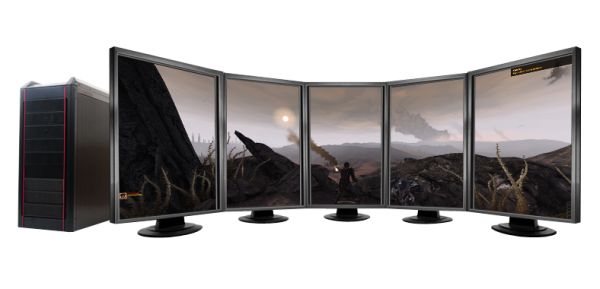
Just saw this picture and thought it was a good 2D representation of 5x1.
Re: Eyefinity 5x1-P is LIVE with "Cayman" Driver
Posted: 13 May 2011, 10:25
by wimo
Hello i'm new here :)
Here are my experiences with the 5x1P mode:
Hardware:
Sapphire 6950 Flex
5x Samsung 2443bw DVI
2600k @ 5ghz
Monitors connected with : 2xDVI , 1x HDMI->DVI (FLEX) and 2x Active DP convertor
Drivers 10.12a (newer won't detect 5x1)
Upgrade tot 11.5a (not the Display drivers, custom install)
5x1P in Windows extended is perfect.
Eyefinity with 3x1L is perfect
5x1P is horrible ... tearing all over the middle monitors. Switchting the outputs doens't help. I get a vertical line that flows over the screens :(
I wouldn't recommend this setup..