Page 36 of 44
Re: Metal Gear Solid 5: The Phantom Pain- 21:9 support broke
Posted: 21 May 2016, 10:34
by K4sh
Coffinspired wrote:K4sh wrote:Ok,
Here is a brand new cheat table that should work with MGS SP with:
Oddly, it says "invalid table". Error loading LUA.
Hmmm.
You need Cheat Engine latest version 64bits to be used with MGS that is a 64 bits process.
When running Cheat engine, you need to open my cheat table and tell cheat engine which process to be attached to. mgsvtpp.exe obviously.
Then, the cheat table should work flawlessly. I have tested it with latest game update with success.
Re: Metal Gear Solid 5: The Phantom Pain- 21:9 support broke
Posted: 23 May 2016, 06:58
by Coffinspired
K4sh wrote:You need Cheat Engine latest version 64bits to be used with MGS that is a 64 bits process.
Just checking back in to follow up for posterity. I don't want anyone reading the other post, thinking there's a nonexistent problem.
Yup, the fact that I'm a goofus is once again, sadly, confirmed.
Your new table works perfectly...I figured out what you said before you ever replied. I was using the "pinned" link to the other .EXE (the 32-64 one) on my taskbar for Cheat Engine. Using the correct .EXE loads the table works perfectly.
Thanks K4sh

Re: Metal Gear Solid 5: The Phantom Pain- 21:9 support broke
Posted: 28 May 2016, 15:49
by QuadGore
@K4sh Ty works ! Any chance for the WindEffects and SonarEffects ?
Re: Metal Gear Solid 5: The Phantom Pain- 21:9 support broke
Posted: 28 May 2016, 17:29
by K4sh
QuadGore wrote:@K4sh Ty works ! Any chance for the WindEffects and SonarEffects ?
Nope,
I've never noticed any wind effects broken in game.
For the sonar, i had the same problem as the markers but could'nt figure out how to fix it.
I have finished the game a while now and don't plan to look further into it. Try to PM jackfuste. Who knows ...
Re: Metal Gear Solid 5: The Phantom Pain- 21:9 support broke
Posted: 30 May 2016, 00:51
by Guest
I just got this game today and have been having a hard time with getting it running nicely on my 2560x1080 monitor, I've been able to set the 2560x1080 resolution with Nightbits patcher and got the markers to fix using the cheat engine process posted by K4sh, however my main problem is the game doesn't look good running at 2560x1080.
It looks like it is running at a 720p equivalent and being upscaled. I have attached photos showing the difference between 2560 and 1920
Re: Metal Gear Solid 5: The Phantom Pain- 21:9 support broke
Posted: 30 May 2016, 07:19
by AlfaReaper
Hi everyone. I just bought MGSV.. and i didn't followed all the topic.
I tought a game like this would have 21:9 support..
Anyway where i have to start to fill the black bars on the screen? Thanks in advice
Re: Metal Gear Solid 5: The Phantom Pain- 21:9 support broke
Posted: 02 Jun 2016, 19:20
by haruka
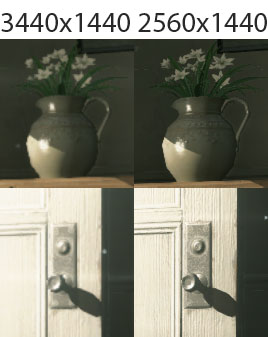
Using Nightbits patcher the difference in image quality is noticeable between 2560x1440 and 3440x1440. I took screenshot comparing at 100% crop during the beginning hospital scene.
- 100% crop
- compare_image2.jpg (38.07 KiB) Viewed 5171 times
Unmodded 2560x1440 looks way sharper and crisp than when modded for 3440x1440. Anyway to fix this?
update: manual hex editing using ekrboi instructions on pg7 resulted with same image quality.
Re: Metal Gear Solid 5: The Phantom Pain- 21:9 support broke
Posted: 02 Jun 2016, 19:46
by K4sh
haruka wrote:Using Nightbits patcher the difference in image quality is noticeable between 2560x1440 and 3440x1440. I took screenshot comparing at 100% crop during the beginning hospital scene.
Unmodded 2560x1440 looks way sharper and crisp than when modded for 3440x1440. Anyway to fix this?
It's best to ask directly in the web forum where you grabed that mod. No ?
Re: Metal Gear Solid 5: The Phantom Pain- 21:9 support broke
Posted: 02 Jun 2016, 19:51
by haruka
K4sh wrote:haruka wrote:Using Nightbits patcher the difference in image quality is noticeable between 2560x1440 and 3440x1440. I took screenshot comparing at 100% crop during the beginning hospital scene.
Unmodded 2560x1440 looks way sharper and crisp than when modded for 3440x1440. Anyway to fix this?
It's best to ask directly in the web forum where you grab that mod. No ?
I used Nightbits patch here on pg54 (
http://www.wsgf.org/forums/viewtopic.ph ... &start=530) in this web forum thread.
Also, tried following K4sh instruction for patching via hex editor on pg.7 by krboi (
http://www.wsgf.org/forums/viewtopic.ph ... 3&start=60).
Same issue with image quality when edited for 3440x1440. Native unmodded 2560x1440 resolution is sharpest. Feels like some graphic settings are ignored or set low when hex editing.
Re: Metal Gear Solid 5: The Phantom Pain- 21:9 support broke
Posted: 02 Jun 2016, 20:03
by K4sh
If i were you, i would try to change the ratio aimed to patch the game exe file.
eg : your calculated ratio is let's say 5.3. Then try lower or raise a little (converted in little endian hexadecimal obviously).
There is no way i can fix it any way via a cheat table.
Re: Metal Gear Solid 5: The Phantom Pain- 21:9 support broke
Posted: 02 Jun 2016, 23:34
by Skylake
Alright so what the hell do I need to do to get Metal Gear Singleplayer to work, I do not care about online. The solutions here are spread out all over I don't know what I need to follow or what is correct. What is the .exe I need to download? How can I get the markers fix?
I Love this page but maybe we should keep the latest updated fixes on the first page, something that is easy to follow.
Thank you to anyone who responds.
Re: Metal Gear Solid 5: The Phantom Pain- 21:9 support broke
Posted: 03 Jun 2016, 02:39
by haruka
K4sh wrote:If i were you, i would try to change the ratio aimed to patch the game exe file.
eg : your calculated ratio is let's say 5.3. Then try lower or higher a little (converted in little endian hexadecimal obviously).
There is no way i can fix it any way via a cheat table.
This thread is pretty long. Is there instruction explaining what calculated ratio are? I don't quite follow. I've only read the instructions to hex edit by krboi.
Re: Metal Gear Solid 5: The Phantom Pain- 21:9 support broke
Posted: 03 Jun 2016, 02:55
by haruka
Guest wrote:I just got this game today and have been having a hard time with getting it running nicely on my 2560x1080 monitor, I've been able to set the 2560x1080 resolution with Nightbits patcher and got the markers to fix using the cheat engine process posted by K4sh, however my main problem is the game doesn't look good running at 2560x1080.
It looks like it is running at a 720p equivalent and being upscaled. I have attached photos showing the difference between 2560 and 1920
I figured it out.
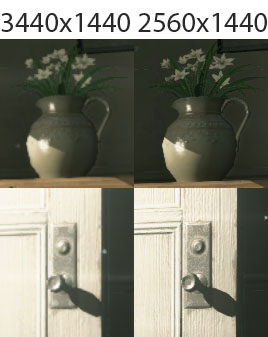
MGSPP defaults to "borderless fullscreen", for some reason the hex edit to support 21:9 introduces degraded image quality like it was upscaled resolution when viewing as 3440x1440. Changing it to another resolution things are crisp and clear again, but you lose 21:9
example 2560x1440 is sharper than 3440.
- compare_image2.jpg (38.07 KiB) Viewed 6399 times
Now if you change the the video to "
Fullscreen" 21:9 is crisp and clear again at full 3440x1440. The problem seems to be with windowed or borderless window mode.
Skylake wrote:Alright so what the hell do I need to do to get Metal Gear Singleplayer to work, I do not care about online. The solutions here are spread out all over I don't know what I need to follow or what is correct. What is the .exe I need to download? How can I get the markers fix?
I Love this page but maybe we should keep the latest updated fixes on the first page, something that is easy to follow.
Thank you to anyone who responds.
Modding for 21:9Read ekrboi post pg7 of this thread (
http://www.wsgf.org/forums/viewtopic.ph ... 3&start=60)
Alternatively if hex editing is to hard, Nightbits patch automates it for you. Read pg 54 (
http://www.wsgf.org/forums/viewtopic.ph ... &start=530)
Needs to be mod/edit again everytime the game updates
Marker fix Read K4sh post pg 72 of this thread (
http://www.wsgf.org/forums/viewtopic.ph ... &start=710)
Needs to be done everytime you load your saved game.
Re: Metal Gear Solid 5: The Phantom Pain- 21:9 support broke
Posted: 16 Jun 2016, 06:07
by beastment
K4sh wrote:Coffinspired wrote:K4sh wrote:Ok,
Here is a brand new cheat table that should work with MGS SP with:
Oddly, it says "invalid table". Error loading LUA.
Hmmm.
You need Cheat Engine latest version 64bits to be used with MGS that is a 64 bits process.
When running Cheat engine, you need to open my cheat table and tell cheat engine which process to be attached to. mgsvtpp.exe obviously.
Then, the cheat table should work flawlessly. I have tested it with latest game update with success.
I'm getting the same LUA error using 64 bit. In fact, I've tried every exe in the cheat engine folder with admin rights, but no luck.
Re: Metal Gear Solid 5: The Phantom Pain- 21:9 support broke
Posted: 03 Jul 2016, 19:43
by onedigita
Ommis wrote:Hi guys!
I'm new here, and created an account just to show you how to fix the resolution and markers. I relied on Ekrboi and Jackfuste to provide me with the completed exe files so I didn't have to do it myself. But when I sat down tonight and really wanted to play the game, they had released a new update (1.0.0.7). Since they hadn't given out the new exe-files, I had to fix it myself. And I was amazed how easy it was! Thanks Jackfuste and Ekrboi!
So I decided to make this post to gather all you need in one place:
1) Download and install Hex editor from here:
http://mh-nexus.de/en/hxd/2) Download and install Cheat Engine from here:
http://www.cheatengine.org/downloads.php3) Download this file:
mgsvtpp_1_007-all.7z
4) Calculate your aspect ratio. Eks: 5760/1080=5.3333333333 (use about 10 decimals to be sure)
Insert that number in the field "value to analyze" here:
http://babbage.cs.qc.cuny.edu/IEEE-754/ In the field behind "Binary 32" you get "40 AA AA AB"
Flip the bytes from right to left and get "AB AA AA 40"
5) Open the Hex editor and open "mgsvtpp.exe"
Hit ctrl+F to search for "39 8E E3 3F" (search for "Hex-value" in the datatype dropbox)
Replace this with your hex. In my example: "AB AA AA 40"
Save the file.
6) Start the game, and alt+tab it.
7) Now open the Cheat Engine and open the "mgsvtpp_1_007-all".
You should see a list of: marker fix, marker size fix, Sonar effect fix, and FOV multiplier
Hit the blinking computer in the upper, left corner. Choose "mgsvtpp.exe" and open.
First value should be changed
from
F3 0F 59 0D BD 76 00 FF
to
F3 0F 59 0D C1 76 00 FF
this fixes marker position
Second value - 64, is size for marker and some ui elements.
Proper value should be calculated by formula:
64 * ((width/height)/1.77777)
For example, 64 * ((5760/1080)/1.77777) = 192.008392
So, 64 should be changed to 192.008392
Third value should be changed
from
F3 44 0F 5E 81 0C 01 00 00
to
F3 44 0F 59 81 0C 01 00 00
this fixes sonar effect.
8) Now alt+tab back to the game, and voilá!

This worked for me, and I really hope that the CT-file works with newer updates as they come out!
If that's the case, this recepie hopefully works everytime
Thanks again Ekrboi and Jackfuste!
I followed this guide and it worked I have single player working but it looks like shit and its not fully 5760 x 1080 looks like a very low resolution but so nice on the wider screen.
will this work on MGS online? and how can I make it a higher resorption so it wont look like shit?
Re: Metal Gear Solid 5: The Phantom Pain- 21:9 support broke
Posted: 11 Jul 2016, 22:33
by Coffinspired
Yeah, the newest update (don't know when it came out)...just re-broke the newest Cheat Table from a page or so back...
Re: Metal Gear Solid 5: The Phantom Pain- 21:9 support broke
Posted: 25 Jul 2016, 10:12
by jafanz
Sorry to bump up this thread but I'm just wondering if it is still possible to play this game in 21:9?
I tried the OP exe files but that crashed my game (3440x1440 exe)
Or if someone could direct me to the correct page that has a working fix that would be great as well.
Thanks in advance
Re: Metal Gear Solid 5: The Phantom Pain- 21:9 support broke
Posted: 25 Jul 2016, 12:31
by blacktronix
Hallo guys,
im new here and i have a question about the enemy marker.
I download a Cheat engine Table and open it
but i cant change the value and i cant active it.
Can anyone help me?
Re: Metal Gear Solid 5: The Phantom Pain- 21:9 support broke
Posted: 25 Jul 2016, 13:09
by K4sh
Can you show here the script content ?
Re: Metal Gear Solid 5: The Phantom Pain- 21:9 support broke
Posted: 27 Jul 2016, 21:03
by Josuejoker
Hi guys, i have a problem with the metal gear v resolution patch. I play with resolution 1280x1024, In the patch I select that resolution and then put "patch" and select the file mgstpp.exe, then says "the file was patched successfully", but when I entered the game the resolution 1280x1024 still appear with black bars above and below. What am I doing wrong?, maybe the resolution patcher is old version?