Page 33 of 72
Post your "Command Centre" Pictures Here
Posted: 08 Oct 2006, 12:01
by ctrlsteef
Skeeder mate, you have done the exact thing i want to do with my screen aswell, place lights behind it. Still haven't found the time to do it though :lol:
Post your "Command Centre" Pictures Here
Posted: 08 Oct 2006, 15:40
by skeeder
I like it. it gives the monitor a threater feel :lol:
Post your "Command Centre" Pictures Here
Posted: 09 Oct 2006, 13:51
by skipclarke
I would watch that speaker behind the monitor on the right though - that could potentially cause damage to the LCD screen :shock:
As noted in many LCD brands' owner's manuals....
Post your "Command Centre" Pictures Here
Posted: 09 Oct 2006, 14:02
by misadlouhy
If you do not mind boys & girls, i will pick all Insiders "command centres" (the best 1 photo) and include them in the gallery. If you do mind, post here better picture OR email it to me, and i will switch them. And, you, others, become insiders, so that you can have your rig's photo in gallery :D. All complains will be answered via PM..... :lol:
Post your "Command Centre" Pictures Here
Posted: 09 Oct 2006, 14:22
by xocomaox
Having those lights on behind my monitor would drive me crazy. I wouldn't be able to handle it.
Post your "Command Centre" Pictures Here
Posted: 09 Oct 2006, 14:34
by skipclarke
misadlouhy,
While this is a generous offer, I strongly suggest that you post this question in the Insider section.
The wait for each person to respond (or not) & only post pics from those that explicitly give you permission.
Post your "Command Centre" Pictures Here
Posted: 09 Oct 2006, 14:35
by misadlouhy
misadlouhy,
While this is a generous offer, I strongly suggest that you post this question in the Insider section.
The wait for each person to respond (or not) & only post pics from those that explicitly give you permission.
allright, lets do it the
l o n g way
Post your "Command Centre" Pictures Here
Posted: 09 Oct 2006, 14:45
by skipclarke
Glad to see that piece of well intentioned friendly advice was so well received :roll:
Post your "Command Centre" Pictures Here
Posted: 09 Oct 2006, 14:57
by misadlouhy
sure it was, thank you m8 :P
Post your "Command Centre" Pictures Here
Posted: 09 Oct 2006, 15:04
by skipclarke
:mrgreen: :nudgenudge
Post your "Command Centre" Pictures Here
Posted: 09 Oct 2006, 16:00
by skeeder
I would watch that speaker behind the monitor on the right though - that could potentially cause damage to the LCD screen :shock:
As noted in many LCD brands' owner's manuals....
you talking about the screen on the right? or the NEC?
Post your "Command Centre" Pictures Here
Posted: 10 Oct 2006, 01:08
by stenchlord
Post your "Command Centre" Pictures Here
Posted: 10 Oct 2006, 07:35
by ctrlsteef
Woohoo, Benq FP202W, Z2300 and Antec P180. You have taste dude. :wink: :lol:
Post your "Command Centre" Pictures Here
Posted: 10 Oct 2006, 07:52
by ctrlsteef
I made a collage of my command centre. :)
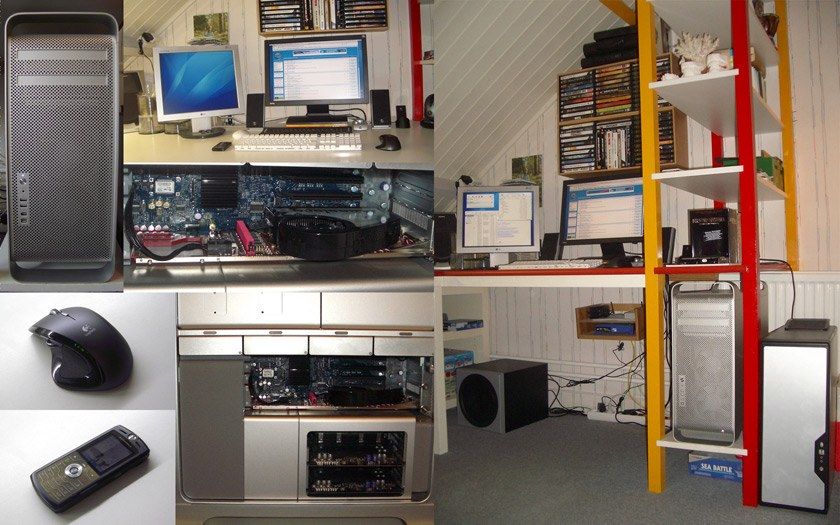
Couple of small changes since my last post. New are the Motorola SLVR, Logitech MX Revolution and the Accelero X2 on the X1900XT in the Mac Pro.
Post your "Command Centre" Pictures Here
Posted: 10 Oct 2006, 10:18
by Paradigm Shifter
How's that Revolution working out for you?
(I nearly bought one on Saturday... :oops:)
Post your "Command Centre" Pictures Here
Posted: 10 Oct 2006, 10:24
by ctrlsteef
Best mouse i EVER used. Perfect form for my hand. The old MX1000 was a little wider which is less comfortable. Also a nice thing is that it glides over my table like an oiled boob on a glass plate. :lol:
Also it works perfectly on OSX although the software is a little less complete then in XP. But it is sufficient for my needs. To bad you didn't buy it, it really is a nice mouse. :)
Post your "Command Centre" Pictures Here
Posted: 10 Oct 2006, 23:42
by Living Ghost
I was going to get one, but it's supposed to suck for gaming.
How is it compaired to a G7?
Post your "Command Centre" Pictures Here
Posted: 11 Oct 2006, 01:19
by g00seberry
....and the Accelero X2 on the X1900XT in the Mac Pro.
What kinda temps are you getting with that? I'm thinking of ordering one myself this week.
Post your "Command Centre" Pictures Here
Posted: 11 Oct 2006, 07:50
by ctrlsteef
I was going to get one, but it's supposed to suck for gaming.
How is it compaired to a G7?
I never used a G7 but i think it's excellent for a medium gamer like myself. Dunno if it's any good for hardcore gamers but i can play UT2004, COD2 and CoH really well with it.
What kinda temps are you getting with that? I'm thinking of ordering one myself this week.
Idle temps are around 40 and load temps after about 2, 2.5 hours of gaming are 70 max. This is in my Mac Pro. I had one in my previous PC aswell which had more airflow and in that rig the temps where around 35 idle and 55 load :shock:
Post your "Command Centre" Pictures Here
Posted: 11 Oct 2006, 11:19
by stenchlord
Woohoo, Benq FP202W, Z2300 and Antec P180. You have taste dude. :wink: :lol:
Well to tell you the truth it's all thanks to you dude. You convinced me to get the FP202W and your review of teh Z2300 had me choose those then the P180B I liked but we'll say it's cause I wanna be like you :P;)