
Multi-Game Widescreen Fixer
Re: Multi-Game Widescreen Fixer
thx from germany :P
Re: Multi-Game Widescreen Fixer
Mate greats on the good work :)
Re: Multi-Game Widescreen Fixer
http://www.youtube.com/watch?v=n-NRTbQMV7o here is a video using Hayden's fix . Dopefish's fix is better though. I'll get a video up tomorrow of Dopefish's fix.
Thanks man .... Your the best !!!!
Thanks man .... Your the best !!!!

Re: Multi-Game Widescreen Fixer
Thanks for all the kind words.
I have updated several plugins for Widescreen Fixer, including the Black Ops plugin.
[Game.BioShock] Changed the way it detects the Steam version.
[Game.Call of Duty 4] Changed the way it detects the Steam version.
[Game.Call of Duty 5] Changed the way it detects the Steam version.
[Game.Call of Duty 6] Changed the way it detects the Steam version.
[Game.Call of Duty Black Ops] Changed the way it detects the Steam version.
[Game.Ghost Recon] Changed the way it detects the Steam version.
[Game.Unreal Tournament 3] Changed the way it detects the Steam version.
Previously, I was doing MD5 checksum verifications to determine whether a user was using retail, steam, etc. versions. This worked fine until I realized that Steam .exe files actually differ from one another; the MD5 checksum is never the same. Because of this I decided to simply check the path instead. It will now check the path of the running .exe file for "steamappscommongame name" and if it matches, it will state the user is using the Steam version. I think this solution is acceptable. The only thing left is to check non-English versions of Steam (are there even non-English versions?). So any user from another country that has their OS set to another language, does your Steam path still contain "steamappscommongame name" or has it been localized? Thanks.
I have updated several plugins for Widescreen Fixer, including the Black Ops plugin.
[Game.BioShock] Changed the way it detects the Steam version.
[Game.Call of Duty 4] Changed the way it detects the Steam version.
[Game.Call of Duty 5] Changed the way it detects the Steam version.
[Game.Call of Duty 6] Changed the way it detects the Steam version.
[Game.Call of Duty Black Ops] Changed the way it detects the Steam version.
[Game.Ghost Recon] Changed the way it detects the Steam version.
[Game.Unreal Tournament 3] Changed the way it detects the Steam version.
Previously, I was doing MD5 checksum verifications to determine whether a user was using retail, steam, etc. versions. This worked fine until I realized that Steam .exe files actually differ from one another; the MD5 checksum is never the same. Because of this I decided to simply check the path instead. It will now check the path of the running .exe file for "steamappscommongame name" and if it matches, it will state the user is using the Steam version. I think this solution is acceptable. The only thing left is to check non-English versions of Steam (are there even non-English versions?). So any user from another country that has their OS set to another language, does your Steam path still contain "steamappscommongame name" or has it been localized? Thanks.
Widescreen Fixer - https://www.widescreenfixer.org/
Widescreen Fixer Twitter - https://twitter.com/widescreenfixer
Personal Twitter - https://twitter.com/davidrudie
Widescreen Fixer Twitter - https://twitter.com/widescreenfixer
Personal Twitter - https://twitter.com/davidrudie


Re: Multi-Game Widescreen Fixer
I would like to get some video footage of the SP campaign with an without dopefish's fix. I want to promote how the community has done what the dev/pub could not do.
If you are able to help with this, please send me a PM.
I uploaded the whole first level to you tube last night (screen capped not video recorded), but it was 15:58 and you tube rejected it after it finished taking 8 hours to upload, now I'm spliting it up, and putting it up again. Although this is without the HUD fix. So I was considering redoing it anyway.
Edit: Infact it won't take long to do a minute or two of play with and without and put them one ontop of another, so I'll do that.
: ) Skid : )
My Multi-Monitor Focused YouTube Channel: http://www.youtube.com/c/SkidIncGaming
My Twitch channel which I've been known to stream on from time to time: http://www.twitch.tv/SkidInc
"Imagination is the only weapon in the war against reality."
My Multi-Monitor Focused YouTube Channel: http://www.youtube.com/c/SkidIncGaming
My Twitch channel which I've been known to stream on from time to time: http://www.twitch.tv/SkidInc
"Imagination is the only weapon in the war against reality."
-
Toothless Spoon
- Insiders

- Posts: 516
- Joined: 01 Sep 2010, 11:38
Re: Multi-Game Widescreen Fixer
Hey Fish, thanks for the fix. It works great. But is it just me or is anyone else have the problem of when a cut scene runs it goes across the left monitor into the middle monitor (mostly on the left). Not a biggy but I found in the prision break out level, when you enter the roof and use the sling shot to take down the 3 targets the cursor is on the left monitor?? Anyone else have this drama? cheers. If this has been addressed dont hate me, as there are 40+ pages to go through. cheers again
起死回生 (kishi kaisei) Wake from death and return to life..
-
g00seberry

- Editors

- Posts: 1317
- Joined: 24 Sep 2006, 16:57
Re: Multi-Game Widescreen Fixer
For those late to the party, I have updated the original post in this thread with a tutorial on how to use Widescreen Fixer. Follow it to the letter before posting a problem! :onethumb
Re: Multi-Game Widescreen Fixer
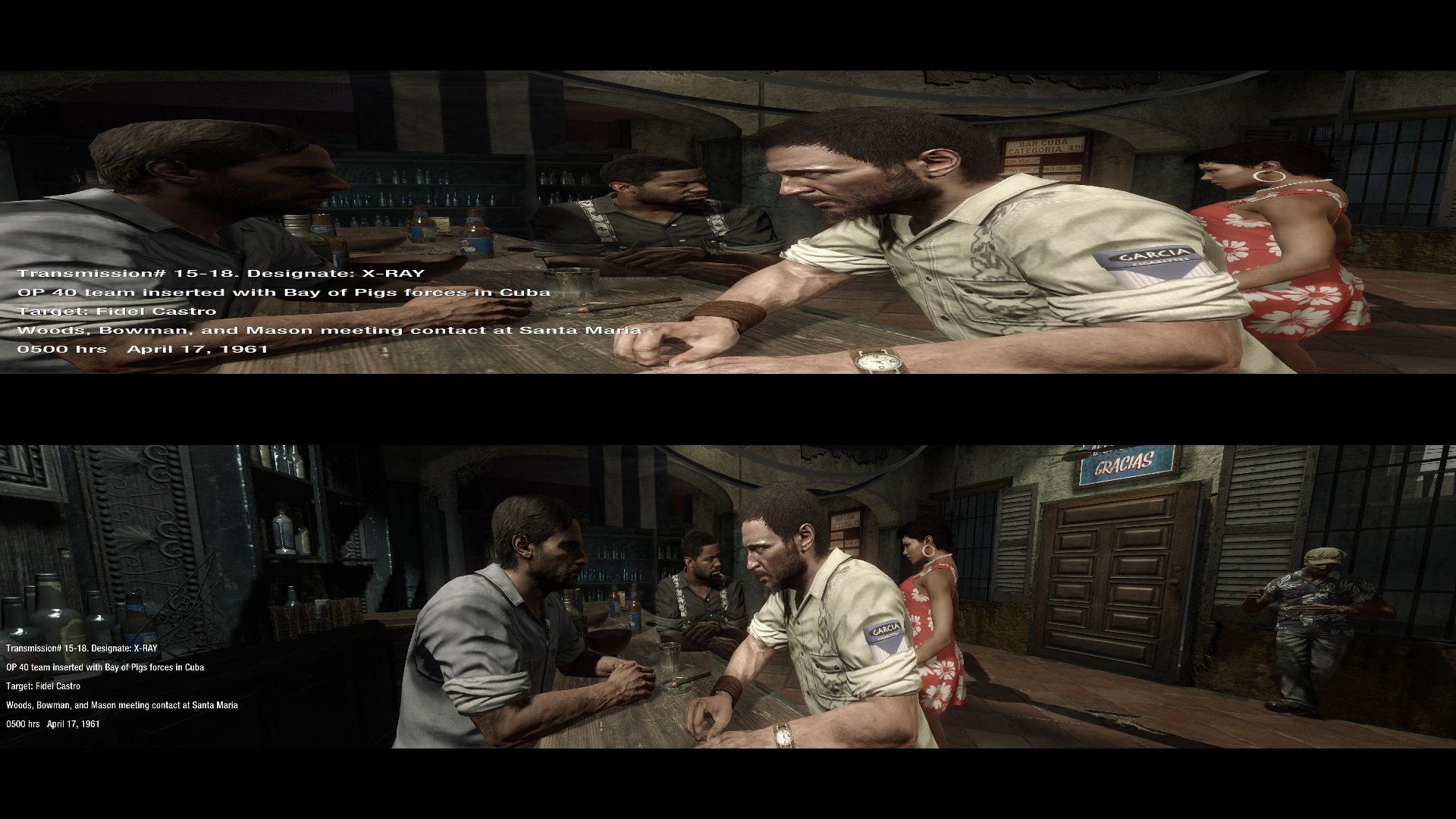
Uploading, 210 minutes left, I'm putting the current title, description and tags below, if you can think of a better ones let me know, I'll also be annotating it since people tend not to read the descriptions.
Title:
Call of Duty: Black Ops [WSFG Fix Comparison] (Triple Monitors / Eyefinity / Surround)
Description:
Comparison between Call of Duty: Black Ops original triple monitor support and while using Widescreen Gaming Forums fix. Original resolution was 5040x1050 via a TripleHead2Go unit, scaled down to 1920x400 to fit on a HQ video, aspect ratio remains the same (48:10). Audio is coming from the bottom video.
Now you might be using a triple screen setup and thinking, mine doesn't look like that, that's because treyarch didn't code proper support in for it. However fear not, my wonderful friends at http://www.widescreengamingforum.com , namely HaYDeN, did in 20 minutes what treyarch failed to do in over a year of development. Dopefish then attached the fix to his Multi-game Widescreen Fixer and also put in a fix so the HUD is scaled correctly and centralised.
Word to the wise, this is counted as a hack, so using it in MP could get you banned, until Activision or Steam say otherwise use it in multiplayer at your own risk.
Tags:
Call of Duty Black Ops cod:bo Eyefinity Surround triple monitor th2g TripleHead2Go
: ) Skid : )
My Multi-Monitor Focused YouTube Channel: http://www.youtube.com/c/SkidIncGaming
My Twitch channel which I've been known to stream on from time to time: http://www.twitch.tv/SkidInc
"Imagination is the only weapon in the war against reality."
My Multi-Monitor Focused YouTube Channel: http://www.youtube.com/c/SkidIncGaming
My Twitch channel which I've been known to stream on from time to time: http://www.twitch.tv/SkidInc
"Imagination is the only weapon in the war against reality."
Re: Multi-Game Widescreen Fixer
For those late to the party, I have updated the original post in this thread with a tutorial on how to use Widescreen Fixer. Follow it to the letter before posting a problem! :onethumb
Thanks! That's a much needed update on instructions. It's something I've been putting off in hopes of making it easier in the application itself. Now what I really need to do is get a proper site design going so it's not as cluttered, messy, or bare.
But is it just me or is anyone else have the problem of when a cut scene runs it goes across the left monitor into the middle monitor (mostly on the left).
I have received an email mentioning this, too.
Not a biggy but I found in the prision break out level, when you enter the roof and use the sling shot to take down the 3 targets the cursor is on the left monitor??
I haven't actually played SP yet. The first thing I did when the game unlocked was create a fix for it, and then played a little bit of MP. When I get a chance I'll do a playthrough of SP and see if I can fix individual problems that stand out case-by-case.
I'll look into these after I get some morning coffee. :)
Another thing I want to look into is the text in SP. I noticed in the screenshot by Skid that the text is on the left screen. I believe this also happened in Call of Duty 4 and up. Since I do not actually have three monitors (I have to borrow the extras from time to time), I can't replicate the issue with the text position. I'll also look into this.
Widescreen Fixer - https://www.widescreenfixer.org/
Widescreen Fixer Twitter - https://twitter.com/widescreenfixer
Personal Twitter - https://twitter.com/davidrudie
Widescreen Fixer Twitter - https://twitter.com/widescreenfixer
Personal Twitter - https://twitter.com/davidrudie
Re: Multi-Game Widescreen Fixer
But is it just me or is anyone else have the problem of when a cut scene runs it goes across the left monitor into the middle monitor (mostly on the left).
yes i am also. also having multiplayer issue where i have to point my mouse over menu selection and hit return key to actually select it. also when entering a server from the browser while its loading the aspect ratio switches really fast back and forth between the fixed and the norm while loading into the server. not a big problem just saying. btw thanks for your continued hard work and support of these games
Re: Multi-Game Widescreen Fixer
Hey there , With the Black Ops 1.3 update when I download and get the .dll dropped into the widescreen icon and I go look at it ... it still says version 1.0 :-/
Re: Multi-Game Widescreen Fixer
The version number of the plugin isn't really shown anywhere inside of Widescreen Fixer. The version number you see in Widescreen Fixer is the game version (I'm just guessing it's 1.0).
Widescreen Fixer - https://www.widescreenfixer.org/
Widescreen Fixer Twitter - https://twitter.com/widescreenfixer
Personal Twitter - https://twitter.com/davidrudie
Widescreen Fixer Twitter - https://twitter.com/widescreenfixer
Personal Twitter - https://twitter.com/davidrudie
Re: Multi-Game Widescreen Fixer
could someone help me? when i use widescreenfixer for black ops the hud is centered and menus are look great but the game is still stretched. did i put something wrong? i used 3x 16:10 for settings. hayden's fix works for me but the hud isnt centered
Re: Multi-Game Widescreen Fixer
could someone help me? when i use widescreenfixer for black ops the hud is centered and menus are look great but the game is still stretched. did i put something wrong? i used 3x 16:10 for settings. hayden's fix works for me but the hud isnt centered
Interesting. Is Steam the only way to use Black Ops? What country are you in? Could you send me your .exe files? Does it not work for both SP and MP?
Widescreen Fixer - https://www.widescreenfixer.org/
Widescreen Fixer Twitter - https://twitter.com/widescreenfixer
Personal Twitter - https://twitter.com/davidrudie
Widescreen Fixer Twitter - https://twitter.com/widescreenfixer
Personal Twitter - https://twitter.com/davidrudie
-
Mach1.9pants

- Insiders
- Posts: 1512
- Joined: 29 Jul 2007, 05:24
- Location: NZ
Re: Multi-Game Widescreen Fixer
Thanks again for such an excellent fix.
I guess these "Call of Duty" guys think so much of your work they don't even bother to fix their own game.
Once I loaded the game today the first place I came was over here to see if there was an update so I could play the game in Surround.
Your Fixer works flawlessly.....awesome job man, awesome.
I guess these "Call of Duty" guys think so much of your work they don't even bother to fix their own game.
Once I loaded the game today the first place I came was over here to see if there was an update so I could play the game in Surround.
Your Fixer works flawlessly.....awesome job man, awesome.
Re: Multi-Game Widescreen Fixer
[quote]But is it just me or is anyone else have the problem of when a cut scene runs it goes across the left monitor into the middle monitor (mostly on the left).
yes i am also. also having multiplayer issue where i have to point my mouse over menu selection and hit return key to actually select it. also when entering a server from the browser while its loading the aspect ratio switches really fast back and forth between the fixed and the norm while loading into the server. not a big problem just saying. btw thanks for your continued hard work and support of these games
Same here on my end
-
Toothless Spoon
- Insiders
- Posts: 516
- Joined: 01 Sep 2010, 11:38
Re: Multi-Game Widescreen Fixer
Cheers for the fast reply Fish, like I said it isnt a big deal just thought if you wanted to know. I am also having the same issue with some of the other cats in here with the multiplayer menu. It doesnt like your fix, I found that if I switch it off to get into the server browser select a game etc then turn it on in game. Just have to make sure it's off in the menu screen because it doesnt let me select anything. BUT I did see that one of the other guys has had success using the return key to select. It's kinda a weird bug, but again I can work around it. Just add it to the list :P cheers again.
起死回生 (kishi kaisei) Wake from death and return to life..
Re: Multi-Game Widescreen Fixer
[quote]could someone help me? when i use widescreenfixer for black ops the hud is centered and menus are look great but the game is still stretched. did i put something wrong? i used 3x 16:10 for settings. hayden's fix works for me but the hud isnt centered
Interesting. Is Steam the only way to use Black Ops? What country are you in? Could you send me your .exe files? Does it not work for both SP and MP?
havent tried sp only mp. what exe files do you need? you can pm me an address to mail it to. currently the only way i made it work properly is to use haydens to load it up and yours to get the hud to the middle. im in canada.
Edit: dont know if this affects anything but my game was activated way way too early i think.. i somehow was able to play the game when it said 18hrs left on steam

Re: Multi-Game Widescreen Fixer
Awesome job as usual dopefish, it works perfectly fine here. :cheers
Who is online
Users browsing this forum: No registered users and 0 guests