Page 4 of 44
Re: Metal Gear Solid 5: The Phantom Pain- 21:9 support broke
Posted: 02 Sep 2015, 14:11
by cloudkake
So ive just had the update, it did break the modified .exe as you would expect but just rename or delete the .exe after the update and repaste the mod one back into the game folder, its working fine again. Hope this helps.
AND THANK YOU JACK!!!!!!
Re: Metal Gear Solid 5: The Phantom Pain- 21:9 support broke
Posted: 02 Sep 2015, 14:30
by wallacefu
For the Steam updated EXE, use a hex editor to replace "39 8E E3 3F" with desired value as author indicated, it will work again. The only issue I have now (as others) is the enemy indicator misplacement. Hope some genius here can figure it out for us, thanks again.
Re: Metal Gear Solid 5: The Phantom Pain- 21:9 support broke
Posted: 02 Sep 2015, 14:57
by drojman
Hi all, I updated the new EXE to work at 3440x1440 and 2560x1080.
Here's the links:
http://www.mediafire.com/download/4ikch ... p+2560.rarhttp://www.mediafire.com/download/leiqc ... p+3440.rarRemember to remove the numbers from the EXE file so it just reads mgsvtpp!
Re: Metal Gear Solid 5: The Phantom Pain- 21:9 support broke
Posted: 02 Sep 2015, 15:55
by BIGGRIMTIM
Thanks for the fix. Now I can give this a try. I was going to wait until it was fixed before starting. Well there goes my weekend.
Re: Metal Gear Solid 5: The Phantom Pain- 21:9 support broke
Posted: 02 Sep 2015, 16:51
by Hooligaani
Is there a tutorial for editing these exe files? I've noticed a few of them are now obselete (Ass Creed IV for example) so I wouldn't mind learning how to make my own. Recomended HEX editor, things like that.
In the meantime thanks again for the updated fix.
Re: Metal Gear Solid 5: The Phantom Pain- 21:9 support broke
Posted: 02 Sep 2015, 17:35
by elven
Specially signed up for an account to thanks jackfuste.
your file work like a charm. You have successfully make the game an enjoyment.
Playing it in 21:9, watching the cinematic in 21:9...excellent.
Thank you very much. Kudos.
Re: Metal Gear Solid 5: The Phantom Pain- 21:9 support broke
Posted: 02 Sep 2015, 17:56
by Towbie
sir biscuit wrote:badassmofo wrote:After about 5 hours of playing, I can honestly say that the map marker problem is so annoying.
I wonder if it's fixable by the community. The map markers are possibly positioned based on the default FOV and screen ratio. I know nothing about finding these hex values and stuff, or even if that is how map markers are position though. But seeing as thought changing the ratio messes them up, it's a possibility.
I doubt that the devs will fix this if they didn't even support these resolutions to begin with. Any thoughts, anyone?
Well I tried your .exe file to get 5760 x 1080 , but it still only works as if it is 1920 x 1080 . I'm at the point where you're on horseback & about to go to the first outpost .
I have this exact issue. Game keeps treating 5760 x 1080 as 1920x1080 without being spread out over the three monitors whilst 1920x1080 gets spread out over all three monitors. Is there any way to fix it?
Re: Metal Gear Solid 5: The Phantom Pain- 21:9 support broke
Posted: 02 Sep 2015, 18:10
by ekrboi
Hooligaani wrote:Is there a tutorial for editing these exe files? I've noticed a few of them are now obselete (Ass Creed IV for example) so I wouldn't mind learning how to make my own. Recomended HEX editor, things like that.
In the meantime thanks again for the updated fix.
I use HxD since it is free (there is a portable version that doesn't require an install).
http://mh-nexus.de/en/downloads.php?product=HxDStep 1. Open HxD and drag mgsvtpp.exe into it (or open with file -> open file)
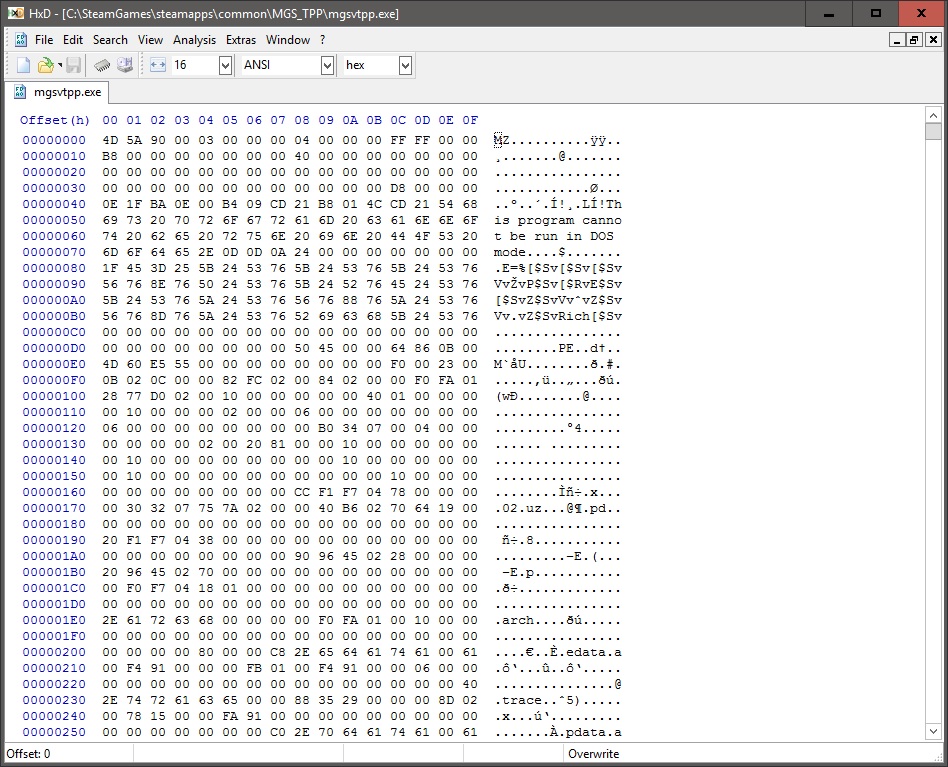
- step1.jpg (246.12 KiB) Viewed 14200 times
Step 2. Press ctrl+f to open find (or Search -> find) then change Datatype to "Hex-values" and search for "39 8E E3 3F"
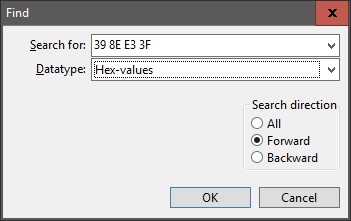
- step2.jpg (20.7 KiB) Viewed 14139 times
Step 3. "39 8E E3 3F" will be highlighted simply hit the left arrow key until you get to 39 and replace with the value for your aspect ratio. Don't delete or anything just move to 39 and start typing, it will replace as you go. (5760x1080 = AB AA AA 40 / 3440x1440 = 8E E3 18 40 / 2560x1080 = 26 B4 17 40)
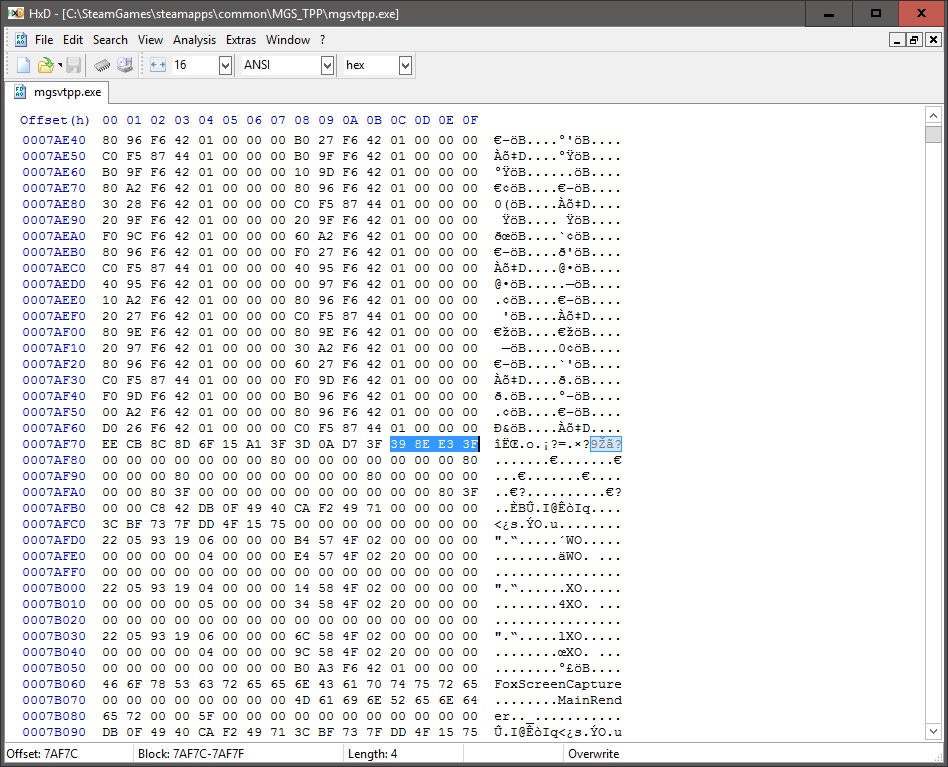
- step3.jpg (251.51 KiB) Viewed 14040 times
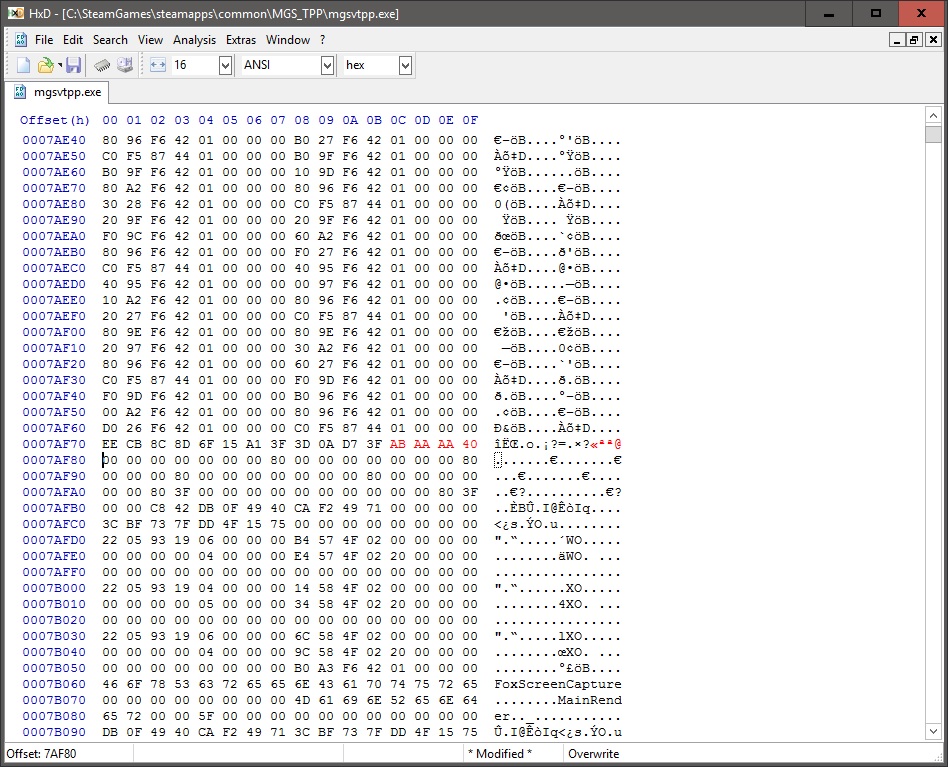
- step4.jpg (249.93 KiB) Viewed 13576 times
Step 4. Press ctrl+s to save (or press the floppy disc icon) it will automatically save a backup of the original as mgsvtpp.exe.bak in the original folder.
Step 5. ENJOY!
Hope that helps some people.. I'm a little concerned of the legalities of uploading/posting the modified exe's so hopefully others can follow the guide and get it working.
Re: Metal Gear Solid 5: The Phantom Pain- 21:9 support broke
Posted: 02 Sep 2015, 20:49
by GooglyBear
Thanks Ekrboi! That was a huge help. The game looks beautiful running at 5760 x 1080. I have no idea why they wouldn't support that resolution natively.
Now I'm just crossing my fingers someone who knows more about this stuff can figure out the targeting icons.
Re: Metal Gear Solid 5: The Phantom Pain- 21:9 support broke
Posted: 03 Sep 2015, 00:23
by Scarnecedor
ekrboi tnx !!!!
A DOUBT like to take these values to( 2560x1080 = 26 B4 17 40) are standard for all games?
EDIT: Values not found
Re: Metal Gear Solid 5: The Phantom Pain- 21:9 support broke
Posted: 03 Sep 2015, 03:26
by ColdSun
Scarnecedor wrote:ekrboi tnx !!!!
A DOUBT like to take these values to( 2560x1080 = 26 B4 17 40) are standard for all games?
EDIT: Values not found
Values not found? You sure you're searching for hex values?
Re: Metal Gear Solid 5: The Phantom Pain- 21:9 support broke
Posted: 03 Sep 2015, 08:16
by valcan_s
Just wanted to say thanks ekrboi a massive thank you for the HEX fix works perfectly in 5760x1080.
Man it looks crazy good.
Re: Metal Gear Solid 5: The Phantom Pain- 21:9 support broke
Posted: 03 Sep 2015, 10:23
by richardsim7
Any chance of a 3840x1645 fix for thsoe of us emulating 21:9 on a 4K monitor?

Re: Metal Gear Solid 5: The Phantom Pain- 21:9 support broke
Posted: 03 Sep 2015, 10:56
by Cemong
GooglyBear wrote:Thanks Ekrboi! That was a huge help. The game looks beautiful running at 5760 x 1080. I have no idea why they wouldn't support that resolution natively.
Now I'm just crossing my fingers someone who knows more about this stuff can figure out the targeting icons.
anyone ? id like to know also, how to fix the messed up targeting icons
Re: Metal Gear Solid 5: The Phantom Pain- 21:9 support broke
Posted: 03 Sep 2015, 11:04
by Toothless Spoon
I've whizzed through the comments - are the markers and issue?
Re: Metal Gear Solid 5: The Phantom Pain- 21:9 support broke
Posted: 03 Sep 2015, 11:39
by KillingArts
Toothless Spoon wrote:I've whizzed through the comments - are the markers and issue?
yes, they are definitely an issue. it's super annoying. often the only way to tell whether a marker belongs to a guy you see is to center the guy on the screen. it's really not optimal.
Re: Metal Gear Solid 5: The Phantom Pain- 21:9 support broke
Posted: 03 Sep 2015, 12:49
by Scarnecedor
game not open...
i change the values, the game does not recognize the exe after amendment of the program
Re: Metal Gear Solid 5: The Phantom Pain- 21:9 support broke
Posted: 03 Sep 2015, 13:05
by Colinrus28
another patch just came out,it seems they are patching it daily.
Re: Metal Gear Solid 5: The Phantom Pain- 21:9 support broke
Posted: 03 Sep 2015, 14:28
by Scarnecedor
new patch... and no fix official

Re: Metal Gear Solid 5: The Phantom Pain- 21:9 support broke
Posted: 03 Sep 2015, 15:29
by upador123

