Page 4 of 5
Command & Conquer 3 Tiberium Wars
Posted: 17 Aug 2008, 16:50
by GeneralAdmission
I'd assume what he's got is basically the same as ZoomMapMod so it's already available as a download.
ZoomMapMod might help some for a Triplehead setup, but based on the pic posted earlier in this thread it seems that the CnC3 version of the SAGE engine still cuts down on Vertical resolution
severely the wider the aspect ratio. Hence that TH screenshot shows nearly a 50% loss in vertical FOV. For my BFME2 mod I have to implement a different and more complex combination of tweaks to recover more FOV, which is why I am releasing separate versions for widescreen and triplehead (
see sample pics here for TH). It looks like CnC3 needs the same thing, so hopefully Uarepoo2 can share his solution.
Additionally, for BFME2 shadow draw distance settings and sound fx pickup also need fixing to work with the new camera. CnC might require similar tweaks.
Command & Conquer 3 Tiberium Wars
Posted: 15 Oct 2008, 06:13
by geniv2
ahh man...
I just got my Th2g and this is THE GAME I was hoping to play in triplehead :(
Command & Conquer 3 Tiberium Wars
Posted: 15 Oct 2008, 08:15
by GeneralAdmission
ahh man...
I just got my Th2g and this is THE GAME I was hoping to play in triplehead :(
If you are up to spending lots of free time, you can probably fix the game to work better in triplehead. That's what I'm doing with BFME2 (see link in sig).
It looks like EA is starting to address aspect/FOV needs in their RTS games, which is good, but CnC3's implementation seems a bit...funky.
Command & Conquer 3 Tiberium Wars
Posted: 02 Nov 2009, 20:48
by Skid
I've quickly tested CnC3 with my TH2Go and taken some screenshots, in order to get them working the configuration file needs changing in the applications data folder, mine is here: C:UsersSkidAppDataRoamingCommand & Conquer 3 Tiberium WarsProfilesNathanSkidmore.
Here are the screen shots:
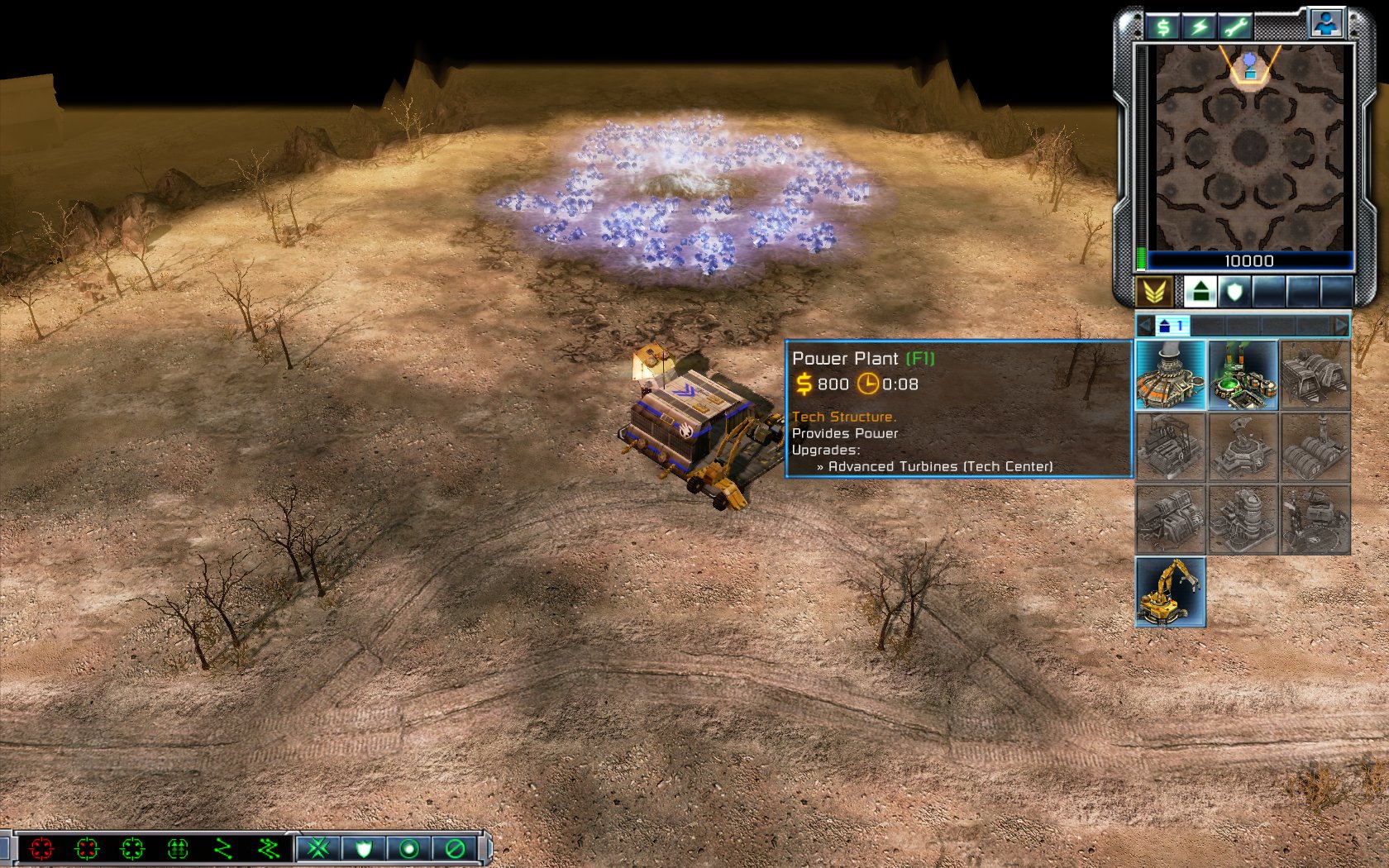
1680x1050 (For comparson)
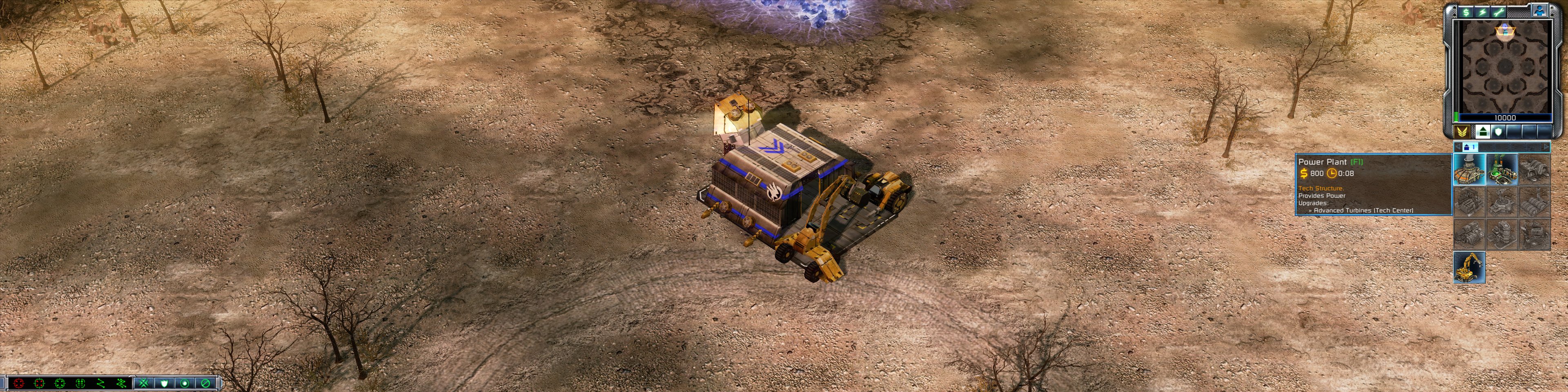
3840x960 (3 x 4:3)
5040x1050 (3 x 16:10)
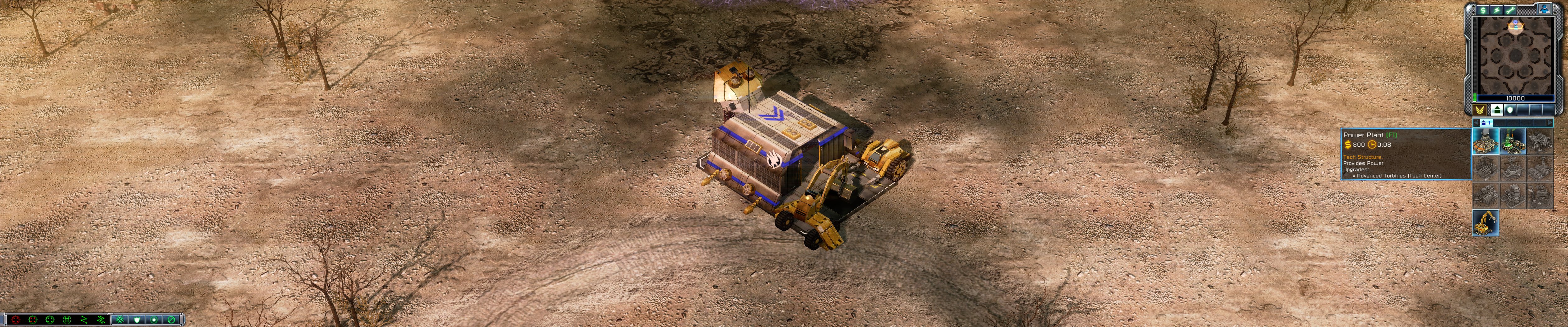
As you can see the game doesn't fix the FOV making is almost unplayable at TH resolutions, however, it is possible to fix this with the zoommapmod, http://www.moddb.com/mods/zoommapmod
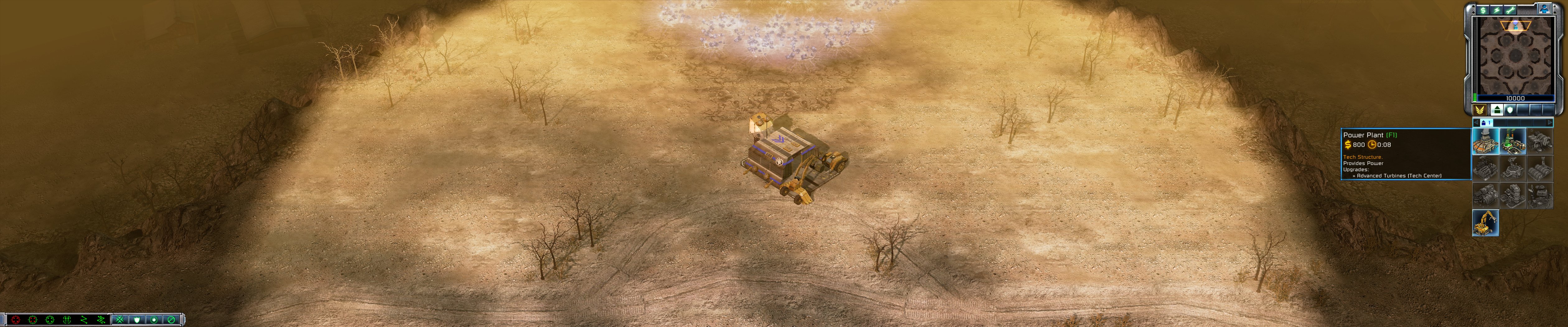
This is the result:
5040x1050 (ZoomMapMod)
Command & Conquer 3 Tiberium Wars
Posted: 02 Nov 2009, 21:05
by The_cranky_hermit
Does that mod actually zoom out, or does it just raise the camera height?
Command & Conquer 3 Tiberium Wars
Posted: 02 Nov 2009, 21:13
by Skid
According to the mods creator it alters the Max Zoom data on every map, however I just checked with it both enabled and disabled it does extend the zoom range. It was originally intended just to help on normal resolutions but it has the advantage of fixing TH resolutions, well almost it makes it playable at least.
Command & Conquer 3 Tiberium Wars
Posted: 02 Nov 2009, 23:44
by The_cranky_hermit
But what does Max Zoom actually mean? Is it really zoom, or is it actually the camera distance?
Command & Conquer 3 Tiberium Wars
Posted: 03 Nov 2009, 00:03
by Skid
From what I can tell every map has a setting in it that is being refered to as Max Zoom, that setting defines how far out you can zoom the camera with the mouse wheel.
At least thats what it says on the mods description here:
http://www.moddb.com/mods/zoommapmod
It also says that "Since the game saves carry the Max Zoom data you can't load old saves and expect them to zoom out more! You must play new games or load from "theatre saves" (those are the parts of the game where you stare at the global maps with next mission points highlighted)"
Command & Conquer 3 Tiberium Wars
Posted: 03 Nov 2009, 00:05
by The_cranky_hermit
Then it's not really zooming. Mouse wheel controls the camera height, which is different from zooming.
Command & Conquer 3 Tiberium Wars
Posted: 03 Nov 2009, 00:08
by Skid
Everyone I know would call that in an RTS zooming into and out of the map, Supreme Commander also refereed to there system as full strategic zoom. But now your arguing over wording, it does the job doesn't it, IE mostly fixes the FOV issue on TH resolutions.
Command & Conquer 3 Tiberium Wars
Posted: 03 Nov 2009, 02:08
by Downtown1
The problem is just doing that will still mess with the LOD of the game. So you can "zoom out" to the same as a 4:3 aspect ratio but you will notice the graphics look a lot worse or are missing some detail.
Command & Conquer 3 Tiberium Wars
Posted: 03 Nov 2009, 03:04
by The_cranky_hermit
But now your arguing over wording, it does the job doesn't it, IE mostly fixes the FOV issue on TH resolutions.
No, it doesn't do the job. It might make the game more playable, but increasing camera distance isn't the same as increasing FOV - TH will still have a very low FOV and will not be hor +.
Here's some info on the distinction:
http://www.widescreengamingforum.com/wiki/index.php/Comparison_of_dolly_and_zoom
Command & Conquer 3 Tiberium Wars
Posted: 03 Nov 2009, 08:39
by Skid
Arr I see, still that guys mod is better then nothing at all, short of expecting EA to sort it out on there own. But anyway I was just trying to provide the missing information in the DR, and while I was at it I figgered I would see the effect of the mod posted on the last page.
Re: Command & Conquer 3 Tiberium Wars
Posted: 17 Feb 2010, 23:18
by SkyQuake
Hi Guys,
Can I get an update on this please?
I've just reinstalled CNC3 prior to the release of CNC4 for a little mammoth tank carnage action and was hoping to get it running nicely with the new TH2G. However, after installing, playing and finding this topic, I've now decided it's more or less unplayable in TH.
I was just hoping that one of you guys might have found a decent solution to EA's incompetance? I've tried ZoomMapMod, and it doesn't do anything for me. Any other ideas?
Many thanks,
Re: Command & Conquer 3 Tiberium Wars
Posted: 17 Feb 2010, 23:55
by GeneralAdmission
I've tried ZoomMapMod, and it doesn't do anything for me. Any other ideas?
Does that mean the mod simply doesn't work for you? If so, there must be a problem somewhere.
FYI- I haven't played CnC3 or used the mod, but I am familiar with the engine.
Re: Command & Conquer 3 Tiberium Wars
Posted: 18 Feb 2010, 23:43
by SkyQuake
Hi GeneralAdmission,
Yeah, I launch the mod from the game browser, as instructed, and nothing seems different in game. I'm certainly not able to zoom out any further.
All the mod files are in the correct directory, and they are detected by the game browser, so that seems fine. I wonder if it's a Win7 thing, what with my docs being in a different directory to normal.
Re: Command & Conquer 3 Tiberium Wars
Posted: 19 Feb 2010, 00:13
by GeneralAdmission
I wonder if it's a Win7 thing, what with my docs being in a different directory to normal.
That is a good guess and might be worth a little tinkering. Unfortunately I don't have Win7 so I'm not sure where to start. I know from modding experience on a previous game (BFMEII) that it only takes one thing out of place to cause all sorts of issues or render the game/mod non-functional.
Re: Command & Conquer 3 Tiberium Wars
Posted: 23 Feb 2010, 20:43
by SkyQuake
Ok, I've managed to open the zoommapmod.big file in a large text viewer to try and determine if the file directories of the maps themselves are where the mod thinks they are. However, the file locations are incomplete, and start from (some random code symbols)datamapsofficialblah blah. Obviously this is because my text viewer doesn't entirely recognise the language this is written in, or I'm too much of a coding lightweight to know what I'm looking at!
That said, I can't find the .map files anywhere in my cnc3 directory (or my docs, or appdata). Any ideas where they should be?
Cheers
Re: Command & Conquer 3 Tiberium Wars
Posted: 23 Feb 2010, 20:58
by GeneralAdmission
You're on the right track. Try this tool to open the .big file and compare things:
FinalBIG
Re: Command & Conquer 3 Tiberium Wars
Posted: 24 Feb 2010, 20:00
by SkyQuake
GA,
Thanks for that. Still no joy though. I've compared the locations for the ZoomMapMod.big data entities with that of the CNC3 SPMaps.big and all of the PatchX.big(s). It all looks good.
I also tried adding the ZoomMapMod.big into the cnc3 directory and altering the CNC3_english_1.9.skudef file to add the ZoomMapMod.big last of all, to make sure it is active every time, and still the game looks like this!

Can anyone tell me how you modify each map's maximum zoom height individually?
Cheers,