

Metal Gear Solid 5: The Phantom Pain- 21:9 support broken FI
Re: Metal Gear Solid 5: The Phantom Pain- 21:9 support broke
Hey guys, now Metal Gear Online is live! And we need a new fix to 1.0.7.1 and for the Metal Gear Online! Ultrawide this game!
Re: Metal Gear Solid 5: The Phantom Pain- 21:9 support broke
Yes need fix to MGO
Re: Metal Gear Solid 5: The Phantom Pain- 21:9 support broke
The aspect ratio fix works perfectly for me, but none of the cheat engine fixes are working. I tried using the trainer and the tables. It's possible that I'm just using the tools wrong, but pressing F1 while in-game isn't doing anything, and activating all of the table values isn't changing anything either.
I also have one question about the aspect ratio fix, does it only work in fullscreen, or is there a way to modify the resolution on borderless windowed?
I also have one question about the aspect ratio fix, does it only work in fullscreen, or is there a way to modify the resolution on borderless windowed?
Re: Metal Gear Solid 5: The Phantom Pain- 21:9 support broke
For people like me that just don't give a f... about MGO you can quite prevent the game from updating automatically.
In steam settings/downloads, simply schedule the auto updating to process let's say from 4am to 5am at the minimum speed (16kB/s).
You should be normally sleeping that time and prevent any future update.
Set the game as well in its own properties to only update while starting it (juste to ensure the whole trick to work).
And if, for some reason, the game would start to update then simply stop the process.
Obviously, this will affect other games and you may have to manually update them.
As soon as any new hack is available simply revert this setting back.
I know it's not perfect but at least that prevented my game from updating to latest version.
In steam settings/downloads, simply schedule the auto updating to process let's say from 4am to 5am at the minimum speed (16kB/s).
You should be normally sleeping that time
and prevent any future update.Set the game as well in its own properties to only update while starting it (juste to ensure the whole trick to work).
And if, for some reason, the game would start to update then simply stop the process.
Obviously, this will affect other games and you may have to manually update them.
As soon as any new hack is available simply revert this setting back.
I know it's not perfect but at least that prevented my game from updating to latest version.
-
KrysCrannor
- Posts: 1
- Joined: 15 Jan 2016, 22:30
Re: Metal Gear Solid 5: The Phantom Pain- 21:9 support broke
you can still play mgo with the patch you can find in the first post.
Just move mgsvtpp.exe out of its directory temporarely and rename mgsvmgo.exe as mgsvtpp.exe.
Now run the patch. When the process is completed, rename mgsvtpp.exe as mgsvmgo.exe and move the original mgsvtpp.exe in its directory again.
Just move mgsvtpp.exe out of its directory temporarely and rename mgsvmgo.exe as mgsvtpp.exe.
Now run the patch. When the process is completed, rename mgsvtpp.exe as mgsvmgo.exe and move the original mgsvtpp.exe in its directory again.
Re: Metal Gear Solid 5: The Phantom Pain- 21:9 support broke
update the patch to 7860x1080 please version 1.7.1 or 1.7.0 
Re: Metal Gear Solid 5: The Phantom Pain- 21:9 support broke
great works perfect in 7860x1080p thank you very much for your work, but when I select 7860x1080 in game, only it is shown on the center display "2560x1080"
Re: Metal Gear Solid 5: The Phantom Pain- 21:9 support broke
Great work it works but only for singleplayer. For some reason MGO Beta doesn't want to launch.
Re: Metal Gear Solid 5: The Phantom Pain- 21:9 support broke
I am running 7680x1440 and it doesn't work, but my resolutions is in the menu.
i7 4930k @ 4.5 Ghz with Quad R9 290x (Everything watercooled)
Triple 1440p monitors (middle is 4k but is ran in 1440p)
Triple 1440p monitors (middle is 4k but is ran in 1440p)
-
zergslayer69
- Posts: 2
- Joined: 19 Jan 2016, 00:16
Re: Metal Gear Solid 5: The Phantom Pain- 21:9 support broke
Great stuff, the widescreen actually works. However graphics res is showing 1920x1080 in options and I can see that the res is definitely blurrier than it should be. I patched it to 3440x1440.
Edit: Silly me has to fullscreen before i see the new options.
Edit: Silly me has to fullscreen before i see the new options.
Last edited by zergslayer69 on 20 Jan 2016, 02:09, edited 1 time in total.
Re: Metal Gear Solid 5: The Phantom Pain- 21:9 support broke
Hi NightBits,
The patcher crashed on me when I run it. Is there any specific steps to apply the patcher?
[Update] Just checked your previous post. Seems like 5760x1080 resolution is not in the list of supported resolutions, so I guess that's why -_-
The patcher crashed on me when I run it. Is there any specific steps to apply the patcher?
- MGSV Patcher crashed
- MGSV Patcher Crash.jpg (72.64 KiB) Viewed 35277 times
[Update] Just checked your previous post. Seems like 5760x1080 resolution is not in the list of supported resolutions, so I guess that's why -_-

Re: Metal Gear Solid 5: The Phantom Pain- 21:9 support broke
NOOOOOOOOOOOOOO!!!!
The 1.071 updates seems to have broken jackfuste's Marker Fixer.
Whenever I try to activate the fix, MGSV crashes.
Can anyone else confirm?
This is killing me!!
The 1.071 updates seems to have broken jackfuste's Marker Fixer.
Whenever I try to activate the fix, MGSV crashes.
Can anyone else confirm?
This is killing me!!
Gigabyte GTX 980 - SLI
i7-4770k @4ghz
16GB Ram
Planar SA2311W 3D Vision monitors (x3)
Windows 7 x64 Ultimate SP1
i7-4770k @4ghz
16GB Ram
Planar SA2311W 3D Vision monitors (x3)
Windows 7 x64 Ultimate SP1

Re: Metal Gear Solid 5: The Phantom Pain- 21:9 support broke
Update for v. 1.0.7.1
For 4:3 (800x600, 1024x768 etc.)
mgsvtpp.7z
For 5:4 (1280x1024)
mgsvtpp.7z
For 2560x1080
mgsvtpp.7z
For 3440x1440
mgsvtpp.7z
For 48:10 (5040x1050; 5760x1200 etc.)
mgsvtpp.7z
For 48:9 (4800x900; 5760x1080 etc.)
mgsvtpp.7z
Markers fix:
For 2560x1080; 3440x1440
21_9_marker_fix_1_071.7z
For triple 16:9 screen 11520x2160; 5760x1080; 4800x900 etc.
48_9_marker_fix_1_071.7z
For triple 16:10 screen 5760x1200; 5040x1050 etc.
48_10_marker_fix_1_071.7z
Cheat Engine table:
mgsvtpp_1071.7z
First value should be changed
from
F3 0F 59 0D 83 8A FB FE
to
F3 0F 59 0D 87 8A FB FE
this fixes marker position.
Second value - 64, is size for marker and some ui elements.
Proper value should be calculated by formula:
64 * ((width/height)/1.77777)
For example, 64 * ((6000/1080)/1.77777) = 200.00087
So, 64 should be changed to 200.00087
Third value should be changed
from
F3 0F 5E A9 0C 01 00 00
to
F3 0F 59 A9 0C 01 00 00
this fixes sonar effect.
Fourth value should be changed
from
F3 0F 5E AA 0C 01 00 00
to
F3 0F 59 AA 0C 01 00 00
this fixes wind effect in the desert.
FOV Tool:
MGSTPP_FOV_1_071.7z
For 4:3 (800x600, 1024x768 etc.)
mgsvtpp.7z
For 5:4 (1280x1024)
mgsvtpp.7z
For 2560x1080
mgsvtpp.7z
For 3440x1440
mgsvtpp.7z
For 48:10 (5040x1050; 5760x1200 etc.)
mgsvtpp.7z
For 48:9 (4800x900; 5760x1080 etc.)
mgsvtpp.7z
Markers fix:
For 2560x1080; 3440x1440
21_9_marker_fix_1_071.7z
For triple 16:9 screen 11520x2160; 5760x1080; 4800x900 etc.
48_9_marker_fix_1_071.7z
For triple 16:10 screen 5760x1200; 5040x1050 etc.
48_10_marker_fix_1_071.7z
Cheat Engine table:
mgsvtpp_1071.7z
First value should be changed
from
F3 0F 59 0D 83 8A FB FE
to
F3 0F 59 0D 87 8A FB FE
this fixes marker position.
Second value - 64, is size for marker and some ui elements.
Proper value should be calculated by formula:
64 * ((width/height)/1.77777)
For example, 64 * ((6000/1080)/1.77777) = 200.00087
So, 64 should be changed to 200.00087
Third value should be changed
from
F3 0F 5E A9 0C 01 00 00
to
F3 0F 59 A9 0C 01 00 00
this fixes sonar effect.
Fourth value should be changed
from
F3 0F 5E AA 0C 01 00 00
to
F3 0F 59 AA 0C 01 00 00
this fixes wind effect in the desert.
FOV Tool:
MGSTPP_FOV_1_071.7z
Re: Metal Gear Solid 5: The Phantom Pain- 21:9 support broke
jackfuste wrote:Update for v. 1.0.7.1
For 4:3 (800x600, 1024x768 etc.)
mgsvtpp.7z
For 5:4 (1280x1024)
mgsvtpp.7z
For 2560x1080
mgsvtpp.7z
For 3440x1440
mgsvtpp.7z
For 48:10 (5040x1050; 5760x1200 etc.)
mgsvtpp.7z
For 48:9 (4800x900; 5760x1080 etc.)
mgsvtpp.7z
Markers fix:
For 2560x1080; 3440x1440
21_9_marker_fix_1_071.7z
For triple 16:9 screen 11520x2160; 5760x1080; 4800x900 etc.
48_9_marker_fix_1_071.7z
For triple 16:10 screen 5760x1200; 5040x1050 etc.
48_10_marker_fix_1_071.7z
Cheat Engine table:
mgsvtpp_1071.7z
First value should be changed
from
F3 0F 59 0D 83 8A FB FE
to
F3 0F 59 0D 87 8A FB FE
this fixes marker position.
Second value - 64, is size for marker and some ui elements.
Proper value should be calculated by formula:
64 * ((width/height)/1.77777)
For example, 64 * ((6000/1080)/1.77777) = 200.00087
So, 64 should be changed to 200.00087
Third value should be changed
from
F3 0F 5E A9 0C 01 00 00
to
F3 0F 59 A9 0C 01 00 00
this fixes sonar effect.
Fourth value should be changed
from
F3 0F 5E AA 0C 01 00 00
to
F3 0F 59 AA 0C 01 00 00
this fixes wind effect in the desert.
FOV Tool:
MGSTPP_FOV_1_071.7z
You, sir, are a life saver!! Or... an FOB saver at the least.

THANKS!!
Gigabyte GTX 980 - SLI
i7-4770k @4ghz
16GB Ram
Planar SA2311W 3D Vision monitors (x3)
Windows 7 x64 Ultimate SP1
i7-4770k @4ghz
16GB Ram
Planar SA2311W 3D Vision monitors (x3)
Windows 7 x64 Ultimate SP1

Re: Metal Gear Solid 5: The Phantom Pain- 21:9 support broke
Thank you jackfuste !!!
Re: Metal Gear Solid 5: The Phantom Pain- 21:9 support broke
I don't understand why I can't use the IEEE-754 converter
I write 8040/1440 = 5,583333333333333 in the Value to Analyse and it just keep calculating without giving a result.
I write 8040/1440 = 5,583333333333333 in the Value to Analyse and it just keep calculating without giving a result.
i7 4930k @ 4.5 Ghz with Quad R9 290x (Everything watercooled)
Triple 1440p monitors (middle is 4k but is ran in 1440p)
Triple 1440p monitors (middle is 4k but is ran in 1440p)
Re: Metal Gear Solid 5: The Phantom Pain- 21:9 support broke
Where do I get v1.0.7.1 I know MGSV updated , but my .exe still says 1.0.7.0??
Re: Metal Gear Solid 5: The Phantom Pain- 21:9 support broke
KaRLiToS wrote:I don't understand why I can't use the IEEE-754 converter
I write 8040/1440 = 5,583333333333333 in the Value to Analyse and it just keep calculating without giving a result.
Try old version - http://babbage.cs.qc.cuny.edu/IEEE-754.old/Decimal.html
Input 5.583333333333333, but not 5,583333333333333
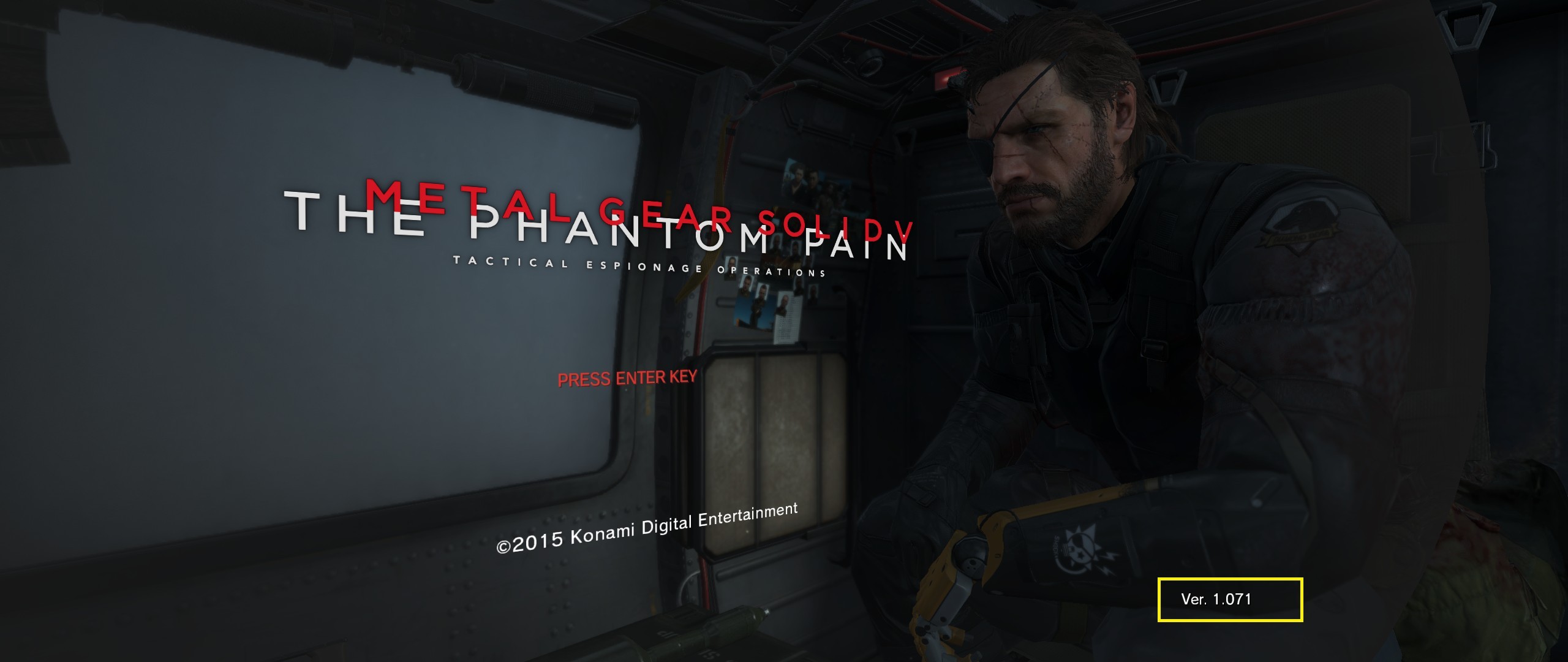
Grave-tm- wrote:Where do I get v1.0.7.1 I know MGSV updated , but my .exe still says 1.0.7.0??
At last update, exe version still 1.0.7.0, but in game menu it shows Ver. 1.071
Re: Metal Gear Solid 5: The Phantom Pain- 21:9 support broke
Again thanks to you Jackfuste.
Using your Cheat Table i can fix the markers but not flawlessly.
The x axis was correctly fixed but not the y that was "floating". And moreover the UI elements was some kind of "flatened".
So i search into your fix and found out that the X et Y ratio you force were not the good ones to apply to my specific resolution.
I mean the 16 & 9 ratios modified by yout cheat table.
In fact mine cannot be the 50 (X) and 9 (Y) used by the CT.
My specific resolution is 6012 * 1076 (for some reason the AMD bezel is a little bit broken which explain the 1076 instead of 1080).
The correct ratios for me would be 50.1 (X) and 8.96666 (Y) which is given by the next formula :
New X ratio = (Bezel width * basic 3 FHD screen X ratio) / basic 3 FHD screen width
Which gives 50.1 = (6012 * 48) / 5760
New Y ratio = (Bezel height * basic 1 FHD screen Y ratio) / basic 1 FHD screen height
Which gives 8.96666 = (1076 * 9) / 1080
Modyfing theses values at address accessed by the mulls assembly code could fix it the right way for me.
I could make a new cheat table but i put the exact 1420923F0 and 1420923F8 address as i don't know how to make it viable for everyone situation.
However, it seems to work for me every time i play the game.
I hope i make myself clear as i'm not english native.
Again big thank Jackfuste as you inspired me.
Using your Cheat Table i can fix the markers but not flawlessly.
The x axis was correctly fixed but not the y that was "floating". And moreover the UI elements was some kind of "flatened".
So i search into your fix and found out that the X et Y ratio you force were not the good ones to apply to my specific resolution.
I mean the 16 & 9 ratios modified by yout cheat table.
In fact mine cannot be the 50 (X) and 9 (Y) used by the CT.
My specific resolution is 6012 * 1076 (for some reason the AMD bezel is a little bit broken which explain the 1076 instead of 1080).
The correct ratios for me would be 50.1 (X) and 8.96666 (Y) which is given by the next formula :
New X ratio = (Bezel width * basic 3 FHD screen X ratio) / basic 3 FHD screen width
Which gives 50.1 = (6012 * 48) / 5760
New Y ratio = (Bezel height * basic 1 FHD screen Y ratio) / basic 1 FHD screen height
Which gives 8.96666 = (1076 * 9) / 1080
Modyfing theses values at address accessed by the mulls assembly code could fix it the right way for me.
- Capture.PNG (79.28 KiB) Viewed 8143 times
I could make a new cheat table but i put the exact 1420923F0 and 1420923F8 address as i don't know how to make it viable for everyone situation.
However, it seems to work for me every time i play the game.
I hope i make myself clear as i'm not english native.
Again big thank Jackfuste as you inspired me.
-
gammatsunami
- Posts: 5
- Joined: 03 Jun 2015, 22:54
Re: Metal Gear Solid 5: The Phantom Pain- 21:9 support broke
I cant get it to work for MGO.
Anyone know how to?
Anyone know how to?
Who is online
Users browsing this forum: Google [Bot] and 4 guests