
Displayport-compatible screens needed for Eyefinity?
Displayport-compatible screens needed for Eyefinity?
Allright completely off topic but no one will respond so please help me.. Someone direct me to an article or tutorial on HOW TO use and run SofTH for the love of GOD I can't get it working and the information is limited...
Displayport-compatible screens needed for Eyefinity?
I'd love to get a confirmation from someone using the Apple Active adapter that is works with 3 x 1920 x 1080 resolutions ... not just 3x1650x1080
anyone?
EDIT: Stuff it ... I ordered same one as FragU ... $200 AU ... ouch ...
anyone?
EDIT: Stuff it ... I ordered same one as FragU ... $200 AU ... ouch ...
Displayport-compatible screens needed for Eyefinity?
I'd love to get a confirmation from someone using the Apple Active adapter that is works with 3 x 1920 x 1080 resolutions ... not just 3x1650x1080
anyone?
EDIT: Stuff it ... I ordered same one as FragU ... $200 AU ... ouch ...
Pretty sure the product blurb said it handles 1920 x 1200.
-
ViciousXUSMC

- Editors

- Posts: 1497
- Joined: 31 Jul 2006, 14:58
Displayport-compatible screens needed for Eyefinity?
I'd love to get a confirmation from someone using the Apple Active adapter that is works with 3 x 1920 x 1080 resolutions ... not just 3x1650x1080
anyone?
EDIT: Stuff it ... I ordered same one as FragU ... $200 AU ... ouch ...
The only review of the mini dp apple adapter I saw said its a bad product and does not work.
You want a eyefinity certified deivce or one known to work well.
Displayport-compatible screens needed for Eyefinity?
[quote]I'd love to get a confirmation from someone using the Apple Active adapter that is works with 3 x 1920 x 1080 resolutions ... not just 3x1650x1080
anyone?
EDIT: Stuff it ... I ordered same one as FragU ... $200 AU ... ouch ...
The only review of the mini dp apple adapter I saw said its a bad product and does not work.
You want a eyefinity certified deivce or one known to work well.
From the Apple site.
"Use the Mini DisplayPort to Dual-Link DVI Adapter to connect your Mac to a 30-inch display that includes a DVI connector, such as the 30-inch Apple Cinema Display HD, and enjoy the ultimate widescreen canvas with a resolution of 2560 by 1600 pixels".
-
ViciousXUSMC
- Editors
- Posts: 1497
- Joined: 31 Jul 2006, 14:58
Displayport-compatible screens needed for Eyefinity?
Yeah the adapter works, but I am saying I have heard it does not work well with eyefinity.
But I guess you will find out on your own if it does or not.
But I guess you will find out on your own if it does or not.
Displayport-compatible screens needed for Eyefinity?
Yeah the adapter works, but I am saying I have heard it does not work well with eyefinity.
But I guess you will find out on your own if it does or not.
Seems that a lot of people complain it not working or being flakey in non-eyefinity related cases too.
Prolly just shoddy engineering.
Displayport-compatible screens needed for Eyefinity?
Yeah the adapter works, but I am saying I have heard it does not work well with eyefinity.
But I guess you will find out on your own if it does or not.
Well I personally bought the Belkin-Accell-Dell. All the same except Dell sell theirs cheaper.

Displayport-compatible screens needed for Eyefinity?
Has anyone cracked open the Belkin-Accell-Dell converter yet to see what chips they are using?
-
BHawthorne

- Insiders

- Posts: 1640
- Joined: 06 May 2006, 12:46
Displayport-compatible screens needed for Eyefinity?
Has anyone cracked open the Belkin-Accell-Dell converter yet to see what chips they are using?
*chuckle* why don't you buy one and find out? Sounds like you want to reverse engineer one with Radio Shack parts? Sounds like more than a $100 worth of headache to me. :wink:
Brad Hawthorne
Product Manager
Nthusim Pty. Ltd. | www.nthusim.com
Product Manager
Nthusim Pty. Ltd. | www.nthusim.com
Displayport-compatible screens needed for Eyefinity?
[quote]Has anyone cracked open the Belkin-Accell-Dell converter yet to see what chips they are using?
*chuckle* why don't you buy one and find out? Sounds like you want to reverse engineer one with Radio Shack parts? Sounds like more than a $100 worth of headache to me. :wink:
I barely have enough money to buy food, let alone a 5870 and 3 monitors. I'm just curious if its one of the 3 DP>DVI chips that we have talked about. It could be quite simple for all we know, I.E one chip with the pins connected to the DVI, DP and USB port's.
Displayport-compatible screens needed for Eyefinity?
Yeah would be nice to know what type of chip are in those active Dell adapters. Posted something in another thread (although this chip is DP > VGA):
-------------------------
http://www.standardics.nxp.com/literature/leaflets/interface/pdf/ptn3392.displayport.vga.adapter.pdf
The line that says "While connected and powered from the DisplayPort connector, PTN3392 always reports an active HIGH Hot Plug Detect (HPD) signal to the source." would indicate at least to me that it is in fact "active" and communicating back to the Displayport on the graphics card?
Here´s another similar chip with some more technical info on it:
http://www.datasheetpro.com/node/194811
--------------------------
-------------------------
http://www.standardics.nxp.com/literature/leaflets/interface/pdf/ptn3392.displayport.vga.adapter.pdf
The line that says "While connected and powered from the DisplayPort connector, PTN3392 always reports an active HIGH Hot Plug Detect (HPD) signal to the source." would indicate at least to me that it is in fact "active" and communicating back to the Displayport on the graphics card?
Here´s another similar chip with some more technical info on it:
http://www.datasheetpro.com/node/194811
--------------------------
Displayport-compatible screens needed for Eyefinity?
some manufacturer has to be aware of making cheap screens using DPort by now is doable and will sell 3 screens instead of just one?
make the TN panel 1920x1080 and 1920x1200 with a DP, it be selling as hotcakes.
I can get why samsung, etc..havent thought about that yet?
make the TN panel 1920x1080 and 1920x1200 with a DP, it be selling as hotcakes.
I can get why samsung, etc..havent thought about that yet?
Displayport-compatible screens needed for Eyefinity?
I've asked accell if theres any European distrubuters as the US one via bizlink wants $115 on top of the convertor just to ship and they pointed me here
http://kabeltje.com/accell-displayport-naar-dvid-dual-link-adapter-25cm-p-1628.html
I think they ship outside Holland but do we have a Dutch member that could translate and check out if they ship to Europe / Worldwide and the cost ?
I probably dont need one myself i've found a dell p2210 that should arrive tommorow but might be usefull for anyone else
I am the sales manager of Kabeltje.com. We have recieved some emails and telephone calls from members of this forum.
We can ship the Accell DisplayPort to all EU destinations via the "Internationaal" shipping method (15.50 euro) at our online shop.
If you live outside of the EU or if you would like to order other cables as well, please contact me at our email adress: info [A] kabeltje [.] com Tell me to which country the adapter must be send to and then I can tell you how much the shipping costs will be.

Displayport-compatible screens needed for Eyefinity?
If you live outside of the EU or if you would like to order other cables as well, please contact me at our email adress: info [A] kabeltje [.] com Tell me to which country the adapter must be send to and then I can tell you how much the shipping costs will be.
Sounds good, thanks. :P
Displayport-compatible screens needed for Eyefinity?
thenjwaslike those pics r great, especially the redundant TH2G in the foreground :D and very glad to hear that the active adaptor works, now just have to get some UK retailers to stock it (*to the forums*)
p.s. get those gameplay videos up ASAP, want to see the 3x goodness!
p.s. get those gameplay videos up ASAP, want to see the 3x goodness!
Displayport-compatible screens needed for Eyefinity?
yeah guys this is definitley a new experience, kinda crappy that we have to pay an extra $100+ for an active adapter but its worth it!!
i finally achieved my 3x1 portrait view of 3600x1920 lol - ive always wanted a setup like this, heres a few more pics -
http://www.uploadgeek.nl/files/mtjq96kya2ik2ccqo3a7.jpg
http://www.uploadgeek.nl/files/ruha4iquoxnw390k6a9a.jpg
http://www.uploadgeek.nl/files/0vxo4hhvowgruk2rqf1d.jpg
http://www.uploadgeek.nl/files/orfuumie3y8dus6cnkf7.jpg
http://www.uploadgeek.nl/files/13jwwg7w6eq8pkugb1ph.jpg
http://www.uploadgeek.nl/files/y0ikh86habr8iqzkw9jw.jpg
http://www.uploadgeek.nl/files/pskkfhruxrj8rz0tzf0d.jpg
http://www.uploadgeek.nl/files/1a9oyu19ou35cple.jpg
gonna record a video and youtube the gameplay in portrait lol
Man, those babies are SM 2443BW like my one.
I think a single 5870 wont run Crysis maxxed out, just ran through all 35 pages and got that Eyefinity = No-XFX. Okay, still got 5870x2 upcoming. Who knows if I will need active adapters only if I want to get more than 4 screens? It seemed to me that 4 passive will do the trick with 4 DVI and 2 active + 4 passive with 6 DVI?
thenjwaslike, The question is does this active adapter add any delay? I wanted to get 2 more 2443s but now I'm confused. My 2443 is able to do this, can all of yours do this or only two of them?
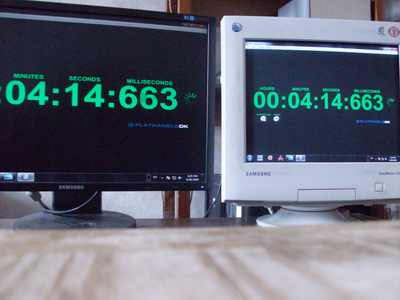
If the adapter is laggy then one of your monitors will become retarded, so a better option will be getting 3 adapters to get them all retarded with a single 5870 :) Or use 2 5870s and hook 2 and 1 displays at each. Or to wait for 5870x2 and hook up 3 DVI displays through 3 passive adapters?
-
thenjwaslike
- Posts: 173
- Joined: 07 Jul 2009, 20:14
Displayport-compatible screens needed for Eyefinity?
yeah i'll post the videos up very soon.
i just experienced something weird, i ran hawx last night and now my left monitor (connected to bottom dvi output) started to bleed red vertical pixel lines only over dark/black colors.. so right then i thought it was a defective card, so i tried a different monitor into the same bottom dvi input and no problems whatsoever.. so i then connected the bleeding red pixelized monitor to my media center and same red horizontal lines begin to flash/bleed.
not sure if its the card that caused that or simply a defective monitor, it was fine when i recieved it and snapped pics with it.
kinda mad now i have to return and wait for the defective exchange at our store. ARRGHHHHHH!!
i just experienced something weird, i ran hawx last night and now my left monitor (connected to bottom dvi output) started to bleed red vertical pixel lines only over dark/black colors.. so right then i thought it was a defective card, so i tried a different monitor into the same bottom dvi input and no problems whatsoever.. so i then connected the bleeding red pixelized monitor to my media center and same red horizontal lines begin to flash/bleed.
not sure if its the card that caused that or simply a defective monitor, it was fine when i recieved it and snapped pics with it.
kinda mad now i have to return and wait for the defective exchange at our store. ARRGHHHHHH!!
-
thenjwaslike
- Posts: 173
- Joined: 07 Jul 2009, 20:14
Displayport-compatible screens needed for Eyefinity?
thenjwaslike, The question is does this active adapter add any delay? I wanted to get 2 more 2443s but now I'm confused. My 2443 is able to do this, can all of yours do this or only two of them?
If the adapter is laggy then one of your monitors will become retarded, so a better option will be getting 3 adapters to get them all retarded with a single 5870 :) Or use 2 5870s and hook 2 and 1 displays at each. Or to wait for 5870x2 and hook up 3 DVI displays through 3 passive adapters?
i can check input tonight, what program is that? and do i setup all 3 monitors as clone and snap a picure? i have a 8mp canon, pretty quick shutter speed
Displayport-compatible screens needed for Eyefinity?
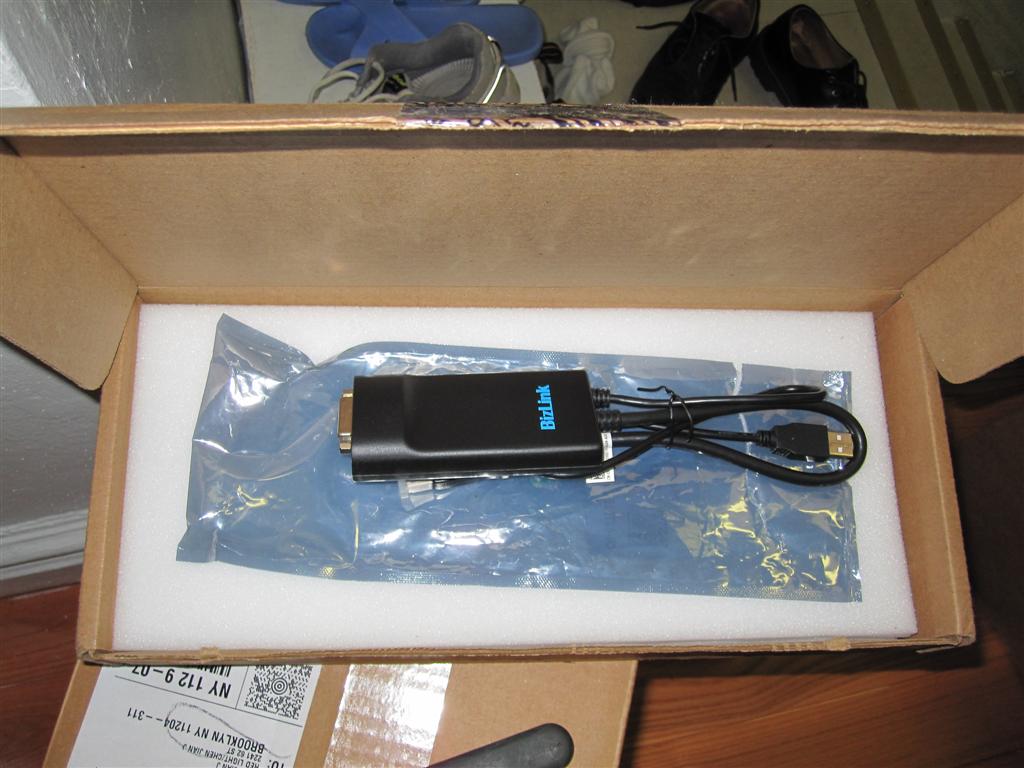
ok I got mine earlier today.
played a bumch of games and did some dsktop type usage..
here's my test and conclusion on a separate thread (including input lag test)
http://www.widescreengamingforum.com/node/#comment-
 [/img]
played a bumch of games and did some dsktop type usage..
here's my test and conclusion on a separate thread (including input lag test)
http://www.widescreengamingforum.com/node/#comment-
[/img]Who is online
Users browsing this forum: No registered users and 3 guests