Page 24 of 44
Re: Metal Gear Solid 5: The Phantom Pain- 21:9 support broke
Posted: 07 Nov 2015, 08:53
by ikazman
tekprimemia wrote:16:3 Support Please!!!!! <3 Thanks for your hard work
Did you tried guide on page 7 by Erkboi, or on page 41 by Mayh3M? Here's quote:
Mayh3M wrote:1. Download and install a hex editor. I use HxD.
2. Go on this site
http://babbage.cs.qc.cuny.edu/IEEE-754/ and type in your resolution in the 'Value to analyze' field with a "/" inbetween the horizontal and vertical resolutions. If you have a 3440x1440 resolution for example, you would type 3440/1440 and then hit enter.
3. Note the binary32 number that emerges, in this case it's 40 18 E3 8E. Rewrite this from right to left, so 8E E3 18 40.
4. Open HxD and open mgsvtpp.exe in your root game folder.
5. On hex editor, hit CTRL+F and change 'Datatype' to Hex-values and then search for 39 8E E3 3F. Then replace it by typing the hex code you noted above, so 8E E3 18 40 in this example. Then save and exit.
And maybe chris686 can help you, here is topic
http://www.wsgf.org/forums/viewtopic.php?f=63&t=30413
Re: Metal Gear Solid 5: The Phantom Pain- 21:9 support broke
Posted: 08 Nov 2015, 06:49
by Dizman7
How do I use the Markers Fix? It just brings up a window with F1-F4 and they say "Fixed" after them. But I don't see where this does anything in or out of the game. Love the 21:9 3440x1440 view though, thank you for that!
Re: Metal Gear Solid 5: The Phantom Pain- 21:9 support broke
Posted: 09 Nov 2015, 05:12
by jhonnyher
thanks bro
Re: Metal Gear Solid 5: The Phantom Pain- 21:9 support broke
Posted: 09 Nov 2015, 22:38
by tekprimemia
ikazman wrote:tekprimemia wrote:16:3 Support Please!!!!! <3 Thanks for your hard work
Did you tried guide on page 7 by Erkboi, or on page 41 by Mayh3M? Here's quote:
Mayh3M wrote:1. Download and install a hex editor. I use HxD.
2. Go on this site
http://babbage.cs.qc.cuny.edu/IEEE-754/ and type in your resolution in the 'Value to analyze' field with a "/" inbetween the horizontal and vertical resolutions. If you have a 3440x1440 resolution for example, you would type 3440/1440 and then hit enter.
3. Note the binary32 number that emerges, in this case it's 40 18 E3 8E. Rewrite this from right to left, so 8E E3 18 40.
4. Open HxD and open mgsvtpp.exe in your root game folder.
5. On hex editor, hit CTRL+F and change 'Datatype' to Hex-values and then search for 39 8E E3 3F. Then replace it by typing the hex code you noted above, so 8E E3 18 40 in this example. Then save and exit.
And maybe chris686 can help you, here is topic
http://www.wsgf.org/forums/viewtopic.php?f=63&t=30413
All of the guides you linked are resolution support only.
To clarify I need MARKER FIX for 16:3 7580x1440
Re: Metal Gear Solid 5: The Phantom Pain- 21:9 support broke
Posted: 10 Nov 2015, 04:29
by chris686
NightBits wrote:I created a (universal patch) patcher for metal gear solid.
For now a couple resolutions are supported:
1024x768 (4:3)
1280x1024 (5:4)
1366x768 (16:9)
1440x900 (16:10)
1680x1050 (16:10)
1920x1080 (16:9)
2560x1080 (21:9)
3440x1440 (21:9)
5040x1050 (48:10)
4800x900 (48:9)

Sharing is caring !
Kind regards,
Jeroen (NightBits)
Please be careful with this. I'd recommend not downloading it. The GUI looks incredibly similar to other malware I've seen. Support for specific resolutions is unneeded, so the person obviously has no clue how to patch the executable. It does not pass a VirusTotal scan and is likely malware.
If you need a resolution patch, either download one of the links posted by jackfuste or (self promotion coming) use
my tool.
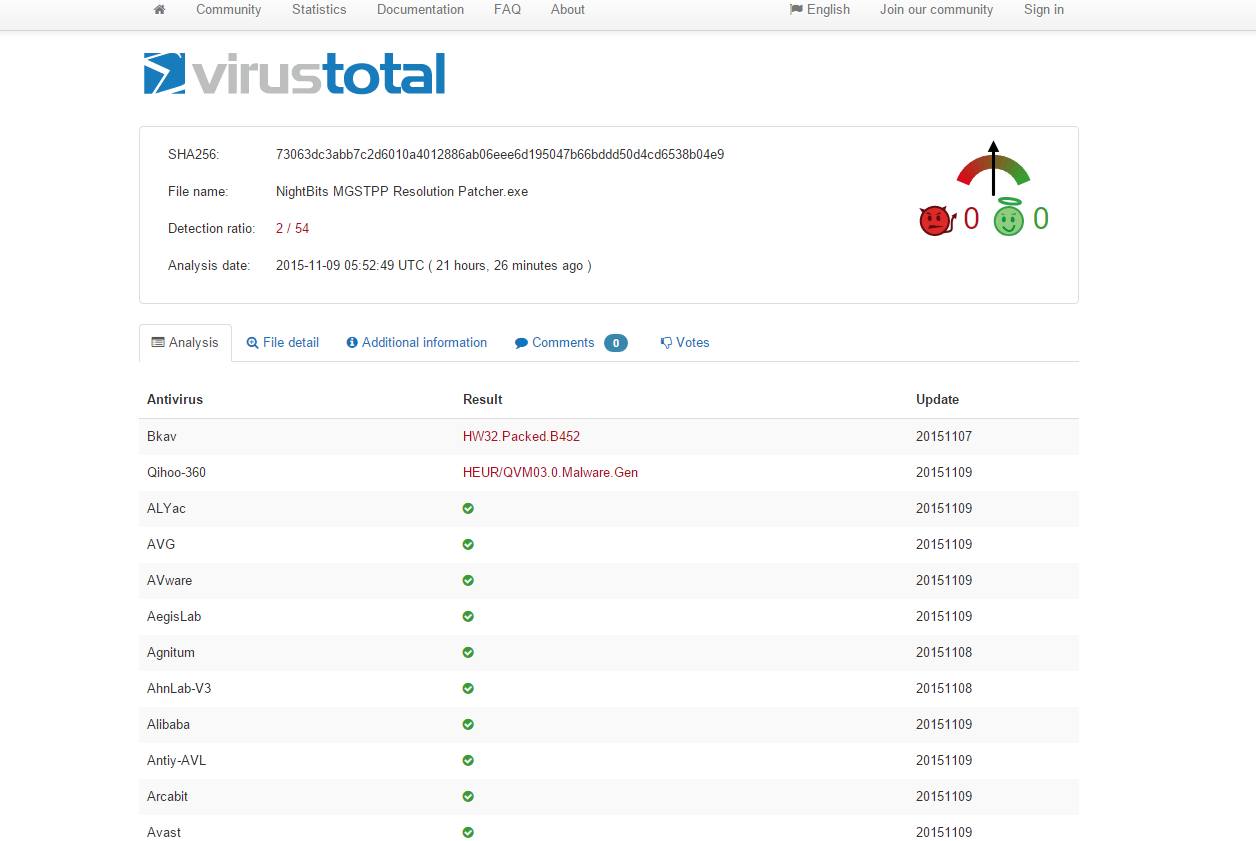
- nightbits.PNG (59.01 KiB) Viewed 7750 times
Re: Metal Gear Solid 5: The Phantom Pain- 21:9 support broke
Posted: 10 Nov 2015, 04:39
by chris686
tekprimemia wrote:ikazman wrote:tekprimemia wrote:16:3 Support Please!!!!! <3 Thanks for your hard work
Did you tried guide on page 7 by Erkboi, or on page 41 by Mayh3M? Here's quote:
Mayh3M wrote:1. Download and install a hex editor. I use HxD.
2. Go on this site
http://babbage.cs.qc.cuny.edu/IEEE-754/ and type in your resolution in the 'Value to analyze' field with a "/" inbetween the horizontal and vertical resolutions. If you have a 3440x1440 resolution for example, you would type 3440/1440 and then hit enter.
3. Note the binary32 number that emerges, in this case it's 40 18 E3 8E. Rewrite this from right to left, so 8E E3 18 40.
4. Open HxD and open mgsvtpp.exe in your root game folder.
5. On hex editor, hit CTRL+F and change 'Datatype' to Hex-values and then search for 39 8E E3 3F. Then replace it by typing the hex code you noted above, so 8E E3 18 40 in this example. Then save and exit.
And maybe chris686 can help you, here is topic
http://www.wsgf.org/forums/viewtopic.php?f=63&t=30413
All of the guides you linked are resolution support only.
To clarify I need MARKER FIX for 16:3 7580x1440
7580x1440 is not 16:3. Are you sure it's not
7680x1440? That is technically 16:3 I guess, but it's known as 48:9. 16 for width, 9 for height. You have three displays of "16" wide, but the height stays the same, hence 48:9. The information in this thread specifically addresses 48:9.
Re: Metal Gear Solid 5: The Phantom Pain- 21:9 support broke
Posted: 10 Nov 2015, 15:06
by Heitor Gomes
Does anyone have the fix for 1.0.6 ??
Thanks !
Re: Metal Gear Solid 5: The Phantom Pain- 21:9 support broke
Posted: 10 Nov 2015, 15:13
by chris686
Heitor Gomes wrote:Does anyone have the fix for 1.0.6 ??
Thanks !
The existing cheat engine tables are likely to work, so try those first. For aspect ratio, you can patch manually or use the tool I wrote (linked a couple posts back).
Re: Metal Gear Solid 5: The Phantom Pain- 21:9 support broke
Posted: 10 Nov 2015, 15:56
by Heitor Gomes
chris686 wrote:Heitor Gomes wrote:Does anyone have the fix for 1.0.6 ??
Thanks !
The existing cheat engine tables are likely to work, so try those first. For aspect ratio, you can patch manually or use the tool I wrote (linked a couple posts back).
I tried to use your tool, but nothing happened. Edited the cfg file for 2560x1080 and runned the patch but didn't work. Kept on a unending loading and nothing happened....
Re: Metal Gear Solid 5: The Phantom Pain- 21:9 support broke
Posted: 10 Nov 2015, 16:42
by ocelot
Hi,
there are some similar issues with fallout 4 and people are willing to donate good amount of cash if it gets solved. Perhaps someone with experience is willing to spent some time and fix the issues and earn some cash....jackfuse maybe

???
Re: Metal Gear Solid 5: The Phantom Pain- 21:9 support broke
Posted: 10 Nov 2015, 19:50
by NightBits
chris686 wrote:NightBits wrote:I created a (universal patch) patcher for metal gear solid.
For now a couple resolutions are supported:
1024x768 (4:3)
1280x1024 (5:4)
1366x768 (16:9)
1440x900 (16:10)
1680x1050 (16:10)
1920x1080 (16:9)
2560x1080 (21:9)
3440x1440 (21:9)
5040x1050 (48:10)
4800x900 (48:9)
Sharing is caring !
Kind regards,
Jeroen (NightBits)
Please be careful with this. I'd recommend not downloading it. The GUI looks incredibly similar to other malware I've seen. Support for specific resolutions is unneeded, so the person obviously has no clue how to patch the executable. It does not pass a VirusTotal scan and is likely malware.
The attachment nightbits.PNG is no longer available
1. Its not a virus
2. To use it you need to patch the ORIGINAL executable (not an already modified one)
3. It works for me on the latest version
4. Look in the posts above and see the resolution files that where already uploaded by someone
5. These resolutions are the most commonly used resolutions these days
6. GUI just like malware ??? really ??
https://www.virustotal.com/en/file/b5e3 ... /analysis/I don't event know the virusscanner named 'Qihoo-360'
https://github.com/NightBits?tab=repositories
Re: Metal Gear Solid 5: The Phantom Pain- 21:9 support broke
Posted: 10 Nov 2015, 20:02
by jackfuste
Update for v. 1.0.6.0For 4:3 (800x600, 1024x768 etc.)
mgsvtpp.7zFor 5:4 (1280x1024)
mgsvtpp.7zFor 2560x1080
mgsvtpp.7zFor 3440x1440
mgsvtpp.7zFor 48:10 (5040x1050; 5760x1200 etc.)
mgsvtpp.7zFor 48:9 (4800x900; 5760x1080 etc.)
mgsvtpp.7zMarkers fix:For 2560x1080; 3440x1440
21_9_marker_fix_1_060.7zFor triple 16:9 screen 11520x2160; 5760x1080; 4800x900 etc.
48_9_marker_fix_1_060.7zFor triple 16:10 screen 5760x1200; 5040x1050 etc.
48_10_marker_fix_1_060.7z
Cheat Engine table:mgsvtpp_1060.7zFirst value should be changed
from
F3 0F 59 0D
DC 16 FC FE
to
F3 0F 59 0D
E0 16 FC FE
this fixes marker position.
Second value - 64, is size for marker and some ui elements.
Proper value should be calculated by formula:
64 * ((width/height)/1.77777)
For example, 64 * ((6000/1080)/1.77777) = 200.00087
So, 64 should be changed to 200.00087
Third value should be changed
from
F3 0F
5E A9 0C 01 00 00
to
F3 0F
59 A9 0C 01 00 00
this fixes sonar effect.
Fourth value should be changed
from
F3 0F
5E AA 0C 01 00 00
to
F3 0F
59 AA 0C 01 00 00
this fixes wind effect in the desert.
FOV Tool:MGSTPP_FOV_1_060.7z
Re: Metal Gear Solid 5: The Phantom Pain- 21:9 support broke
Posted: 10 Nov 2015, 20:05
by Heitor Gomes
Jack, you the man. Thanks
Re: Metal Gear Solid 5: The Phantom Pain- 21:9 support broke
Posted: 10 Nov 2015, 21:37
by Kayden
Thank you so much Jackfuste!
Re: Metal Gear Solid 5: The Phantom Pain- 21:9 support broke
Posted: 11 Nov 2015, 00:08
by Drells
Like a boss! Thanks Jackfuste!
Re: Metal Gear Solid 5: The Phantom Pain- 21:9 support broke
Posted: 11 Nov 2015, 02:38
by chris686
NightBits wrote:1. Its not a virus
2. To use it you need to patch the ORIGINAL executable (not an already modified one)
3. It works for me on the latest version
4. Look in the posts above and see the resolution files that where already uploaded by someone
5. These resolutions are the most commonly used resolutions these days
6. GUI just like malware ??? really ?? https://www.virustotal.com/en/file/b5e3a11637410a3ab0b9aefa477ca8cb969a8b06ec306edd91f1fbc83b3ba9fc/analysis/
I don't event know the virusscanner named 'Qihoo-360'
https://github.com/NightBits?tab=repositories
If your program is legit, that's great and I apologize. You need to figure out where these false positives are coming from. That said, I have two problems with your post:
1. This is the scan of the program I downloaded: https://www.virustotal.com/en/file/73063dc3abb7c2d6010a4012886ab06eee6d195047b66bddd50d4cd6538b04e9/analysis/1447205025/
2. This is the scan of the program you linked to: https://www.virustotal.com/en/file/b5e3a11637410a3ab0b9aefa477ca8cb969a8b06ec306edd91f1fbc83b3ba9fc/analysis/
MD5 hash of the file I downloaded from your mega link: fdfb26c42f5ba935b23881d8850d5d6c
MD5 hash of the file you scanned yourself: 5ff977880c2c2dc43e42fe86bde5dee5
These aren't the same program.
Re: Metal Gear Solid 5: The Phantom Pain- 21:9 support broke
Posted: 11 Nov 2015, 02:40
by UWGaming
I'd like to thank jackfuste and the wsgf community for fixing what should ship with any game nowadays from the beginning... Ultra wide support.
Re: Metal Gear Solid 5: The Phantom Pain- 21:9 support broke
Posted: 11 Nov 2015, 03:41
by ilis29
how do i use the marker fix?
Re: Metal Gear Solid 5: The Phantom Pain- 21:9 support broke
Posted: 11 Nov 2015, 04:55
by funkyb
Thank you jackfuste, we appreciate it!
Re: Metal Gear Solid 5: The Phantom Pain- 21:9 support broke
Posted: 11 Nov 2015, 20:58
by Heitor Gomes
UWGaming wrote:I'd like to thank jackfuste and the wsgf community for fixing what should ship with any game nowadays from the beginning... Ultra wide support.
My thoughts as well...It's not like it's that difficult..