
Registered just to get this information available and to get your feedback.
I purchased the ACCELL UltraAV DisplayPort to DVI Dual-Link Adapter this past week from Fry's Electronics.
I have the following displays:
1 x Chimei CMV 222H connected via HDMI -> HDMI and using 1080p
1 x ViewSonic VX2433wm connected via DVI -> DVI and using 1080p
1 x ViewSonic VX2433wm connected via DP [above] to DVI and using 1080p
My video card is XFX HD5770 1 GB GDDR5
OS is Windows 7 x64 Pro.
I've tried ATI drivers: 10.3; 10.4; 10.4a; 10.4b; and 10.5Betas.
I've also tried the DP Adapter on the other ViewSonic. (The Chimei does not have DVI input!)
The monitor using the DP Adapter consistently goes to a blank screen. I've tried plugging the USB cable into both the motherboard's USB Port and into a powered USB HUB. Nothing has changed.
I contacted XFX and they sent me a BIOS update for my video card. Still no change.
I've contacted ACCELL on the 5th of this month about the problem and, in spite of their promise to replay to email support within 24 hours, I have yet to get even the decency of an auto reply.
Unless someone can help me remedy this problem, the adapter is going back to Fry's this coming Tuesday when I have my next day off from work.
Even when Eyefinity is not in use, and the DP Display is used as Extended, the screen will still go off at random. I can unplug and re-plug the USB connection to get display again....for a short while.
Oh, and my PSU is a 1000W unit, but, that's immaterial since I've also tried a powered HUB.
If ACCELL cannot respond to email support as promised, I advise avoiding their products at least until they get their act together.
My Monitor keeps going out ? ? ?
-
Dyre Straits
- Posts: 210
- Joined: 06 May 2010, 05:52
Re: My Monitor keeps going out ? ? ?
~Windows 7 x64 Professional~MSI X58A-GD45~Intel I7-950~6x2 GB DDR3 1600 RAM (Triple Channel)~RealTek Onboard~XFX HD 6950 2 GB GDDR5~3 ViewSonic 24 inch LCDs in Eyefinity~SATA Dual Layer DVD RW~1000 W PSU~And a Whole Lot More!~Done with Vista~XP Pro on the way out, too!~AND....250 GB XBOX 360~
Re: My Monitor keeps going out ? ? ?
If you are an HD 5850 user and want to try a BIOS update (again, same caveats apply as before) then you can try the following one:
http://www.techpowerup.com/vgabios/65298/ATI.HD5850.1024.091211.html
As this may be the only solution I have not yet tried I may just give it a go. My fear is I have never flashed anything other than my wife and I almost screwed that up.
-
Dyre Straits
- Posts: 210
- Joined: 06 May 2010, 05:52
Re: My Monitor keeps going out ? ? ?
ACCELL finally responded -- after five days -- and their solution is to return the product as they have no fix for the current state of things.
My own suspicion is that all these adapters are actually made by one company and the ones selling them are only distributors. As I've read all over the Internet/Forums, this blanking/flickering loss of signal is all too common.
My own suspicion is that all these adapters are actually made by one company and the ones selling them are only distributors. As I've read all over the Internet/Forums, this blanking/flickering loss of signal is all too common.
~Windows 7 x64 Professional~MSI X58A-GD45~Intel I7-950~6x2 GB DDR3 1600 RAM (Triple Channel)~RealTek Onboard~XFX HD 6950 2 GB GDDR5~3 ViewSonic 24 inch LCDs in Eyefinity~SATA Dual Layer DVD RW~1000 W PSU~And a Whole Lot More!~Done with Vista~XP Pro on the way out, too!~AND....250 GB XBOX 360~


Re: My Monitor keeps going out ? ? ?
ACCELL finally responded -- after five days -- and their solution is to return the product as they have no fix for the current state of things.
My own suspicion is that all these adapters are actually made by one company and the ones selling them are only distributors. As I've read all over the Internet/Forums, this blanking/flickering loss of signal is all too common.
I suspect that there are some crappy revisions out there (which might be why ATI is stating the revision on their homepage for compatibility). I could imagine that the sync requirements are much higher with an Eyefinity setup and needs to be much tighter, then by just using them for a single screen/TV setup.
-
Dyre Straits
- Posts: 210
- Joined: 06 May 2010, 05:52
Re: My Monitor keeps going out ? ? ?
[quote]ACCELL finally responded -- after five days -- and their solution is to return the product as they have no fix for the current state of things.
My own suspicion is that all these adapters are actually made by one company and the ones selling them are only distributors. As I've read all over the Internet/Forums, this blanking/flickering loss of signal is all too common.
I suspect that there are some crappy revisions out there (which might be why ATI is stating the revision on their homepage for compatibility). I could imagine that the sync requirements are much higher with an Eyefinity setup and needs to be much tighter, then by just using them for a single screen/TV setup.
The problem with the Revision requirement is that you cannot see any revision information on the adapter until AFTER the package is opened. In most cases that info is on a little sticker attached to one of the cables and not visible through the packaging. This whole situation needs to be reviewed and updated so that people don't waste time and money .... and losing hair in the process.
~Windows 7 x64 Professional~MSI X58A-GD45~Intel I7-950~6x2 GB DDR3 1600 RAM (Triple Channel)~RealTek Onboard~XFX HD 6950 2 GB GDDR5~3 ViewSonic 24 inch LCDs in Eyefinity~SATA Dual Layer DVD RW~1000 W PSU~And a Whole Lot More!~Done with Vista~XP Pro on the way out, too!~AND....250 GB XBOX 360~
Re: My Monitor keeps going out ? ? ?
The problem with the Revision requirement is that you cannot see any revision information on the adapter until AFTER the package is opened. In most cases that info is on a little sticker attached to one of the cables and not visible through the packaging. This whole situation needs to be reviewed and updated so that people don't waste time and money .... and losing hair in the process.
I agree. The biggest headache people have with Eyefinity is getting a working adapter. The Sapphire ones was a good idea, but from what I have read, they have an extreme backorder on those, so they are hard to get.
Since its a new revision, older revisions will be phased out eventually. But for now, the best thing is to order an adapter and either go through the Eyefinity sub-site or specify in the order that you need at least revXXX, so you can easily return it if its the wrong one. :(
For new adopters of Eyefinity, this is less of a problem, since they only have to make sure that their new screens are DP capable and it seems like a lot of the new displays feature a DP. :)
-
bluereverend
- Posts: 3
- Joined: 17 Jun 2010, 15:48
Re: My Monitor keeps going out ? ? ?
Hey all...just wanted to chime in here, I read through almost this entire post last night because I too have the same issue listed by many of you. Yes, it's a dell/bizlink adapter...yes the problem has gotten worse/more frequent in the last few days.
I just called Dell and they are shipping me a new adapter. Got mine in Feb. I'll let you know if this works. I hope, because I'm not fond of the idea of shelling out another $100 for the Accell version of the same device. Just doesn't inspire confidence, though I must say, the success stories of doing just that do...so, we'll see. I'll let you know what happens.
I just called Dell and they are shipping me a new adapter. Got mine in Feb. I'll let you know if this works. I hope, because I'm not fond of the idea of shelling out another $100 for the Accell version of the same device. Just doesn't inspire confidence, though I must say, the success stories of doing just that do...so, we'll see. I'll let you know what happens.
Re: My Monitor keeps going out ? ? ?
I have the same issue and I own the Accell Adaptor, my DP monitor goes blank after sitting on the desktop for a couple hours, I have to physically pull the power cord from the monitor to reset it. Turning it off/on with the button does not work it acts like there is no signal. It didnt happen in version 10.3b and ive upgraded to 10.4 10.5 and now 10.6 and the issue returns soon as I upgrade.
I am downgrading back to 10.3b, this is not a hardware issue its a problem with ATI drivers.
I am downgrading back to 10.3b, this is not a hardware issue its a problem with ATI drivers.
-
bluereverend
- Posts: 3
- Joined: 17 Jun 2010, 15:48
Re: My Monitor keeps going out ? ? ?
I have the same issue and I own the Accell Adaptor, my DP monitor goes blank after sitting on the desktop for a couple hours
You're lucky man, mine is at the point that I lose video every 5-10 minutes (just joking about the lucky part, no matter how frequent/infrequent the video drop happens, it's !@#$%^& annoying). I'm sincerely hoping the replacement adapter from Dell does the trick. After looking through this post, it seems the Dell/Bizlink has a higher failure rate...either that or more people bought that version than any other version.
Oh, and for the record. here's my system.
Phenom 9950 Quad Core (O.C.'ed from 2.6ghz to 2.8 ghz) (Cooled by a xigmatek black knight heat 120mm heat pipe setup using arctic silver 5 thermal compound)
Gigabyte MA790X-UD4 Mobo
Corsair 750W PS
4 Gig (2X2Gig) OCZ PC2 8500 Platinum RAM
2 Radeon 5770's
3 Acer H243H monitors (24 inch)
Running ATI CCC 10.6 currently (have had same issue with 10.3, 10.4 and 10.6)
And just for reference sake, 1 WD black (7200 RPM) 500 Gig HD, 1 Samsung (7200 RPM) 1TB HD, and 1 Seagate (5900) 1.5 TB HD
Rockin' Win 7 Ultimate X64
-
bluereverend
- Posts: 3
- Joined: 17 Jun 2010, 15:48
Re: My Monitor keeps going out ? ? ?
One thing I will say for sure, Dell certainly doesn't mess around. They overnighted the adapter to me, so I just hooked it up. I guess I'll see what happens. I expect that it'll work for at least a while, much like the old one...I'm curious if it'll last longer than the last one.
Re: My Monitor keeps going out ? ? ?
I am fairly confident that this is not a hardware issue with the adapter. The issue goes away immediately after downgrading to 10.3beta. I suspect it is being caused by the ATI card going into some automatic low-power mode which lowers the signal strength to the DP port and it never fully recovers until you re-seat the monitor cable. I rarely have the display go out while I am in the middle of playing a game but it happens a lot when I am just on the desktop running 2D applications.
Re: My Monitor keeps going out ? ? ?
Two days ago I unistalled 10.4 did a driver sweep and installed 10.6 and have not had one blank screen yet.
Dam, sorry got over excited. Monitor just went black. Just keep hoping for a confirmed fix that wont lighten the pocket again.
Dam, sorry got over excited. Monitor just went black. Just keep hoping for a confirmed fix that wont lighten the pocket again.
Re: My Monitor keeps going out ? ? ?
Honestly I am starting to loose faith in ATI again, I wanted to give them a chance to redeem themselves but its been 6 months since I purchased the Eyefinity rig and continue to have the same problems with this DisplayPort bs, either it turns off randomly or I get artifacts or blinking and have to restart or reseat the video cable.
$129 for the DP to dual-link dvi adapter and it still does not allow me to run 120hz mode on my LCD or do 3d content. I am considering selling my extra monitors and buying one large one again or trying nVidias 3 monitor solution. DisplayPort does not seem really thought out I would have paid more for a ATI card that had 3 video clocks onboard to get this working over DVI in a heartbeat. If they are going to require us to buy an adapter to use it properly then they should also make and sell an official ATI adapter that is guaranteed to work.
Right now I feel we have been left out to dry as consumers to try and figure everything out ourselves. If anything I think this is my last ATI product.
$129 for the DP to dual-link dvi adapter and it still does not allow me to run 120hz mode on my LCD or do 3d content. I am considering selling my extra monitors and buying one large one again or trying nVidias 3 monitor solution. DisplayPort does not seem really thought out I would have paid more for a ATI card that had 3 video clocks onboard to get this working over DVI in a heartbeat. If they are going to require us to buy an adapter to use it properly then they should also make and sell an official ATI adapter that is guaranteed to work.
Right now I feel we have been left out to dry as consumers to try and figure everything out ourselves. If anything I think this is my last ATI product.
Re: My Monitor keeps going out ? ? ?
Hi, new guy here. I didn't read through all 30 pages, however I had the same problem. Here is my solution:
This has been the solution to the black screen flickering using Win7 64-bit. Follow these instructions to see if it helps you as well:
1. Open Control Panel
2. Set Power Plan to 'High performance.'
3. Click on 'Change plan settings.'
4. In resulting window click 'Change advanced power settings.'
5. In resulting window click the '+' next to 'USB settings.'
6. Under 'USB selective suspend settings,' click on 'Setting' and select 'Disabled.'
Hopefully enjoy flicker-free gaming. I'm not familiar with monitors with native display port connections regarding their use of USB power connections. If they do, then perhaps it will work for them as well. This fix is specifically directed at users of the active DVI to Displayport adapter.
EDIT: Unfortunately, after several days of no flickering, the blacking out started again. I did a reboot and it was fixed, at least until the next time. Since I have ASUS cards, I might give the bios flash a try.
I tried disabling the USB suspend setting and the horizontal flickering disappeared, but the DP monitor still randomly turns off briefly and then back on. 10.5 - 10.8 was more of an issue then 10.4a with me. Certain drivers will work better than others for a particular setup.
I don't believe this to be a hardware issue. Trying a combination of drivers, power settings, adjusting 2D clocks, and at the very most flashing the card's bios will resolve these issues IMO. I've seen many people RMA their adapter more than once to be left with the same problems. I don't think RMA'ing is the solution.
It's been awhile since many of you chimed in. Are many of you still experiencing problems with this?
Re: My Monitor keeps going out ? ? ?
mine happens once every 8 hours or so. it could be anything to be honest.
also sometimes when switching from bezel managed resolution on exiting a game to non bezeled windows desktop resolution (but still eyefinity) the DP Adaptered screen is pixelated and requires a increase or decrease in resolution then back again to fix.
this is something to do with locking onto refresh rates i belive including the flicker, it must lose a flag or sync for a split second.
I have been largely disapointed with eyefinity. it looks good on the web but the heat, power requirements,lower graphics settings (although i heavily OC to overcome this) and general no support from games, let alone not having a hugley stretched out FOV and glicthes means that this tech is more suited to 2D applications or top down games
browsing without hydra grid is a pain although this is a slower load for windows at startup as its another 28mb just for the function!
2 screens seems to work perfect to be honest. if there was no bezel then two screens would give more than ample FOV, increase resolution and hardly any performance hit in reality. you wouldnt have to worry about heat, power as much and browsing and just general application usage is easier to accomodate. you also wouldnt require a DP adapter. ohh and using two screens as a test i had no real stretching fish eye look on the image
and finally in the end, my 1080p DLP @ 84" 16:9 is just as imersive and the quality is great still, because i paid for 1 dedicated PJ instead of 3x lower quality screens to save money.
id think anyone with 2 x 120hz LED 1080p projectors (if such things existed cheaply in 2010) would be laughing.
for me iam considering moving to a dedicated cinema setup 2:35:1 and modding the PC aspect to fit
also sometimes when switching from bezel managed resolution on exiting a game to non bezeled windows desktop resolution (but still eyefinity) the DP Adaptered screen is pixelated and requires a increase or decrease in resolution then back again to fix.
this is something to do with locking onto refresh rates i belive including the flicker, it must lose a flag or sync for a split second.
I have been largely disapointed with eyefinity. it looks good on the web but the heat, power requirements,lower graphics settings (although i heavily OC to overcome this) and general no support from games, let alone not having a hugley stretched out FOV and glicthes means that this tech is more suited to 2D applications or top down games
browsing without hydra grid is a pain although this is a slower load for windows at startup as its another 28mb just for the function!
2 screens seems to work perfect to be honest. if there was no bezel then two screens would give more than ample FOV, increase resolution and hardly any performance hit in reality. you wouldnt have to worry about heat, power as much and browsing and just general application usage is easier to accomodate. you also wouldnt require a DP adapter. ohh and using two screens as a test i had no real stretching fish eye look on the image
and finally in the end, my 1080p DLP @ 84" 16:9 is just as imersive and the quality is great still, because i paid for 1 dedicated PJ instead of 3x lower quality screens to save money.
id think anyone with 2 x 120hz LED 1080p projectors (if such things existed cheaply in 2010) would be laughing.
for me iam considering moving to a dedicated cinema setup 2:35:1 and modding the PC aspect to fit
Re: My Monitor keeps going out ? ? ?
I don't think I could go back to a single or dual monitor configuration. I really enjoy the immersion you get from a widescreen res. If I had to do it all again, I would either get a monitor with a native DP, or go the nvidia route and forget DP all together.
Most games released today are bringing native widescreen resolutions to the table, like Metro 2033 and Mafia 2 for example. As far as the fisheye effect you get, I believe this will eventually be corrected through the software devs the more popular widescreen gaming becomes.
A year ago DP monitors were much more expensive and for most, the dp adapter was the only option. This isn't the case today though. Yes, the technology is still somewhat new but prices are dropping.
AMD is now offering a single link "official" adapter for 30 bucks. It's still expensive for an adapter IMO, but it beats paying $100.
http://www.tomshardware.com/news/DVI-DisplayPort-Radeon-Eyefinity,11201.html
Most games released today are bringing native widescreen resolutions to the table, like Metro 2033 and Mafia 2 for example. As far as the fisheye effect you get, I believe this will eventually be corrected through the software devs the more popular widescreen gaming becomes.
A year ago DP monitors were much more expensive and for most, the dp adapter was the only option. This isn't the case today though. Yes, the technology is still somewhat new but prices are dropping.
AMD is now offering a single link "official" adapter for 30 bucks. It's still expensive for an adapter IMO, but it beats paying $100.
http://www.tomshardware.com/news/DVI-DisplayPort-Radeon-Eyefinity,11201.html
Re: My Monitor keeps going out ? ? ?
Hi all. New to this forum. Just want to add that the BIOS flash fixed my problem of the "blacking out" of the display that's attached to the active DP-to-DVI adapter. It's a Dell Bizlink that I found through Amazon.uk and bought from Ebay (same seller). I'm very happy now. :cheers The BIOS flash also cured my Arma2 crashing.
I'll search the forum for the game specific issues I still have.
I'll search the forum for the game specific issues I still have.
Re: My Monitor keeps going out ? ? ?
Hi Everyone,
I have the Accel displayport DVI Adaptor on 3 Samsung SyncMaster 205BW Monitors(5040x1050) and it exhibits flickering, out of sync problems, blanking out black, etc. just like everyone else here in this forum. I figured enough is enough so I purchased this:
Sapphire 6110026701G Active DisplayPort to Single-Link Adapter
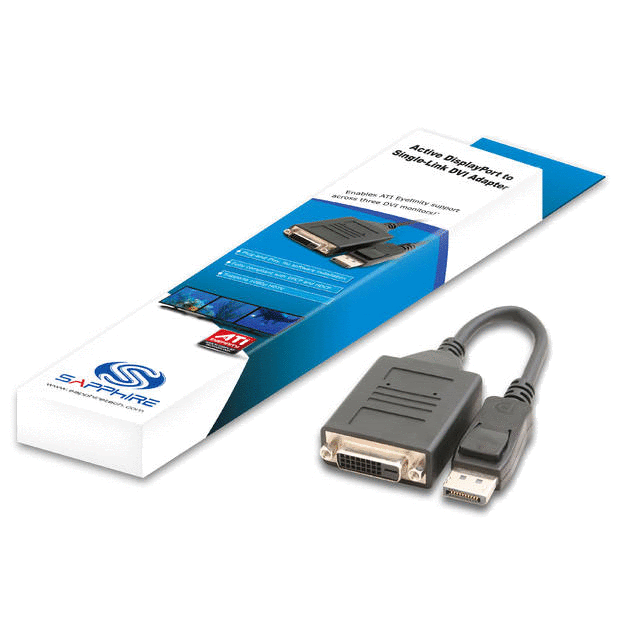
Now No flickering, No blanking out, no out of sync problems. Just solid DVI video as if it were plugged into the native DVI ports on the card. I'm running 10.9 WHQL - solid! Finally a solution that only cost me only $35.00! No need to say anything else! Sapphire's solution truly works.
Very Satisfied,
Psygnosi :D
I have the Accel displayport DVI Adaptor on 3 Samsung SyncMaster 205BW Monitors(5040x1050) and it exhibits flickering, out of sync problems, blanking out black, etc. just like everyone else here in this forum. I figured enough is enough so I purchased this:
Sapphire 6110026701G Active DisplayPort to Single-Link Adapter
Now No flickering, No blanking out, no out of sync problems. Just solid DVI video as if it were plugged into the native DVI ports on the card. I'm running 10.9 WHQL - solid! Finally a solution that only cost me only $35.00! No need to say anything else! Sapphire's solution truly works.
Very Satisfied,
Psygnosi :D
Re: My Monitor keeps going out ? ? ?
I've got the Saphire adapter shown above, but it won't work with my XFX 5870. I tried flashing my card with the 2010-03-04 bios from techpowerup, but didn't help.
If I have the DP adapter connected at startup the BIOS and windows boot/login screen will appear as long as it is one of two or fewer attached displays. Nothing appears on it if I have all 3 attached. After I log in if I have any DVI monitors attached I get about 20 seconds of the screens all blinking on and off rapidly without showing anything before finally stabilizing with only my native DVI monitors working. If I boot with only the DP-DVI cable connected I can log into windows and see the desktop for about 20-30 seconds before the monitor loses signal and goes blank.
In windows when I try and enable the monitor my screen blanks out for a few seconds and then I get the do you want to keep your settings dialog with the monitor on the DP cable still disabled. CCC 10.9a silently fails when I try to extend my desktop onto the 3rd monitor. CCC10.8 thought it was extending my desktop to the 3rd display but despite showing success in the UI never was able to get it working in windows.
My system is i7-930 running on an Asus P6X58D Premium, with 6GB DDR3-1600, and an XFX 5870. I'm using Win7-64 ultimate and have all the windows updates and the AMD 10.9a driver installed. I have two NEC 2090's and an NEC 3090 arranged in a PLP configuration.
The Saphire DP-DVI adaptor does work for several hours if connected to my dell E6400 laptop, so the compatibility problem appears to be either with my GPU or with my OS. I tried booting an Ubuntu 10.04 live CD to see if it was a windows problem but it failed to detect the DP-DVI monitor at all and had seriously messed up graphics when running on one of the DVI monitors, to the point that I was unable to determine which button was to boot the OS off the CD and which was to do an install.
Edit: PS I tried flashing a generic ATI BIOS bit it failed with the error: Old SSID 2961, New SSDID 0B00, Error 0FL01"
If I have the DP adapter connected at startup the BIOS and windows boot/login screen will appear as long as it is one of two or fewer attached displays. Nothing appears on it if I have all 3 attached. After I log in if I have any DVI monitors attached I get about 20 seconds of the screens all blinking on and off rapidly without showing anything before finally stabilizing with only my native DVI monitors working. If I boot with only the DP-DVI cable connected I can log into windows and see the desktop for about 20-30 seconds before the monitor loses signal and goes blank.
In windows when I try and enable the monitor my screen blanks out for a few seconds and then I get the do you want to keep your settings dialog with the monitor on the DP cable still disabled. CCC 10.9a silently fails when I try to extend my desktop onto the 3rd monitor. CCC10.8 thought it was extending my desktop to the 3rd display but despite showing success in the UI never was able to get it working in windows.
My system is i7-930 running on an Asus P6X58D Premium, with 6GB DDR3-1600, and an XFX 5870. I'm using Win7-64 ultimate and have all the windows updates and the AMD 10.9a driver installed. I have two NEC 2090's and an NEC 3090 arranged in a PLP configuration.
The Saphire DP-DVI adaptor does work for several hours if connected to my dell E6400 laptop, so the compatibility problem appears to be either with my GPU or with my OS. I tried booting an Ubuntu 10.04 live CD to see if it was a windows problem but it failed to detect the DP-DVI monitor at all and had seriously messed up graphics when running on one of the DVI monitors, to the point that I was unable to determine which button was to boot the OS off the CD and which was to do an install.
Edit: PS I tried flashing a generic ATI BIOS bit it failed with the error: Old SSID 2961, New SSDID 0B00, Error 0FL01"

Re: My Monitor keeps going out ? ? ?
I was using the Accel displayport DVI Adaptor too on three Samsung 245T at a res of 6016x1200 and after flashing the card with a modded bios and using Cat 10.3 I really didn't have to much problems with the DP monitor going out. Although I did get some blinking during bootup but a resolution switch would make it stable until I turned off I rig. The only down side was all other Catalyst after 10.3 made my monitor a strobe light....until today.
Just like psygnosi I got the same Sapphire Active DisplayPort Single-Link Adapter. For me it was just plug and play, I have been running it for hours not and not one problem. This #%*# works perfect for me. Thanks Sapphire and ATI for finally getting this out.
BTW here are my specs. (The short list)
MB: Asus POG Rampage II Extreme, Bois 1802
CPU: Intel i7 920 D0
RAM: Corsair Dominator GT CMG6GX3M3A2000C8 (6 x 2GB)
GPU: XFX ATI Radeon HD 5870, Cat 10.9
Optical Drive: Pioneer BDC-2202B Blu-Ray
HD Primary: Western Digital VelciRaptor 300GB
HD Sorage: Seagate Barracuda 7200.12 1TB (x4)
PSU: PC Power & Cooling, SILENCER 910
OS: Windows 7 64Bit
Monitors: Samsung 245T 24" (x3)
Scooby :wink:
Just like psygnosi I got the same Sapphire Active DisplayPort Single-Link Adapter. For me it was just plug and play, I have been running it for hours not and not one problem. This #%*# works perfect for me. Thanks Sapphire and ATI for finally getting this out.
BTW here are my specs. (The short list)
MB: Asus POG Rampage II Extreme, Bois 1802
CPU: Intel i7 920 D0
RAM: Corsair Dominator GT CMG6GX3M3A2000C8 (6 x 2GB)
GPU: XFX ATI Radeon HD 5870, Cat 10.9
Optical Drive: Pioneer BDC-2202B Blu-Ray
HD Primary: Western Digital VelciRaptor 300GB
HD Sorage: Seagate Barracuda 7200.12 1TB (x4)
PSU: PC Power & Cooling, SILENCER 910
OS: Windows 7 64Bit
Monitors: Samsung 245T 24" (x3)
Scooby :wink:
Who is online
Users browsing this forum: No registered users and 11 guests