Page 21 of 24
Re: My Monitor keeps going out ? ? ?
Posted: 15 Jan 2010, 00:09
by INGlewood78
After almost of week of use, the bios flash seems to be working (for the most part). Here are some of my experiences:
1. One instance of 4-6 blinks during a cold boot on Tues. Seemed to "stabilized" after that and didn't blink for the rest of the night.
2. Monitor sometimes freezes/displays garbage when switching in and out of games. For example, when I start up MW2, the adapter monitor will not display properly when the game menu comes up. The picture is corrected by turning the monitor off and on.
3. My clocks (gpu and memory) have been locked since my registry changes. It has not reset.
4. I don't notice any decrease in performance with the new bios. My vantage scores are virtually identical.
Even though its not perfect, it's a "good enough" solution. :)
Re: My Monitor keeps going out ? ? ?
Posted: 16 Jan 2010, 01:50
by ledfoot
I'm also pleased to report that my setup has been running flicker free since I upgraded the bios on my 5870. My frame rates seem to be fine as well. The Mosport track in iRacing is just an fps killer :(.
I loaded the Catalyst 10.1 beta drivers and so far they have also been stable for me. I have not seen any improved fram rates in the games that I play with this new version but I have not seen any decrease either :).
Re: My Monitor keeps going out ? ? ?
Posted: 16 Jan 2010, 16:05
by HavoK187
Hi All,
New to the forum and have been following this thread. I have read about the bios fix and the success that many have had with this approach. I have a couple of questions before I attempt this fix and I hope someone can help answer these.
1) I have two 5870's in crossfire (Diamond and XFX) and need to know if the bios update should be done on both or only the main card where DP is connected
2) with the new 10.1 catalyst driver in the works, should this be expected to fix the flickering issue? would the driver update accomplish the same thing as the bios update with regards to increasing voltage on DP?
3) if the bios update is only needed on main card, is there a recommendation for which card to use as main card with respect to ease of bios update? It might be the same procedure to update the cards, but wondering if it is better to go with updating the Diamond vs the XFX.
system hardware:
Intel Core i5 750
evga P55 FTW
8GB Patriot Viper DDR3 2000MHz
Thermaltake 1200 modular PSU
crossfire eyefinity using:
Diamond 5870
XFX 5870
also using evga GTX280 for PhysX
Monitors:
3 Samsung 2693HM (1920x1200)
These have 3 inputs (vga, dvi, hdmi)
I have concluded that my issue is with the DP port voltage and not the DP adapter or anything else. Other than the screen flicker issue (or screen just goes black), I have been very satisfied with eyefinity and overall 5870 performance with 30,000 3dMarks in Vantage (using crossfire + gtx280 for PhysX).
thanks in advance.
Re: My Monitor keeps going out ? ? ?
Posted: 16 Jan 2010, 20:58
by direwolf
Now all we need is a bios fix for the 5770 :(
Re: My Monitor keeps going out ? ? ?
Posted: 19 Jan 2010, 05:24
by Clayman
Now all we need is a bios fix for the 5770 :(
I did some testing with my Accell (Amazon) adapter and Sapphire 5770's today by updating the bios to VER012.014.000.004.000000. As mentioned, this version also has a bug whereby the shader count is reduced from 800 to 720. I gave it a shot to see if it made any improvements with the DP monitor cutting out, but there was no difference.
Re: My Monitor keeps going out ? ? ?
Posted: 19 Jan 2010, 14:59
by cafenated
So my experience is as follows:
2x5770 in CF, 3xSamsung 24" 1920x1080 new tn panels, cat 9.12 hotfix
Accell adapter from amazon dp->dvi
This gave me flickering to the point where it was unusable, with the third monitor blinking constantly. Support ticket to sapphire blames on it the adapter. Exchanged adapter at amazon for one with exactly the same firmware/model and wouldn't you know it works perfectly now it seems. Not one flicker in 48 hours. So bad adapter.
It might be that the upgraded bios for 5870/5850 users is shooting a higher DP signal which is making up for the adapter's hardware shortcomings (on the bad ones at least) who knows.
Of note at the 3840 x 1024 resolution I had 0 flickering with the old one as well, and I did try the monoprice vga adapter and that gave me a BSOD.
And for those of you wondering the 5770 in CF work GREAT! Even at this monsterous resolution I can play fsx, iracing, dirt 2, l4d, tf at great fps albeit with 2x aa or no aa...which is not really needed at this res!
Re: My Monitor keeps going out ? ? ?
Posted: 19 Jan 2010, 21:25
by ralphnumbers
:rockout
Almost a week with no DisplayPort adapter screen blanking...
RMA your adapters people, you will eventually get one that works.
Still no bios fix for 5770 though? That is mighty unfortunate.
I have played for a collective 30-35 hours now with the RMA'ed accell displayport to dvi active adapter without incident, now on to the next obsession.
Re: My Monitor keeps going out ? ? ?
Posted: 20 Jan 2010, 01:27
by djspiel
Well after trying everything....I tried the BIOS dave posted and what do you know it works! I don't wanna get to excited but I haven't had any issues for about 5 hours. However, I am in extended mode...I will have to try "eyefinity" and see if it craps out in that mode.
Re: My Monitor keeps going out ? ? ?
Posted: 20 Jan 2010, 17:45
by Dave Baumann
http://www.techpowerup.com/vgabios/66005/ATI.HD5770.1024.091007.html
Try that for HD 5770. Note that this is only for the board designs with the fully enclosed (black with red accents) fan shroud.
Re: My Monitor keeps going out ? ? ?
Posted: 20 Jan 2010, 19:04
by djspiel
BIOS WORKS!
Page 6 if you have not updated your BIOS and have issues please update BIOS as this has solved my issues along with many others. FINALLY!
Thanks Dave!
Re: My Monitor keeps going out ? ? ?
Posted: 20 Jan 2010, 20:14
by Clayman
Dave,
Can we expect to see a bios update for the other type of 5770's?
Re: My Monitor keeps going out ? ? ?
Posted: 20 Jan 2010, 20:24
by Dave Baumann
As far as I'm aware it shouldn't be necessary. By the time the other type of shroud came in the production BIOS had already been updated.
Re: My Monitor keeps going out ? ? ?
Posted: 21 Jan 2010, 06:44
by direwolf
http://www.techpowerup.com/vgabios/66005/ATI.HD5770.1024.091007.html
Try that for HD 5770. Note that this is only for the board designs with the fully enclosed (black with red accents) fan shroud.
I assume it is only for one like this?

Mine looks more like this one and I get really bad blinkity blink using the Accell B087B-002B DP-DVI adapter. :(

I do note that the BIOS is a few days newer than what mine are:
Mine:
BIOS Date: 2009/10/02
BIOS Part Number: 113-C01001-100
Posted BIOS:
Date: 2009-10-07
Number: 113-C01002-102
Worth a try?
Re: My Monitor keeps going out ? ? ?
Posted: 21 Jan 2010, 22:48
by Vaitek
I have two XFX 5870's.
I've started having the blank out issues with the monitor connected with the Dell active displayport adapter so I've been going through this thread.
This is the BIOS posted here in the forum on page 6 of this thread:
http://techpowerup.com/vgabios/61848/ATI.HD5870.1024.091112.html
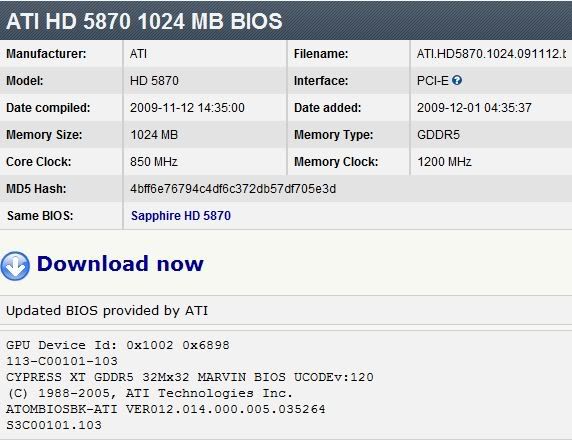
This is the XFX specific BIOS is located at:
http://techpowerup.com/vgabios/62601/XFX.HD5870.1024.091126.html
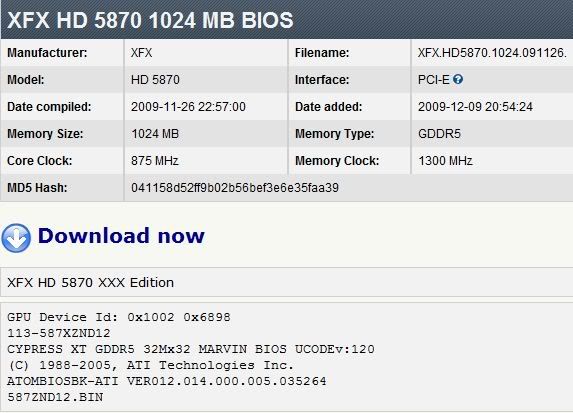
The XFX has a later release date and different clocks, but the version number looks the same.
Before I screw something up I just wanted to see if anyone has used the XFX specific one versus the one posted on page 6 and what kind of results they've had. I guess I can try it and take one for the team, but if someone has already gone down this road I'd like to hear about it.
Thanks!
Re: My Monitor keeps going out ? ? ?
Posted: 22 Jan 2010, 03:53
by djspiel
If you have not UPDATED your BIOS do so now then. PAGE 6...from what I understand that BIOS makes changed to the Display Port on the video card. The BIOS you posted specifically for your XFX card I dont know.
I do know that the one on page 6 fixed my problems.
I have two XFX 5870's.
I've started having the blank out issues with the monitor connected with the Dell active displayport adapter so I've been going through this thread.
This is the BIOS posted here in the forum on page 6 of this thread:
http://techpowerup.com/vgabios/61848/ATI.HD5870.1024.091112.html
This is the XFX specific BIOS is located at:
http://techpowerup.com/vgabios/62601/XFX.HD5870.1024.091126.html
The XFX has a later release date and different clocks, but the version number looks the same.
Before I screw something up I just wanted to see if anyone has used the XFX specific one versus the one posted on page 6 and what kind of results they've had. I guess I can try it and take one for the team, but if someone has already gone down this road I'd like to hear about it.
Thanks!
Re: My Monitor keeps going out ? ? ?
Posted: 22 Jan 2010, 15:06
by Flamin Joe
I do note that the BIOS is a few days newer than what mine are:
Mine:
BIOS Date: 2009/10/02
BIOS Part Number: 113-C01001-100
Posted BIOS:
Date: 2009-10-07
Number: 113-C01002-102
Worth a try?
Same here, although I have the XFX branded cards. How does the type of cooler attached to the card have anything to do with the BIOS version? A fan is a fan? :? Different overclocking restrictions?
Re: My Monitor keeps going out ? ? ?
Posted: 22 Jan 2010, 18:04
by Dave Baumann
1.) The the cooler versioning is specific to the HD 5770.
2.) A fan is not just a fan. The BIOS contains a fan table that is specific to the type of cooler that is supplied on the board.
Re: My Monitor keeps going out ? ? ?
Posted: 22 Jan 2010, 18:23
by Vaitek
Hi Dave,
Having a XFX 5870, should I use the XFX specific one of the ATI one?
Re: My Monitor keeps going out ? ? ?
Posted: 22 Jan 2010, 18:28
by Paradigm Shifter
If your core/momory clocks are the same, go with the XFX one I'd say. If the clocks aren't the same, if you want the increased memory frequency, I'd try the increase out in the ATi Overdrive section of the CCC first to make sure it's stable...
Re: My Monitor keeps going out ? ? ?
Posted: 22 Jan 2010, 19:39
by Dave Baumann
Having a XFX 5870, should I use the XFX specific one of the ATI one?
I would suggest you speak to XFX and ask them to provide an update BIOS based of the latest base BIOS but with the correct clock speeds for your model.

