Page 3 of 4
markjrey wrote:works a treat,
Posted: 22 Mar 2012, 20:29
by helifax
works a treat, centre only task bar, windows open to single displays etc. I've not tested games, stability etc yet.
(pic removed by admin)
Anyone tested the driver in actual games? to see how it behaves?:)
Yep, played Mass Effect 3
Posted: 22 Mar 2012, 22:41
by markjrey
Yep, played Mass Effect 3 with your very own fix, worked perfectly :-)
markjrey wrote:To install I
Posted: 22 Mar 2012, 23:14
by kahilm
To install I downloaded the drivers, extracted then edited the following:
ListedDevices.txt add lines for your GPU, in my case
DEV.1080 "NVIDIA GeForce GTX 580"
DEV.1089 "NVIDIA GeForce GTX 580 "
DEV.108B "NVIDIA GeForce GTX 580 "
NvDisp.inf update 3 sections, again adding lines for you GPU
[NVIDIA_SetA_Devices.NTamd64.6.0]
%NVIDIA_DEV.1080% = Section034, PCIVEN_10DE&DEV_1080
%NVIDIA_DEV.1089% = Section004, PCIVEN_10DE&DEV_1089
%NVIDIA_DEV.108B% = Section004, PCIVEN_10DE&DEV_108B
[NVIDIA_SetA_Devices.NTamd64.6.1]
%NVIDIA_DEV.1080% = Section035, PCIVEN_10DE&DEV_1080
%NVIDIA_DEV.1089% = Section015, PCIVEN_10DE&DEV_1089
%NVIDIA_DEV.108B% = Section005, PCIVEN_10DE&DEV_108B
[Strings]
NVIDIA_DEV.1080 = "NVIDIA GeForce GTX 580"
NVIDIA_DEV.1089 = "NVIDIA GeForce GTX 580 "
NVIDIA_DEV.108B = "NVIDIA GeForce GTX 580 "
If you need the info for you particular GPU just grab it from the files in an older driver. No idea how well this will work so try it at your own risk etc.
Thanks for this!
I did it with my 2x465 SLI setup. Working so far in Windows, going to try out some games and see how it goes.
LOVE the centered task bar and being able to maximize windows to single screens!
so? anyone done any
Posted: 22 Mar 2012, 23:37
by tepescovir
so? anyone done any banchmarks for bf3 in surround on these? hoping to replace my 3 580's with 680's,
CoolMan=GCHQ= wrote:so?
Posted: 23 Mar 2012, 00:54
by skipclarke
so? anyone done any banchmarks for bf3 in surround on these? hoping to replace my 3 580's with 680's,
CoolMan, can you please drop me an email at
[email protected]? We tried to make you an Insider, but Drupal doesn't like the = in your name. I couldn't even send you a PM. The = made it through the import from phpBB to Drupal, but we're kinda deadlocked on anything with your name now. I tried sending an email before, but it may have been lost in a spam filter or something.
helifax wrote:markjrey
Posted: 23 Mar 2012, 01:44
by BHawthorne
[quote]works a treat, centre only task bar, windows open to single displays etc. I've not tested games, stability etc yet.
Anyone tested the driver in actual games? to see how it behaves?:)
Can it do 2x1 and 4x1?
BHawthorne wrote:helifax
Posted: 23 Mar 2012, 01:50
by skipclarke
[quote][quote]works a treat, centre only task bar, windows open to single displays etc. I've not tested games, stability etc yet.
Anyone tested the driver in actual games? to see how it behaves?:)
Can it do 2x1 and 4x1?
The review at HardOCP outlines that it can do up to three displays in multi-mon SLS. The 4th is a secondary display...
Ibrin wrote:BHawthorne
Posted: 23 Mar 2012, 01:58
by BHawthorne
[quote][quote][quote]works a treat, centre only task bar, windows open to single displays etc. I've not tested games, stability etc yet.
Anyone tested the driver in actual games? to see how it behaves?:)
Can it do 2x1 and 4x1?
The review at HardOCP outlines that it can do up to three displays in multi-mon SLS. The 4th is a secondary display...
I'm really interested in seeing 2x1 examples. I might go GK110 when it comes out if it can.
As on my thread opening post:
Posted: 23 Mar 2012, 06:48
by stangflyer
As on my thread opening post: all I want to know is if the 680 can do surround with diff size and or res monitors WITH BM. If it cannot I will go to the 7990.
I'm also intrested to know if
Posted: 23 Mar 2012, 10:27
by alphatoomega7
I'm also intrested to know if nvidia has dropped the requirement for all monitors to have the same the sync polarity for 2d surround. Based on nvidia articles I've found, they only briefly mention monitor requirements.
www.geforce.com/whats-new/articles/nvidia-surround-on-the-geforce-gtx-680/#1
"Any combination of connectors and monitors is A-OK in 2D Surround, though in 3D Vision Surround the two DVI connectors and single DisplayPort connector must be utilized, and users must have three matching 3D Vision monitors."
http://www.geforce.com/optimize/guides/how-to-correctly-configure-geforce-gtx-680-surround/#1
"In 2D Surround, any combination of monitors that share common timings is perfectly acceptable, though each must have, at minimum, one DVI, HDMI, or DisplayPort connector. Aesthetically, identical monitors are preferable, but not a requirement."
Not enough to confirm it, but hopefully nvidia will update their surround
spec sheet with the GTX 680 shortly.
BHawthorne wrote:helifax
Posted: 23 Mar 2012, 19:35
by Paradigm Shifter
[quote][quote]works a treat, centre only task bar, windows open to single displays etc. I've not tested games, stability etc yet.
Anyone tested the driver in actual games? to see how it behaves?:)
Can it do 2x1 and 4x1?
No, the new driver can't do 2x1, and from that I extrapolate that it can't do 4x1 either.
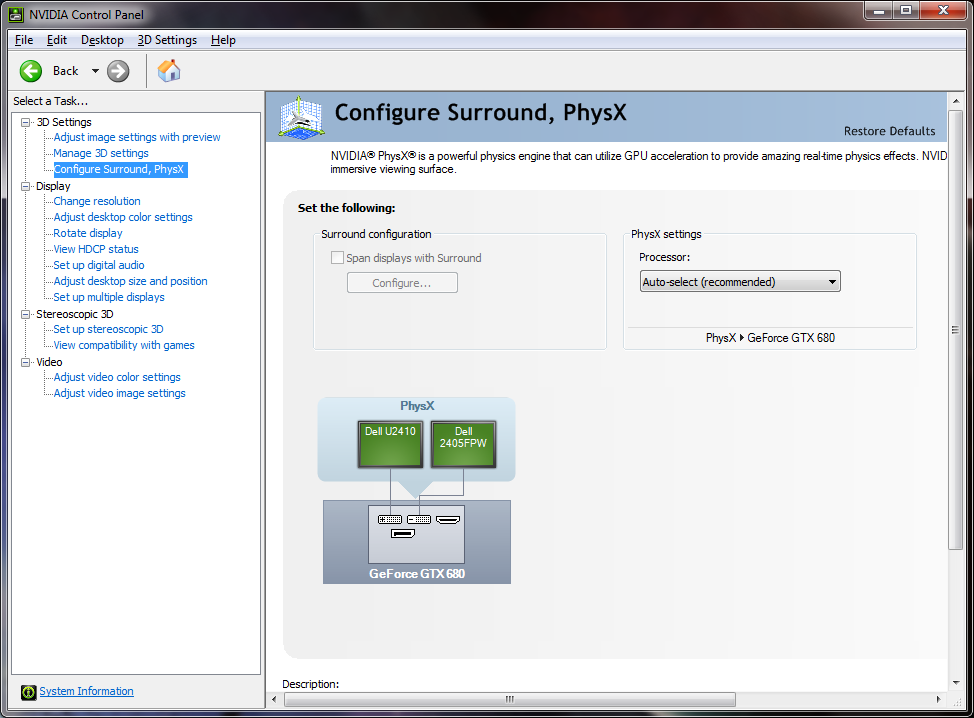
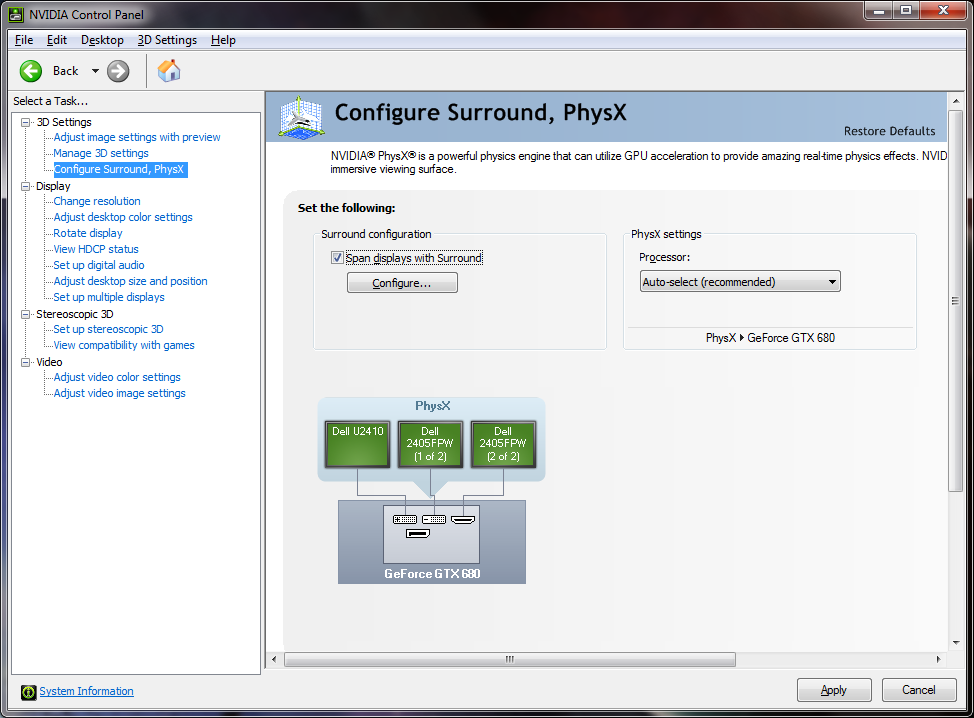
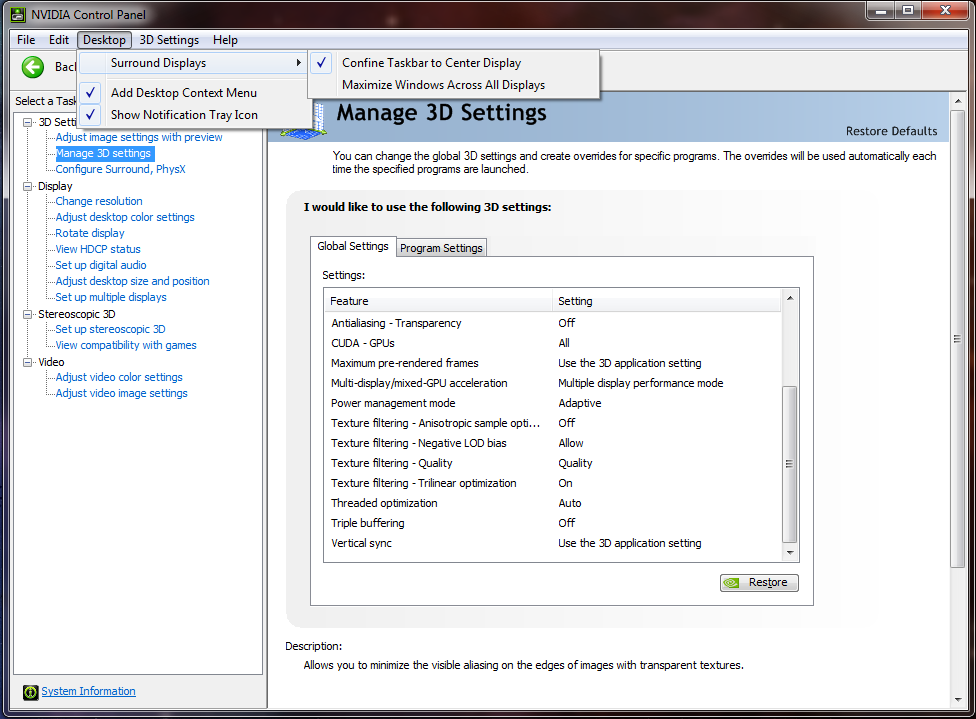
I love the improvements to Taskbar centring, and windows now maximise to a monitor, rather than across three. This driver has, frankly, fixed my biggest issues with Surround.
The fact that a GTX680 costs basically the same as my GTX460 SLI setup did, and
totally obliterates it when gaming is no bad thing either. Saints Row 3 @ 6064x1200, DX11, Ultra settings.

Paradigm Shifter
Posted: 23 Mar 2012, 22:13
by helifax
[quote][quote][quote]works a treat, centre only task bar, windows open to single displays etc. I've not tested games, stability etc yet.
Anyone tested the driver in actual games? to see how it behaves?:)
Can it do 2x1 and 4x1?
No, the new driver can't do 2x1, and from that I extrapolate that it can't do 4x1 either.
I love the improvements to Taskbar centring, and windows now maximise to a monitor, rather than across three. This driver has, frankly, fixed my biggest issues with Surround.
The fact that a GTX680 costs basically the same as my GTX460 SLI setup did, and
totally obliterates it when gaming is no bad thing either. Saints Row 3 @ 6064x1200, DX11, Ultra settings.
So basically it is safe to game with it...No problems and no cards going out in flames?:)) That is good to know;))
helifax wrote:So basically it
Posted: 24 Mar 2012, 22:09
by Paradigm Shifter
So basically it is safe to game with it...No problems and no cards going out in flames?:)) That is good to know;))
It's the coolest and quietest running nVidia card I've seen in some time. Idles ~30*C, loads at max (so far, in Saints Row 3 and Shogun 2) at 64*C. This is running on the same custom fan profile which only just kept my GTX460s from spontaneously combusting when playing new games.
Paradigm Shifter
Posted: 24 Mar 2012, 23:06
by BHawthorne
[quote][quote][quote]works a treat, centre only task bar, windows open to single displays etc. I've not tested games, stability etc yet.
Anyone tested the driver in actual games? to see how it behaves?:)
Can it do 2x1 and 4x1?
No, the new driver can't do 2x1, and from that I extrapolate that it can't do 4x1 either.
I love the improvements to Taskbar centring, and windows now maximise to a monitor, rather than across three. This driver has, frankly, fixed my biggest issues with Surround.
The fact that a GTX680 costs basically the same as my GTX460 SLI setup did, and
totally obliterates it when gaming is no bad thing either. Saints Row 3 @ 6064x1200, DX11, Ultra settings.
That is unfortunate. The whole idea behind 2x1 and single GPU spanning is to set the bar low as possible for entry into surround-gaming club. I suppose only time will tell if they make this port standard across all 600-series cards. It's one step closer to lowering the bar all the way so anyone can piecemeal a triplehead system, but it falls short of what AMD allows. I suppose 2x1 option is less meaningful in a world where LCDs are $120 each though. Still for the economy gamer they have to buy a $500 card and 2x $125-250 LCDs to get the job done. That's pushing +$750-1000 dropped into a system at one time to triplehead.
BHawthorne wrote:That is
Posted: 24 Mar 2012, 23:19
by Paradigm Shifter
That is unfortunate. The whole idea behind 2x1 and single GPU spanning is to set the bar low as possible for entry into surround-gaming club. I suppose only time will tell if they make this port standard across all 600-series cards. It's one step closer to lowering the bar all the way so anyone can piecemeal a triplehead system, but it falls short of what AMD allows. I suppose 2x1 option is less meaningful in a world where LCDs are $120 each though. Still for the economy gamer they have to buy a $500 card and 2x $125-250 LCDs to get the job done. That's pushing +$750-1000 dropped into a system at one time to triplehead.
Yeah, I agree... it could be done better. Still, most of the gamers who do try Surround are likely to play a fair amount of FPS games, so lacking support for a setup which puts a bezel smack in the middle probably wasn't the largest of their worries.
...
Had an interesting quirk today with the new drivers and Taskbar Centring. On a cold boot, the taskbar was centred, but at the top of the screen, unmovable, and half off the top. Killing the explorer process and restarting it did nothing; however, on a second boot (left off for a couple of minutes to make sure it wasn't a warm reboot) and it was how it should be. A few more restarts were all fine too. Curious...
Paradigm Shifter wrote:Yeah,
Posted: 24 Mar 2012, 23:59
by BHawthorne
Yeah, I agree... it could be done better. Still, most of the gamers who do try Surround are likely to play a fair amount of FPS games, so lacking support for a setup which puts a bezel smack in the middle probably wasn't the largest of their worries.
...
Had an interesting quirk today with the new drivers and Taskbar Centring. On a cold boot, the taskbar was centred, but at the top of the screen, unmovable, and half off the top. Killing the explorer process and restarting it did nothing; however, on a second boot (left off for a couple of minutes to make sure it wasn't a warm reboot) and it was how it should be. A few more restarts were all fine too. Curious...
I'm using 301.10 with Tri-SLI GTX470 at the moment. The driver is buggy. I think my issue is with 3D Vision and the new adaptive-vsync. YouTube overlays flicker and when you control-t turn off S3D in-game it doesn't stick. I think when the adaptive-vsync shifts it resets 3D Vision to on even when you toggled it off. Minor things like that are annoying me. It's not a game-stopper though.
The issue I take with the lack of 2x1 is also that lowering the bar for entry. It's more pronounced with projectors. 3x1 requires $1500 in projectors while 2x1 only requires $1000. I've been pushing 2x1 Eyefinity 120-180 degree projection for about a year now as a viable entry level configuration compared to triplehead. The lack of 2x1 on NVIDIA side is problematic. I suppose the Zotac DP-to-Dual HDMI adapter covers that though for $45 and the GTX680 DP port. That's still $45 I'd rather people not have to spend.
I just noticed toms hardware
Posted: 25 Mar 2012, 18:25
by Skid
I just noticed toms hardware has done a second review that details both triple monitor benchmarks and SLI benchmarks.
http://www.tomshardware.co.uk/geforce-gtx-680-sli-overclock-surround,review-32405.html
helifax wrote:Paradigm
Posted: 26 Mar 2012, 23:02
by helifax
[quote][quote][quote][quote]works a treat, centre only task bar, windows open to single displays etc. I've not tested games, stability etc yet.
Anyone tested the driver in actual games? to see how it behaves?:)
Can it do 2x1 and 4x1?
No, the new driver can't do 2x1, and from that I extrapolate that it can't do 4x1 either.
I love the improvements to Taskbar centring, and windows now maximise to a monitor, rather than across three. This driver has, frankly, fixed my biggest issues with Surround.
The fact that a GTX680 costs basically the same as my GTX460 SLI setup did, and
totally obliterates it when gaming is no bad thing either. Saints Row 3 @ 6064x1200, DX11, Ultra settings.
So basically it is safe to game with it...No problems and no cards going out in flames?:)) That is good to know;))
One thing I noticed!!! Using these drivers at least for a GTX590 is that the VDC is now 0.960 instead of 0.913. This will make the card work around 6-8 degrees hotter on watercooling. No idea about air cooling. So be advised and monitor the temperatures and voltages.
I know the GTX 590 has some weak VRM for the memory... you wouldn't want of those to pop;))
I've been using MSI
Posted: 27 Mar 2012, 05:34
by BHawthorne
I've been using MSI Afterburner to control fan speed. Not had temp issues so far because of that.
Ibr.... Skip you busy
Posted: 27 Mar 2012, 12:35
by Haldi
Ibr.... Skip you busy Benchmarking/ testing or that didn't work out?