Page 3 of 3
Free Dual LCD Screen Mount to First Three Gamers who email
Posted: 30 Aug 2008, 17:50
by MatroxRulez
Could someone please explain what I'm missing regarding ergotron or other stands?
I just don't see why you'd spend the price or more of another panel just to mount your panels in the exact same spot as their built-in stand allows with a slight more space under em.
Hi,
For Tripleheader, it's easy to find plenty of reasons.
First of all, you can put something directly below your left/right monitors.
http://www.matroxrulez.net/pics/desktop.jpg
And if you take a look at my monitors, Eizo FlexScan L550's, you'll see the main reason for buying the triple desk stand. These monitors don't have proper stands, so without the Triple Desk Stand there would be huge caps between the monitors.
http://www.eizo.com/support/discontinued/lcd/l550.asp
Free Dual LCD Screen Mount to First Three Gamers who email
Posted: 30 Aug 2008, 21:35
by Mesh
I guess I don't see the reason for the multi-stands is because the panels I've had to date have had decent stands to begin with. My Westinghouse is large enough that even with the flat stand there I can still fit things. My benq's is a bit round but some things work there too and the samsung's too small to matter much.
And now that I've moved almost everything tech related to a 'tower' of shelves I built the only tech gear on my desk are the monitors, kb and mouse. So I don't need the under panel space anymore.
Well, glad you guys find a use for em, I still think they're way too expensive to be worth it though.
Free Dual LCD Screen Mount to First Three Gamers who email
Posted: 31 Aug 2008, 06:17
by skipclarke
Here is some of what I wrote in my review of my Ergotron stands
The real benefit comes from getting the monitor up and off your desk. My 30" panel was originally sitting in the corner of my desk. I also ran wires such as USB cables and speaker cables through holes in the back corner of that same area. It was a significant pain to make changes to my setup, as I had to work around the large panel, which filled the entire corner. With the Neo-Flex HD, I was able to simply move the monitor out of the way to rearrange anything in that area of my desk.
Pulling the monitor up off the desk allowed me to place other items on my desk, where the monitor stand had once been. This provided a significant improvement in making maximum use of my desk space
...
My recommendation is to seriously consider getting your monitors up off your desk, by mounting them on your wall. The freedom to make better use of your desk space is damn-near a liberating experience.
With a single panel, a wall mount is amazing. With my triple monitor setup, going to a single stand (and better yet, modding to mount on the wall) removes clutter form your desk. It allowed me to use the space under those monitors, which would have been taken up my a stand.
http://www.widescreengamingforum.com/wiki/index.php/Ergotron_Neo-Flex_HD_%26_DS100_Triple-Monitor_Stand_%28Featured_Review%29
Free Dual LCD Screen Mount to First Three Gamers who email
Posted: 01 Sep 2008, 03:37
by skeeder
I think stands are more of a luxury item, its not required hardware, but i you've spent the money for x3 20" WS LCD's, than another $200+ for saving deskspace is nothing,.
Free Dual LCD Screen Mount to First Three Gamers who email
Posted: 01 Sep 2008, 04:26
by Mach1.9pants
They would (I imagine, I use 3 cheapo single stands bolted onto a piece of 'C' shaped wood) be great if your screens, like mine, are not the same and the stands differ :)
My bodged together stand is not quite right either angle wise or height...so I would love a triple 24" stand!
Free Dual LCD Screen Mount to First Three Gamers who email
Posted: 01 Sep 2008, 04:42
by Mesh
Maybe I'm missing something obvious but if your current 3 screens don't have identical stands, what stops you from getting 3 single screen stands that are identical? or maybe 1 single and 1 dual?
Or rig a panel behind your desk and use 3 single wall mounts?
I don't know, I'm just throwing ideas here.
Free Dual LCD Screen Mount to First Three Gamers who email
Posted: 01 Sep 2008, 04:46
by Dem Pyros
Maybe I'm missing something obvious but if your current 3 screens don't have identical stands, what stops you from getting 3 single screen stands that are identical? or maybe 1 single and 1 dual?
Or rig a panel behind your desk and use 3 single wall mounts?
I don't know, I'm just throwing ideas here.
Most monitors have entirely different stand mounts for their own proprietary system. However, a lot have the mounting points available for a third party stand.
Unless your monitor is missing a mounting point, the only thing stopping you from buying either a wall mount or a stand is money.
Free Dual LCD Screen Mount to First Three Gamers who email
Posted: 01 Sep 2008, 06:13
by Mesh
I thought most of em followed the 'vesa' standard so that almost any wall mount fits?
Free Dual LCD Screen Mount to First Three Gamers who email
Posted: 01 Sep 2008, 17:44
by Dem Pyros
I thought most of em followed the 'vesa' standard so that almost any wall mount fits?
Most do for the wall mounts, however for the desk-stands a lot of them (for ex I have two, a dell and a Samsung) use their own proprietary mounts for the desk-stands in addition to the vesa mount points on the back.
Free Dual LCD Screen Mount to First Three Gamers who email
Posted: 01 Sep 2008, 18:03
by packerfan
Yea, often the standard desk stand that comes with your dell, or samsung or something else monitor isnt vesa but often has like two tabs that slip in an lock, however once you remove the mount vesa holes are usually behind it.
So generally putting a samsung stand on a dell wont work, but usually all have standard vesa for 3rd party.
Free Dual LCD Screen Mount to First Three Gamers who email
Posted: 01 Sep 2008, 18:33
by Mesh
The stands that come with the monitors sure. But aren't there third party vesa standard using deskstands? heck you could use the desk clamp/bolt mounts no? 3 identical of those should work?
Free Dual LCD Screen Mount to First Three Gamers who email
Posted: 01 Sep 2008, 19:19
by skipclarke
The stands that come with the monitors sure. But aren't there third party vesa standard using deskstands? heck you could use the desk clamp/bolt mounts no? 3 identical of those should work?
And that is what the Ergotron line of products are. They are 3d party mounting products that utilize the VESA standard. The offer single/dual/triple/quad mounting solutions; and they offer desk and wall mount solutions for single and doubles. I modded a triple to be wall mountable.
Free Dual LCD Screen Mount to First Three Gamers who email
Posted: 19 Sep 2008, 00:11
by Mr Pibb
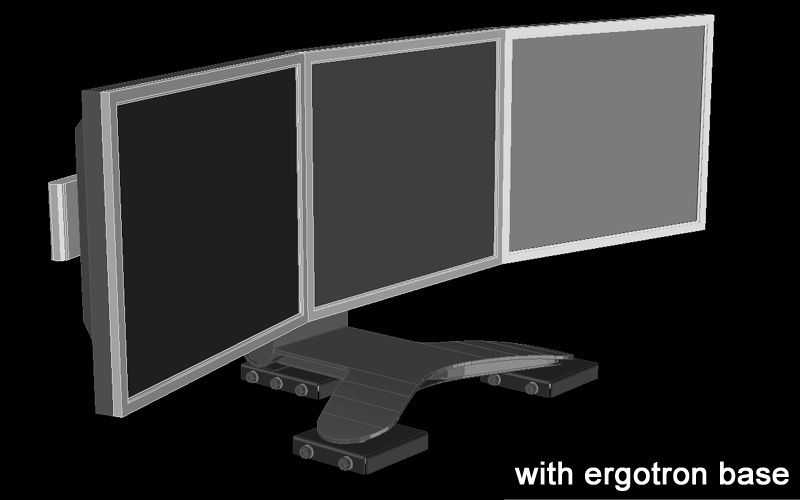
I'm using the Ergotorn LX triple stand, and I've gotta say it's a lovely piece of kit. There's one feature it doesn't have though which is proving to be annoying, and that's the ability to move it backwards and forwards (easily). Up and down, tilt etc is a breeze, but moving it back and forth is a real problem due to its weight and grippy rubber underneath.
I need to move the screens backwards and forwards for my race-sim cockpit which clips to the front of the desk. When seated behind the steering wheel in a laid-back position, the monitors are quite far away. To aleveiate this I
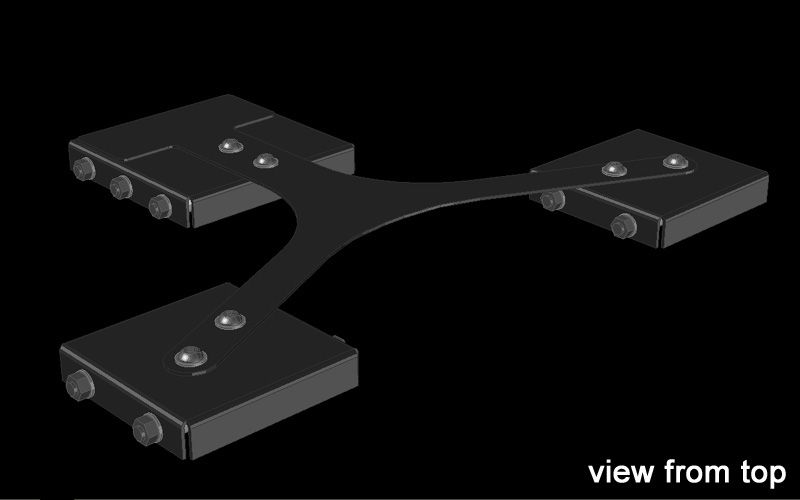
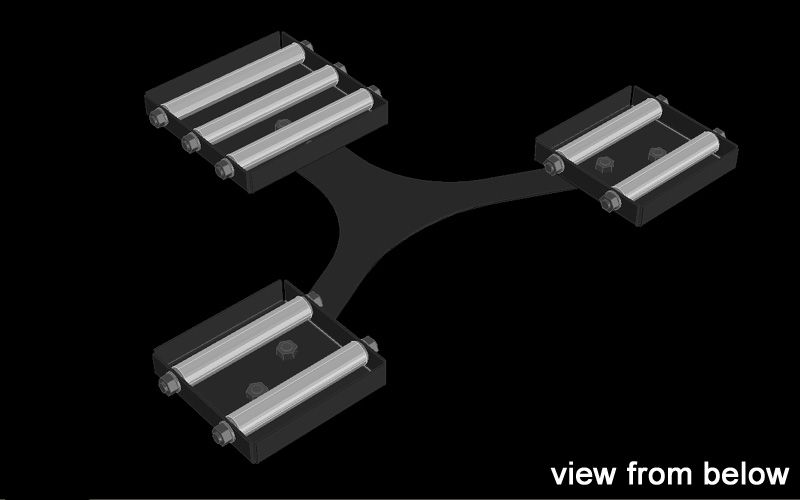
draaaaaag the monitors forwards, and heave them back when finished. It's become such a pain in the *#%! that I've decided to make this device which is basically just a very low profile set of rollers to fit under the Ergotron LX:
Before I go ahead and have this thing made (at great expense) is there any off the shelf product out there that'll do this job already?
Many thanks,
Mr Pibb
Free Dual LCD Screen Mount to First Three Gamers who email
Posted: 19 Sep 2008, 04:46
by Mesh
Couldn't you take one or more of those under the case/box wheel things to do the job? don't know how they'd fit size/height wise though.
Free Dual LCD Screen Mount to First Three Gamers who email
Posted: 19 Sep 2008, 15:31
by Krystm
I really like that Idea! I don't need to move my monitors near as much however it would make it nice for cleaning and if I ever did get to a point that I needed to pull my monitors closer it would make it a heck of a lot easier!
Free Dual LCD Screen Mount to First Three Gamers who email
Posted: 19 Sep 2008, 21:15
by JKeefe
Mr. Pibb,
I don't think you're going to find an off-the-shelf product to do what you want, but I bet you could build something simpler for cheaper. Of course, it will be a lot less refined, will take more vertical space, and not look anywhere near as nice. It's always a tradeoff.
Here in the States Home depot sell casters as small as 2 inches, in swivelling and fixed versions. Bolt three of the fixed versions to some plywood and you've got yourself a rolling platform that will take about 3 inches of vertical space. Paint it black or gray and it might not even look that bad. I'm guessing there's a Home Depot (do-it-yourself hardware retailer) equivalent in the UK. It will be a lot cheaper that custom metal construction, that's for sure.
Free Dual LCD Screen Mount to First Three Gamers who email
Posted: 20 Sep 2008, 00:11
by Mr Pibb
Thanks JKeefe.
Actually, there's more to this than meets the eye. The desk I'm using is a cheap Ikea desk. It's made from two VERY thin layers of veneer either side of a cardboard honeycomb core. Weight distribution is paramount.
But there's more... I'm currently building a race sim cockpit that's tucked away under the desk, but will fold out into position in two easy moves. The TH2Go will roll forward and into place as part of the first movement of setting up the cockpit (opening the cabinet door) via a mechanism linking the door to this roller unit illustrated above. It'll then return to it's normal position upon storing the cockpit away again when the cabinet door is closed. Lazy huh?
Anyway, the height of the monitors will be perfect for both normal use and in the cockpit with this low profile unit under. The cockpit's dash board will be just below bottom of screen.
In a nutshell, I can have a full-blown race sim cockpit when I want (the desk will then be in Mr Pibb mode) and then I can very quickly tuck it away to return the desk to normal (upon which the desk will be in 'wife friendly' mode). :wink:
Free Dual LCD Screen Mount to First Three Gamers who email
Posted: 20 Sep 2008, 00:43
by CyberCrist
It almost looks as if you are looking for miniature gravity conveyors. Gravity conveyors are using used in big industry and shipping to load/unload/move boxes. I'm not sure where you would get really little ones though.