Page 20 of 22
Battlefield 2 Widescreen - Definitive Discussion Thread
Posted: 23 Jul 2007, 09:06
by Octopuss
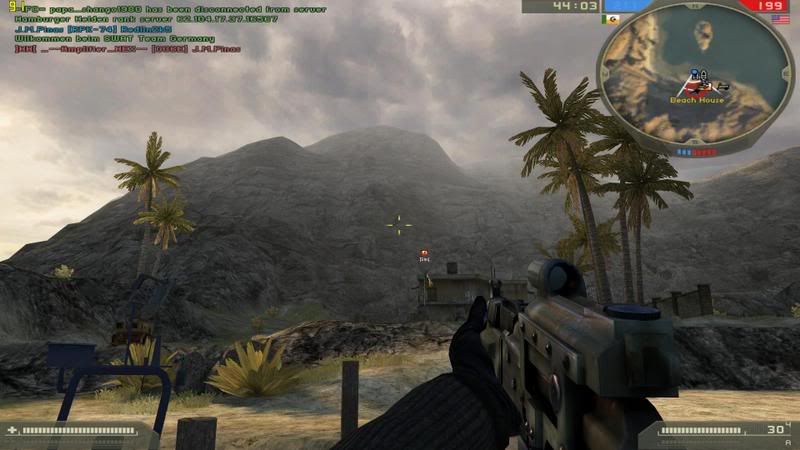
Hi. I did read the thread but still am unsure about one thing. Do you mean that even on widescreen LCD the top and bottom of the screen is cut off? FOV I don't give a damn about...
Battlefield 2 Widescreen - Definitive Discussion Thread
Posted: 24 Jul 2007, 07:40
by Paddy the Wak
Yes ... if you use a widescreen resolution.
Battlefield 2 Widescreen - Definitive Discussion Thread
Posted: 24 Jul 2007, 09:17
by Octopuss
Hm, that sucks... But apparently there's no other choice.
Does the +widescreen 1 switch do anything at all?
Battlefield 2 Widescreen - Definitive Discussion Thread
Posted: 06 Aug 2007, 16:16
by boomstick68
Battlefield 2 Widescreen - Definitive Discussion Thread
Posted: 06 Aug 2007, 19:53
by Paddy the Wak
Hm, that sucks... But apparently there's no other choice.
Does the +widescreen 1 switch do anything at all?
No.
Battlefield 2 Widescreen - Definitive Discussion Thread
Posted: 06 Aug 2007, 20:34
by JosephJEHancock
Paddy, does your TH2GO setup work with Battlefield 2?
Battlefield 2 Widescreen - Definitive Discussion Thread
Posted: 06 Aug 2007, 21:15
by Paddy the Wak
It did for a while ...
Racer_S made a hack for the FOV but Punkbuster didn't like it and would kick you from the game.
We couldn't find a way around this so it was never updated ... :(
Check this old thread ... http://www.widescreengamingforum.com/node/6536tlefield
Battlefield 2 Widescreen - Definitive Discussion Thread
Posted: 06 Aug 2007, 21:21
by JosephJEHancock
Thanks mate.Info like that really helps me to decide my next monitor purchase. 8)
Battlefield 2 Widescreen - Definitive Discussion Thread
Posted: 20 Sep 2007, 21:11
by blunden
This little program in combination with the 1680x1050 shortcut works fine in 1.41 for me. I didn't get kicked by punkbuster either. It's amazing to see the difference it makes when enabling it (which is done by the *-numpad key). Maybe it has been posted before in this thread and I was just lucky.
http://imk.cx/pc/widescreenfixer/
EDIT: Ooops. Sorry. Old news. Still works fine for me though. :D
Battlefield 2 Widescreen - Definitive Discussion Thread
Posted: 06 Nov 2007, 10:42
by Uber
This thread is to long to read everything so I'll just post my quick question.
I have the shortcut line on and works great but what I'm wondering is how to turn on all the other stuff like AA, textures, etc. to max?
I don't think works then I load up BF2 change just those options and reload BF2 because I think they just revert back to default since I changed the res again.
Any suggestions?
Thanks
Battlefield 2 Widescreen - Definitive Discussion Thread
Posted: 07 Nov 2007, 05:29
by dDub
This thread is to long to read everything so I'll just post my quick question.
I have the shortcut line on and works great but what I'm wondering is how to turn on all the other stuff like AA, textures, etc. to max?
I don't think works then I load up BF2 change just those options and reload BF2 because I think they just revert back to default since I changed the res again.
Any suggestions?
Thanks
All the other video options are set in-game and stay true to what you set them there. There are no modifications when you use the target line settings to launch the game -- just set the video settings in the options section in-game and you're good to go with your custom resolution set by the target line in the shortcut.
BTW, if you hadn't noticed the recent posts in this thread, a
true widescreen workaround has been released (see the link in the post above yours). YOu can now use that tool in combination the the command line settings to achieve
true widescreen FOV. It's truly an amazing workaround by Dopefish.
Please note: if you want to test this program, do not use version 1.30 of the program, there seems to be an issue with punkbuster (unlike the previous versions where Evenbalance/EA had no issues with the workaround). Dopefish is in communications with both parties trying to figure out what went wrong with 1.30. Until further notice, just use a previous build.
Check here on WSGF
this thread and or
Dopefish's blog for updates...
[EDIT] Just checked his blog and it seems a new version, 1.32, of WidescreenFixer appears to be "safe" to use with PB
Battlefield 2 Widescreen - Definitive Discussion Thread
Posted: 11 Nov 2007, 20:08
by widescreenfant
I made a post somewhere else, but obviously this thread fits just better, so I'm going to repeat myself:
Actually, some "users" want to achieve exactly the opposite goal as we do here: Making EA/pb to consider using even the widescreen fixer as a cheat.
E.g.:
'm sorry, but its not 4:3 users fault the game doesnt support WS, and it certainly doesnt automatically give you the right hack in a wider view. Just because you can. Just like we 4:3 user will have to take it on the chin with games that do support WS. but this one doesnt, so its your side thats on D
And im gonna do all i can, to get this disallowed, as its my right to object. And im making it my duty, to make sure every 4:3 user is aware of this issue.
Read it up at this http://forums.filefront.com/fh2-suggestions/296226-fh2-widescreen.html
thread, if you want to.
Regards, wsfant
Battlefield 2 Widescreen - Definitive Discussion Thread
Posted: 04 Jan 2008, 10:50
by DaveKap
Quick question. I just reinstalled BF2142 and tried making my shortcut as follows:
"C:Program FilesElectronic ArtsBattlefield 2142BF2142.exe" +menu 1 +fullscreen 1 +szx 1680 + szy 1050
But with and without the widescreenfix program, BF2142 instantly crashes as soon as it starts. Does anyone know what may be causing the problem? I checked the other thread suggesting I reinstall but this is a totally fresh computer, latest drivers, fresh install and patch on the game, so it can't be any old information leaking over.
Battlefield 2 Widescreen - Definitive Discussion Thread
Posted: 04 Jan 2008, 11:09
by Paddy the Wak
Quick question. I just reinstalled BF2142 and tried making my shortcut as follows:
"C:Program FilesElectronic ArtsBattlefield 2142BF2142.exe" +menu 1 +fullscreen 1 +szx 1680 + szy 1050
But with and without the widescreenfix program, BF2142 instantly crashes as soon as it starts. Does anyone know what may be causing the problem? I checked the other thread suggesting I reinstall but this is a totally fresh computer, latest drivers, fresh install and patch on the game, so it can't be any old information leaking over.
Space between these ?
Battlefield 2 Widescreen - Definitive Discussion Thread
Posted: 04 Jan 2008, 11:28
by DaveKap
Space between these ?
God... I am an idiot. Thank you kind sir.
Battlefield 2 Widescreen - Definitive Discussion Thread
Posted: 22 Mar 2008, 10:08
by zajcevik
I`ve tray those things few times http://www.widescreengamingforum.com/node/7181
and nothing .
I`ve iiyama 22" DVI and ati x800xt pe .
i launch game with "D:[-=gry=-]Battlefield 2BF2.exe" +menu 1 +widescreen 1 +szx 1680 +szy 1050
and BF2 is still in 800x600 ;/
what i doing wrong ??
Battlefield 2 Widescreen - Definitive Discussion Thread
Posted: 22 Mar 2008, 12:25
by Paddy the Wak
I can't think what might be wrong ...
Can you get any other res in the game without the additions to the shortcut ?
Battlefield 2 Widescreen - Definitive Discussion Thread
Posted: 22 Mar 2008, 13:44
by zajcevik

i have only those one to choose.
Battlefield 2 Widescreen - Definitive Discussion Thread
Posted: 23 Mar 2008, 13:07
by Paddy the Wak
Your card and your screen should be able to do 1680x1050 so it must be something you have missed when removing the video.con files ...
I notice you have it installed on the D: drive ... have you made sure you deleted all the video.con files from all drives ? ... you never know there might be some put where you wouldn't expect them.
There is nothing else I can say ...
Battlefield 2 Widescreen - Definitive Discussion Thread
Posted: 23 Mar 2008, 13:50
by zajcevik
yes i delete all i found only two video.con on C: but on D: nothing
thx for all