Page 18 of 44
Re: Metal Gear Solid 5: The Phantom Pain- 21:9 support broke
Posted: 14 Oct 2015, 20:29
by Mayh3M
Thanks.
By using these are we able to downsample via normal DSR methods or do we have to use a custom resolution via the hex editor? For example I wanted to use DSR for this game @ 6880x2880 instead of my normal 3440x1440.
Re: Metal Gear Solid 5: The Phantom Pain- 21:9 support broke
Posted: 15 Oct 2015, 01:15
by Francesco
Abram wrote:They provide and email address in that notice. Fire off an email and ask.
I found this
LINK but I see no contact email.
Re: Metal Gear Solid 5: The Phantom Pain- 21:9 support broke
Posted: 15 Oct 2015, 03:32
by THEBOSSMAN
Can someone please give a step by step (or some type of guidance) on fixing the markers using the jackfuste marker fix. I'd really appreciate it.
Re: Metal Gear Solid 5: The Phantom Pain- 21:9 support broke
Posted: 15 Oct 2015, 16:05
by Mayh3M
THEBOSSMAN wrote:Can someone please give a step by step (or some type of guidance) on fixing the markers using the jackfuste marker fix. I'd really appreciate it.
Follow the guide under 'Cheat Engine Table' on page 33 by jackfuste. That's what I did and it fixed the markers for me.
Re: Metal Gear Solid 5: The Phantom Pain- 21:9 support broke
Posted: 16 Oct 2015, 00:30
by smushroomed
Great work everybody, especially jackfuste
I want to mention that 980ti SLI + the CE marker fix causes crashes
I switch to using a single 980ti and it worked fine.
Re: Metal Gear Solid 5: The Phantom Pain- 21:9 support broke
Posted: 16 Oct 2015, 03:26
by Mayh3M
smushroomed wrote:Great work everybody, especially jackfuste
I want to mention that 980ti SLI + the CE marker fix causes crashes
I switch to using a single 980ti and it worked fine.
I use 980 Ti SLI and Cheat Engine marker fix following jackfuste's instructions under 'cheat engine table' on p33. All works properly after I manually edit the values.
Re: Metal Gear Solid 5: The Phantom Pain- 21:9 support broke
Posted: 18 Oct 2015, 00:12
by hubertus
Hallo !
Do you guys also have the Problem that 21:9 is working but there is a Problem with several things like scope view@ sniper or effects like Wind dust in desert is only in 16:9??!??!!!?!!?
Please help! Can i fix that?
Re: Metal Gear Solid 5: The Phantom Pain- 21:9 support broke
Posted: 18 Oct 2015, 11:51
by SamLombardo
Hi guys, i ve got a question. Is one of these fixes working with custom resolutions? I Play 21:9 on a 40 inch monitor in 3840x1620. Can i use a fix for this setting? Thanks in advance
Re: Metal Gear Solid 5: The Phantom Pain- 21:9 support broke
Posted: 18 Oct 2015, 12:17
by hubertus
Here is a picture of what i mean:
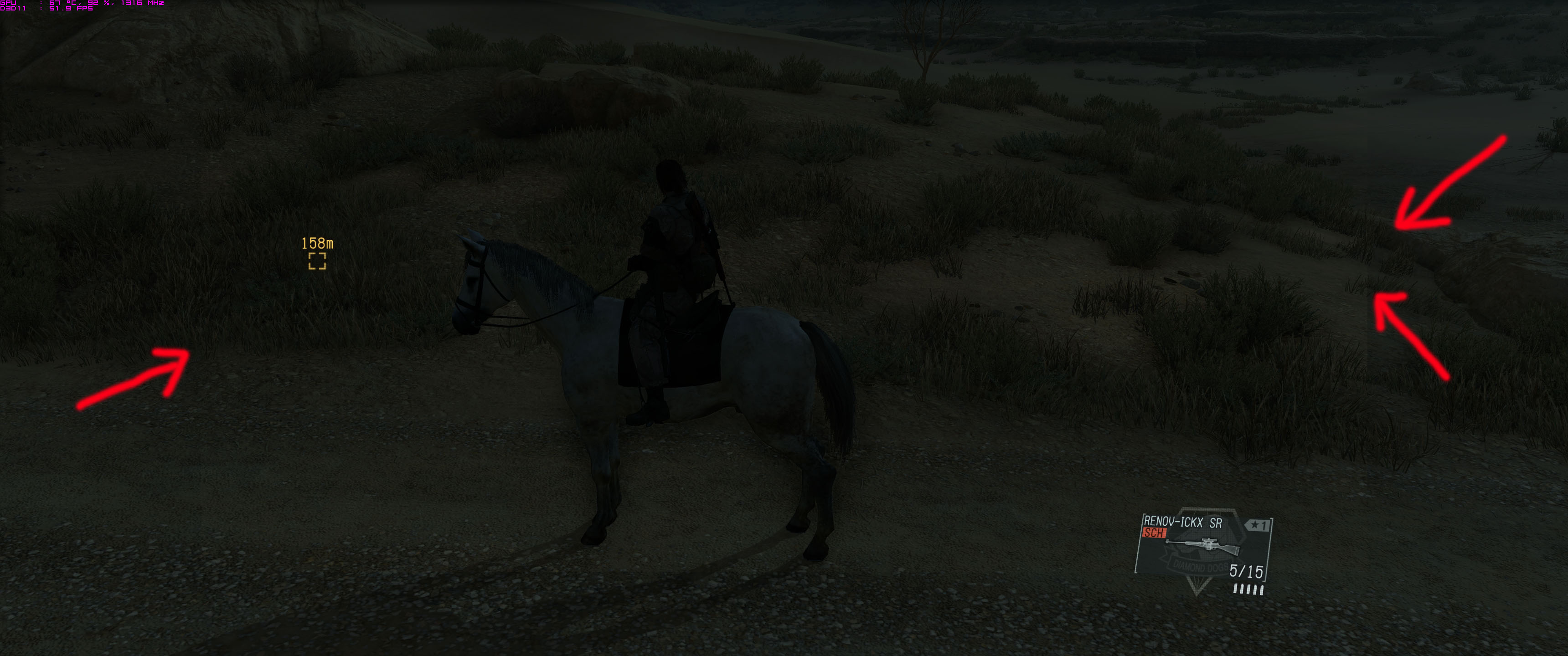
- mgs.jpg (403.88 KiB) Viewed 6246 times
Re: Metal Gear Solid 5: The Phantom Pain- 21:9 support broke
Posted: 18 Oct 2015, 15:26
by magoo25
I have used the tutorial Hex editing for NVidia surround and I have had zero problems in the game. I have GTX 980 Ti in Sli.
First I took my resolution and created the Hex code......I use 5760 x 1200 so 5760/1200 = 4.8
So, the correct code to enter into HxD is: 9A 99 99 40 (this IS the correct order for the digits and letters)
open HxD, drag mgsvtpp folder from steam/steamapps/common/MGS_TPP and correct the code line, save.
My game runs perfectly in Surround, HUD is perfect, no marker issues, no other corrections needed.
My game version on the start screen shows 1.04
Sorry if this is redundant, but I had a hard time finding mgsvtpp(exe) file so I thought I'd include the path here.
Re: Metal Gear Solid 5: The Phantom Pain- 21:9 support broke
Posted: 18 Oct 2015, 16:52
by hubertus
magoo25 wrote:I have used the tutorial Hex editing for NVidia surround and I have had zero problems in the game. I have GTX 980 Ti in Sli.
First I took my resolution and created the Hex code......I use 5760 x 1200 so 5760/1200 = 4.8
So, the correct code to enter into HxD is: 9A 99 99 40 (this IS the correct order for the digits and letters)
open HxD, drag mgsvtpp folder from steam/steamapps/common/MGS_TPP and correct the code line, save.
My game runs perfectly in Surround, HUD is perfect, no marker issues, no other corrections needed.
My game version on the start screen shows 1.04
Sorry if this is redundant, but I had a hard time finding mgsvtpp(exe) file so I thought I'd include the path here.
Re: Metal Gear Solid 5: The Phantom Pain- 21:9 support broke
Posted: 19 Oct 2015, 12:16
by Shunkan
Hi

Need update after the new update.
Thanks.
Re: Metal Gear Solid 5: The Phantom Pain- 21:9 support broke
Posted: 19 Oct 2015, 13:02
by jackfuste
Update for v. 1.0.4.1For 4:3 (800x600, 1024x768 etc.)
mgsvtpp.7zFor 5:4 (1280x1024)
mgsvtpp.7zFor 2560x1080
mgsvtpp.7zFor 3440x1440
mgsvtpp.7zFor 48:10 (5040x1050; 5760x1200 etc.)
mgsvtpp.7zFor 48:9 (4800x900; 5760x1080 etc.)
mgsvtpp.7zMarkers fix:For 2560x1080; 3440x1440
21_9_marker_fix_1_041.7zFor triple 16:9 screen 11520x2160; 5760x1080; 4800x900 etc.
48_9_marker_fix_1_041.7zFor triple 16:10 screen 5760x1200; 5040x1050 etc.
48_10_marker_fix_1_041.7zCheat Engine table:mgsvtpp_1041.7zFirst value should be changed
from
F3 0F 59 0D
DC 0D FD FE
to
F3 0F 59 0D
E0 0D FD FE
this fixes marker position.
Second value - 64, is size for marker and some ui elements.
Proper value should be calculated by formula:
64 * ((width/height)/1.77777)
For example, 64 * ((6000/1080)/1.77777) = 200.00087
So, 64 should be changed to 200.00087
Third value should be changed
from
F3 44 0F
5E 81 0C 01 00 00
to
F3 44 0F
59 81 0C 01 00 00
this fixes sonar effect.
Fourth value should be changed
from
F3 0F
5E AA 0C 01 00 00
to
F3 0F
59 AA 0C 01 00 00
this fixes wind effect in the desert.
FOV Tool:MGSTPP_FOV_1_041.7z
Re: Metal Gear Solid 5: The Phantom Pain- 21:9 support broke
Posted: 19 Oct 2015, 13:35
by QuadGore
jackfuste wrote:Update for v. 1.0.4.1For 4:3 (800x600, 1024x768 etc.)
mgsvtpp.7zFor 5:4 (1280x1024)
mgsvtpp.7zFor 2560x1080
mgsvtpp.7zFor 3440x1440
mgsvtpp.7zFor 48:10 (5040x1050; 5760x1200 etc.)
mgsvtpp.7zFor 48:9 (4800x900; 5760x1080 etc.)
mgsvtpp.7zMarkers fix:For 2560x1080; 3440x1440
21_9_marker_fix_1_041.7zFor triple 16:9 screen 11520x2160; 5760x1080; 4800x900 etc.
48_9_marker_fix_1_041.7zFor triple 16:10 screen 5760x1200; 5040x1050 etc.
48_10_marker_fix_1_041.7zCheat Engine table:mgsvtpp_1041.7zFirst value should be changed
from
F3 0F 59 0D
DC 0D FD FE
to
F3 0F 59 0D
E0 0D FD FE
this fixes marker position.
Second value - 64, is size for marker and some ui elements.
Proper value should be calculated by formula:
64 * ((width/height)/1.77777)
For example, 64 * ((6000/1080)/1.77777) = 200.00087
So, 64 should be changed to 200.00087
Third value should be changed
from
F3 44 0F
5E 81 0C 01 00 00
to
F3 44 0F
59 81 0C 01 00 00
this fixes sonar effect.
Fourth value should be changed
from
F3 0F
5E AA 0C 01 00 00
to
F3 0F
59 AA 0C 01 00 00
this fixes wind effect in the desert.
FOV Tool:MGSTPP_FOV_1_041.7z
Thank you man !!! That was fast
One question: why we cant fix the scope ?
Re: Metal Gear Solid 5: The Phantom Pain- 21:9 support broke
Posted: 19 Oct 2015, 15:50
by Francesco
Thank you jackfuste !!!
Re: Metal Gear Solid 5: The Phantom Pain- 21:9 support broke
Posted: 19 Oct 2015, 16:45
by Mayh3M
Thanks dude!
Re: Metal Gear Solid 5: The Phantom Pain- 21:9 support broke
Posted: 19 Oct 2015, 19:35
by magoo25
Grrrrr.....
The darned patches/updates FUBAR the settings.
Since last evening, I guess there was some kind of update.
I simply revisited the .exe file and placed it into HxD and re-edited my settings.....all good.
Re: Metal Gear Solid 5: The Phantom Pain- 21:9 support broke
Posted: 20 Oct 2015, 18:01
by n1ghtm4r3
magoo25 wrote:Grrrrr.....
The darned patches/updates FUBAR the settings.
Since last evening, I guess there was some kind of update.
I simply revisited the .exe file and placed it into HxD and re-edited my settings.....all good.
Hey man is it easy for you to send me the new hex values for the cheat engine? (marker fix, sonar fix, desert) Appreciate it!
Re: Metal Gear Solid 5: The Phantom Pain- 21:9 support broke
Posted: 20 Oct 2015, 20:14
by Mayh3M
Did the EXE/codes change AGAIN today? My game is crashing now even though jackfuste's codes for 1.041 were working perfectly yesterday.
EDIT: Can confirm when I use cheat engine the codes are no longer the same as what Jackfuste posted yesterday, here is what I'm getting now instead:
1. 28 C3 0F 28 CA 0F C6 C3
2. 64
3. 0F 59 D0 0F 55 F3 0F 58 D4
4. D2 E8 BC BA 8B FF 90 48
and the FOV multiplier now has a default value of 0.
Re: Metal Gear Solid 5: The Phantom Pain- 21:9 support broke
Posted: 20 Oct 2015, 20:43
by Kayden
Mayh3M wrote:Did the EXE/codes change AGAIN today? My game is crashing now even though jackfuste's codes for 1.041 were working perfectly yesterday.
EDIT: Can confirm when I use cheat engine the codes are no longer the same as what Jackfuste posted yesterday, here is what I'm getting now instead:
1. 28 C3 0F 28 CA 0F C6 C3
2. 64
3. 0F 59 D0 0F 55 F3 0F 58 D4
4. D2 E8 BC BA 8B FF 90 48
and the FOV multiplier now has a default value of 0.
Just confirming that there was a new update. Also when I looked at the mgsvtpp.exe properties, under the details tab, it shows the same file version (1.0.4.1) but yesterdays exe file size was 77.3MB while this new exe is 77.4. Not sure how Konami is doing it's revision system but it is confusing as hell.