Page 17 of 19
Re: Sekiro: Shadows Die Twice will need an ultrawide fix
Posted: 03 Apr 2019, 18:40
by Erzkonservativ
Is there a way to get the texture disabler working together with Special K? One overwrites the other.
Need Special K for the networking fix (causes random freezes for me) and the texture disabler... well, so the game doesn't look weird.
Re: Sekiro: Shadows Die Twice will need an ultrawide fix
Posted: 04 Apr 2019, 01:44
by DetectiveSpunkMurphy
Does anyone else have the bug where the combat skill "Whirlwind Slash" just doesn't work? It doesn't connect with enemies at all. Not that it's a big deal since I use Ichimonji: Double all the time but I must say it's very weird.
Re: Sekiro: Shadows Die Twice will need an ultrawide fix
Posted: 04 Apr 2019, 03:53
by DinguoLee
Any one can fix the HUD problem for 21:9 and make the red box whole screen when suffer a low health.
Re: Sekiro: Shadows Die Twice will need an ultrawide fix
Posted: 04 Apr 2019, 14:42
by SamD
DetectiveSpunkMurphy wrote:Does anyone else have the bug where the combat skill "Whirlwind Slash" just doesn't work? It doesn't connect with enemies at all. Not that it's a big deal since I use Ichimonji: Double all the time but I must say it's very weird.
Yeah unfortunately, while the game feels a million times better. I've also noticed that the first slash of the dummy guy you can practice with & regular baddies seems to whiff consistently. I tested with 60 fps and it works fine, but then I tried various different fps, gsync, vsync, no vsync etc. The game is absolutely way better with higher fps, but a bug like this might be further reaching. I'd love it if Susahamat or jack can check to see why the first attack if parried seems to whiff on the enemies end, its pretty easy to recreate with the dummy guy in starting area. Other then that, thank you for all the hard work.
Testing parameters:
120fps+ Version
Choose the deflect training mode, and just stand really close to the dummy guy as he swings, and try to perfect parry his first attacks. You will quickly see the animation that is whiffing through Sekiro's body. It's weird to, its only if you parry it perfectly, instead of triggering the parry sound, it seems to be maybe thinking its a perfect dodge.
Re: Sekiro: Shadows Die Twice will need an ultrawide fix
Posted: 04 Apr 2019, 18:58
by tallgeese
Hello everyone, I'd like to provide some feedback.
I've applied jack's fixes for 21:9 and removing HP/stealth screen edge effects and my resolution is 3440x1440.
I am also experiencing the issue with letters missing from area names. Ashina Castle is spelled as Ashina Castl and Hirata Estate comes up as Hirata Estat.
Not a super serious problem tbh, just wanted to check in.
Re: Sekiro: Shadows Die Twice will need an ultrawide fix
Posted: 04 Apr 2019, 19:03
by Sbrock
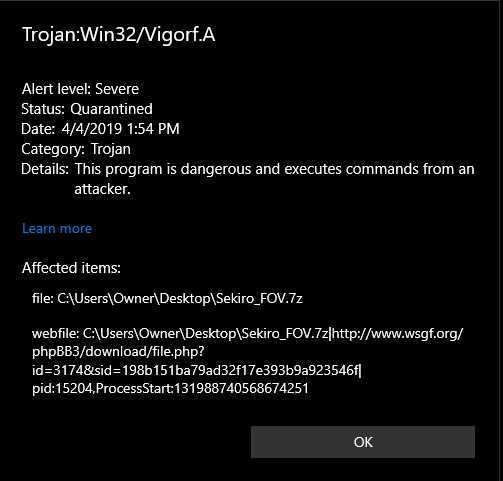
- Capture.PNG (18.39 KiB) Viewed 9075 times
Malware??? I can't download because my browsers detect a Trojan...
Re: Sekiro: Shadows Die Twice will need an ultrawide fix
Posted: 05 Apr 2019, 05:25
by ardamax
eccentricity wrote:Zehdah wrote:Out of curiosity why would you turn Vsync off?
In this case, Sekiro doesn't provide a way to turn it off in-game, so you have to do it through the control panel.
Zehdah wrote:I have it on in the control panel with the fps unlock mod and I have no issues, 144hz G-sync on.
What is the native refresh rate of your monitor? If it's 144 Hz, then that's why it works fine. You'd only need to turn it off if you wanted to run at a higher refresh rate than native (eg. the other user who wanted to run at 144 Hz with a 60 Hz monitor).
i have the same problem as it is but mine has 75hz monitor, tried anything like disable vsync on radeon settings, make sure none of 3rd party software limiting framerate, and tried 100hz, 120hz, and 144hz uncap from jackfuste but it keep stay at 75 fps
download/file.php?mode=view&id=3283so the vsync was on by default in game, is there a way to turn it off?
Re: Sekiro: Shadows Die Twice will need an ultrawide fix
Posted: 05 Apr 2019, 21:23
by Zehdah
Hey all. been using the FOV mod for a few weeks now and today my MalwareBytes decided to block it, delete it and force me to reboot my computer to remove it... I haven't updated it or changed everything and I've played a little bit every day using it, what changed? Very strange! (I know it's safe of course, just wondering what could've caused this)
Re: Sekiro: Shadows Die Twice will need an ultrawide fix
Posted: 06 Apr 2019, 11:13
by jelbo
Erzkonservativ wrote:Is there a way to get the texture disabler working together with Special K? One overwrites the other.
Need Special K for the networking fix (causes random freezes for me) and the texture disabler... well, so the game doesn't look weird.
Try this mod:
Minimal HUD (Customizable HUD). It needs
Sekiro Mod Engine, which uses dinput8.dll and is compatible With SpecialK.
I'm currently running a SpecialK build that has a modded ReShade 3.0.8 with it, combined with the Mod Engine mod that removes the 16:9 overlays and of course, jackfuste's modded sekiro.exe that enables using my native 1920x1200 resolution.
For anyone interested, there's info in
this Steam Community topic post of me.
Re: Sekiro: Shadows Die Twice will need an ultrawide fix
Posted: 06 Apr 2019, 16:37
by wootwoots
jackfuste wrote:FOV trainer:
Sekiro_FOV.7z
Created a account to thanks a lot for that. Really better to have a decent FOV on pc.
Just a little request, would it be possible to add the disable auto center to that mod ? would be far more handy than having to use cheat engine on top + the script with the auto center
thanks

Re: Sekiro: Shadows Die Twice will need an ultrawide fix
Posted: 06 Apr 2019, 18:01
by Erzkonservativ
jelbo wrote:Erzkonservativ wrote:Is there a way to get the texture disabler working together with Special K? One overwrites the other.
Need Special K for the networking fix (causes random freezes for me) and the texture disabler... well, so the game doesn't look weird.
Try this mod:
Minimal HUD (Customizable HUD). It needs
Sekiro Mod Engine, which uses dinput8.dll and is compatible With SpecialK.
I'm currently running a SpecialK build that has a modded ReShade 3.0.8 with it, combined with the Mod Engine mod that removes the 16:9 overlays and of course, jackfuste's modded sekiro.exe that enables using my native 1920x1200 resolution.
For anyone interested, there's info in
this Steam Community topic post of me.
Thank you so much, worked flawlessly!
Re: Sekiro: Shadows Die Twice will need an ultrawide fix
Posted: 07 Apr 2019, 08:58
by RyoHazukiITA
tallgeese wrote:Hello everyone, I'd like to provide some feedback.
I've applied jack's fixes for 21:9 and removing HP/stealth screen edge effects and my resolution is 3440x1440.
I am also experiencing the issue with letters missing from area names. Ashina Castle is spelled as Ashina Castl and Hirata Estate comes up as Hirata Estat.
Not a super serious problem tbh, just wanted to check in.
There's apparently no fix for the missing letters; I've tried different texture removal and HUD minimizer mods and I'd get either the letter missing bug or a black 16:9 box on my screen for a split second everytime there's a loading screen. For me I'd rather have a missing letter in 4 locations in the game then a flashing black box on the screen everytime I use an idol
Re: Sekiro: Shadows Die Twice will need an ultrawide fix
Posted: 09 Apr 2019, 01:37
by HangmanforHire
Does anyone have an issue trying to run higher framerates with the disabled textures for 21:9? I will just have the game freeze and then either play the game audio for a few seconds before crashing, or just crash after the freeze. I did a fresh install of the game and mods. Using the 21:9 fix (3440x1440), the unlocked framerate (120 fps specifically), and the texture disabler for the blood/sneaking. I have included a log in hopes that I can get this issue figured out. It seems to occur only once I've unlocked the framerate. If I use just the 21:9 fix and texture disabler it seems to be fine. Any help would be appreciated!
Edit: Here is a link:
https://drive.google.com/file/d/1csrh3Swj3hrd_ZbATID5ylYBt8bofUpX/view?usp=sharing
Re: Sekiro: Shadows Die Twice will need an ultrawide fix
Posted: 23 Apr 2019, 03:58
by iagob1
jackfuste wrote:Replace
sekiro.exe in the game folder -
sekiro_v4.7z- Windowed mode changed to borderless fullscreen
The new patch 1.03 is live and broke the fix for the 1.02
Jack can you tell us what you changed so we can fix without bother you ? Or make one of those trainers that automatically patch the .exes ? Thank you for all you do for us

PS: The Texture fix still works, only the blackbars need to be removed again
Re: Sekiro: Shadows Die Twice will need an ultrawide fix
Posted: 23 Apr 2019, 08:36
by Skovper
iagob1 wrote:jackfuste wrote:Replace
sekiro.exe in the game folder -
sekiro_v4.7z- Windowed mode changed to borderless fullscreen
The new patch 1.03 is live and broke the fix for the 1.02
Jack can you tell us what you changed so we can fix without bother you ? Or make one of those trainers that automatically patch the .exes ? Thank you for all you do for us
PS: The Texture fix still works, only the blackbars need to be removed again
I just replaced sekiro.exe with jackfuste's version again, and that seemed to do the trick.
Re: Sekiro: Shadows Die Twice will need an ultrawide fix
Posted: 23 Apr 2019, 12:44
by jackfuste
Update for v 1.03
Replace
sekiro.exe in the game folder -
sekiro_1_03.7zFPS Unlocker:
FOV patch:
FOV + ~15%
F3 0F 10 08 F3 0F 59 0D 44 F8 9B 02 => F3 0F 10 08 F3 0F 59 0D 48 F8 9B 02
FOV + ~25%:
F3 0F 10 08 F3 0F 59 0D 44 F8 9B 02 => F3 0F 10 08 F3 0F 59 0D C9 62 B3 01
FOV + ~40%
F3 0F 10 08 F3 0F 59 0D 44 F8 9B 02 => F3 0F 10 08 F3 0F 59 0D 4C F8 9B 02
FOV + ~75%
F3 0F 10 08 F3 0F 59 0D 44 F8 9B 02 => F3 0F 10 08 F3 0F 59 0D 50 F8 9B 02
FOV + ~90%
F3 0F 10 08 F3 0F 59 0D 44 F8 9B 02 => F3 0F 10 08 F3 0F 59 0D 54 F8 9B 02
Re: Sekiro: Shadows Die Twice will need an ultrawide fix
Posted: 23 Apr 2019, 15:36
by Lexars
I've edited some sekiro files, to remove the stealth texture, health and some bars and outlines, for the time being, I'm trying to figure out a solution to the cutscenes, loading screen, interactions with objects and npcs. I edited some lines from the talk.gfx file, but the subtitles also disappear


Re: Sekiro: Shadows Die Twice will need an ultrawide fix
Posted: 23 Apr 2019, 15:56
by PH_SXE
jackfuste wrote:Update for v 1.03
Replace
sekiro.exe in the game folder -
sekiro_1_03.7zFPS Unlocker:
Sekiro_FPS_1_03.7z
FOV patch:
Sekiro_FOV_1_03.7z
FOV + ~15%
F3 0F 10 08 F3 0F 59 0D 44 F8 9B 02 => F3 0F 10 08 F3 0F 59 0D 48 F8 9B 02
FOV + ~25%:
F3 0F 10 08 F3 0F 59 0D 44 F8 9B 02 => F3 0F 10 08 F3 0F 59 0D C9 62 B3 01
FOV + ~40%
F3 0F 10 08 F3 0F 59 0D 44 F8 9B 02 => F3 0F 10 08 F3 0F 59 0D 4C F8 9B 02
FOV + ~75%
F3 0F 10 08 F3 0F 59 0D 44 F8 9B 02 => F3 0F 10 08 F3 0F 59 0D 50 F8 9B 02
FOV + ~90%
F3 0F 10 08 F3 0F 59 0D 44 F8 9B 02 => F3 0F 10 08 F3 0F 59 0D 54 F8 9B 02
Thank you again
Re: Sekiro: Shadows Die Twice will need an ultrawide fix
Posted: 23 Apr 2019, 17:27
by iagob1
jackfuste wrote:Update for v 1.03
Replace
sekiro.exe in the game folder -
sekiro_1_03.7zFPS Unlocker:
Sekiro_FPS_1_03.7z
Thank you
Re: Sekiro: Shadows Die Twice will need an ultrawide fix
Posted: 23 Apr 2019, 19:37
by valcan_s
jackfuste wrote:Update for v 1.03
Replace
sekiro.exe in the game folder -
sekiro_1_03.7zFPS Unlocker:
Sekiro_FPS_1_03.7z
FOV patch:
Sekiro_FOV_1_03.7z
FOV + ~15%
F3 0F 10 08 F3 0F 59 0D 44 F8 9B 02 => F3 0F 10 08 F3 0F 59 0D 48 F8 9B 02
FOV + ~25%:
F3 0F 10 08 F3 0F 59 0D 44 F8 9B 02 => F3 0F 10 08 F3 0F 59 0D C9 62 B3 01
FOV + ~40%
F3 0F 10 08 F3 0F 59 0D 44 F8 9B 02 => F3 0F 10 08 F3 0F 59 0D 4C F8 9B 02
FOV + ~75%
F3 0F 10 08 F3 0F 59 0D 44 F8 9B 02 => F3 0F 10 08 F3 0F 59 0D 50 F8 9B 02
FOV + ~90%
F3 0F 10 08 F3 0F 59 0D 44 F8 9B 02 => F3 0F 10 08 F3 0F 59 0D 54 F8 9B 02
Nice! Thanks a lot Man

we mega appreciate it!