Fallout 4 Eyefinity/Surround

Discussions about getting games to run in a Multi-Mon setup.
phlimm
Posts: 20
Joined: 14 Nov 2015, 02:26

Re: Fallout 4 Eyefinity/Surround

Post by phlimm »

DeusOmnia wrote:
phlimm wrote:So I have 3 monitors, eyefinity set to 5520 x 1010. I have downloaded the fix from page 20 and set the fSafeZoneX to 250 and the fSafeZoneXWide to 1400 and that makes the game almost usable. BUT the Pip-Boy is way too big for the screen, as shown below. Anyone have any ideas how to get this fixed?

Image


I'm having the opposite problem. My PipBoy is all smashed and tiny.


So I figured out one thing. When I use "fov 80" from the console command prompt, that fixes this. It made the Pip-Boy much smaller and able to be used...BUT now everything on the left and right monitors is really stretched out and it looks like crap. I had it set to 70 because with my system, that made everything about the same size no matter which monitor it was in. But the Pip-Boy is unusable. Example pics below:


Trailer in the middle monitor, Vault Elevator in the righht monitor:

Image


Trailer in the left monitor, Vault Elevator in the middle monitor:

Image
ekrboi
Posts: 70
Joined: 01 Jul 2014, 01:00

Re: Fallout 4 Eyefinity/Surround

Post by ekrboi »

Phlimm, what size are your monitors? like 22-24"? Mine are 27's and 70 is just terrible.. but I guess the overall width of the surround/eyefinity display probably makes a big difference. I'm running 90/100!
phlimm
Posts: 20
Joined: 14 Nov 2015, 02:26

Re: Fallout 4 Eyefinity/Surround

Post by phlimm »

I have a 21.8 in the middle and 2 23"s on the left and right. 70 is about right for me as far as FOV goes other than the Pip-Boy. WIth your recommended settings it is exactly like my original screenshot.

I HATE the fact that in order to be able to play at all...i.e. Pip-Boy usable, the 2 side monitors have to look like garbage. >:(
User avatar
Brett
Editors
Editors
Posts: 34
Joined: 04 Jun 2011, 21:18

Re: Fallout 4 Eyefinity/Surround

Post by Brett »

Bumpinthenight wrote:I tried setting that bit but while Fraps reported about a 30% gain in FPS (going from 35->45) the whole thing felt sluggy and even the menus were glitching as I'd cycle through options so I turned it off. (2xGTX980s, if anyone is reporting different experiences and we want to compare)


I know what you mean by sluggish. In fact, this is what appeared to be happening: you know the whole "simulation tied to framerate" thing? At one point, the lower the framerate went, the slower the game not only ran, but "felt". Like, I was walking in slow motion. I'm not sure if it's that what you felt, or if it was the 150ms or so input lag induced with some settings.

I eventually fixed it by randomly changing combinations of a lot of things (SLI bits, VSync, .ini framerate limiter, things like that) so it's kind of tough to pinpoint what actually fixed it. I'm sorry I don't have more of a guess!

That said, it doesn't really matter - I'm only getting 45 or so FPS in triple screen. I've seen as high as 140FPS with a single GPU active on one screen, so the 45 makes sense for a single GPU on three screens. I should be able to maintain a very solid 60 on three screens.
ekrboi
Posts: 70
Joined: 01 Jul 2014, 01:00

Re: Fallout 4 Eyefinity/Surround

Post by ekrboi »

phlimm wrote:I have a 21.8 in the middle and 2 23"s on the left and right. 70 is about right for me as far as FOV goes other than the Pip-Boy. WIth your recommended settings it is exactly like my original screenshot.

I HATE the fact that in order to be able to play at all...i.e. Pip-Boy usable, the 2 side monitors have to look like garbage. >:(


Ahh Ok.. so you don't have as much overall width. There's a post somewhere around here that explains why they look like that.. of course I can't find it when I'm trying to =/

I sit about 2-2.5 feet from my 3x 27" monitors. In this game I use a first person FOV of 90 and a 3rd person FOV of 100. Yes the image on the outer monitors is distorted, but 95% of the time I'm looking at the middle monitor only and the outer monitors are angled towards me around 30deg and are only input for my peripheral vision. Setup this way when I walk down a hallway it actually feels to me like walking down a hallway or walking through a field feels like walking through a field because my monitors nearly fill my left/right "real life" FOV. One of the first things I always do when playing a first person game 3-wide is find a hallway and adjust the FOV until I get the feeling of actually walking down a hallway.. It's ruined me.. I absolutely cannot play a first person game on a single monitor anymore.. it feels like I have tunnel vision..

Hey other triple screen people... I'm not the only one who does this right? or am I crazy? :cheers:


Some shots of my 3 story lair in Sactuary for me and my peeps. :D

Pip-Boy
pipboy.jpg
pipboy.jpg (2.94 MiB) Viewed 9470 times


First Floor
1st_floor.jpg
1st_floor.jpg (4.29 MiB) Viewed 9507 times


Second Floor
2nd_floor.jpg
2nd_floor.jpg (4.02 MiB) Viewed 9463 times


Third Floor/MY FLOOR(Dogmeat too)! No worker peasants allowed!
3rd_floor.jpg
3rd_floor.jpg (2.49 MiB) Viewed 9468 times


As you can see in the Afterburner HUD FPS is all over the place with the Arkham City SLI bits.. but it still never goes lower than without them and all of my GPUs aren't all running @ 99% to do it. Plus it was dropping quite a bit when I took screenshots. It's normally pretty steady at 55-60.
User avatar
Haldi
Editors
Editors
Posts: 2286
Joined: 08 May 2011, 18:58

Re: Fallout 4 Eyefinity/Surround

Post by Haldi »

but you do know that the newest version of MSI afterburner shows "Overall" CPU Temperature and Load?
i coulnd't live with 12 rows high Stats xD

P.S i'm sure Strong likes your appartment xD
We gonna send it to outa space!
ekrboi
Posts: 70
Joined: 01 Jul 2014, 01:00

Re: Fallout 4 Eyefinity/Surround

Post by ekrboi »

Haldi wrote:but you do know that the newest version of MSI afterburner shows "Overall" CPU Temperature and Load?
i coulnd't live with 12 rows high Stats xD

P.S i'm sure Strong likes your appartment xD


Ha! I have the overlay bound to ctl+o. It's normally off.. I only turn it on when I actually want to look at it. I turned it on for the screen shots, it kind of backfired because it was dipping hard when taking them. It's fairly steady otherwise except for maybe diamond city. I like to be able to see the cores/hyper threads so I can tell how well the load is spread and I can see how hard the main thread is pounding whatever core it's running on.
tricky
Posts: 205
Joined: 29 Mar 2008, 17:19

Re: Fallout 4 Eyefinity/Surround

Post by tricky »

For anyone that wants to reprogram the keys, here is my AutoHotkey script, it only swaps the keys while the game is active, working great for me as I always use all the numpad keys to move, reload, open etc.

Running smooth as butter at 5760x1080 on a single 980Ti, ultra everything + SweetFx, so not sure why some of you are getting < 60 fps.

https://www.autohotkey.com
"Fallout4Keys.ahk"

#NoEnv ; Recommended for performance and compatibility with future AutoHotkey releases.
SendMode Input ; Recommended for new scripts due to its superior speed and reliability.
SetWorkingDir %A_ScriptDir% ; Ensures a consistent starting directory.

#IfWinActive ahk_exe Fallout4.exe
{
a::Numpad1
w::Numpad8
s::Numpad2
d::Numpad3

e::Numpad0
LCtrl::NumpadDiv
Tab::NumpadMult
f::NumpadAdd
g::Numpad9
v::Numpad5
q::Numpad7
r::NumpadDot

Numpad1::a
Numpad8::w
Numpad2::s
Numpad3::d

Numpad0::e
NumpadDiv::LCtrl
NumpadMult::Tab
NumpadAdd::f
Numpad9::g
Numpad5::v
Numpad7::q
NumpadDot::r
}
__________________________________________________________

Core i7-8086K @ 5.0 Ghz | H60 | Nvidia GTX 980 Ti 6GB | Soundblaster Z | Asus Z370-A

16GB DDR4 | Win10 x64 | 3x27" Asus IPS @ 5760x1080 | Samsung 970 1TB NVMe
User avatar
Haldi
Editors
Editors
Posts: 2286
Joined: 08 May 2011, 18:58

Re: Fallout 4 Eyefinity/Surround

Post by Haldi »

Tutorial how to edit .ba2 files
Things you need:
.ba2 un(re-)packer from here: http://www.loverslab.com/topic/54891-f4-ba2-unpack/ (seems to be down, Reupload by myself:
QuickBMS extractor.zip
(7.93 MiB) Downloaded 991 times
)
(Edit: OR use Archive2.exe which comes included in the Creation Kit for Fallout 4 )
JPEXS Free Flash Decompiler from here: https://github.com/jindrapetrik/jpexs-d ... r/releases
the original Fallout4 Interfaces.ba2 (or you can use my modified version)

What to do?
  • Start up the quickbms.exe
  • select f4.bms as plugin
  • select the Fallout4 - Interface.ba2 to unpack
  • select the target folger
You have now an unpacked archive and can modify all .swf files how you wan't em.

Edit: Open the Interface.ba2 with archive2.exe select the files you want to extract, click on Archive-> Extract Selected to


What to change?
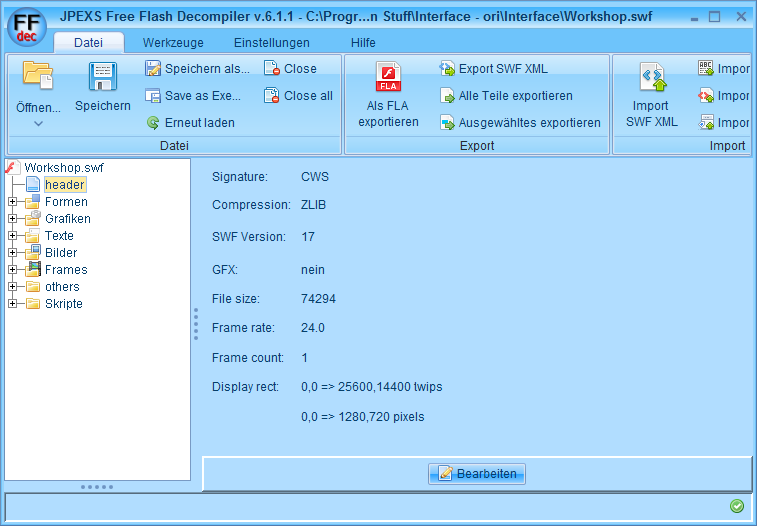
You have the heade of the .swf file, most of the time it's enough to simply change that to the Aspect Ratio you want.
Original is 25'600x14'400 twips aka 1280x720 pixel (Yep... it's simply x 20) if you wan't 21:9 you don't set it to your Resolution of 3440x1440 but leave it the 720p in height and simply set the according 1706 pixel wide aka 34'120 twips
Image


How to center the HUD
If you're using mutliple Monitors you can Center the whole Hud via .ini Edits in the Fallout4.ini in myDocuments:

Code: Select all

[Interface]
fSafeZoneX=250.0
fSafeZoneXWide=250.0

It's trial and Error there.... just play around until you have your Hud at the perfect position.
Be aware... this numbers are NOT the pixels of your resolution but the pixel of your HUD, so if you modified your hud for 3840x720 you'd need to add 1280+20 (border) for the SafeZoneXWide

How to prevent certain Elements from being Left aligned?
Stuff like Examine and Workshop are all left aligned, if you want them to be over the whole Monitor you'd need to modify each element itself.
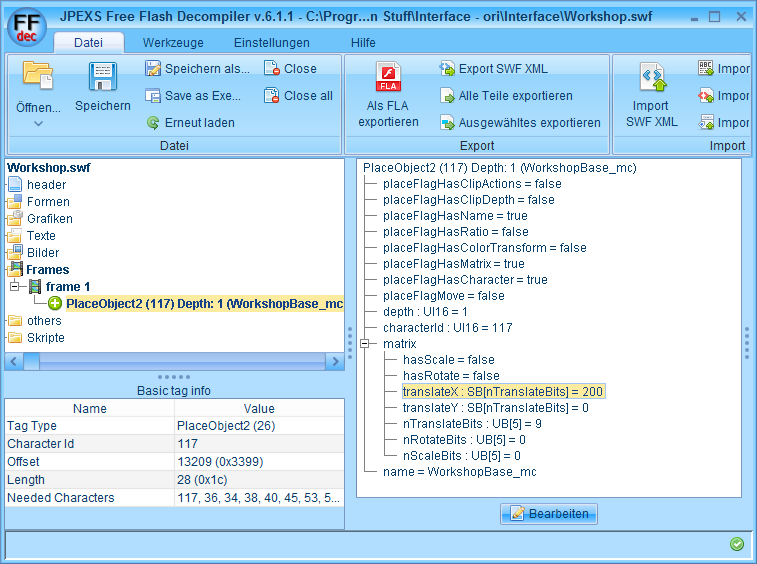
If you wan't them to be Centered you can modify the whole Frame. you go to "Frames" select "frame 1" select tha "place Object blablabla" and search for the "translateX: SB[n TranslateBits] = 000" in "matrix". With this you can move the whole Frame segment.
Be aware that this are NOT pixels but twips (pixel x 20) and that the maximum X lenght is defined in the header of the file, not your gaming resolution.
Image

How to fix the green shades?
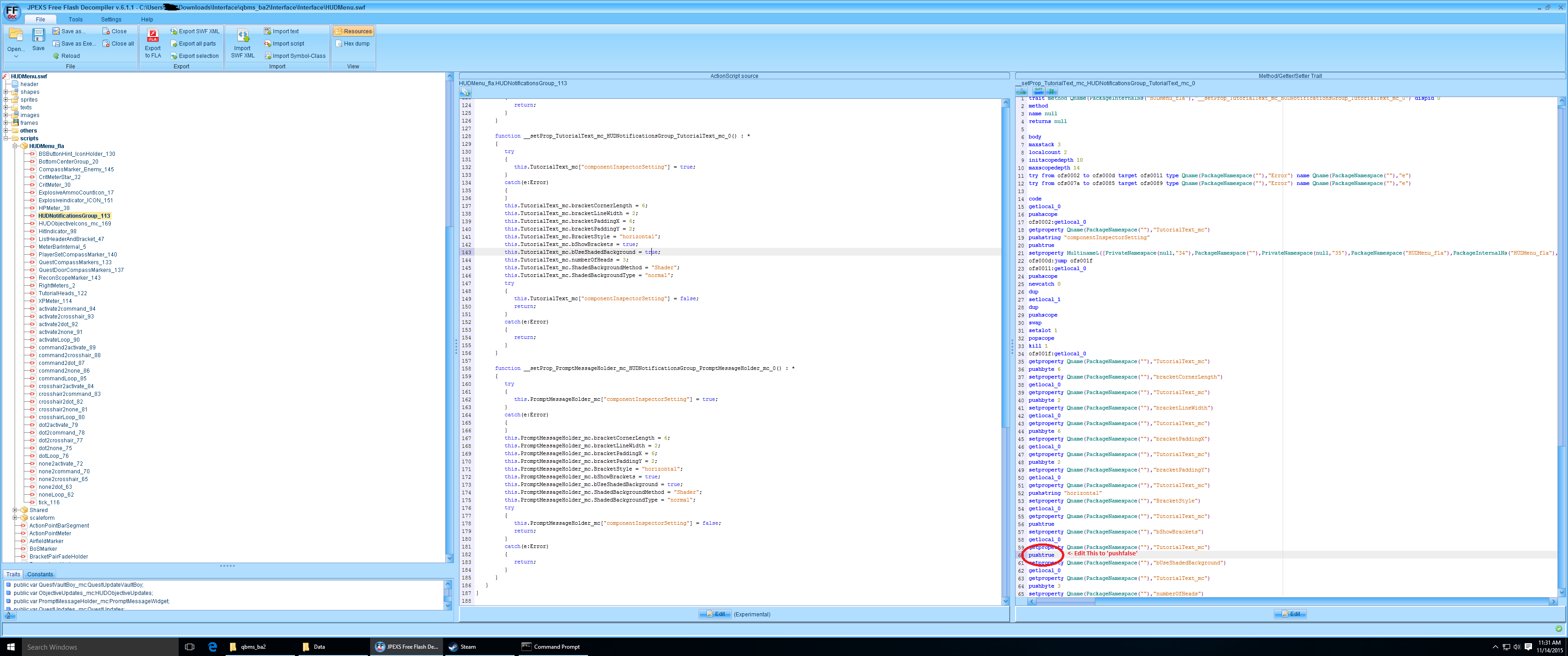
According to Galnix the green shades are caused by the "bUseShadedBackground = true;" in the script part of the .swf file.
Galnix wrote:If you look through the scripts embedded in the SWF files, there is a 'bUseShadedBackground = true;' included in some of them. Setting that to false removes the green boxes. To edit it you will need to click on the word 'true' in the 'ActionScript source' pane, and then go to the corresponding line in the 'Method/Getter/Setter Trait' pane that opens up. Change that from 'pushtrue' to 'pushfalse'. After you save that change, you should see the line in the other pane automatically change to false. You will need to repeat this for every instance of the 'bUseShadedBackgound' you can find.
Image

If you remove them from the HUDMenu.swf and FavoritesMenu.swf it looks way better... they're totally gone though, not fixed.

How to recompile the .swf files into a .ba2
it's written in the readme of the quickbms :)
ATM this only works via CMD, here is the command i'm using:

Code: Select all

quickbms -w -r "C:\Program Files (x86)\Steam\steamapps\common\Fallout 4\Tools n Stuff\QuickBMS extractor\f4.bms" "C:\Program Files (x86)\Steam\steamapps\common\Fallout 4\Tools n Stuff\original Interface.ba2" "C:\Program Files (x86)\Steam\steamapps\common\Fallout 4\Tools n Stuff\Interfacefolder with Modified swf files"

important note on reimporting. you need ALL .swf files in this Folder you want to reimport, if you only import the changed ones the archive structure might get broken and you can't start Fallout4.
When you get the error "this file is bigger than the original and can't be reimportet: Yes, no, force" always use the Force!

Edit:
Open the interface.ba2 with Archive2.exe click on Archive-> Add Folder and import the Folder you exported and fixed before. Now click on File->Save and thats all.


Clipping Issues:
Thanks to Aiken Drum
Hey guys, regarding the unintended wallhacking you get with surround resolutions (and, at least on my box, the glaring white background that often shows through and blinds me)... I have a fix.
Merge this into Fallout4.ini:

Code: Select all

[Display]
fNear1stPersonDistance=0.4
fNearDistance=6.0000

(The existing values, if present, will probably be 1.0 and 15.0, respectively.)
Basically, the problem was that we are effectively making the near clipping plane considerably wider, which allows it to clip through walls that previously couldn't get both close and on-screen at the same time. The solution is to bring the near clip closer so that it covers a smaller area that can't get close enough to walls to clip through them.
The numbers above should work well for 3 x 16:9, even with large bezel corrections. If not, try 0.3333 and 5.0000, respectively, but those are total overkill.


Small Objects in preview (letters, maps, newspapers) and building objects icons
Thanks to Aiken Drum
On the bright side, the books/notes already display in the right aspect, just not big enough, so this properly fixes them.
Option 1: Simply make the height correct. Merge this with Fallout4.ini:

Code: Select all

[Interface]
fNoteDistance=12.0000
fBookDistance=36.6667
fWorkshopMenuItem3DScale=2.0000


Option 2: For the horizontally-squished elements, make them a bit taller than originally intended, in order to show more detail that has been lost from the squishing. Merge this with Fallout4.ini:

Code: Select all

[Interface]
fInventory3DItemZoomScale=2.6250
fInventory3DItemPosScaleWide=1.7500
fInventory3DItemPosScale=2.1875
fNoteDistance=12.0000
fBookDistance=36.6667
fWorkshopMenuItem3DScale=1.7143
fWorkbenchItemScreenScale=1.7500
fInspectItemScreenScale=1.7500

Note this assumes 48:9 (surround/eyefinity). For 21:9 you'd want to scale fWorkshopMenuItem3DScale and the two distances by 48/21.

Last edited by Haldi on 22 Feb 2019, 18:07, edited 2 times in total.
Reason: Changed Jpex URL
We gonna send it to outa space!
Deryan3
Posts: 3
Joined: 06 Jul 2015, 02:00

Re: Fallout 4 Eyefinity/Surround

Post by Deryan3 »

a little help please,
I have done all the following but out of the 3 monitors i have the game is only playing on my middle and right monitor, wallpaper is still showing on my left. what do i need to do to have all 3 monitors working?

thank you in advance.
Zettoz
Posts: 5
Joined: 03 May 2014, 02:48

Re: Fallout 4 Eyefinity/Surround

Post by Zettoz »

Is anyone else running into this issue where there will be an invisible horizontal line indoors where the shading is off on half the screen? I've been trying everything but I can't get it to go away, makes indoor combat really tough.

EDIT: I found the fix right after posting here this morning, should have looked around my other forums again before posting here.
To fix the issue I have with the shaders modify "bComputeShaderDeferredTiledLighting=0" in Fallout4Prefs.ini (\My Games\Fallout4\)
Credits to Jorum from GameFaqs http://www.gamefaqs.com/boards/164594-f ... 271?page=1
Attachments
Issue
Issue
2015-11-14_00001.jpg (837.74 KiB) Viewed 7270 times
Last edited by Zettoz on 14 Nov 2015, 15:43, edited 1 time in total.
User avatar
Brett
Editors
Editors
Posts: 34
Joined: 04 Jun 2011, 21:18

Re: Fallout 4 Eyefinity/Surround

Post by Brett »

tricky wrote:For anyone that wants to reprogram the keys, here is my AutoHotkey script, it only swaps the keys while the game is active, working great for me as I always use all the numpad keys to move, reload, open etc.


My God, man. Are you left handed?

I'm a righty, but you still remind me of me before I eventually just gave in to modern games and started using WSAD (I *really* didn't want to). Eventually I bought a Logitech G13 and I'm pretty happy with that.
Pendaz
Posts: 8
Joined: 10 Nov 2015, 11:45

Re: Fallout 4 Eyefinity/Surround

Post by Pendaz »

Brett wrote:
tricky wrote:For anyone that wants to reprogram the keys, here is my AutoHotkey script, it only swaps the keys while the game is active, working great for me as I always use all the numpad keys to move, reload, open etc.


My God, man. Are you left handed?

I'm a righty, but you still remind me of me before I eventually just gave in to modern games and started using WSAD (I *really* didn't want to). Eventually I bought a Logitech G13 and I'm pretty happy with that.


Heh reminds me of my old config:
mouse 1 + mouse 2 = walk forward/back
Arrowkeys = strafe left/right/jump/duck
kp Insert = fire
kp_pgdown reload etc

I'm left handed, no idea why ended up with that config but ended up being forced to use WASD when i started playing ARMA - way too many keys to rebind
tricky
Posts: 205
Joined: 29 Mar 2008, 17:19

Re: Fallout 4 Eyefinity/Surround

Post by tricky »

Brett wrote:
tricky wrote:For anyone that wants to reprogram the keys, here is my AutoHotkey script, it only swaps the keys while the game is active, working great for me as I always use all the numpad keys to move, reload, open etc.


My God, man. Are you left handed?

I'm a righty, but you still remind me of me before I eventually just gave in to modern games and started using WSAD (I *really* didn't want to). Eventually I bought a Logitech G13 and I'm pretty happy with that.


Haha no what happened is that I didn't play Doom and those games when they first came out (was young and partying), and my first real mouse+keyboard game was Terminator: Future Shock (great game). I programmed the numpad for everything and it used reverse mouse look as default. Then I repeated the setup for Duke Nukem 3D which I played for 1,000s of hours and now it's ingrained in me. Every game I use numpad and mouse reverse look. I am horrible at FPS on consoles so I haven't owned a console since Sega Genesis.

I also like how I can just move my keyboard to the left and it feels natural to just mouse and numpad for most everything. I saw a screenshot of someone here that puts their mousepad and mouse on top of their keyboard to bring them closer together, I don't have to do that.

[n/a_][reload__][special_][light__]
[walk][forward][_run___][jump_]
[n/a_][special_][_unused][_____]
[left_][back___][_right__][crouch]
[use/open____][grenade][______]
__________________________________________________________

Core i7-8086K @ 5.0 Ghz | H60 | Nvidia GTX 980 Ti 6GB | Soundblaster Z | Asus Z370-A

16GB DDR4 | Win10 x64 | 3x27" Asus IPS @ 5760x1080 | Samsung 970 1TB NVMe
daragman
Posts: 9
Joined: 02 Dec 2014, 13:50

Re: Fallout 4 Eyefinity/Surround

Post by daragman »

Hi again,

First off, many thx to those working on solutions for multi monitor for FO4!

I asked a question before on page 27 but no replies as of yet.

Is the fix for 5760x1080 only???
Because with bezel correction the whole game shifts to the left and leaves me with a black bar on my right monitor...
Any ideas what might cause this and how i might fix it?
User avatar
Haldi
Editors
Editors
Posts: 2286
Joined: 08 May 2011, 18:58

Re: Fallout 4 Eyefinity/Surround

Post by Haldi »

Deryan3 wrote:a little help please,
I have done all the following but out of the 3 monitors i have the game is only playing on my middle and right monitor, wallpaper is still showing on my left. what do i need to do to have all 3 monitors working?

thank you in advance.


In MyDocuments Fallout4Prefs.ini edit to this:
iSize H=1080
iSize W=5760

same goes to daragman, did you edit your Bezel Corrected Resolution in the .ini file ? If you take an Ingame screenshot, do you have the black bar on the screenshot or not? what resolution is the screenshot?
We gonna send it to outa space!
Deryan3
Posts: 3
Joined: 06 Jul 2015, 02:00

Re: Fallout 4 Eyefinity/Surround

Post by Deryan3 »

Haldi wrote:
Deryan3 wrote:a little help please,
I have done all the following but out of the 3 monitors i have the game is only playing on my middle and right monitor, wallpaper is still showing on my left. what do i need to do to have all 3 monitors working?

thank you in advance.


In MyDocuments Fallout4Prefs.ini edit to this:
iSize H=1080
iSize W=5760

same goes to daragman, did you edit your Bezel Corrected Resolution in the .ini file ? If you take an Ingame screenshot, do you have the black bar on the screenshot or not? what resolution is the screenshot?


Thanks Haldi, I did that before and again, i still can only get the middle and right screen to display the game.. I've had F3 running on all 3 w/o problems, and i havent changed anything in NVcontrols. I greatly appreciate your help.
Galnix
Posts: 3
Joined: 14 Nov 2015, 18:17

Re: Fallout 4 Eyefinity/Surround

Post by Galnix »

I figured out how to remove the dark green boxes, at least from the HUD anyway. I'm guessing the process would be similar for other UI elements as well.

If you look through the scripts embedded in the SWF files, there is a 'bUseShadedBackground = true;' included in some of them. Setting that to false removes the green boxes. To edit it you will need to click on the word 'true' in the 'ActionScript source' pane, and then go to the corresponding line in the 'Method/Getter/Setter Trait' pane that opens up. Change that from 'pushtrue' to 'pushfalse'. After you save that change, you should see the line in the other pane automatically change to false. You will need to repeat this for every instance of the 'bUseShadedBackgound' you can find.

Do not edit the code in the 'ActionScript source' pane itself, that will cause the game to crash.

Some pictures to help/show the dark green boxes are gone:

fo4_edit.png
fo4_edit.png (291.29 KiB) Viewed 7263 times

Image
Image

Attached is the HUDMenu.swf with these edits applied.
Attachments
HUDMenu.zip
(91.9 KiB) Downloaded 465 times
phlimm
Posts: 20
Joined: 14 Nov 2015, 02:26

Re: Fallout 4 Eyefinity/Surround

Post by phlimm »

Deryan3 wrote:a little help please,
I have done all the following but out of the 3 monitors i have the game is only playing on my middle and right monitor, wallpaper is still showing on my left. what do i need to do to have all 3 monitors working?

thank you in advance.


Are all your monitors the same physical size? I have one off sized on and I needed to adjust my Eyefinity (under Resize Desktop) to "Fit". When I tried "Expand", I got what you are describing except the right hand monitor was the one showing the desktop.
phlimm
Posts: 20
Joined: 14 Nov 2015, 02:26

Re: Fallout 4 Eyefinity/Surround

Post by phlimm »

Galnix wrote:I figured out how to remove the dark green boxes, at least from the HUD anyway. I'm guessing the process would be similar for other UI elements as well.

If you look through the scripts embedded in the SWF files, there is a 'bUseShadedBackground = true;' included in some of them. Setting that to false removes the green boxes. To edit it you will need to click on the word 'true' in the 'ActionScript source' pane, and then go to the corresponding line in the 'Method/Getter/Setter Trait' pane that opens up. Change that from 'pushtrue' to 'pushfalse'. After you save that change, you should see the line in the other pane automatically change to false. You will need to repeat this for every instance of the 'bUseShadedBackgound' you can find.

Do not edit the code in the 'ActionScript source' pane itself, that will cause the game to crash.


Sorry for my ignorance...is the HUDMenu.SWF something that I can just add to my game or it that embedded in the .ba2 files?
Post Reply

Who is online

Users browsing this forum: Semrush [Bot] and 11 guests
