Page 16 of 44
Re: Metal Gear Solid 5: The Phantom Pain- 21:9 support broke
Posted: 25 Sep 2015, 03:11
by Garden
Here the marker fix 1.0.0.7 for 2560x1080 (should work for 3440x1440)...
Re: Metal Gear Solid 5: The Phantom Pain- 21:9 support broke
Posted: 25 Sep 2015, 05:35
by LePewp
Thanks, Garden, but any idea why Malware Bytes flags your file for "hackingtool.cheatengine"? I realize that's the method for achieving the fix, but the .exe's offered by Jackfuste and Ekrboi have never been flagged so I thought I'd ask.
Re: Metal Gear Solid 5: The Phantom Pain- 21:9 support broke
Posted: 25 Sep 2015, 07:09
by oldsql
New 1.0.0.7 Exe for 2560x1080 plz.

Re: Metal Gear Solid 5: The Phantom Pain- 21:9 support broke
Posted: 25 Sep 2015, 07:40
by iria2
oldsql wrote:New 1.0.0.7 Exe for 2560x1080 plz.
If you'd like, you can always try out the patcher I made
here. Still working with the latest update!

Re: Metal Gear Solid 5: The Phantom Pain- 21:9 support broke
Posted: 25 Sep 2015, 07:53
by Ommis
lmimmfn wrote:Ommis wrote: Second value - 64, is size for marker and some ui elements.
Proper value should be calculated by formula:
64 * ((width/height)/1.77777)
For example, 64 * ((5760/1080)/1.77777) = 192.008392
So, 64 should be changed to 192.008392
Thanks for that, i think your formula is wrong though, the markers were tiny with the above formula with 3440x1440, instead i changed it around and this works:
( 64 * (3440/1440) )/1.77777 = 86
The "formula" is correct but yes, you have to change the numbers for your actual resolution.
Eks:
3840x1620:
64*((3840/1620)/1.77777)) = 85.3337066
2560x1080:
64*((2560/1080)/1.77777)) = 85.3337066
3440x1440:
64*((3440/1440)/1.77777)) = 86.00037625
5760x1080:
64*((5760/1080)/1.77777)) = 192.00084
As we can see, the reason why some marker fixes work for several resolutions, is because the ratio is the same.
Re: Metal Gear Solid 5: The Phantom Pain- 21:9 support broke
Posted: 25 Sep 2015, 10:34
by X1XNobleX1X
jackfuste wrote:Here's update for v. 1.006
this fixes sonar effect.
Hello Jack,
Trying to get the marker fix to work, but with no luck. The UI becomes tiny, and the markers still aren't right.
I'v used the guide, but I'm not sure what I'm doing wrong..
Could you please help,
my resolution is 5760x1200.
Thank you!
Re: Metal Gear Solid 5: The Phantom Pain- 21:9 support broke
Posted: 25 Sep 2015, 15:08
by Garden
LePewp wrote:Thanks, Garden, but any idea why Malware Bytes flags your file for "hackingtool.cheatengine"? I realize that's the method for achieving the fix, but the .exe's offered by Jackfuste and Ekrboi have never been flagged so I thought I'd ask.
I realy dont know, i just get the jackfuste table, follow the guide and create a generic trainer exe with the cheat engine.
Re: Metal Gear Solid 5: The Phantom Pain- 21:9 support broke
Posted: 25 Sep 2015, 15:41
by CY:G
Jackfuste, If you could release an update for the FOV tool you provided a few pages back I would appreciate it, game is giving me headaches again

Thanks in advance

Re: Metal Gear Solid 5: The Phantom Pain- 21:9 support broke
Posted: 25 Sep 2015, 15:57
by CY:G
Sorry for the double post but I think this is important enough.
While we wait for Jackfuste, you can go into the properties of the game, to the BETA tab and select Beta 1.006, the game will download a 60MB patch and voila, all the previous fixes work for me Didnt do anything to my save file but I would suggest you back it up just in case. Location of the save file steam\userdata\<steamid>\311340\remote\
Re: Metal Gear Solid 5: The Phantom Pain- 21:9 support broke
Posted: 25 Sep 2015, 18:29
by oldsql
iria2 wrote:oldsql wrote:New 1.0.0.7 Exe for 2560x1080 plz.
If you'd like, you can always try out the patcher I made
here. Still working with the latest update!
Thhhaaannnnkksss

Re: Metal Gear Solid 5: The Phantom Pain- 21:9 support broke
Posted: 25 Sep 2015, 19:08
by j-gvk
iria2 wrote:oldsql wrote:New 1.0.0.7 Exe for 2560x1080 plz.
If you'd like, you can always try out the patcher I made
here. Still working with the latest update!
Thanks works like a charm !
Re: Metal Gear Solid 5: The Phantom Pain- 21:9 support broke
Posted: 25 Sep 2015, 20:06
by jackfuste
Here's update for v. 1.007For 4:3 (800x600, 1024x768 etc.)
mgsvtpp.7zFor 5:4 (1280x1024)
mgsvtpp.7zFor 2560x1080
mgsvtpp.7zFor 3440x1440
mgsvtpp.7zFor 48:10 (5040x1050; 5760x1200 etc.)
mgsvtpp.7zFor 48:9 (4800x900; 5760x1080 etc.)
mgsvtpp.7zMarkers fix:For 2560x1080; 3440x1440
For triple 16:9 screen 11520x2160; 5760x1080; 4800x900 etc.
For triple 16:10 screen 5760x1200; 5040x1050 etc.
Cheat Engine table:First value should be changed
from
F3 0F 59 0D
BD 76 00 FF
to
F3 0F 59 0D
C1 76 00 FF
this fixes marker position.
Second value - 64, is size for marker and some ui elements.
Proper value should be calculated by formula:
64 * ((width/height)/1.77777)
For example, 64 * ((6000/1080)/1.77777) = 200.00087
So, 64 should be changed to 200.00087
Third value should be changed
from
F3 44 0F
5E 81 0C 01 00 00
to
F3 44 0F
59 81 0C 01 00 00
this fixes sonar effect.
Fourth value should be changed
from
F3 0F
5E AA 0C 01 00 00
to
F3 0F
59 AA 0C 01 00 00
this fixes wind effect in the desert.
Ci7rus wrote:QuadGore wrote:How can I solve this problem ? (really hope there is a solution) :

This happens whenever I enter a side-ops mission area (usually in open desert areas only), and strangely enough it'll fix itself once I leave the area. Unfortunately, I think the only way this will ever be fixed is if the game gets patched with proper 21:9 support.
That fixed now.
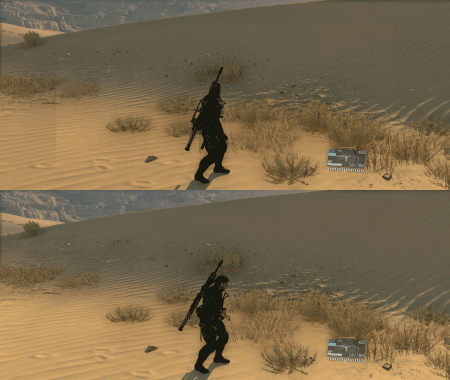
- wind.gif (77.48 KiB) Viewed 7223 times
CY:G wrote:Jackfuste, If you could release an update for the FOV tool you provided a few pages back I would appreciate it, game is giving me headaches again
Thanks in advance
Re: Metal Gear Solid 5: The Phantom Pain- 21:9 support broke
Posted: 26 Sep 2015, 00:06
by LePewp
Thanks, Jackfuste!
Also, thanks Garden! Just to clear the air, I was in no way insinuating your files contained any malware, etc. Oddly enough, Jackfuste's FOV fix is flagged in the same way by MWB. Go figure.
Re: Metal Gear Solid 5: The Phantom Pain- 21:9 support broke
Posted: 26 Sep 2015, 05:04
by Thespieler11
Thank you so much Jackfuste, youre the best.
Re: Metal Gear Solid 5: The Phantom Pain- 21:9 support broke
Posted: 26 Sep 2015, 10:25
by X1XNobleX1X
Thank you again Jack!
You're amazing!
Re: Metal Gear Solid 5: The Phantom Pain- 21:9 support broke
Posted: 26 Sep 2015, 17:45
by QuadGore
jackfuste wrote:Here's update for v. 1.007For 4:3 (800x600, 1024x768 etc.)
mgsvtpp.7zFor 5:4 (1280x1024)
mgsvtpp.7zFor 2560x1080
mgsvtpp.7zFor 3440x1440
mgsvtpp.7zFor 48:10 (5040x1050; 5760x1200 etc.)
mgsvtpp.7zFor 48:9 (4800x900; 5760x1080 etc.)
mgsvtpp.7zMarkers fix:For 2560x1080; 3440x1440
21_9_marker_fix_1_007.7z
For triple 16:9 screen 11520x2160; 5760x1080; 4800x900 etc.
48_9_marker_fix_1_007.7z
For triple 16:10 screen 5760x1200; 5040x1050 etc.
48_10_marker_fix_1_007.7z
Cheat Engine table:mgsvtpp_1_007.7z
First value should be changed
from
F3 0F 59 0D
BD 76 00 FF
to
F3 0F 59 0D
C1 76 00 FF
this fixes marker position.
Second value - 64, is size for marker and some ui elements.
Proper value should be calculated by formula:
64 * ((width/height)/1.77777)
For example, 64 * ((6000/1080)/1.77777) = 200.00087
So, 64 should be changed to 200.00087
Third value should be changed
from
F3 44 0F
5E 81 0C 01 00 00
to
F3 44 0F
59 81 0C 01 00 00
this fixes sonar effect.
Fourth value should be changed
from
F3 0F
5E AA 0C 01 00 00
to
F3 0F
59 AA 0C 01 00 00
this fixes wind effect in the desert.
Ci7rus wrote:QuadGore wrote:How can I solve this problem ? (really hope there is a solution) :
This happens whenever I enter a side-ops mission area (usually in open desert areas only), and strangely enough it'll fix itself once I leave the area. Unfortunately, I think the only way this will ever be fixed is if the game gets patched with proper 21:9 support.
That fixed now.
wind.gif
CY:G wrote:Jackfuste, If you could release an update for the FOV tool you provided a few pages back I would appreciate it, game is giving me headaches again
Thanks in advance
MGSTPP_FOV_1_007.7z
Amazing, I Think the game is perfect now Thank you very much !!
Re: Metal Gear Solid 5: The Phantom Pain- 21:9 support broke
Posted: 27 Sep 2015, 14:30
by jadel
jackfuste wrote:Here's update for v. 1.007Cheat Engine table:mgsvtpp_1_007.7z
First value should be changed
from
F3 0F 59 0D
BD 76 00 FF
to
F3 0F 59 0D
C1 76 00 FF
this fixes marker position.
Second value - 64, is size for marker and some ui elements.
Proper value should be calculated by formula:
64 * ((width/height)/1.77777)
For example, 64 * ((6000/1080)/1.77777) = 200.00087
So, 64 should be changed to 200.00087
Third value should be changed
from
F3 44 0F
5E 81 0C 01 00 00
to
F3 44 0F
59 81 0C 01 00 00
this fixes sonar effect.
Fourth value should be changed
from
F3 0F
5E AA 0C 01 00 00
to
F3 0F
59 AA 0C 01 00 00
this fixes wind effect in the desert.
Ci7rus wrote:QuadGore wrote:How can I solve this problem ? (really hope there is a solution) :
This happens whenever I enter a side-ops mission area (usually in open desert areas only), and strangely enough it'll fix itself once I leave the area. Unfortunately, I think the only way this will ever be fixed is if the game gets patched with proper 21:9 support.
That fixed now.
wind.gif
[/attachment]
The wind fix looks great!
Is it possible to use those cheat engine fixes for 1.005? Or they are all different?
Thanks
EDIT: Never mind, I figured it out myself. Now I just have to figure out how to make it a standalone trainer.
Re: Metal Gear Solid 5: The Phantom Pain- 21:9 support broke
Posted: 28 Sep 2015, 00:45
by DirtySouthWookie
Where do I drag these files to? I was using the hex editor walkthrough (worked perfect and I felt accomplished) back on page 7 and the update broke it. I have the new file provided on this page I just don't know what to do next. Sorry, this is my first time to do this.
Re: Metal Gear Solid 5: The Phantom Pain- 21:9 support broke
Posted: 28 Sep 2015, 10:55
by dr1v3n l1k3 stol3n
Right click on the game in your steam window, and go to properties, then click on local files. this should bring up the games folder in windows explorer.
Re: Metal Gear Solid 5: The Phantom Pain- 21:9 support broke
Posted: 28 Sep 2015, 13:36
by steakhutzeee
I'm on a 1280/1024 monitor, and i'm using a vga adapter because my monitor isn't compatible with r9 270X. My game is version 1.01 and i tried to modify manually the hex and with the screen hex patch but not working for me, i see black borders up and down at max res (1280/1024), any solution?
