
The game folder is not 'C:Programme(x86)...
but it is: 'C:spieleAgeOfEmpires'
But I found the problem: I had the version 1.0c, but you need 1.0e.
I downloaded 1.0e an installed it.
Now it works!
Very thanks for this good Widescreen-Patch.
Its very cool to use 1920x1080 on a multiplayer-game,
its a little like cheating,
because you can see more.
Very good Patch! Thanks! :cheers
Patched: Age of Empires 2 Conquerers
-
Daedalus_DM
- Posts: 1
- Joined: 22 Oct 2010, 17:28
Re: Patched: Age of Empires 2 Conquerers
Greetings Boekabart,
This post will be a two-parter and some of it may veer towards the weird, but perhaps you can assist me. For this post assume I know nothing about Age of Empires II.
First off, thank you so much for working on this patch for this immortal game. Continuously fighting for support of older titles on newer systems is a very noble pursuit and my hat is off to you for this one.
I understand that I require a no-cd patch for this widescreen patch to work. Could you please direct me to the correct patch or give me its precise name so that I could locate it? Any instructions on that (if required) would be appreciated.
I've stuck to The Conquerors 1.0b for many years now. I once tried 1.0c, but I found some difficulties with it. I know this is somewhat odd, but I've since forgotten exactly why I stick to 1.0b! Which version do you recommend I have for this patch - hell, which version do you recommend in general?
Once I've acquired the no-cd patch I'll return to tell you if I'm having any luck.
Thanks for reading!
This post will be a two-parter and some of it may veer towards the weird, but perhaps you can assist me. For this post assume I know nothing about Age of Empires II.
First off, thank you so much for working on this patch for this immortal game. Continuously fighting for support of older titles on newer systems is a very noble pursuit and my hat is off to you for this one.
I understand that I require a no-cd patch for this widescreen patch to work. Could you please direct me to the correct patch or give me its precise name so that I could locate it? Any instructions on that (if required) would be appreciated.
I've stuck to The Conquerors 1.0b for many years now. I once tried 1.0c, but I found some difficulties with it. I know this is somewhat odd, but I've since forgotten exactly why I stick to 1.0b! Which version do you recommend I have for this patch - hell, which version do you recommend in general?
Once I've acquired the no-cd patch I'll return to tell you if I'm having any luck.
Thanks for reading!
-
JimAge4Greeks
- Posts: 1
- Joined: 23 Oct 2010, 16:17
Re: Patched: Age of Empires 2 Conquerers
I'm pretty sure this is 1.0e (anti-cheat version of 1.0c) internally checking whether it is 'unchanged' - it isn't, obviously, therefore reporting 1.0c (possibly cheaty version) instead of 1.0e. Only the author of 1.0e can help me with this, I'm afraid...
Thanks for the awesome patch boekabart! :cheers
Its the greatest work for AoC, together with the anticheat. The only problem is they don't work together. lol
Its exactly because of the reason you mentioned, that people can't use it on voobly.
The "version changer" voobly uses (to change into 1.0e or VLY), recognizes the patched Age2_x1 as changed version and replaces it. To my surprise, running a few tests in voobly, if you choose to play a game without the Anti-Cheat shield and NAT, since you re allowed to use the 1.0c version, it works fine! (Of course you have to modify your .bat file and merge it with age2_x1.exe to do that.)
I m afraid writing to voobly admins won't help much, since they ask for $300,00 to incorporate an own widescreen patch/version/option, check it out here (scroll down to the middle of the page).
I guess the only way is to modify the Widerscreen patcher, to not affect the anti-cheat version changer? Wish i d have some clue of how to do this. :lol:
-
Death Legion
- Posts: 1
- Joined: 23 Oct 2010, 20:55
Re: Patched: Age of Empires 2 Conquerers
Hello,
First thanks for your work, it was really great to enjoy a widescreened Age of Empires II !
I was wondering if you were also planning to do a patch for the first game expansion, The Rise of Rome ?
This would be truly the icing on the cake :D
Thanks again :)
First thanks for your work, it was really great to enjoy a widescreened Age of Empires II !
I was wondering if you were also planning to do a patch for the first game expansion, The Rise of Rome ?
This would be truly the icing on the cake :D
Thanks again :)
Re: Patched: Age of Empires 2 Conquerers
Hello, greetings from the Netherlands. :D
First of all, compliments for this mod!
Second, unfortunately I have got some problems with this mod.
I have got AOE II Gold Edition and I installed this mod to "C:Program FilesMicrosoft GamesAge Of Empires II Gold Edition" and I am running on Windows 7 32 Bits Pro.
When the mod is successfully installed, I get a shortcut on my desktop, when I double click on this I get this error:
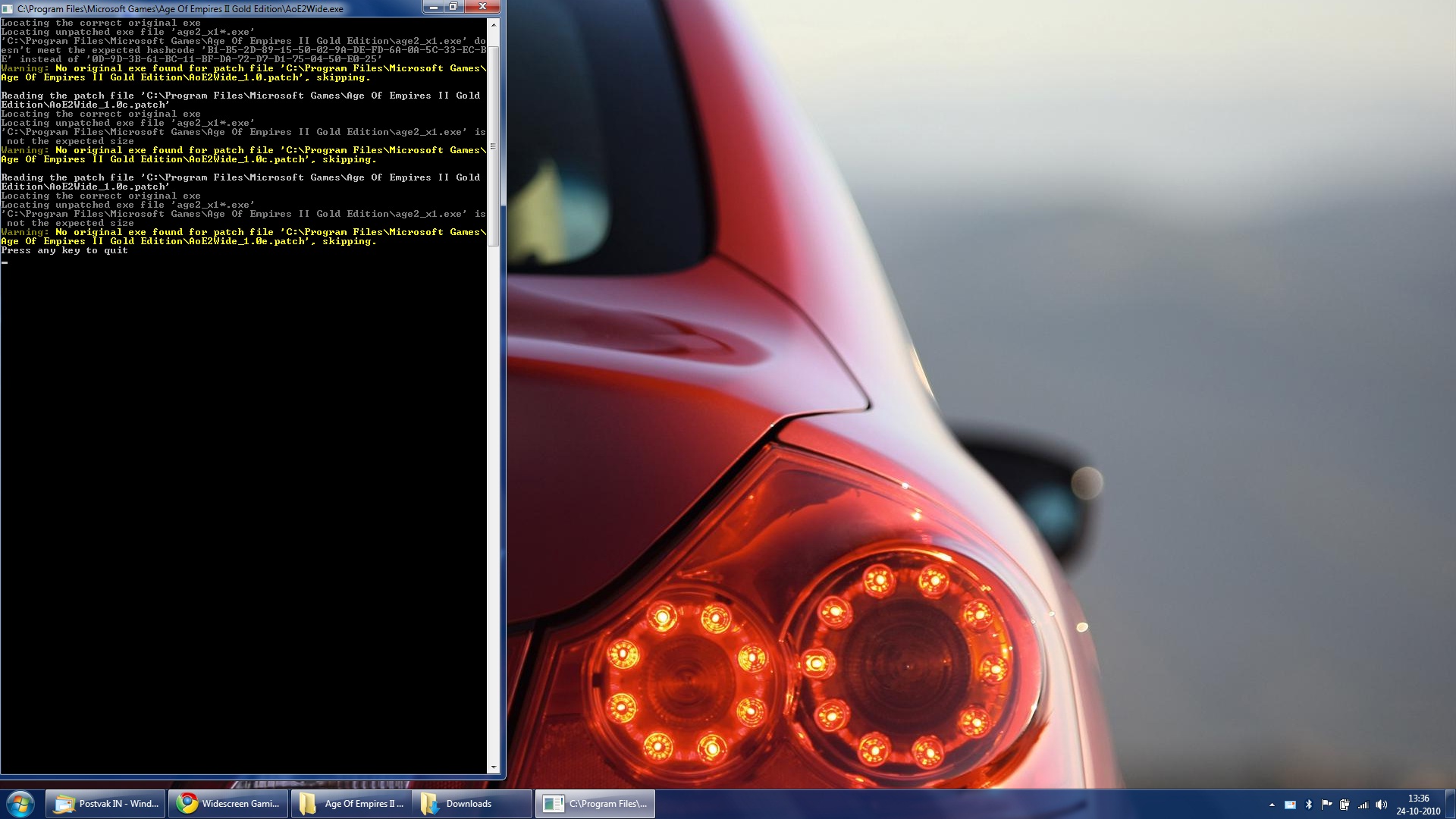
My resolution is btw 1920x1080 (Full HD reso).
I hope that somebody could help me...
Many thnx!
First of all, compliments for this mod!
Second, unfortunately I have got some problems with this mod.
I have got AOE II Gold Edition and I installed this mod to "C:Program FilesMicrosoft GamesAge Of Empires II Gold Edition" and I am running on Windows 7 32 Bits Pro.
When the mod is successfully installed, I get a shortcut on my desktop, when I double click on this I get this error:
My resolution is btw 1920x1080 (Full HD reso).
I hope that somebody could help me...
Many thnx!
Re: Patched: Age of Empires 2 Conquerers
Hello,
I think you need to copy the nocd-file into your age2 folder first (depends on the version you patched the game...1.0, 1.0c or e) and then apply the widescreen-patch again.
The nocd-file is a must-have to get this to work...look at boekabart´s site...maybe there is the exe-file too...
and for me and win7 32bit...i copied the conquerors-exe into the main folder to get this to work...in the age2_x1 folder it didn`t work for me.
AOEWide Rocks :rockout
I think you need to copy the nocd-file into your age2 folder first (depends on the version you patched the game...1.0, 1.0c or e) and then apply the widescreen-patch again.
The nocd-file is a must-have to get this to work...look at boekabart´s site...maybe there is the exe-file too...
and for me and win7 32bit...i copied the conquerors-exe into the main folder to get this to work...in the age2_x1 folder it didn`t work for me.
AOEWide Rocks :rockout
Re: Patched: Age of Empires 2 Conquerers
Great thnx, that nocd exe file solved the problem!
But how do I set the resolution for AOE?
Edit: the ingame menu is still in 1024x768, but when I start a game its in widescreen, great! Many thnx. :mrgreen:
But how do I set the resolution for AOE?
Edit: the ingame menu is still in 1024x768, but when I start a game its in widescreen, great! Many thnx. :mrgreen:
-
Blakshade007
- Posts: 1
- Joined: 29 Oct 2010, 08:10
Re: Patched: Age of Empires 2 Conquerers
Hey,
firstly thanks for all your time and effort in creating this fix.
I downloaded your latest widescreen patcher from http://boekabart.dyndns.org/aoe2wide/latestpatcher/ and i got it to work with the 1.0 patch but not c or e. Also, after patching and opening AOE to test it, the in-game screen still uses the 1024x768 ratio for the main map, not the 1280x1024 ratio I'm after. Reading through all the pages on this forum you said you did get it to work with 1024x1280. How do I get it work with that ratio? Btw, my screen resolution is 1440x900.
Thanks.
firstly thanks for all your time and effort in creating this fix.
I downloaded your latest widescreen patcher from http://boekabart.dyndns.org/aoe2wide/latestpatcher/ and i got it to work with the 1.0 patch but not c or e. Also, after patching and opening AOE to test it, the in-game screen still uses the 1024x768 ratio for the main map, not the 1280x1024 ratio I'm after. Reading through all the pages on this forum you said you did get it to work with 1024x1280. How do I get it work with that ratio? Btw, my screen resolution is 1440x900.
Thanks.
Re: Patched: Age of Empires 2 Conquerers
I dont know that for sure, got the same thing here, but while playing the game, the resolution is correctly 1920x108 here. And thats everything what matters for me. :)
Would be nice anyway if that ingame menu would be possible.
Would be nice anyway if that ingame menu would be possible.
AOC Widescreen on Voobly
My setup:
Windows 7 x64.
My steps so far
1) Installed a cracked version of aoe from here:
2) Ran all the patches and fixes by voobly.
3) Dowloaded and ran:
4) Ran AoE2Wide from desktop. See screenshot:

5) Copied "C:Program Files (x86)Microsoft GamesAge of Empires IIage2_x1_1.0e_1680x1050.exe" to "C:Program Files (x86)Microsoft GamesAge of Empires IIage2_x1"
6) Renamed age2_x1.exe to age2_x1.orginal
7) Renamed age2_x1_1.0e_1680x1050.exe to age2_x1.exe
8) Ran age2_x1.exe, changed the resolution to 1280x1024.
9) Downloaded the AOC W7 color fix and have it running as Killer mode. I uploaded here:
10) Started a single player game. everything looks good! its in 1680x1050! sweeeeet! Very happy with that.
11) Close the game
12) Start age2_x1.exe again and started a single player. Sweeet, verified it worked again
13) Opened up voobly and joined a game. During Launch I get this.

Has anyone got this to work with Voobly in Windows 7 or windows XP? Any help would be greatly appreciated!
Windows 7 x64.
My steps so far
1) Installed a cracked version of aoe from here:
Code: Select all
http://www.warez-bb.org/viewtopic.php?p=41507495#415074952) Ran all the patches and fixes by voobly.
3) Dowloaded and ran:
Code: Select all
http://www.boekabart.net/aoe2wide/latestpatcher/AoE2WideSetup.msi4) Ran AoE2Wide from desktop. See screenshot:
5) Copied "C:Program Files (x86)Microsoft GamesAge of Empires IIage2_x1_1.0e_1680x1050.exe" to "C:Program Files (x86)Microsoft GamesAge of Empires IIage2_x1"
6) Renamed age2_x1.exe to age2_x1.orginal
7) Renamed age2_x1_1.0e_1680x1050.exe to age2_x1.exe
8) Ran age2_x1.exe, changed the resolution to 1280x1024.
9) Downloaded the AOC W7 color fix and have it running as Killer mode. I uploaded here:
Code: Select all
http://d01.megashares.com/dl/ghz625Y/AOE II TC W7 color FIX.rar
10) Started a single player game. everything looks good! its in 1680x1050! sweeeeet! Very happy with that.
11) Close the game
12) Start age2_x1.exe again and started a single player. Sweeet, verified it worked again
13) Opened up voobly and joined a game. During Launch I get this.
Has anyone got this to work with Voobly in Windows 7 or windows XP? Any help would be greatly appreciated!
Re: Patched: Age of Empires 2 Conquerers
so i downloaded the file, installed it, but it wont work. i read that you needed the nocd-file... where can you get that? i looked on the link and its not there.
i have window 7 64 bit
thanks
i have window 7 64 bit
thanks
Re: Patched: Age of Empires 2 Conquerers
This is AMAZING. Thank you so much boekabart!
The only problem I have is that I do not understand all the complex programming talk in this thread, so getting this to work at all has been trial and error and constantly hit and miss. I would love for there to be a nice easy to use, step-by-step guide with a guide to how to change resolutions too.
I do not know what I did to get it, but I have a conquerors expansion exe created in my game folder called " age2_x1_1680_1050.exe " and when I run that I get the game at that res, which is fantastic, as it's higher than I could ever get before of course. However my screen resolution is actually 1920 x 1080, so I'd love to get that working, but I have no idea how I can do that, and despite reading almost every page of this thread, whenever I get close to understanding what to do, there is a load of technical jargon that I do not understand!
For the guy wanting help above, I don't know what the batch file created on the desktop actually does, as it's only ever given that same error message for me, the only way I can run the game with a new resolution is using the .exe that gets created in my main game folder.
Any more support would be incredibly welcomed boekabart, but thank you already for putting so much of your time and effort into supporting this fantastic old game! You are a true legend.
The only problem I have is that I do not understand all the complex programming talk in this thread, so getting this to work at all has been trial and error and constantly hit and miss. I would love for there to be a nice easy to use, step-by-step guide with a guide to how to change resolutions too.
I do not know what I did to get it, but I have a conquerors expansion exe created in my game folder called " age2_x1_1680_1050.exe " and when I run that I get the game at that res, which is fantastic, as it's higher than I could ever get before of course. However my screen resolution is actually 1920 x 1080, so I'd love to get that working, but I have no idea how I can do that, and despite reading almost every page of this thread, whenever I get close to understanding what to do, there is a load of technical jargon that I do not understand!
For the guy wanting help above, I don't know what the batch file created on the desktop actually does, as it's only ever given that same error message for me, the only way I can run the game with a new resolution is using the .exe that gets created in my main game folder.
Any more support would be incredibly welcomed boekabart, but thank you already for putting so much of your time and effort into supporting this fantastic old game! You are a true legend.
Re: Patched: Age of Empires 2 Conquerers
boekabart you are an absolute legend, thank you so much indeed for putting so much time and effort into making this patch. I have had some success and it has got me playing AoEII again!
I would really appreciate some help with my problems though:
Has anyone had any success in running any resolutions other than 1680 x 1050?
I tried to follow all the instructions, and most things leave me with error messages, but I do have a .exe with the conquerors icon that has 1680_1050_ in the name, and it runs the game with that res. Great!
But my screen is 1920 x 1080, so what are my next moves to try and get that to work?
I am so grateful to boekabart for this wonderful patch, I just wish I could get it to work at resolutions other than 1680. Any help greatly appreciated!
I would really appreciate some help with my problems though:
Has anyone had any success in running any resolutions other than 1680 x 1050?
I tried to follow all the instructions, and most things leave me with error messages, but I do have a .exe with the conquerors icon that has 1680_1050_ in the name, and it runs the game with that res. Great!
But my screen is 1920 x 1080, so what are my next moves to try and get that to work?
I am so grateful to boekabart for this wonderful patch, I just wish I could get it to work at resolutions other than 1680. Any help greatly appreciated!
Re: Patched: Age of Empires 2 Conquerers
Hello, maybe I did not understand correctly, but only thing, that AOC W7 color FIX do is watching for process "age2_x1.exe" in process list. If this is started, the app. suspend/kill explorer. It has nothing to do with any of age2_x1.exe versions. You can test my app. on any .exe file, if you rename it to age2_x1.exe. If you use any of age2_x1_AAAAxBBBB.exe format, my application will not realize, that AOC has started.I cannot start the game through the batch file either, it never works. But I can start it by using the new generated 1680x1050.exe, but how can I get a different resolution now? People talk about editing files, but I cannot see any of the files that need to be edited. Any help much appreciated, I love playing in 1680, but my screen is 1920 and I would love to have those extra pixels!
To widescreen patch: I used age2wide patch to have 1680x1050 resolution. I installed it correctly and it works perfectly. I just do not start the game through batch file, but I use only to start the game the new generated age2_x1_1680x1050.exe (placed in game root folder) file. I renamed it back to age2_x1.exe by hand and copied back to Age2_X1 folder over the original .exe (also by myself). This is due to be able to play on GameRanger (GameRanger requires to have executable with original name).
Or, did you ask for something else? :)
Thanks in advance people :)
-
nightskyjam
- Posts: 2
- Joined: 13 Jan 2011, 03:24
Re: Patched: Age of Empires 2 Conquerers
is this compatible with multiplayer. i cant get it to work on gameranger
Gr8 work but online gg !
nice work der ... but it is patched for only aoe1.0 and 1.0c not for aoe1.0e which we widely use to play online. can u plz fix the problem ?
( It creates an age2_x1_myresolution_e.exe but seems that that also is aoe 1.0c )
( It creates an age2_x1_myresolution_e.exe but seems that that also is aoe 1.0c )
Re: Patched: Age of Empires 2 Conquerers
I'm pretty sure this is 1.0e (anti-cheat version of 1.0c) internally checking whether it is 'unchanged' - it isn't, obviously, therefore reporting 1.0c (possibly cheaty version) instead of 1.0e. Only the author of 1.0e can help me with this, I'm afraid...
No it isnt 1.0e ... it comes as 1.0c only whn tryin to play multiplayer .... plz help coz dat patch is awsome
Re: Patched: Age of Empires 2 Conquerers
One thing I did notice is that with the exe modified, there is no more Turbo Random map available...
Re: Patched: Age of Empires 2 Conquerers
Hey there, first of all thanks alot for doing this!!
But I really can't figure out which files to download and how to install.
Please please please, someone tell me how to do a step by step install - thanks!
[My screen resolution is 1920 x 1080]
But I really can't figure out which files to download and how to install.
Please please please, someone tell me how to do a step by step install - thanks!
[My screen resolution is 1920 x 1080]
Re: Patched: Age of Empires 2 Conquerers
can anyone explene how to fix work with AOC W7 color fix
Who is online
Users browsing this forum: Google [Bot] and 7 guests