Page 128 of 151

dopefish wrote:I can always

Posted: 07 Mar 2012, 04:43
by Exodus
I can always extend the slider and add more time. I thought 7 would be enough but I can't predict everyone's system.

This solution is only meant to be temporary until either of us can figure out a solid way of enabling it.


Yeah I would have thought 7 seconds would have been enough for most programs also. I think it's just all the mods I'm loading. I think I have like 50 mods. lol

Is there a way to just put in a field where someone can enter their own number in seconds? I can see the problem though. In cases like mine where it takes a long time to load people are going to have to time their own startup times from the time the plugin starts counting. Maybe a toggle where someone can disable the auto-start and use manual? It seems like 4 or 5 seconds is working for most people.

CTD after fast travel using r396

Posted: 07 Mar 2012, 08:50
by bakersville123
I've never had CTD issues with Skyrim but I'm getting them every time I try fast traveling after updating to r396. I get to the new location, start walking and CTD. I've done nothing to the game be it mods, config settings changes etc since working fine with last weekends update. Anyone else having this issue?

Inventory Centered but images and books extra large

Posted: 08 Mar 2012, 02:25
by madwurms
I am running version r396 and when I start up the game the inventory and font size look good but the images of the notes books and other peices look very large and go off screen. Is ther a setting I am missing?

Thanks for the help!

Posted: 08 Mar 2012, 10:22
by Phrayzur
Thanks Exodus et al!

I've got it working great!

All of you are awesome for doing this.

Thanks Again!!

I got it kind of working with

Posted: 08 Mar 2012, 11:54
by Taipan
I got it kind of working with my PLP setup, although the menus are way too small.

Would it be possible to specify center screen width for the menus like Haydens did?

Total width / 3 is not ideal as my sides are 1200 wide and my center is 2560 wide.


Very very weird thing is, it will only work the first time I run Skyrim.

Any time after that it doesn't work and it puts the menu off screen. If I want to quit out of Skyrim I have to reboot to get the fixer working again.

Has anyone heard is Hayden going to enable his fixer for the new version?

First off BIG Mahlo to

Posted: 08 Mar 2012, 16:18
by scooby
First off BIG Mahlo to Hayden, Helifax and dopefish
The Gods of widescreen gamers around the world... pizzas and beers are on me guys.

I've been using HaYDeN's Eyefinity/Surround App Fix v0.91 with Skyrim v1.3.10.0. Simply because of the very easy interface. That said I have come across things that you may or may not be aware of.

- During Race creation the cursor does not allow the head to rotate around for better viewing.
- Some mods (just a few) have issues with the app activated.

Umm..yup I think that's it so far. I want to try Helifax and dopefish's fix but I've been enjoying the game so much that I keep forgetting. At the same time I'm testing out so many mods it's so easy to test and quit and test again. Only down side is that newer mods are coming out that requires Skyrim v1.4 or newer. So I may have to try Helifax and dopefish's fix after all.

These are my specs and game setting I'm running. If you guys see anything that you thing I need to adjust please let me know and I'll give it a try.

Rig Specs:
MB: Asus POG Rampage II Extreme, X58 Express
CPU: Intel i7 920 D0 @ 4.2GHz, 1.22v
RAM: Corsair Dominator GT CMG6GX3M3A2000C8 (12GB)
GPU: XFX ATI Radeon HD 6990, 4GB, DDR5
Optical Drive: Pioneer BDC-2202B Blu-Ray
HD Primary: Western Digital VelciRaptor 600GB 10000 RPM
HD Storage: Seagate Barracuda 7200.12 1TB (x4)
PSU: PC Power & Cooling, SILENCER 910
Monitors: Samsung 245T 24" (x3)

Driver Data:
Mobo: Full Update ASUS ROG Drivers
GPU: Catalyst 12.1 / Catalyst Profile 12.2 CAP 1

Game Data:
HaYDeN's Eyefinity/Surround App Fix v0.91 (NOTE: The app is a WIP and this latest fix works with Skyrim v1.3.10.0. Waiting for his next update.)
Skyrim v1.3.10.0 (NOTE: This is due to the Widescreen Fix app limitation.)
Nexus Mod Manager v0.14.2 (NOTE: My Skyrim game is heavily modded with almost everything to make the game look beautiful and I'm still trying other mods.)

My Skyrim Options Settings
Antialiasing:
8 Samples - 1920x1200 Single Screen
Off (best performance) - 5760x1200 Triple Screen Eyefinity (NOTE: I'm still testing some settings but oddly enough I don't see much of a change graphically from Off or with any Samples selected.)
Anisotropic Filtering: NOTE: For me this is the biggest performance hit of all the settings
8 Samples - 1920x1200 Single Screen
Off (best performance) - 5760x1200 Triple Screen Eyefinity (NOTE: Same notation as Antialiasing setting but come with a hefty performance hit.)

Advanced Details
Texture Quality: High
Radial Blur Quality: High
Shadow Detail: Ultra
Decal Quantity: Ultra
FXAA: Checked
Reflect Land: Checked
Reflect Trees: Checked
Reflect Objects: Checked
Reflect Sky: Checked

View Distance
Object Fade: 15
Actor Fade: 15
Grass Fade: 7
Specularity Fade: 20
Light Fade: 35
Item Fade: 15
Distant Object Detail: Ultra
Object Detail Fade: Checked

The game has been heavily modded with environmental high resolution textures, I really wanted Skyrim to look as beautiful as possible and have fun too so I have a lot of fun mods I'm trying....exploding chicken anyone!!! Despite all the added mods the game with the settings above runs pretty smooth.

45-100+ fps. avg. 60 fps - 1920x1200 (I have actually seen Fraps hit over 300+ fps in some in-game spots, very cool)
20- 80+ fps. avg. 35-45 fps - 5760x1200 (funny even when I dip to 20 fps I have not experienced too much choppiness it seems to feel very smooth)

I've been reading in other forums that a lot of guys are trying mods then the game crashes and a lot of them keep saying "my computer can't handle this". Will let me tell you that may not always be the case. Even with my setup I'll come across a mod that just messes everything up. So for those of you who thinks that it may be their hardware it may just be the mod. I could basically try anything on this and once in a while one mod would crash me. Easy fix....NEXT MOD!!! Anyways just my $0.02 and I hope this info helps.

Check out my ladies...watch out don't get them mad. They'll Dragon Shout you a new one.
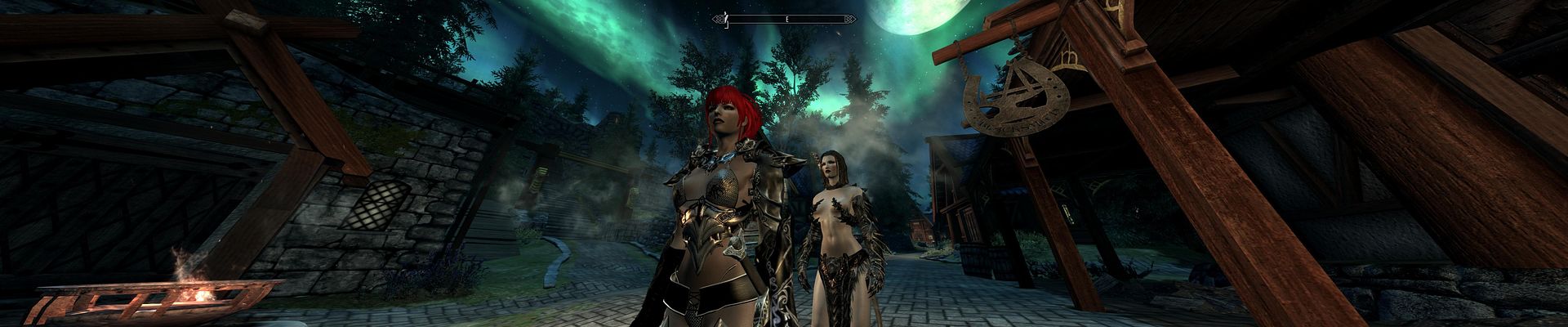
I am finally enjoying Skyrim

Posted: 08 Mar 2012, 18:47
by Ryukan
I am finally enjoying Skyrim and I plan on playing it through after having it sit around since November 11th. The Helifax/Dopefish fix is working great for me.

Just a couple issues I am seeing that I am not sure if there is a workaround for or not.

1) Whenever I use the map or read a book/notes/journal/etc and exit the map or book when I go return to the game the cursor and HUD/interface elements move to the left most monitor. If I go into the game menu and back out to the game screen everthing resets itself to the center monitor. But this gets a bit annoying because often using the map and reading a lot of books and stuff means I am doing this a lot. Is there any fix fot this?

2) The windows for confirming fast travel/placing a map marker are zoomed in a good deal. Not game breaking because the confirmation choices still show up but the window is so zoome in that all I can see is the confirmation options, the rest of the text above is cut off.

@Ryukan, Are you running the

Posted: 08 Mar 2012, 19:04
by scooby
@Ryukan, Are you running the Immersive HUD - iHUD mod? Just wondering because I had it running and when I toggled it to hide my HUD jumped to the left screen as well, wanted to see if the we're related issues.

One more thing, what version of Skyim are you using with Helifax/Dopefish fix? Version 5 or 6? TY

scooby wrote:@Ryukan, Are you

Posted: 08 Mar 2012, 19:35
by Ryukan
@Ryukan, Are you running the Immersive HUD - iHUD mod? Just wondering because I had it running and when I toggled it to hide my HUD jumped to the left screen as well, wanted to see if the we're related issues.

One more thing, what version of Skyim are you using with Helifax/Dopefish fix? Version 5 or 6? TY


I am not using any UI mods and my Skyrim version is 1.4.27.

Thank you sir.

Posted: 08 Mar 2012, 20:58
by scooby
Thank you sir.

Hey just got me thinking. Maybe you should try the iHUD mod. It uses a hotkey to toggle the HUD (in my case) from center screen to the left screen and back again.

If you HUD keeps switching screen this will allow you to do it with a hotkey. Might be solution for you.

Link: http://skyrim.nexusmods.com/downloads/file.php?id=3222

Helifax/dopefish,Can I put

Posted: 08 Mar 2012, 21:48
by DancingSamurai
Helifax/dopefish,

Can I put in a request to have a greater range for the fix activation timeout? 7s is still activating the widescreen fix too early for me about 50% of the time....

Other than the HUD moving to the left monitor when exiting from the map (known issue I know), it's perfect!

Thanks for all your hard work!

DancingSamurai

Posted: 09 Mar 2012, 00:47
by helifax
Helifax/dopefish,

Can I put in a request to have a greater range for the fix activation timeout? 7s is still activating the widescreen fix too early for me about 50% of the time....

Other than the HUD moving to the left monitor when exiting from the map (known issue I know), it's perfect!

Thanks for all your hard work!


Hi,

Heavy modder there:P I will ask dopefish to increment the timer to 10 seconds:) Hope that helps:) Yes that is known issue for the map/hud thingy.;))

Best regards

helifax wrote:DancingSamurai

Posted: 09 Mar 2012, 00:58
by Exodus
[quote]Helifax/dopefish,

Can I put in a request to have a greater range for the fix activation timeout? 7s is still activating the widescreen fix too early for me about 50% of the time....

Other than the HUD moving to the left monitor when exiting from the map (known issue I know), it's perfect!

Thanks for all your hard work!


Hi,

Heavy modder there:P I will ask dopefish to increment the timer to 10 seconds:) Hope that helps:) Yes that is known issue for the map/hud thingy.;))

Best regards


A couple pages back I posted that this was what was causing my problem as well. Mine takes as much as 15 seconds to load and Dopefish responded that he could increase the slider. Not sure if he's already corrected it for that or not.

Fix Enabled says No

Posted: 09 Mar 2012, 05:09
by researchcapt
Widescreen Fixer, v3.0.307 with the 1.4.27.0.4 plugin installed for the same version of Skyrim running in Steam is saying Yes to the Game Running but Fix Enabled is saying No. Under Settings I have tried each of three different optional hot keys, Control, Shift, and Alt. What else might I try to get it working? Thanks!

Great forum and the fixes are most appreciated.

Exodus wrote:helifax

Posted: 09 Mar 2012, 11:01
by helifax
[quote][quote]Helifax/dopefish,

Can I put in a request to have a greater range for the fix activation timeout? 7s is still activating the widescreen fix too early for me about 50% of the time....

Other than the HUD moving to the left monitor when exiting from the map (known issue I know), it's perfect!

Thanks for all your hard work!


Hi,

Heavy modder there:P I will ask dopefish to increment the timer to 10 seconds:) Hope that helps:) Yes that is known issue for the map/hud thingy.;))

Best regards


A couple pages back I posted that this was what was causing my problem as well. Mine takes as much as 15 seconds to load and Dopefish responded that he could increase the slider. Not sure if he's already corrected it for that or not.

New version is up. It allows you to select a start time up to 30 seconds. Download latest WSF.
r397 — 2012 March 08, 19:39:36 EST
M /trunk/Plugin.The Elder Scrolls V Skyrim/Configuration.Designer.cs
M /trunk/Plugin.The Elder Scrolls V Skyrim/Configuration.cs

Increased delay time on Skyrim plugin from 7 to 30.

If you dont have problems with the plugin working dont change this value


Best Regards

helifax wrote: New version is

Posted: 09 Mar 2012, 12:10
by thales100
New version is up. It allows you to select a start time up to 30 seconds. Download latest WSF.
r397 — 2012 March 08, 19:39:36 EST


Awesome, thanks helifax. :twothumb

helifax's solution is working

Posted: 09 Mar 2012, 19:00
by ethr
helifax's solution is working great for me. I only had to do a couple of things. Edit your prefs file for the screen size of course. Upgrade to latest catalyst drivers 12.3 (I was on 12.1 i think and the fix wasn't happy with that). There is a known problem with the 12.3 drivers in the release notes about texture corruption with anti-aliasing turned on. Said this would be fixed with the next release of catalyst drivers. This happened to me but went away when I turned AA off.

One note: when bezel correction is on the messages like "XX Gold added" are "under" the bezel. Minor issue.

Running a 5870 eyefinity 6 @ 6048x1200.

Thanks so much helifax.

Jumping HUD

Posted: 10 Mar 2012, 00:35
by apomerans
Helifax, great work on wsf! Thanks!

Wanted to post 2 issues and hoping for advice on remedy:

1. When I enter map and then close it - my HUD , as in compas, health and reticule
Jump to my left monitor. Open menu then closing it puts my HUD back in center.

Pretty consistent behavior. Menus are not effected though. Why would it do that?

2. I'm running SkyUI mod, and all my items aRe super magnified, as in 3d image of the item is huge, covering most of the time good chunk of menu. I understand it might be SkyUI related as it reners in wsf solution, but wanted to ask if you are familiar with that anomaly.

Vanilla menu 3d item rendering works as expeced though.

Thanks in advance

apomerans wrote:Helifax,

Posted: 10 Mar 2012, 15:57
by DancingSamurai
Helifax, great work on wsf! Thanks!

Wanted to post 2 issues and hoping for advice on remedy:

1. When I enter map and then close it - my HUD , as in compas, health and reticule
Jump to my left monitor. Open menu then closing it puts my HUD back in center.

Pretty consistent behavior. Menus are not effected though. Why would it do that?

2. I'm running SkyUI mod, and all my items aRe super magnified, as in 3d image of the item is huge, covering most of the time good chunk of menu. I understand it might be SkyUI related as it reners in wsf solution, but wanted to ask if you are familiar with that anomaly.

Vanilla menu 3d item rendering works as expeced though.

Thanks in advance


Issue 1 is a known issue. We all have the same problem, and helifax knows about it -- I'm sure that if it can be fixed, it will be eventually. I admit it's annoying when reading a lot of books / trying to figure out where you are and opening the map a lot, but, compared to running on one monitor -- a minor issue.

Re: skyUI -- edit the skyrimDataInterfaceskyui_cfg.txt file, under [ItemInfo] play with these values:

Code: Select all


   itemicon.xOffset = 20
   itemicon.yOffset = -6
   itemicon.scale = 0.6


The above is what works well for me, YMMV.

Good luck!

--DS

DancingSamurai

Posted: 10 Mar 2012, 16:11
by helifax
[quote]Helifax, great work on wsf! Thanks!

Wanted to post 2 issues and hoping for advice on remedy:

1. When I enter map and then close it - my HUD , as in compas, health and reticule
Jump to my left monitor. Open menu then closing it puts my HUD back in center.

Pretty consistent behavior. Menus are not effected though. Why would it do that?

2. I'm running SkyUI mod, and all my items aRe super magnified, as in 3d image of the item is huge, covering most of the time good chunk of menu. I understand it might be SkyUI related as it reners in wsf solution, but wanted to ask if you are familiar with that anomaly.

Vanilla menu 3d item rendering works as expeced though.

Thanks in advance


Issue 1 is a known issue. We all have the same problem, and helifax knows about it -- I'm sure that if it can be fixed, it will be eventually. I admit it's annoying when reading a lot of books / trying to figure out where you are and opening the map a lot, but, compared to running on one monitor -- a minor issue.

Re: skyUI -- edit the skyrimDataInterfaceskyui_cfg.txt file, under [ItemInfo] play with these values:

Code: Select all


   itemicon.xOffset = 20
   itemicon.yOffset = -6
   itemicon.scale = 0.6


The above is what works well for me, YMMV.

Good luck!

--DS

Hello all,

yes I know about all the issues with the UI moving to the left and the map problems. What I did was to change how some instructions work. The problem is that the same instructions are called with/without a delay when entering/exiting different menus. Finding out why the delay is there is harder than fixing it in the 1st place. I know is a bit annoying, but I dont consider it game breaking. After all pressing 2 ESC makes the game re-center it:) ATM I will not pursue this;))
Hope you understand and enjoy the fix:)

Best Regards,
Helifax