
My Monitor keeps going out ? ? ?
Re: My Monitor keeps going out ? ? ?
Yes In fact all cables are new dual link . You know what though! the DP adapter monitor has a different brand. that might be it??
Re: My Monitor keeps going out ? ? ?
I would think so, I never liked the idea of mixing monitors for widescreen setup due to variation in brands. Just think of any time you have walked through Best Buy at the different TV or monitors. You always see some that look brighter or more crisp than others.
Re: My Monitor keeps going out ? ? ?
No, the dvi cable attached to the monitor with the adapter is a different brand. All my monitors are the same
Re: My Monitor keeps going out ? ? ?
I don't see how that should matter, but hey half the stuff here is being done for the first time by people so odd ball things like this should be the norm.
Re: My Monitor keeps going out ? ? ?
You know what's a real mystery to me?
Why didn't ATI simply make their own adapter?
Given the paucity of DP-equipped displays (and there are NO large-screens), the (equally rare) DVI adapter becomes an essential accessory for 99% of end users. It would also have saved ATI a ton of headaches associated with all the support calls due to these flaky adapters.
If Apple and game consoles have taught us anything, it's that bringing the hardware in-house can have a most salutary effect on compatibility and, ultimately, customer satisfaction.
Why didn't ATI simply make their own adapter?
Given the paucity of DP-equipped displays (and there are NO large-screens), the (equally rare) DVI adapter becomes an essential accessory for 99% of end users. It would also have saved ATI a ton of headaches associated with all the support calls due to these flaky adapters.
If Apple and game consoles have taught us anything, it's that bringing the hardware in-house can have a most salutary effect on compatibility and, ultimately, customer satisfaction.

Re: My Monitor keeps going out ? ? ?
Awesome McKie, glad to hear it's been stable so far. I think that should do it for you, now it's gaming time. :rockout
Just an FYI on my stuff so far. Well since my last post I am still solid as a rock. I do though still get a little flicker during the switch from extended to Eyefinity but it seems to stabilize itself and the flickering goes away and this all happens within a few seconds.
In my experience with my three Samsung 245T I don't see any difference between the screens, it may be their but it must be very minimal. I also want to add that my Hotkey configs are working fine now for some reason all the monitors are always in the right places. No need to configure any more. I guess the fresh install of Window7 and all the new drivers help after my flashing of the card.
BTW all my cables are all gold tip 6' dual link DVI and the Accell USB is connected to my mobo's USB port.
Now all we need is Cat 9.12 with bezel management. :wink:
Just an FYI on my stuff so far. Well since my last post I am still solid as a rock. I do though still get a little flicker during the switch from extended to Eyefinity but it seems to stabilize itself and the flickering goes away and this all happens within a few seconds.
In my experience with my three Samsung 245T I don't see any difference between the screens, it may be their but it must be very minimal. I also want to add that my Hotkey configs are working fine now for some reason all the monitors are always in the right places. No need to configure any more. I guess the fresh install of Window7 and all the new drivers help after my flashing of the card.
BTW all my cables are all gold tip 6' dual link DVI and the Accell USB is connected to my mobo's USB port.
Now all we need is Cat 9.12 with bezel management. :wink:
Re: My Monitor keeps going out ? ? ?
So I guess 9.12 is supposed to be out tomorrow. Anyone using 9.12 beta? Where can I get the beta at it is not listed anywhere that I can seen on ati site. Sorry I am used to Nvidia posting beta drivers for people to use.
-
Sideeffect
- Posts: 177
- Joined: 30 Oct 2009, 19:20
Re: My Monitor keeps going out ? ? ?
So I guess 9.12 is supposed to be out tomorrow. Anyone using 9.12 beta? Where can I get the beta at it is not listed anywhere that I can seen on ati site. Sorry I am used to Nvidia posting beta drivers for people to use.
Beta's are not released for every ATI release and hardly ever on the ATI website. There was a 9.12 beta released for XP on Guru3D. The Windows 7 beta turned out to be a modified 9.10 driver. No 9.12 was released to the general public at least.
Re: My Monitor keeps going out ? ? ?
I'll wait for the official release. My system is running very well now and don't want to mess it up by using beta drivers at least for now. :wink:
Re: My Monitor keeps going out ? ? ?
[quote]So I guess 9.12 is supposed to be out tomorrow. Anyone using 9.12 beta? Where can I get the beta at it is not listed anywhere that I can seen on ati site. Sorry I am used to Nvidia posting beta drivers for people to use.
Beta's are not released for every ATI release and hardly ever on the ATI website. There was a 9.12 beta released for XP on Guru3D. The Windows 7 beta turned out to be a modified 9.10 driver. No 9.12 was released to the general public at least.
Ahh ok well I was just going to mess around with it see if there were any changes. Hopefully fix some issues. Guess I will just wait till tomorrow haha. Has anyone heard or know of the release notes or what fixes if any. Post them if you do I would like to know.
Re: My Monitor keeps going out ? ? ?
I've been following this thread for a while now and decided to register to post my experience. Been having issues with the accell adapter I got from amazon. It would lose connection and the monitor would totally cut out. Thankfully amazon has great customer service. I requested an rma and they overnighted me the replacement. Well the replacement has been wonderful. I have no issues at all for almost a week now. I think it's a crapshoot when it comes to the adapters. Probably the reason why some people have no trouble at all while some of us got nothing but headaches. For anyone thinking of getting one I suggest get it from amazon. That way you can at least get a replacement if it doesn't work out the first time.
Re: My Monitor keeps going out ? ? ?
Awesome McKie, glad to hear it's been stable so far. I think that should do it for you, now it's gaming time. :rockout
Yes. I actually get to enjoy some game time... finally Yeah!!!!! :rockout
:cheers
Re: My Monitor keeps going out ? ? ?
I have 3 Dell 2405WFP Monitors on my 5870
2 are Hooked using DVI
1 is hooked up using the Bizlink (Dell)
The Bizlink one constantly flickers and I have tried
All three monitors.
Different DVI cables (which all work when hooked up to DVI). and all are heavy duty dual link monoprice cables.
I also tried the 9.12 drivers released today without any success.
Issue occurs in both Eyefinity mode and extended desktop mode.
Wall USB charger did nothing to help (but freed up a USB port I needed, so no harm done).
Overdrive is off
That being said I've seen this type of behavor before on a Samsung 20" LCD 1600x1200 which just did not (and still to this day will not work on ATI cards, but does with Nvidia). This issue with the flashing appears to me to be the exact same, and I'm guessing it has to do the refresh rates from the Bizlink to the Monitor, the older Dell's (seem to be the most common and others), may just not handle the converted single. What is interesting is that the displayport works fine if a passive cable is used.
I'd be interested if anyone which the issue and a Bizlink adapter has had success with the Apple Adapter?, since based on previous experience this is a 100% issue with the Bizlink hardware, and might very well work with a different brand.
EDIT:
Performed 2 other tests:
1. On an Asus 24" monitor 1920x1080P: Did not work
2. On an Acer 24" monitor 1920x1080P: Did not work
2. Changed Display resolution on the Dell 2405WFP and it works at 1280x768 and 1440x900, but not at 1600x1200, 1920x1080 or 1920x1200. As the resolution above 1440x900 was increased so did the rate of flicker. My new theory is that the Bizlink can not handle high frequencies correctly.
ERIC
2 are Hooked using DVI
1 is hooked up using the Bizlink (Dell)
The Bizlink one constantly flickers and I have tried
All three monitors.
Different DVI cables (which all work when hooked up to DVI). and all are heavy duty dual link monoprice cables.
I also tried the 9.12 drivers released today without any success.
Issue occurs in both Eyefinity mode and extended desktop mode.
Wall USB charger did nothing to help (but freed up a USB port I needed, so no harm done).
Overdrive is off
That being said I've seen this type of behavor before on a Samsung 20" LCD 1600x1200 which just did not (and still to this day will not work on ATI cards, but does with Nvidia). This issue with the flashing appears to me to be the exact same, and I'm guessing it has to do the refresh rates from the Bizlink to the Monitor, the older Dell's (seem to be the most common and others), may just not handle the converted single. What is interesting is that the displayport works fine if a passive cable is used.
I'd be interested if anyone which the issue and a Bizlink adapter has had success with the Apple Adapter?, since based on previous experience this is a 100% issue with the Bizlink hardware, and might very well work with a different brand.
EDIT:
Performed 2 other tests:
1. On an Asus 24" monitor 1920x1080P: Did not work
2. On an Acer 24" monitor 1920x1080P: Did not work
2. Changed Display resolution on the Dell 2405WFP and it works at 1280x768 and 1440x900, but not at 1600x1200, 1920x1080 or 1920x1200. As the resolution above 1440x900 was increased so did the rate of flicker. My new theory is that the Bizlink can not handle high frequencies correctly.
ERIC
Re: My Monitor keeps going out ? ? ?
I dont know about the apple adapter. But after returning my Dell adapter and getting the Accell adapter. I haven't had any Issues Yet
Re: My Monitor keeps going out ? ? ?
ATIflash is 100% command based homey. Did you try BIN or ROM for the file name? Running atiflash in windows will not work
[quote]Well I was going to try to flash my bios to get my version of this problem to go away but alas when i made a bootable usb and used atiflash and followed the instructions to the letter is simply told me that "no such file could be found". Dejectedly i tried ATIWinflash and it simply will not run on windows 7 32 bit, i click the .exe, it runs for about half a second and exits so i cant do it that way either. Fortunately for me, this problem only prevents me from playing modern warfare 2 triplewide, but it still would have been nice to give it a shot.
i ran atiflash from a bootable flash drive, i recall it being a .bin, since that was the extension of the bios file i d/ld from daves link.
-
stryker7314
- Posts: 7
- Joined: 07 Oct 2009, 23:53
Re: My Monitor keeps going out ? ? ?
@ morolen
What kind of results did you get by flashing the bios, and what adapter are you using?
What kind of results did you get by flashing the bios, and what adapter are you using?
Re: My Monitor keeps going out ? ? ?
@ morolen
What kind of results did you get by flashing the bios, and what adapter are you using?
i got no results as i was unable to get the program to work and i am useing the bizlink adapter from dell.
-
ronaldjeremy
- Posts: 11
- Joined: 01 Dec 2009, 01:35
Re: My Monitor keeps going out ? ? ?
I had this same problem when i first tried driving two identical 1920x1200 LCD's with two identical Accell adapters attached to two identical XFX 5750's.
I installed the hydravision ccc plugin, rebooted, then swapped the monitor cables around (which shouldnt have done much since both Accell adapters are identical and both monitors are identical), rebooted again, and there hasnt been a single flicker in over a day.
Also yesterday I doubled the above configuration (four of each -- my E762 board has four pcie x16 slots) and still no flicker.
I installed the hydravision ccc plugin, rebooted, then swapped the monitor cables around (which shouldnt have done much since both Accell adapters are identical and both monitors are identical), rebooted again, and there hasnt been a single flicker in over a day.
Also yesterday I doubled the above configuration (four of each -- my E762 board has four pcie x16 slots) and still no flicker.
Re: My Monitor keeps going out ? ? ?
I have been fine....
here's what I did
Updated BIOS to ASUS card one
Voltage is at 1212
I am now running a Acoustic Research AR-489 Pro II Series DVI Repeater
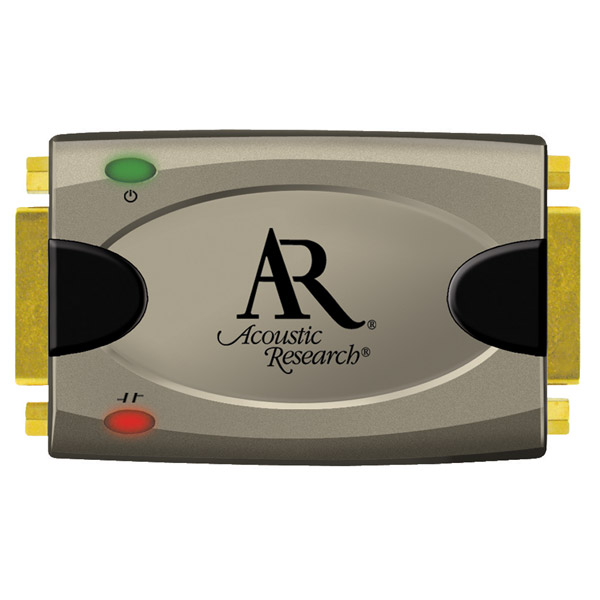
here's what I did
Updated BIOS to ASUS card one
Voltage is at 1212
I am now running a Acoustic Research AR-489 Pro II Series DVI Repeater
-
ronaldjeremy
- Posts: 11
- Joined: 01 Dec 2009, 01:35
Re: My Monitor keeps going out ? ? ?
I have been fine....
here's what I did
Updated BIOS to ASUS card one
Voltage is at 1212
I am now running a Acoustic Research AR-489 Pro II Series DVI Repeater
Awesome to hear that -- fedex just delivered two AR-489's i ordered a few days ago.
Unfortunately I spoke too soon and last night I had blinking like crazy. But since this morning, no blinking at all. I didnt turn the computer off or reboot or anything -- the computer was on all night (but the power setts do turn the monitors off after 30 minutes of inactivity). I am on Windows 7 64bit, by the way.
The little manual the AR-489's came with states that the dvi display cable should be 85% shorter than the source cable. What is your cabling like with the AR-489?
I am running XFX 5750's, but I havent seen any bios update for them. Do you think the BIOS you used would work on them? I also asked Dave Baumann to post a 5750 BIOS and am awaiting his reply.
Although its been several hours without a flicker i suspect it will come back. Right now everything is perfect and my monitors are arranged just like I want, so I am going to wait until it starts happening again to hook up the AR-489's. If i unplug just one monitor, all of the eyefinity groups break, and my whole arrangement of various portrait orientations and relative positions gets reset.
I have a pretty intense setup (12 monitors total -- two portrait eyefinity'ed groups of two, one landscape eyefinity'ed group of two, and then 6 independant portrait) and it takes foreeeever to configure everything so that it is just right. Windows 7 never remembers which monitor is which after reboots -- they get completely renumbered each time.
Who is online
Users browsing this forum: No registered users and 5 guests